
HTC HTC TWS3
HTC True Wireless Earbuds 2 Benutzerhandbuch
Model: HTC TWS3
Einführung
The HTC True Wireless Earbuds 2 offer a seamless audio experience with advanced features designed for comfort and convenience. These earbuds utilize the latest Bluetooth 5.1 technology for instant pairing and stable connections across various devices. Enjoy extended listening times, intuitive touch controls, and a comfortable, ergonomic fit for all-day use.

Image: HTC True Wireless Earbuds 2 in their pink charging case, showcasing das kompakte Design.

Image: A display of HTC True Wireless Earbuds 2 in three available colors: white, black, and pink.
Video: Ein Beamter überview of the HTC True Wireless Bluetooth Earbuds, highlighting key features and design.
Lieferumfang
Your HTC True Wireless Earbuds 2 package includes the following items:
- HTC True Wireless Earbuds 2 (Left and Right)
- USB-C-Ladekabel
- Rubber Eartips (Two pairs: Large and Small sizes, in addition to the pre-installed medium size)
- Ladeetui
Video: An unboxing video for the HTC True Wireless Earbuds 2, showing the contents of the package.
Aufstellen
1. Aufladen der Ohrhörer und des Ladecase
Before first use, ensure both the earbuds and the charging case are fully charged. Connect the provided USB-C cable to the charging port on the case and plug the other end into a compatible USB power source. The indicator light on the case will show charging status. A full charge provides up to 8 hours of listening time for the earbuds and up to 32 hours total with the charging case.

Image: Pink HTC True Wireless Earbuds 2 and their charging case, illustrating the 30-hour combined battery life.
2. Koppeln mit Ihrem Gerät
- Öffnen Sie das Ladeetui. Die Ohrhörer wechseln automatisch in den Kopplungsmodus.
- Gehen Sie auf Ihrem Gerät (Smartphone, Tablet, Laptop) zu den Bluetooth-Einstellungen.
- Select "HTC True Wireless Earbuds 2" from the list of available devices.
- Sobald die Verbindung hergestellt ist, hören Sie eine akustische Aufforderung, und die Kontrollleuchte an den Ohrhörern ändert sich.
The earbuds utilize Bluetooth 5.1 for quick and stable connections. They are compatible with iOS, Android, and Windows devices.

Image: A diagram illustrating the quick pairing process and wide compatibility of the HTC True Wireless Earbuds 2 with various devices.
3. Achieving Optimal Comfort
The earbuds are ergonomically crafted for a secure and comfortable in-ear fit. Experiment with the included rubber eartips (small, medium, large) to find the size that provides the best seal and comfort for your ears. A proper fit enhances sound quality and noise isolation.

Image: A woman wearing pink HTC True Wireless Earbuds 2 while working on a laptop, emphasizing the ultra-lightweight comfort and ergonomic design.
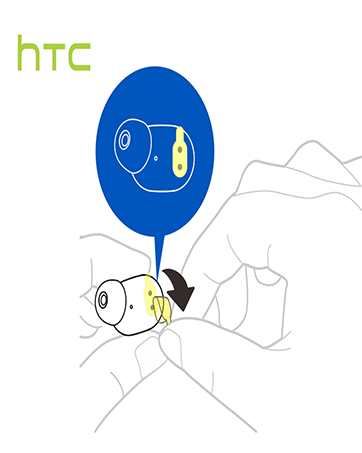
Image: A diagram illustrating the correct method for inserting an earbud to ensure a secure and comfortable fit.
Bedienungsanleitung
Touch-Bedienelemente
The HTC True Wireless Earbuds 2 feature intuitive touch controls on each earbud for easy management of your audio and calls:
- Abspielen/Pause: Tippen Sie einmal auf den linken/rechten Ohrhörer.
- Anruf annehmen: Tippen Sie einmal auf den linken Ohrhörer.
- Anruf auflegen: Tippen Sie einmal auf den rechten Ohrhörer.
- Anruf ablehnen: Tap and hold left/right earbud for 2 seconds.
- Vorheriges Lied: Tap and hold left earbud for 2 seconds.
- Nächster Titel: Tap and hold right earbud for 2 seconds.
- Lautstärke erhöhen: Tap left earbud twice.
- Lautstärke runter: Tap right earbud twice.
- Sprachassistenten aktivieren: Tap left/right earbud three times.

Image: A visual guide detailing the simple touch controls for the pink HTC True Wireless Earbuds 2.

Image: A visual guide detailing the simple touch controls for the black HTC True Wireless Earbuds 2.
Verwendung eines einzelnen Ohrhörers
You can use either earbud independently for mono audio or calls. Simply take one earbud out of the case, and it will automatically connect to your device. This feature allows for versatility depending on your listening needs.

Image: Two smartphones connected to individual pink HTC True Wireless Earbuds 2, showcasing the versatility of using one or both earbuds.

Image: A diagram illustrating the versatility of using one or both black HTC True Wireless Earbuds 2 with different devices.
Wartung
Reinigung und Pflege
- Reinigen Sie die Ohrhörer und das Ladecase regelmäßig mit einem weichen, trockenen Tuch.
- Entfernen Sie die Ohrstöpsel und reinigen Sie sie gegebenenfalls mit milder Seife und Wasser. Stellen Sie sicher, dass sie vollständig trocken sind, bevor Sie sie wieder anbringen.
- Vermeiden Sie die Verwendung von Scheuermitteln oder aggressiven Chemikalien.
Wasserbeständigkeit
The HTC True Wireless Earbuds 2 are IPX5 waterproof, meaning they are protected against low-pressure water jets from any direction. This makes them suitable for workouts and light rain. However, they are not designed for submersion in water.
Fehlerbehebung
If you encounter any issues with your HTC True Wireless Earbuds 2, please refer to the following common solutions:
| Problem | Lösung |
|---|---|
| Ohrhörer lassen sich nicht koppeln | Ensure earbuds are charged. Place them back in the case, close, then reopen to re-enter pairing mode. Check your device's Bluetooth settings and forget/remove previous connections if necessary. |
| Kein Ton von einem Ohrhörer | Stellen Sie sicher, dass beide Ohrhörer geladen sind. Legen Sie beide Ohrhörer zurück in das Ladecase und nehmen Sie sie wieder heraus. Koppeln Sie sie anschließend erneut mit Ihrem Gerät. |
| Touch-Bedienelemente reagieren nicht | Ensure earbuds are clean and dry. Restart your device and re-pair the earbuds. |
| Schlechte Tonqualität | Adjust the eartips for a better seal. Ensure your device is within the 10m Bluetooth range. Check for interference from other wireless devices. |
Technische Daten
| Besonderheit | Detail |
|---|---|
| Modellname | HTC True Wireless Ohrhörer 2 |
| Artikelmodellnummer | HTC TWS3 |
| Konnektivitätstechnologie | Kabellos (Bluetooth 5.1) |
| Akkulaufzeit (Ohrhörer) | Bis zu 8 Stunden mit einer einzigen Ladung |
| Akkulaufzeit (mit Ladecase) | Bis zu 32 Stunden |
| Akkukapazität des Ladegehäuses | 500 mAh |
| Wasserbeständigkeit | IPX5 (wasserbeständig) |
| Steuerungstyp | Touch Control (Volume, Play/Pause, Call Management, Voice Assistant) |
| Platzierung des Ohrs | Im Ohr |
| Frequenzbereich | 20-20,000 Hz |
| Artikelgewicht | 2.82 Unzen |
| Technische Daten | 1.71 x 1.71 x 1.36 Zoll |
Garantie und Support
HTC provides a 12-month warranty for the True Wireless Earbuds 2. For any support inquiries or warranty claims, please contact HTC customer service through their official webWebsite oder den Händler, bei dem das Produkt gekauft wurde.
Weitere Informationen finden Sie auf der offiziellen HTC Store bei Amazon.
Ask a question about this manual
Ask about setup, troubleshooting, compatibility, parts, safety, or missing instructions. Manuals+ will review the question and use this page’s manual context to help answer it.