
1. Einleitung
This manual provides instructions for the HCDZ Replacement Remote Control, designed for use with various Epson 3LCD 4K Large Venue Laser Projectors. This remote offers direct functionality without the need for programming.
Packungsinhalt:
- 1 x HCDZ Replacement Remote Control
Hinweis: Batterien und zusätzliche Anweisungen sind nicht im Lieferumfang enthalten.
2. Einrichtung
2.1 Einlegen der Batterie
Für die Fernbedienung werden zwei AAA-Batterien benötigt (nicht im Lieferumfang enthalten). Gehen Sie zum Einlegen der Batterien wie folgt vor:
- Suchen Sie die Batteriefachabdeckung auf der Rückseite der Fernbedienung.
- Schieben Sie den Deckel nach unten oder drücken Sie den Riegel und heben Sie ihn an, um das Fach zu öffnen.
- Legen Sie zwei AAA-Batterien ein und achten Sie darauf, dass die Plus- (+) und Minus- (-) Anschlüsse mit den Markierungen im Inneren des Batteriefachs übereinstimmen.
- Bringen Sie die Abdeckung des Batteriefachs wieder an ihren Platz und schieben Sie sie so weit hinein, bis sie sicher einrastet.

Image: Back of the remote control with the battery compartment open, illustrating correct AAA battery placement.
2.2 Erstgebrauch
Once batteries are correctly installed, the remote control is ready for immediate use. No programming or pairing is required. Point the remote directly at your Epson projector's infrared (IR) sensor.
3. Bedienung der Fernbedienung
This remote control provides full functionality for your compatible Epson projector. Refer to your projector's original user manual for specific functions of each button.
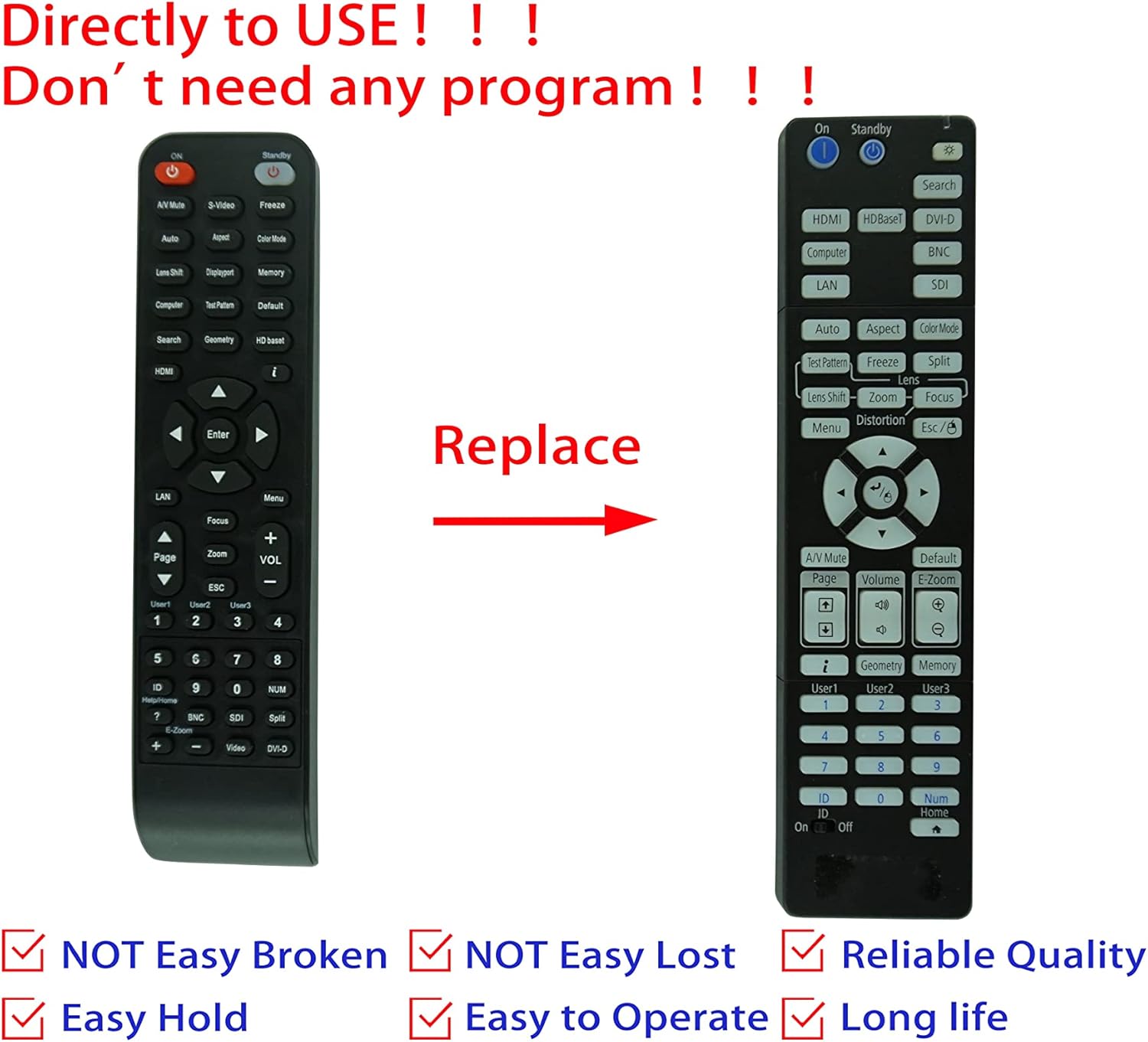
Image: Comparison of an original Epson remote (left) and the HCDZ replacement remote (right), highlighting the replacement functionality.
3.1 Key Functions (General)
- Ein-/Ausschalten: Typically a dedicated button, often red or clearly marked.
- Eingangsauswahl: Buttons for HDMI, Computer, Video, etc., to switch input sources.
- Navigation: Arrow keys (Up, Down, Left, Right) and an Enter/OK button for menu navigation.
- Speisekarte: Öffnet das On-Screen-Display-Menü (OSD-Menü) des Projektors.
- Volumen: Adjusts audio output if the projector has built-in speakers or audio pass-through.
- Zoom/Fokus: Adjusts the projected image size and clarity.
- Numerische Tastatur: For direct input or selecting specific functions.
4. Wartung und Pflege
To ensure the longevity and proper functioning of your remote control, observe the following guidelines:
- Reinigung: Reinigen Sie die Fernbedienung mit einem weichen, trockenen Tuch. Verwenden Sie keine flüssigen Reinigungsmittel oder Scheuermittel.
- Umfeld: Vermeiden Sie es, die Fernbedienung extremen Temperaturen, hoher Luftfeuchtigkeit oder direkter Sonneneinstrahlung auszusetzen.
- Batteriewechsel: Replace both batteries simultaneously. Do not mix new and old batteries, or different types of batteries.
- Lagerung: Wenn die Fernbedienung längere Zeit nicht benutzt wird, sollten die Batterien entfernt werden, um ein Auslaufen und mögliche Schäden zu vermeiden.
- Auswirkungen: Vermeiden Sie es, die Fernbedienung fallen zu lassen oder starken Stößen auszusetzen.

Bild: Rückseite view of the HCDZ remote control, illustrating its design.
5. Fehlerbehebung
Sollten Sie Probleme mit Ihrer Fernbedienung haben, versuchen Sie die folgenden Schritte zur Fehlerbehebung:
- Fernbedienung reagiert nicht:
- Achten Sie darauf, dass die Batterien korrekt und mit der richtigen Polarität eingelegt sind.
- Ersetzen Sie alte Batterien durch neue AAA-Batterien.
- Check for any obstructions between the remote and the projector's IR sensor.
- Ensure you are within the effective range and pointing the remote directly at the projector.
- Intermittierende Funktionalität:
- Strong light sources (e.g., direct sunlight, fluorescent lights) can interfere with IR signals. Try operating the remote in a different lighting condition.
- Stellen Sie sicher, dass die Batteriekontakte sauber und korrosionsfrei sind.
6. Spezifikationen
| Besonderheit | Detail |
|---|---|
| Marke | HCDZ |
| Kompatibilität | Epson EB-PU2010B, EB-PU1007B, EB-PU2010W, EB-PU1007W, EB-PU1008B, EB-PU1006W, EB-PU1008W Projectors |
| Konnektivitätstechnologie | Infrarot (IR) |
| Stromquelle | 2 x AAA-Batterien (nicht enthalten) |
| Programmierung erforderlich | NEIN |
| Farbe | Schwarz |
7. Garantie und Support
This HCDZ replacement remote control comes with a 90-day warranty from the date of purchase. This warranty covers manufacturing defects under normal use.
For warranty claims or technical support, please contact your retailer or the HCDZ customer service department with your purchase details.
Bitte bewahren Sie Ihren Kaufbeleg für Garantiezwecke auf.