
1. Einleitung
Thank you for choosing the DollaTek DT-12VB 12V Digital Battery and Alternator Tester. This device is designed to quickly and accurately assess the health of your 12V vehicle battery and the performance of your alternator's charging system. Its compact design and clear LED indicators make it an essential tool for automotive maintenance. Please read this manual thoroughly before use to ensure safe and correct operation.
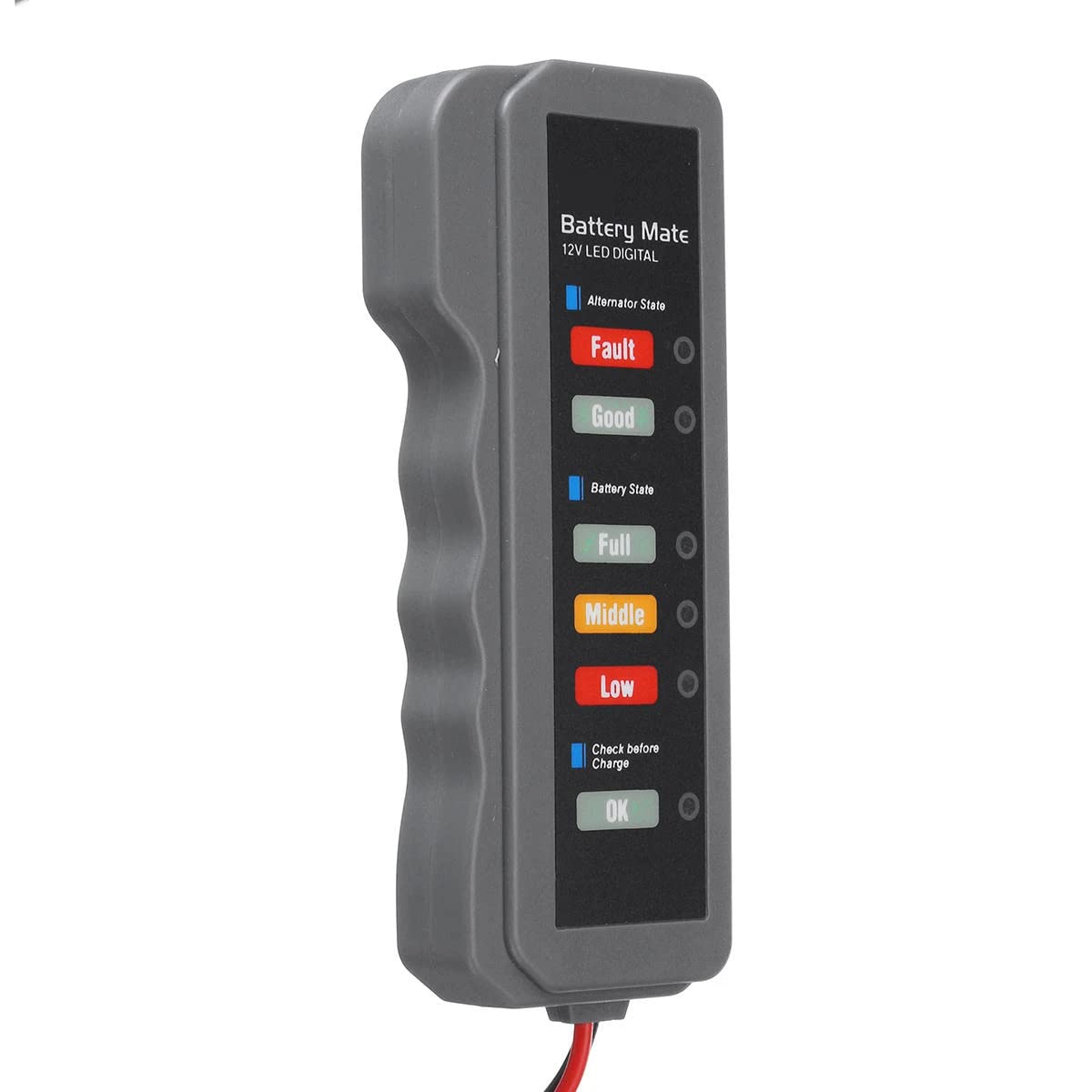
Bild 1.1: Vorderseite view of the DollaTek DT-12VB 12V Digital Battery and Alternator Tester.
2. Sicherheitshinweise
Beachten Sie stets die folgenden Sicherheitsvorkehrungen, um Verletzungen von Personen oder Schäden am Tester oder Fahrzeug zu vermeiden.
- Wear appropriate eye protection when working near vehicle batteries.
- Stellen Sie sicher, dass die Zündung des Fahrzeugs ausgeschaltet ist, bevor Sie das Testgerät anschließen oder abziehen.
- Vermeiden Sie den Kontakt mit Batteriesäure. Sollte es dennoch zu Kontakt kommen, spülen Sie die betroffenen Stellen sofort mit Wasser ab und suchen Sie einen Arzt auf.
- Verwenden Sie den Tester nicht, wenn er beschädigt erscheint.
- Das Testgerät sollte vor Feuchtigkeit und extremen Temperaturen geschützt werden.
- This device is designed for 12V DC battery systems only. Do not use with other voltage-Systeme.
- Achten Sie beim Anschließen des Steckers auf die richtige Polarität.amps: Red to positive (+), Black to negative (-). Incorrect connection can damage the tester or vehicle.
3. Packungsinhalt
The DollaTek DT-12VB package includes:
- 1 x DollaTek 12V Digital Battery and Alternator Tester (Model: DT-12VB)
- Integrated cable with alligator clamps (approximately 25 cm / 9.84 inches in length)
- Benutzerhandbuch (dieses Dokument)

Image 3.1: The DollaTek DT-12VB tester with its integrated alligator clamps.
4. Produktmerkmale
The DollaTek DT-12VB offers the following key features:
- Multifunction Testing: Capable of checking alternator state, battery state, and indicating overload conditions.
- 6-LED Display: Clear visual indication of alternator and battery status.
- Sicher und einfach zu bedienen: Designed for straightforward operation and user safety.
- Kompakt und tragbar: Small size and lightweight for easy transport and storage.
- Pre-Charge Check: Includes a "Check Before Charge" indicator.
5. Einrichtung
Before using the tester, ensure the vehicle's ignition is off and the battery terminals are clean and free of corrosion.
- Identify the positive (+) and negative (-) terminals on your 12V vehicle battery. The positive terminal is usually marked with a plus sign and is larger, while the negative terminal is marked with a minus sign.
- Verbinden Sie den roten Krokodilklemmenamp des Testers an den Pluspol (+) der Batterie anschließen.
- Connect the black alligator clamp des Testers an den Minuspol (-) der Batterie anschließen.
- Stellen Sie sicher, dass beideamps are securely attached to the battery terminals to ensure a good connection.

Bild 5.1: Nahaufnahme view of the red and black alligator clamps für Batterieanschluss.
6. Bedienungsanleitung
The DollaTek DT-12VB performs two primary tests: Alternator State and Battery State.
6.1. Testing Alternator State
- Connect the tester to the battery as described in Section 5.
- Starten Sie den Motor des Fahrzeugs.
- Observe the "Alternator State" LEDs on the tester. The illuminated LED will indicate the alternator's charging performance.
- Turn off the engine after the test.

Image 6.1: The tester being used to check a vehicle's battery and alternator in an engine bay.
6.2. Testing Battery State
- Stellen Sie sicher, dass der Motor des Fahrzeugs ausgeschaltet ist.
- Connect the tester to the battery as described in Section 5.
- Observe the "Battery State" LEDs on the tester. The illuminated LED will indicate the current charge level of the battery.
- Additionally, the "Check Before Charge" and "OK" LEDs provide further diagnostic information regarding the battery's readiness for charging or its overall health.
7. LED-Anzeigen verstehen
The DollaTek DT-12VB features a 6-LED display to clearly communicate diagnostic results. Refer to the diagram below for a detailed explanation of each indicator.

Image 7.1: Detailed diagram illustrating the meaning of each LED indicator on the DollaTek DT-12VB.
| Indikator | Farbe | Bedeutung |
|---|---|---|
| Generatorstatus: Fehler | Rot | Charging system error detected. |
| Lichtmaschinenzustand: Gut | Grün | Das Ladesystem funktioniert einwandfrei. |
| Akkustand: Vollständig | Grün | Der Akku ist vollständig geladen. |
| Batteriestatus: Mittel | Orange | Battery is moderately charged. |
| Batteriestatus: Niedrig | Rot | Battery charge is low. Charging is recommended. |
| Vor dem Laden prüfen: OK | Grün | Battery is in good status and ready for charging if needed. |
8. Wartung
To ensure the longevity and accuracy of your DollaTek DT-12VB tester:
- Clean the tester's casinMit einem weichen, trockenen Tuch abwischen. Keine Scheuermittel oder Lösungsmittel verwenden.
- Keep the alligator clamps sauber und frei von Korrosion.
- Bewahren Sie den Tester an einem trockenen, kühlen Ort, fern von direkter Sonneneinstrahlung und extremen Temperaturen auf.
- Vermeiden Sie es, das Gerät fallen zu lassen oder starken Stößen auszusetzen.
9. Fehlerbehebung
If you encounter issues with your DollaTek DT-12VB, refer to the following common problems and solutions:
| Problem | Mögliche Ursache | Lösung |
|---|---|---|
| No LEDs illuminate when connected. |
|
|
| Inkonsistente Lesarten. |
|
|
| Alternator "Fault" LED always on. |
|
|
10. Spezifikationen
Detailed technical specifications for the DollaTek DT-12VB tester:
| Spezifikation | Wert |
|---|---|
| Erkennungssystem | 12V DC Batterie |
| Versorgungsvolumentage | Gleichstrom 12 V |
| Anzahl der LEDs | 6 (2 Red, 3 Green, 1 Yellow/Orange) |
| Artikelgröße | 12.5 x 5.5 x 2 cm (ca. 4.9 x 2.2 x 0.8 Zoll) |
| Kabellänge | 25 cm (ca. 9.84 Zoll) |
| Gewicht | 50 Gramm (ca. 1.76 Unzen) |
| Modellnummer | DT-12VB |
| Hersteller | DollaTek |
| Kompatible Geräte | Vehicles using 12V batteries |
| Sicherheitsstandard | UL 61010-1 (as per product specifications) |

Image 10.1: Visual representation of the tester's dimensions and packaging.
11. Garantie und Support
DollaTek products are manufactured to high-quality standards. For specific warranty information, please refer to the documentation provided at the time of purchase or contact your retailer.
For technical support or inquiries, please visit the official DollaTek website or contact their customer service department through your purchase platform.


