
1. Einleitung
Thank you for choosing the OSALO OS-5M 12-Digit Desktop Calculator. This manual provides essential information for the proper setup, operation, and maintenance of your calculator. Please read it thoroughly before use to ensure optimal performance and longevity of the device.
The OSALO OS-5M calculator is designed for ease of use with its large buttons and extra-large 12-digit display. It is suitable for various environments, including offices, schools, and retail settings. The calculator operates on both solar power and a backup battery, ensuring reliable performance.
2. Sicherheitshinweise
- Batteriewarnung: The included battery is for single use only. Do not attempt to recharge it.
- Energiequelle: The solar panel provides limited power and is intended to supplement the battery, not to charge it.
- Lagerung: Store the calculator in a dry place, away from extreme temperatures and direct sunlight for prolonged periods.
- Reinigung: Use a soft, dry cloth to clean the calculator. Do not use liquid cleaners or abrasive materials.
- Demontage: Do not attempt to disassemble or repair the calculator yourself. Contact qualified personnel for service.
3. Packungsinhalt
- 1 x OSALO OS-5M Desktop Calculator
- 1 x AAA-Batterie (vorinstalliert oder separat enthalten)
- 1 x Englisch Bedienungsanleitung
4. Produktüberschreitungview
The OSALO OS-5M calculator features a clear layout and ergonomic design for comfortable and efficient use.

Abbildung 4.1: Vorderseite view of the OSALO OS-5M Desktop Calculator.

Abbildung 4.2: Nahaufnahme view highlighting the large buttons and clear 12-digit display.
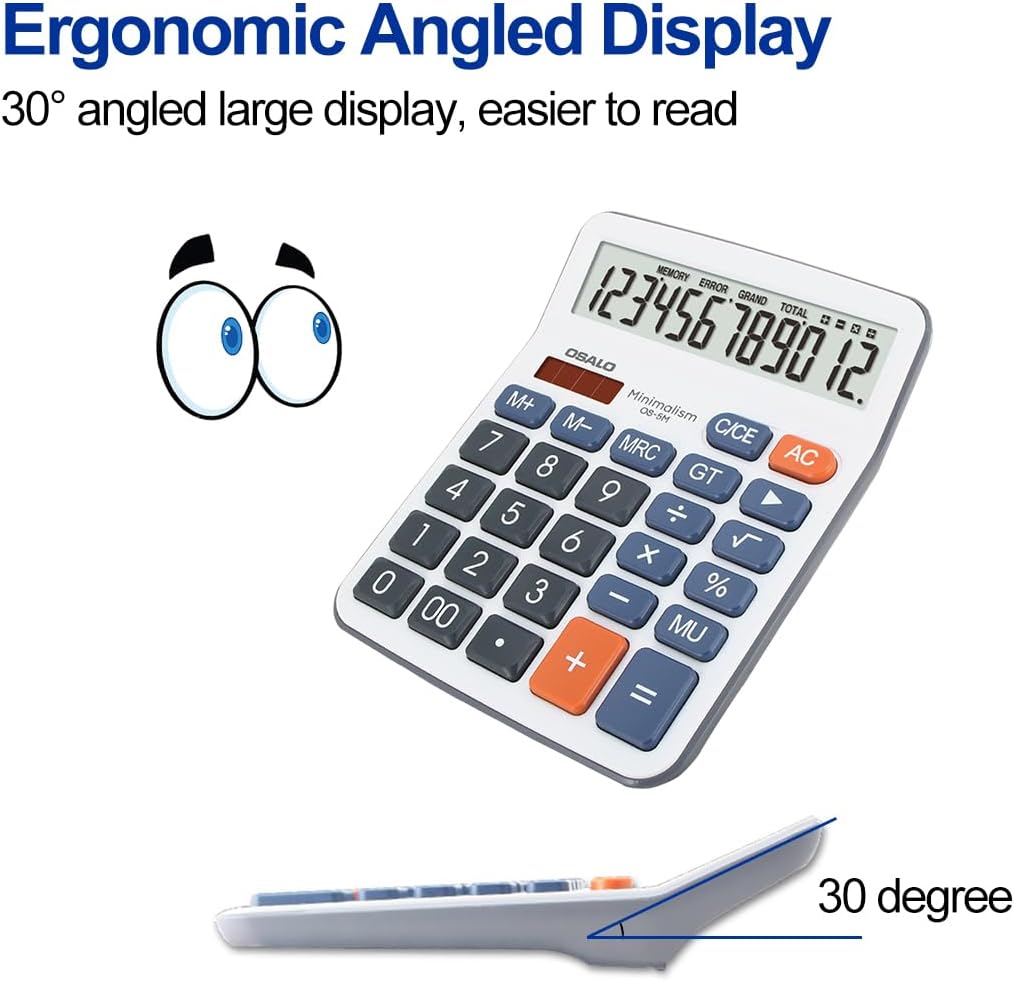
Abbildung 4.3: Seite view demonstrating the ergonomic 30-degree tilted LCD screen for improved readability.

Abbildung 4.4: Ausführlich view of the clear LCD screen, soft and silent keys, and the specially embossed '5' marking key for tactile recognition.

Abbildung 4.5: Vorder- und Rückseite views of the calculator, showing the overall design and battery compartment on the rear.
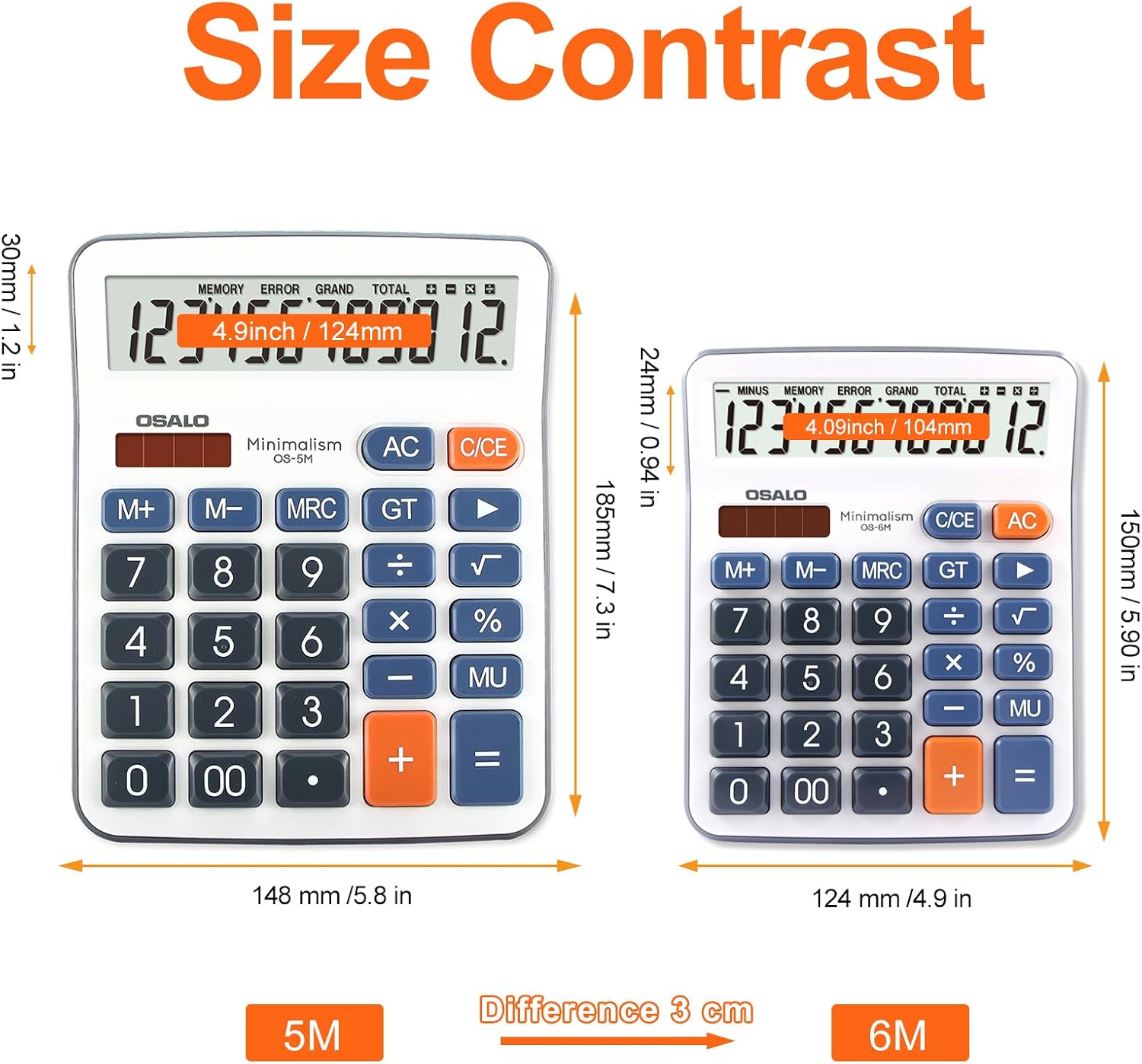
Figure 4.6: Size comparison of the OSALO OS-5M (left) with a smaller calculator, illustrating its larger dimensions for desktop use.

Abbildung 4.7: Bspamples of the OSALO OS-5M calculator being used in different environments, such as a supermarket, office, business, and school.
Video 4.1: Eine 360-Grad-Ansicht view of the OSALO OS-5M calculator, showcasing sein Design aus allen Blickwinkeln.
5. Einrichtung
5.1 Einlegen der Batterie
The OSALO OS-5M calculator requires one AAA battery for operation. The battery may be pre-installed or included separately in the package. If not pre-installed, please follow these steps:
- Suchen Sie das Batteriefach auf der Rückseite des Taschenrechners.
- Den Deckel des Batteriefachs vorsichtig aufschieben.
- Legen Sie eine AAA-Batterie ein und achten Sie darauf, dass die Plus- (+) und Minus- (-) Anschlüsse mit den Markierungen im Inneren des Batteriefachs übereinstimmen.
- Schließen Sie den Batteriefachdeckel fest.
Notiz: The calculator also features a solar panel for power. The solar panel helps extend battery life by providing power in well-lit conditions but does not recharge the installed battery.
6. Bedienung
6.1 Grundlegende Berechnungen
So führen Sie grundlegende Rechenoperationen aus:
- Drücken Sie die ON/C/CE button to turn on the calculator or clear the current entry.
- Enter the first number using the number keys (0-9, 00).
- Drücken Sie die gewünschte Bedientaste (+, -, ×, ÷). The operation symbol will appear on the display.
- Geben Sie die zweite Zahl ein.
- Drücken Sie die = Taste zum Anzeigen des Ergebnisses.
6.2 Sonderfunktionen
- AC (Alles klar): Clears all entries and calculations, resetting the calculator to zero.
- C/CE (Clear Entry): Clears the last entered number or the current calculation without affecting previous operations in a sequence. Pressing it twice usually acts as an AC.
- M+ (Speicher Plus): Fügt den angezeigten Wert dem Speicher hinzu.
- M- (Speicher Minus): Subtrahiert den angezeigten Wert vom Speicher.
- MRC (Speicherabruf/-löschung): Drücken Sie einmal, um den gespeicherten Wert abzurufen. Drücken Sie zweimal, um den Speicher zu löschen.
- GT (Gesamtsumme): Displays the grand total of all calculations performed since the last GT clear.
- % (Prozenttage): Wird für Prozent verwendettage Berechnungen. Zum BeispielampUm beispielsweise 10 % von 200 zu berechnen, geben Sie 200 × 10 % ein.
- MU (Mark Up): Used for profit margin calculations.
- +/- (Vorzeichenwechsel): Changes the sign of the displayed number (positive to negative, or negative to positive).
- √ (Quadratwurzel): Berechnet die Quadratwurzel der angezeigten Zahl.
6.3 Automatische Abschaltung
The calculator is equipped with an automatic shutdown feature. If left idle for approximately 8 minutes, it will automatically power off to conserve battery life. To turn it back on, press the ON/C/CE Taste.
7. Wartung
7.1 Reinigung
Um das Aussehen und die Funktionalität des Taschenrechners zu erhalten:
- Wischen Sie die Außenseite des Taschenrechners mit einem weichen, trockenen Tuch ab.
- Verwenden Sie keine Scheuermittel, Lösungsmittel oder Sprays direkt auf den Taschenrechner.
- Avoid getting moisture into the display or button areas.
7.2 Batteriewechsel
When the display becomes dim or the calculator functions erratically, it may be time to replace the AAA battery. Follow the battery installation steps in Section 5.1 to replace the battery. Dispose of used batteries according to local regulations.
8. Fehlerbehebung
| Problem | Mögliche Ursache | Lösung |
|---|---|---|
| Der Taschenrechner lässt sich nicht einschalten. | Schwache oder leere Batterie; unzureichendes Licht für Solarenergie. | Replace the AAA battery. Ensure adequate lighting for solar operation. |
| Das Display ist dunkel oder flackert. | Schwache Batterie. | Ersetzen Sie die AAA-Batterie. |
| Falsche Berechnungsergebnisse. | Incorrect key input; complex calculation error. | Clear the calculator with AC and re-enter the calculation carefully. Refer to Section 6 for operation details. |
| Die Tasten reagieren nicht. | Staub oder Schmutz unter den Tasten; interne Fehlfunktion. | Reinigen Sie den Bereich um die Tasten vorsichtig. Sollte das Problem weiterhin bestehen, wenden Sie sich bitte an den Kundendienst. |
9. Spezifikationen
| Besonderheit | Detail |
|---|---|
| Marke | OSALO |
| Modellnummer | OS-5M |
| Anzeigetyp | LCD Bildschirm |
| Bildschirmgröße | 4.5 Zoll |
| Anzahl der Ziffern | 12 |
| Technische Daten | 19 x 14.8 x 0.1 cm |
| Artikelgewicht | 170 g |
| Stromquelle | Solar Powered, 1 AAA Battery (required) |
| Material | Plastik |
| Farbe | Grau |
| Rechnertyp | Geschäft |
| Datum der ersten Verfügbarkeit | 12. Mai 2022 |
10. Garantie und Support
For warranty information or technical support, please refer to the contact details provided with your purchase or visit the official OSALO webBewahren Sie Ihren Kaufbeleg als Kaufnachweis für eventuelle Garantieansprüche auf.