
1. Einleitung
Vielen Dank für Ihren Einkauf.asing the TURBOX Giantpeak Mechanical Feel RGB Gaming Keyboard. This manual provides essential information for setting up, operating, and maintaining your new keyboard. Please read this manual carefully before use to ensure optimal performance and longevity of your device.
2. Sicherheitshinweise
- Keep the keyboard away from excessive heat, direct sunlight, and moisture.
- Although the keyboard is spill-resistant, avoid intentionally exposing it to large amounts of liquid. In case of spills, disconnect the keyboard immediately and allow it to dry completely before reconnecting.
- Do not attempt to disassemble or modify the keyboard. This will void the warranty and may cause damage.
- Nur mit kompatiblen Geräten und Stromquellen gemäß Angabe verwenden.
- Außerhalb der Reichweite von Kindern aufbewahren.
3. Packungsinhalt
Bitte prüfen Sie das Paket auf folgende Artikel:
- TURBOX Giantpeak Mechanical Feel RGB Gaming Keyboard
- Benutzerhandbuch (dieses Dokument)
4. Produktüberschreitungview
The TURBOX Giantpeak keyboard is designed for gaming, featuring a mechanical feel, customizable RGB lighting, and macro capabilities. It also includes a convenient mobile device holder.
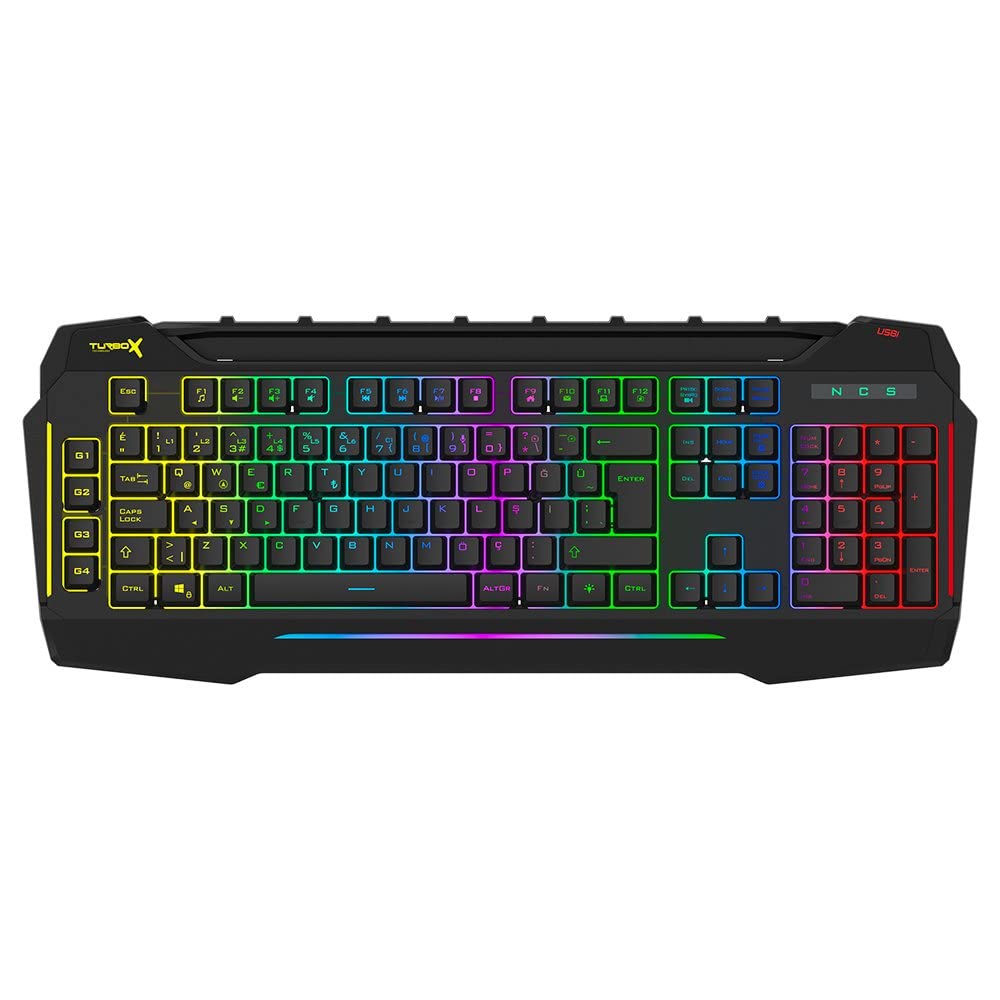
Figure 4.1: TURBOX Giantpeak keyboard with integrated mobile device stand.
This full-size keyboard offers a standard Q layout, providing a comfortable and responsive typing experience for both gaming and general use.

Abbildung 4.2: Oben view of the TURBOX Giantpeak keyboard.
The keyboard features vibrant RGB backlighting that can be customized to various effects, including sound-sensitive modes. Its spill-resistant design provides added durability.

Abbildung 4.3: Schräg view showing RGB lighting.
Dedicated macro keys (G1-G4) are located on the left side, allowing for quick execution of complex commands or sequences.

Figure 4.4: Close-up of programmable G-keys.
The keyboard also includes a full numeric keypad for data entry and additional functions.

Figure 4.5: Numeric keypad detail.
Connectivity is provided via a durable USB cable, ensuring a stable and responsive connection to your computer.

Abbildung 4.6: Seite view mit USB-Kabel.
5. Einrichtung
Follow these steps to set up your TURBOX Giantpeak keyboard:
- Auspacken der Tastatur: Carefully remove the keyboard and any packaging materials from the box.
- Mit Computer verbinden: Plug the USB connector of the keyboard into an available USB port on your desktop or laptop computer.
- Treiberinstallation: Your operating system (Windows, macOS, etc.) should automatically detect and install the necessary drivers. This process may take a few moments.
- Funktionalität überprüfen: Once drivers are installed, test the keyboard by typing in a text editor or browser to ensure all keys are functioning correctly. The RGB lighting should also illuminate.
6. Bedienungsanleitung
6.1 Grundlegende Tastaturfunktionen
The TURBOX Giantpeak keyboard operates like a standard Q-layout keyboard. All standard keys (alphanumeric, function keys, numeric keypad, navigation keys) function as expected.
6.2 RGB-Beleuchtungssteuerung
The keyboard features customizable RGB backlighting with 7 different color options and sound-sensitive modes. Specific key combinations are used to cycle through lighting effects and adjust brightness:
- Beleuchtungsmodus ändern: Verwenden Sie die Fn + Rollen-Taste keys to cycle through various lighting effects.
- Helligkeit anpassen: Verwenden Sie die Fn + Bild nach oben (erhöhen) oder Fn + Bild ab (decrease) keys to adjust the brightness level of the backlighting.
- Sound-Sensitive Mode: The keyboard supports sound-sensitive lighting. Refer to specific software or key combinations (if available) for activation. (Note: Specific key combinations for sound-sensitive mode may vary or require software.)
6.3 Macro Programming (G1-G4 Keys)
The TURBOX Giantpeak keyboard includes 4 programmable macro keys (G1, G2, G3, G4) for executing custom commands or sequences. Follow these general steps for macro recording:
- Makro-Aufnahmemodus aktivieren: Drücken Sie die MR key (Macro Record, usually near the G-keys). The keyboard's indicator light may flash to indicate recording mode.
- Select Macro Key: Press one of the G-keys (G1, G2, G3, or G4) where you want to save the macro.
- Aufnahmereihenfolge: Type the sequence of keys you wish to record. This can include multiple keystrokes, delays, and modifier keys.
- Exit Macro Recording Mode: Drücken Sie die MR key again to save the macro and exit recording mode. The indicator light should stop flashing.
- Makro ausführen: To use the recorded macro, simply press the assigned G-key.
Note: For advanced macro settings or specific software-based macro management, please check the manufacturer's website for any available utility software.
6.4 Mobile Device Holder
The integrated slot at the top of the keyboard is designed to hold smartphones or small tablets, providing a convenient viewing angle while gaming or working.
7. Wartung
Um die Langlebigkeit und Leistungsfähigkeit Ihrer Tastatur zu gewährleisten, beachten Sie bitte folgende Wartungsrichtlinien:
- Reinigung: Verwenden Sie ein weiches, trockenes Tuch, um die Oberfläche der Tastatur abzuwischen. Bei hartnäckigem Schmutz leicht andrücken.ampBefeuchten Sie das Tuch mit Wasser oder einer milden Reinigungslösung. Vermeiden Sie scharfe Chemikalien oder scheuernde Materialien.
- Staubentfernung: Verwenden Sie Druckluft, um Staub und Schmutz zwischen den Tastenkappen zu entfernen.
- Umgang mit Verschüttungen: In case of liquid spills, immediately disconnect the keyboard from your computer. Turn it upside down to drain any liquid and allow it to air dry completely for at least 24-48 hours before reconnecting.
- Lagerung: Bei längerer Nichtbenutzung sollte die Tastatur in einer sauberen, trockenen Umgebung aufbewahrt werden.
8. Fehlerbehebung
If you encounter issues with your TURBOX Giantpeak keyboard, refer to the following common problems and solutions:
| Problem | Mögliche Lösung |
|---|---|
| Die Tastatur reagiert nicht. |
|
| Die RGB-Beleuchtung funktioniert nicht oder ist defekt. |
|
| Macro keys (G1-G4) are not working. |
|
| Die Tasten klemmen oder reagieren nicht. |
|
9. Spezifikationen
| Besonderheit | Detail |
|---|---|
| Modellname | Giantpeak |
| Teilenummer | ID9923266 |
| Marke | TURBOX |
| Konnektivitätstechnologie | USB verkabelt |
| Kompatible Geräte | Notebook, PC |
| Schlüsseltyp | Mechanical Feel (Membrane) |
| Besondere Merkmale | RGB Lighting, Macro Keys (4), Sound-Sensitive Lighting, Spill-Resistant, Mobile Device Holder |
| Anzahl der Schlüssel | 87 (Note: Visuals suggest a full-size layout, this number may refer to a specific key group or variant.) |
| Hardware-Schnittstelle | USB |
| Verpackungsabmessungen | 51.2 x 22.2 x 5.2 cm |
| Artikelgewicht | 1 Kilogramm |
10. Garantie und Support
For warranty information and technical support, please refer to the warranty card included with your product or visit the official TURBOX webBewahren Sie Ihren Kaufbeleg für eventuelle Garantieansprüche auf.
If you require further assistance, please contact TURBOX customer support through their official channels.