
Einführung
Thank you for choosing the Krisons Sound Blaster Tower Speaker. This manual provides essential information for the safe and efficient operation of your speaker system. Please read it thoroughly before use and retain it for future reference.
Produkt überview
The Krisons Sound Blaster Tower Speaker is designed to deliver clear and balanced audio with an 8-inch woofer. It features multiple connectivity options including Bluetooth, USB, AUX, and FM radio, along with an LCD display for mode information. The speaker includes controls for volume, bass, and mode selection.

Abbildung 1: Vorder- und Seitenansicht view of the Krisons Sound Blaster Tower Speaker, highlighting the display, USB port, mode button, play/pause, previous/next controls, bass, treble, volume knobs, 4-inch speakers, and 8-inch woofer.
Aufstellen
1. Auspacken
Nehmen Sie alle Komponenten vorsichtig aus der Verpackung. Stellen Sie sicher, dass folgende Teile vorhanden sind:
- 1 x Krisons Sound Blaster Tower Speaker
- 1 x Fernbedienung
- 1 x Benutzerhandbuch (dieses Dokument)
- 1 x Garantiekarte
2. Platzierung
Position the tower speaker on a flat, stable surface. For optimal sound performance, place the speaker in a location that allows for clear sound dispersion. The compact design allows for flexible placement in various room sizes.
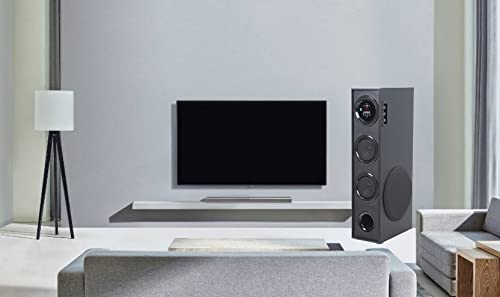
Abbildung 2: BspampBeispiel für die Lautsprecherplatzierung in einer häuslichen Umgebung.

Figure 3: Speaker dimensions for placement planning.
3. Stromanschluss
Connect the speaker's power cable to a standard AC power outlet. Ensure the power switch on the speaker is in the OFF position before connecting to power.
4. Audioverbindungen
Der Lautsprecher unterstützt mehrere Audioeingabemethoden:
- Bluetooth: Für die drahtlose Verbindung mit Smartphones, Tablets und anderen Bluetooth-fähigen Geräten.
- USB: Zum Abspielen von Audio files direkt von einem USB-Laufwerk.
- AUX-Eingang: Für den kabelgebundenen Anschluss an Geräte mittels eines 3.5-mm-Audiokabels.
- FM Radio: Built-in FM tuner for radio broadcasts.

Figure 4: Available connectivity options.

Figure 5: Connecting to an external device via AUX cable.
Bedienungsanleitung
1. Ein-/Ausschalten
Locate the power switch on the rear panel of the speaker. Flip the switch to the "ON" position to power on the speaker. The LCD display will illuminate. Flip to "OFF" to power down.
2. Kontrollmethoden
The speaker can be controlled using the physical buttons and knobs on the side panel or via the included remote control.
- Bedienelemente an der Seite: Includes buttons for mode change, play/pause, previous/next track, and knobs for volume and bass adjustment.
- Fernbedienung: Provides full functionality for convenient operation from a distance.
3. Modusauswahl
Press the "MODE" button on the speaker's control panel or the remote control to cycle through available input modes: Bluetooth, USB, AUX, and FM Radio. The selected mode will be indicated on the LCD display.
4. Bluetooth-Betrieb
- Switch the speaker to Bluetooth mode. The LCD display will show "BT" or a similar indicator, and the speaker will enter pairing mode.
- Aktivieren Sie auf Ihrem Gerät (Smartphone, Tablet) Bluetooth und suchen Sie nach verfügbaren Geräten.
- Select "Krisons Sound Blaster" (or similar name) from the list of devices.
- Once paired, the speaker will confirm the connection, and you can play audio from your device.
5. USB-Wiedergabe
- Stecken Sie einen USB-Stick mit MP3-Audiodateien ein. files in den USB-Anschluss des Lautsprechers.
- Switch the speaker to USB mode. The speaker will automatically detect and begin playing audio files vom USB-Laufwerk.
- Use the previous/next buttons to navigate tracks and the play/pause button to control playback.
6. AUX-Eingangsanschluss
- Connect one end of a 3.5mm audio cable to the AUX-in port on the speaker.
- Connect the other end of the 3.5mm audio cable to the audio output jack of your external device (e.g., TV, computer, MP3 player).
- Switch the speaker to AUX mode. Audio from your connected device will now play through the speaker.
7. UKW-Radio
- Schalten Sie den Lautsprecher auf FM-Radio-Modus.
- Der Lautsprecher scannt und speichert automatisch verfügbare FM-Sender.
- Use the previous/next buttons to cycle through the stored stations.
8. Lautstärke- und Toneinstellung
Use the "Volume" knob to adjust the overall sound level. Use the "Bass" knob to increase or decrease the low-frequency output. The speaker is designed to provide a balanced sound across treble, midrange, and bass frequencies.
Wartung
To ensure the longevity and optimal performance of your Krisons Sound Blaster Tower Speaker, follow these maintenance guidelines:
- Reinigung: Use a soft, dry cloth to wipe the exterior surfaces of the speaker. Do not use abrasive cleaners, waxes, or solvents, as these can damage the finish.
- Staub: Reinigen Sie die Lautsprechergitter und Lüftungsschlitze regelmäßig mit Staub, um Ablagerungen zu vermeiden, die die Klangqualität und die internen Komponenten beeinträchtigen können.
- Flüssigkeitsexposition: Keep the speaker away from water and other liquids. Do not place liquid-filled containers on or near the speaker.
- Lagerung: If storing the speaker for an extended period, disconnect it from power and store it in a cool, dry place, away from direct sunlight and extreme temperatures.
Fehlerbehebung
Sollten Sie Probleme mit Ihrem Lautsprecher haben, beachten Sie bitte die folgenden häufig auftretenden Probleme und Lösungen:
| Problem | Mögliche Lösung |
|---|---|
| Kein Strom |
|
| Kein Ton |
|
| Bluetooth stellt keine Verbindung her |
|
| Fernbedienung funktioniert nicht |
|
| Sound during power on/off | A brief sound or pop during power on/off is normal for this type of audio equipment and does not indicate a malfunction. |
Technische Daten
| Besonderheit | Detail |
|---|---|
| Marke | Krisons |
| Modellname | Sound Blaster |
| Maximale Lautsprecherausgangsleistung | 80 Watt |
| Konnektivitätstechnologie | Aux-Anschluss, Bluetooth, USB, Drahtlos |
| Audioausgabemodus | Umgeben |
| Montagetyp | Bodenständig |
| Gehäusematerial | Kristall |
| Lautsprechertyp | Subwoofer/Bookshelf/Woofer/Tower |
| Farbe | Schwarz |
| Kontrollmethode | Berührung, Fernbedienung |
| Woofer Driver Diameter | 8 Zoll |
| Tweeter Driver Diameter | 1 Zoll |
| Total USB 2.0 Ports | 1 |
| Anzahl der Audiokanäle | 2.1 |
| Artikelabmessungen (T x B x H) | 39 cm (T) x 24 cm (B) x 57 cm (H) |
| Artikelgewicht | 8900 Gramm |
| Kompatible Geräte | Smartphone, Tablet |
| Stromquelle | AC |
Garantieinformationen
This Krisons Sound Blaster Tower Speaker comes with a 6 Monate Garantie on manufacturing defects. Please refer to the included Warranty Card for detailed terms and conditions. Retain your purchase receipt as proof of purchase for warranty claims.
Kundenservice
For any questions, assistance, or support regarding your Krisons Sound Blaster Tower Speaker, please contact Krisons Customer Care:

Figure 6: Krisons Customer Support contact details.
- E-Mail: service@krisons.com
- Telefon: +91-8287124581 / +91-9910016757
- Öffnungszeiten: 10 bis 6 Uhr
- Hersteller: Krisons Electronic Systems Limited, ZYTEL ENTERPRISES PVT


