
Technics EAH-A800
Technics EAH-A800 Kabelloser Over-Ear-Kopfhörer mit Geräuschunterdrückung – Benutzerhandbuch
Einführung
This manual provides essential instructions for the safe and effective use of your Technics EAH-A800 Wireless Noise Cancelling Over-Ear Headphones. Please read this manual thoroughly before using the product and retain it for future reference.

Image: Technics EAH-A800 Wireless Noise Cancelling Over-Ear Headphones in black, showcasing ihr elegantes Design.
The Technics EAH-A800 headphones are designed to deliver high-fidelity audio with advanced noise-cancelling technology and superior call clarity. They feature multi-point connectivity for seamless switching between devices and comfortable over-ear earpads for extended wear.
Lieferumfang
Überprüfen Sie, ob alle Artikel im Paket vorhanden sind:
- Technics EAH-A800 Over-Ear Headphones
- USB-Ladekabel
- Audio Cable (3.5 mm jack)
- Schützende Tragetasche

Image: The complete package contents, including the headphones, charging cable, audio cable, and protective case.
Aufstellen
1. Aufladen der Kopfhörer
Before first use, fully charge the headphones. Connect the USB charging cable to the headphone's charging port and a USB power source. The charging indicator will show the charging status.
2. Bluetooth-Kopplung
- Stellen Sie sicher, dass die Kopfhörer ausgeschaltet sind.
- Halten Sie die Einschalttaste gedrückt, bis die LED-Anzeige blau und rot blinkt und damit den Kopplungsmodus anzeigt.
- Aktivieren Sie auf Ihrem Gerät (Smartphone, Tablet, Computer) Bluetooth und suchen Sie nach verfügbaren Geräten.
- Select "Technics EAH-A800" from the list of found devices.
- Sobald die Verbindung hergestellt ist, blinkt die LED-Anzeige langsam blau.
3. Technics Audio Connect App
For enhanced control and customization, download the Technics Audio Connect app from your device's app store. The app allows you to adjust sound settings, noise cancellation levels, and other features.

Image: Screenshots of the Technics Audio Connect app, illustrating its interface for sound and ambient control settings.
Bedienungsanleitung
1. Ein-/Ausschalten
- To power on: Press and hold the power button until the LED indicator lights up.
- To power off: Press and hold the power button until the LED indicator turns off.
2. Noise Cancelling and Ambient Sound Modes
The EAH-A800 features active noise cancellation to reduce external distractions and an ambient sound mode to allow you to hear your surroundings.
- Geräuschunterdrückung: Reduces environmental noise for an immersive listening experience.
- Umgebungsmodus: Allows external sounds to be heard, useful for awareness in public spaces.
Switch between modes using the dedicated button on the headphones or through the Technics Audio Connect app.

Image: A visual representation of the noise cancelling technology in action, showing how external sounds are minimized.
3. Mehrpunktverbindungen
The headphones can connect to more than two Bluetooth devices simultaneously, allowing for seamless audio switching. For example, you can listen to music from your laptop and instantly answer a call from your smartphone without re-pairing.

Image: A user seamlessly switching audio between a smartphone and a laptop, highlighting the multi-point connectivity feature.
4. Funktionen aufrufen
The EAH-A800 headphones are equipped with 8 microphones and advanced wind noise reduction for clear voice transmission during calls. Use the integrated controls to answer, end, or reject calls.
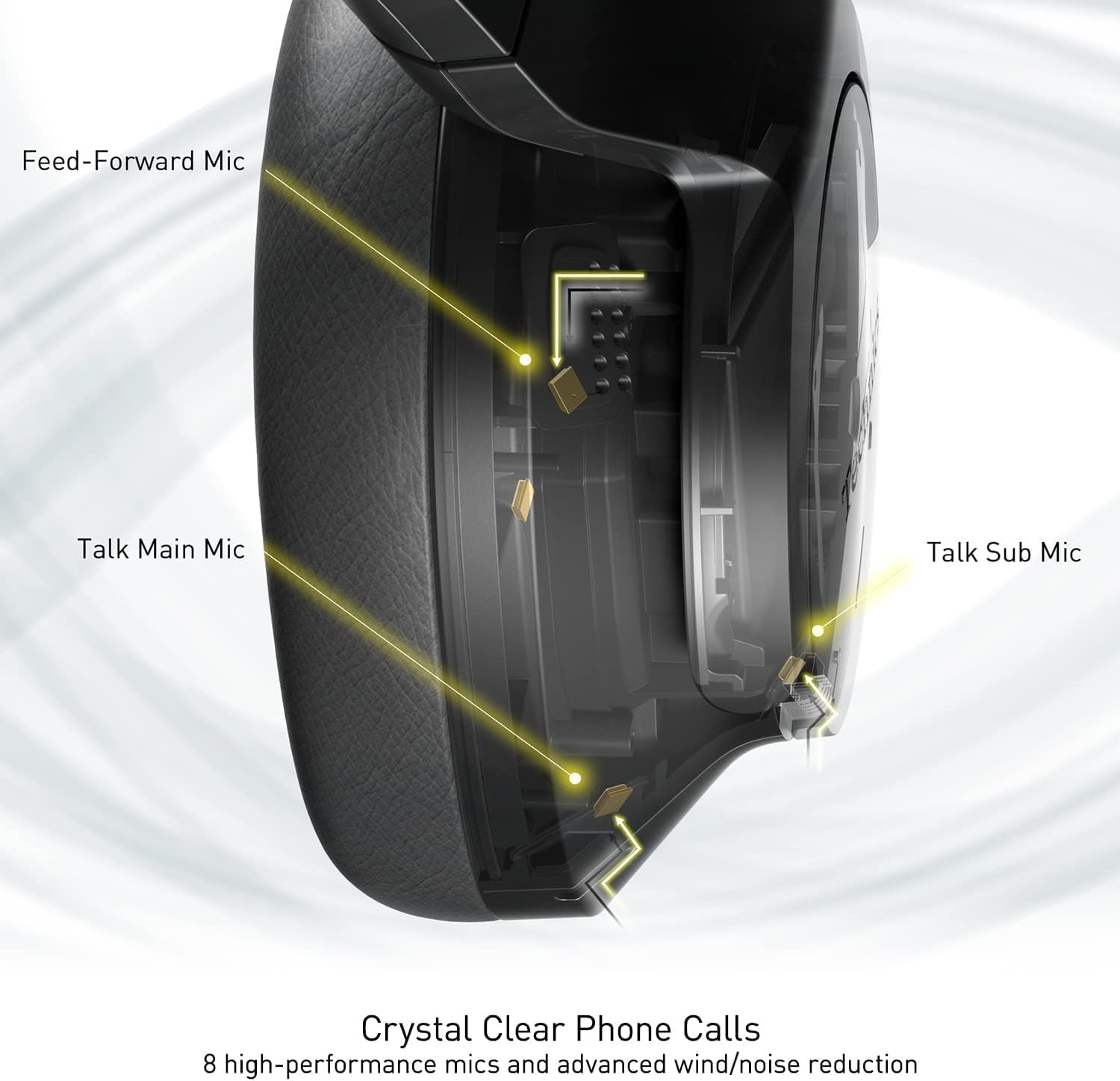
Image: An internal diagram illustrating the strategic placement of 8 microphones within the headphone for optimal call clarity.
5. Bedienelemente
The headphones feature physical buttons for power, volume, and mode switching, as well as a touch-sensitive panel on one earcup for additional functions. Refer to the quick start guide for a detailed layout of controls.
6. Akkulaufzeit und Laden
The EAH-A800 offers up to 50 hours of playback with Active Noise Cancellation (ANC) enabled on a single charge. A quick 15-minute charge provides approximately 10 hours of playback.

Image: A graphic detailing the impressive battery life and quick charge capabilities of the headphones.
Wartung
1. Reinigung
- Wischen Sie die Kopfhörer mit einem weichen, trockenen Tuch ab.
- Die Ohrpolster vorsichtig mit einem leicht feucht gehaltenen Tuch abwischen.amp Das Tuch auftragen und vor Gebrauch vollständig an der Luft trocknen lassen.
- Verwenden Sie keine scharfen Chemikalien, Lösungsmittel oder Scheuermittel.
2. Speicherung
When not in use, store the headphones in their protective carrying case to prevent damage from dust, scratches, and impacts. Avoid exposing the headphones to extreme temperatures or humidity.
Fehlerbehebung
| Problem | Mögliche Ursache | Lösung |
|---|---|---|
| Kopfhörer lassen sich nicht einschalten | Schwache Batterie | Laden Sie die Kopfhörer vollständig auf. |
| Bluetooth-Kopplung nicht möglich | Kopfhörer nicht im Kopplungsmodus; Bluetooth am Gerät deaktiviert; Außerhalb der Reichweite | Ensure headphones are in pairing mode (flashing blue/red). Turn on Bluetooth on your device. Move device closer to headphones. |
| Kein Ton oder geringe Lautstärke | Volume too low; Incorrect audio output selected; Device not connected | Increase headphone and device volume. Check device's audio output settings. Re-establish Bluetooth connection. |
| Schlechte Anrufqualität | Microphone obstructed; Weak signal; Environmental noise | Ensure microphones are clear. Move to an area with better signal. Adjust noise cancelling settings via the app. |
| Multi-point connectivity issues | Connection conflict; Device not properly paired | Disconnect from one device and reconnect. Ensure both devices are paired correctly. |
If problems persist, consult the Technics Audio Connect app for further diagnostics or visit the official Technics support webWebsite.
Technische Daten
| Modellname | Technics EAH-A800 |
| Konnektivitätstechnologie | Bluetooth 5.2 |
| Frequenzgang | 4 Hz - 40 kHz |
| Lärmschutz | Aktive Geräuschunterdrückung |
| Akkulaufzeit | Up to 50 Hours (with ANC ON) |
| Ladezeit | Approximately 3 Hours (15 min quick charge for 10 hrs playback) |
| Artikelgewicht | 10.5 Unzen (298 Gramm) |
| Material | Polyurethan (PU) |
| Kopfhöreranschluss | 3.5 mm Klinke |
| Kompatible Geräte | Cellphones, Desktops, Laptops, Tablets, Telephones |
| Besondere Merkmale | Fast Charging, Foldable, Microphone Included |
| UPC | 885170381162 |
Garantie und Support
Your Technics EAH-A800 headphones are covered by a manufacturer's warranty. For specific warranty terms, registration, and support inquiries, please refer to the official Technics webWebsite oder wenden Sie sich an den Kundendienst.
For additional information, FAQs, and software updates, please visit the official Technics brand store or support pages:
Ask a question about this manual
Ask about setup, troubleshooting, compatibility, parts, safety, or missing instructions. Manuals+ will review the question and use this page’s manual context to help answer it.