
SPYCLOPS SPY-MNBLT3WIP8
Spyclops SPY-MNBLT3WIP8 4K 8.0-Megapixel Outdoor Fixed Lens Mini Bullet IP PoE Camera
Model: SPY-MNBLT3WIP8
Einführung
This manual provides comprehensive instructions for the installation, operation, and maintenance of your Spyclops SPY-MNBLT3WIP8 4K 8.0-Megapixel Outdoor Fixed Lens Mini Bullet IP PoE Camera. Please read this manual thoroughly before using the product to ensure proper functionality and safety.
Sicherheitshinweise
Beachten Sie die folgenden Sicherheitsvorkehrungen, um Schäden am Produkt oder Verletzungen zu vermeiden:
- Stellen Sie sicher, dass die Stromquelle die Anforderungen der Kamera erfüllt (PoE).
- Versuchen Sie nicht, die Kamera zu zerlegen oder zu verändern.
- Install the camera in a secure location to prevent unauthorized access or tampRing.
- Vermeiden Sie es, die Kamera über längere Zeiträume direkt auf starke Lichtquellen zu richten.
- Verwenden Sie nur vom Hersteller zugelassenes Zubehör.
Packungsinhalt
Überprüfen Sie, ob alle Artikel im Paket vorhanden sind:
- Spyclops SPY-MNBLT3WIP8 Camera
- Mounting Hardware (screws, wall anchors, hex key)
- Wasserdichtes Anschlussset
- Bedienungsanleitung

Produkt überview
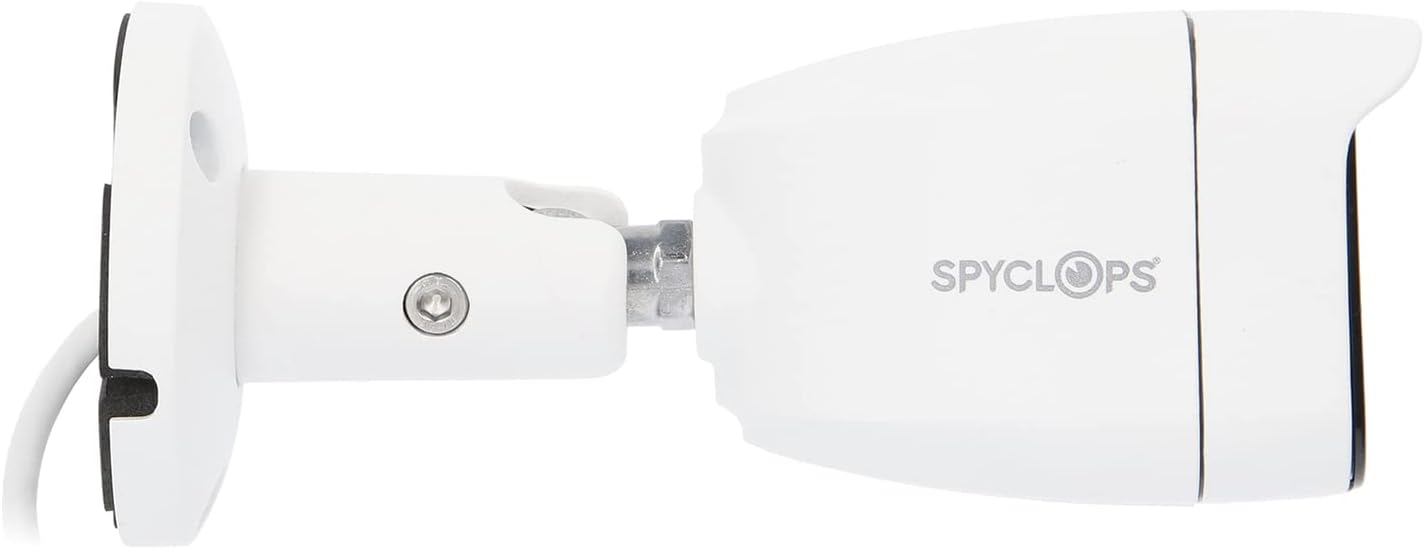
The Spyclops SPY-MNBLT3WIP8 is a 4K 8.0-Megapixel Outdoor Fixed Lens Mini Bullet IP PoE Camera designed for robust surveillance. It features an advanced CMOS sensor for high-resolution video capture and supports both color night vision in low light and black and white in total darkness using smart IR LEDs. The camera includes a built-in microphone for audio recording and utilizes H.265+ video compression to optimize storage and bandwidth.


Aufstellen
1. Physische Installation
- Wählen Sie einen Montageort: Wählen Sie einen Standort im Freien, der die gewünschten Bedingungen bietet. viewing angle and is within reach of your network cable. The camera is water-resistant (IP67).
- Montieren Sie die Kamera:
- Verwenden Sie die beiliegende Montagevorlage (falls vorhanden), um die Bohrlöcher zu markieren.
- Bei der Montage an Gipskarton- oder Mauerwerkswänden müssen Vorbohrungen durchgeführt und Wandanker eingesetzt werden.
- Secure the camera's base to the surface using the provided screws.
- Adjust the camera's angle and orientation using the adjustable arm and hex key.
- Netzwerkkabel anschließen: Connect an Ethernet cable from your PoE switch or NVR to the camera's RJ45 port. Ensure the connection is secure and use the waterproof connector kit for outdoor installations to protect the connection from moisture.
2. Netzwerkkonfiguration
The camera is designed to work with IP/PoE systems. It will typically obtain an IP address automatically via DHCP from your network. For initial setup and advanced configuration, you will need to access the camera's web interface or use compatible NVR software.
- Entdecken Sie die Kamera: Use a network scanner tool or your NVR's discovery function to find the camera's IP address on your network.
- Zugang Web Schnittstelle: Öffnen Sie ein web browser and enter the camera's IP address. Log in using the default credentials (refer to specific documentation or contact support if unknown).
- Anfangskonfiguration: Change default passwords, set time zones, and configure network settings as required.
Bedienungsanleitung
1. Leben View und Aufzeichnung
Nach der Konfiguration können Sie view the live feed and manage recordings through your NVR or the camera's web Schnittstelle.
- Live-Überwachung: Access the live video stream to monitor the surveillance area in real-time.
- Aufnahmemodi: Configure continuous recording, motion-detection recording, or scheduled recording based on your security needs.
- Wiedergabe: Review aufgenommenes footage using the NVR or software interface.
2. Erweiterte Funktionen
- 4K-Auflösung: The 8.0-megapixel CMOS sensor provides high-definition 4K video, capturing detailed images.
- Farbnachtsicht: In low-light conditions, the camera can utilize ambient light to provide color video.
- Intelligente IR-LEDs: In total darkness, the camera automatically switches to black and white mode, using smart IR LEDs to illuminate the scene without overexposure.
- Audioaufnahme: The built-in microphone captures audio within the camera's vicinity.
- H.265+ Komprimierung: This advanced video compression technology reduces file sizes and bandwidth usage while maintaining video quality.
Wartung
- Reinigung: Reinigen Sie das Kameraobjektiv und das Gehäuse regelmäßig mit einem weichen Tuch.amp Tuch. Keine Scheuer- oder Lösungsmittel verwenden.
- Firmware-Updates: Überprüfen Sie die Angaben des Herstellers website for available firmware updates to ensure optimal performance and security. Follow the provided instructions carefully when updating firmware.
- Kabelinspektion: Regularly inspect all cables and connections for signs of wear or damage, especially for outdoor installations.
Fehlerbehebung
| Problem | Mögliche Ursache | Lösung |
|---|---|---|
| Kein Video-Feed | No power (PoE), network cable disconnected, incorrect IP address. | Verify PoE connection, check network cable, ensure correct IP configuration. |
| Schlechte Bildqualität | Dirty lens, environmental factors, low bandwidth. | Clean the lens, ensure adequate lighting, check network bandwidth. |
| Nachtsicht funktioniert nicht | IR LEDs obstructed, camera settings. | Clear any obstructions, check night vision settings in the camera's interface. |
| Kein Zugriff möglich web Schnittstelle | Incorrect IP address, network issue, firewall blocking access. | Confirm IP address, check network connectivity, temporarily disable firewall for testing. |
Technische Daten
| Besonderheit | Detail |
|---|---|
| Modellname | SPY-MNBLT3WIP8 |
| Effektive Standbildauflösung | 8.0 Megapixel (4K) |
| Bildsensor | CMOS |
| Linse | 2.8 mm Festobjektiv |
| Videokomprimierung | H.265 + |
| Konnektivitätsprotokoll | W-lan |
| Stromquelle | Wechselstrom Gleichstrom |
| Verwendung im Innen- und Außenbereich | Im Freien |
| Internationale Schutzbewertung | IP67 (wasserbeständig) |
| Besondere Merkmale | Color Night Vision, Smart IR LEDs, Built-in Microphone |
| Abmessungen (L x B x H) | 8.27 x 6.3 x 3.54 Zoll |
| Artikelgewicht | 1.29 Pfund |
| Farbe | Weiß |
Garantie und Support
For warranty information, technical support, or service inquiries, please refer to the official Spyclops webBesuchen Sie die Website oder kontaktieren Sie den Kundendienst. Bewahren Sie Ihren Kaufbeleg als Kaufnachweis auf.
Hersteller: METRA-ETHEREAL
Modellnummer: SPY-MNBLT3WIP8
Ask a question about this manual
Ask about setup, troubleshooting, compatibility, parts, safety, or missing instructions. Manuals+ will review the question and use this page’s manual context to help answer it.