
FLEXISPOT 42" Electric Standing Desk Converter
FLEXISPOT Electric Standing Desk Converter 42" User Manual
Brand: FLEXISPOT | Model: 42" Electric Standing Desk Converter
Einführung
This manual provides essential information for the safe and efficient operation, setup, and maintenance of your FLEXISPOT Electric Standing Desk Converter. Please read this manual thoroughly before use and retain it for future reference.

Figure 1: The FLEXISPOT 42-inch Electric Standing Desk Converter in a typical office setup, supporting two external monitors and a laptop.
Sicherheitshinweise
Always ensure the desk converter is placed on a stable, flat surface. Do not overload the desk beyond its specified weight capacity. Keep hands and objects clear of moving parts during height adjustment. Disconnect power before cleaning or maintenance. This product is intended for indoor use only.
Packungsinhalt
Bitte überprüfen Sie nach dem Auspacken, ob alle Komponenten vorhanden sind:
- FLEXISPOT Electric Standing Desk Converter Unit
- Quick Release Keyboard Tray
- Netzkabel
- Benutzerhandbuch (dieses Dokument)
Aufstellen
The FLEXISPOT Electric Standing Desk Converter is designed for quick and easy assembly. Follow these two steps:
- Connect the keyboard tray: Align the keyboard tray with the designated slots on the desktop plate and slide it into place until it locks securely.
- Position the converter: Place the assembled desk converter on your existing desk. Connect the power cord to a suitable power outlet.

Figure 2: Simple two-step assembly process for the desk converter.
Bedienungsanleitung
The FLEXISPOT Electric Standing Desk Converter features a powerful and quiet electric motor for smooth height adjustments. The elegant control panel allows you to easily find your ideal height setting.
- Höhenverstellung: Use the up and down arrow buttons on the control panel to raise or lower the desk converter to your desired ergonomic height. The height adjustment ranges from 5.7 inches to 19.7 inches.
- Desktop Capacity: The upper U-shaped desktop is designed to accommodate dual monitors or a laptop and monitor setup, with a weight capacity of 44 lbs.
- Tastaturablage: The roomy lower tier has a depth of 12.1 inches and can hold a standard keyboard and mouse, or a 13-inch laptop, with a weight capacity of 11 lbs. The keyboard tray is quick-release and removable for flexibility.
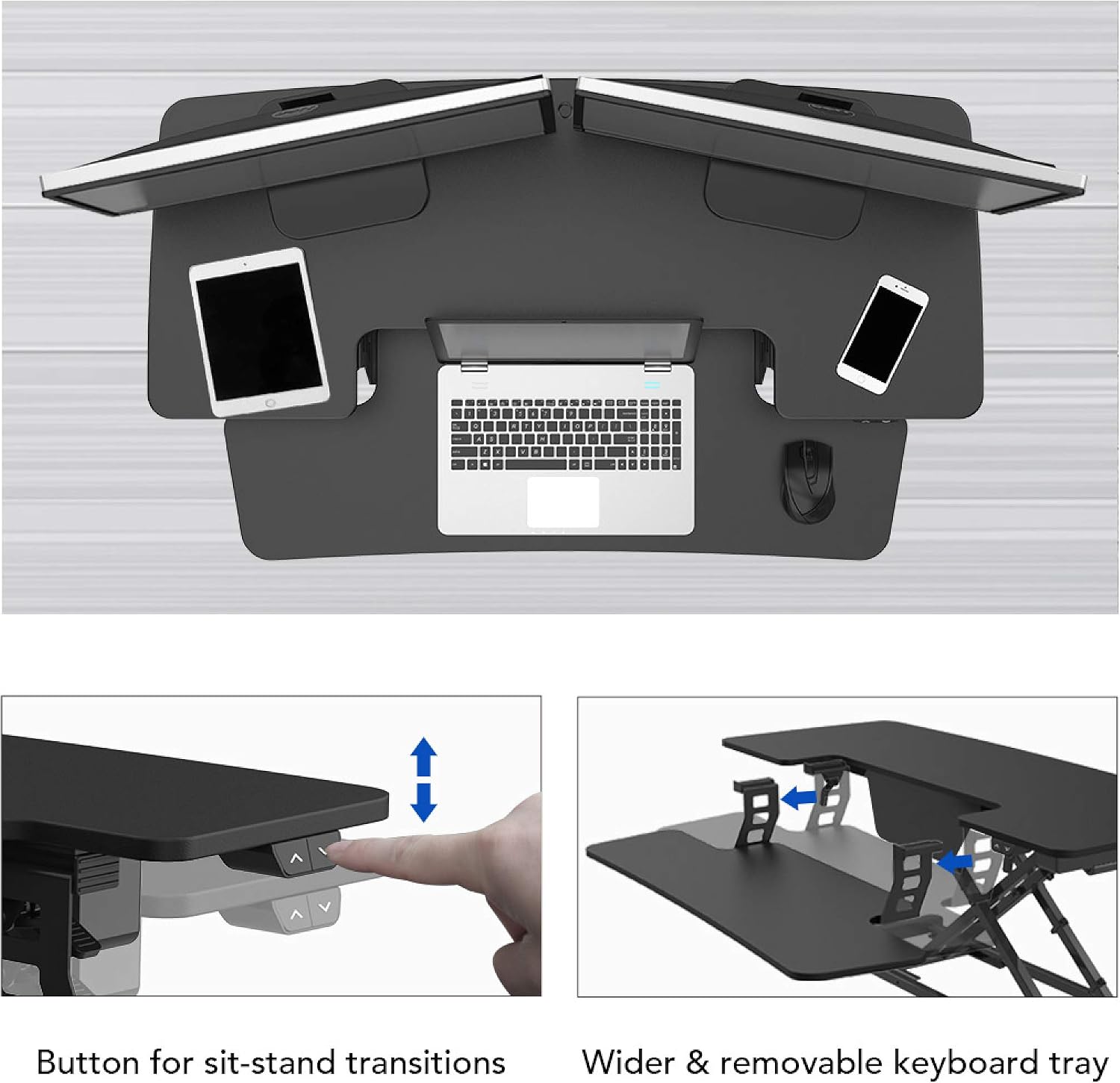
Figure 3: Control buttons for sit-stand transitions.

Figure 4: The spacious and removable keyboard tray provides ample room for a keyboard and mouse.

Figure 5: The electric motor ensures smooth and vertical lifting.
Wartung
To ensure the longevity and optimal performance of your FLEXISPOT Electric Standing Desk Converter, follow these maintenance guidelines:
- Reinigung: Wischen Sie Oberflächen mit einem weichen, damp Tuch. Vermeiden Sie Scheuermittel oder aggressive Chemikalien.
- Kabelmanagement: Überprüfen und ordnen Sie die Kabel regelmäßig, um Verwicklungen und Beschädigungen zu vermeiden.
- Inspektion: Periodically inspect all screws and connections to ensure they are tight and secure.
- Überlastungsschutz: Do not exceed the maximum weight capacities (44 lbs for desktop, 11 lbs for keyboard tray) to prevent motor strain and potential damage.
Fehlerbehebung
If you encounter any issues with your desk converter, refer to the following common troubleshooting steps:
| Problem | Mögliche Ursache | Lösung |
|---|---|---|
| Der Schreibtisch bewegt sich nicht. | Power cord disconnected; Overload; Motor error. | Check power connection; Reduce weight on desk; Unplug for 10 seconds and replug. |
| Ungewöhnliche Geräusche während des Betriebs | Lose Bauteile; Blockierung des Mechanismus. | Check all screws and connections; Remove any obstructions. |
| Schreibtisch bewegt sich ungleichmäßig | Uneven weight distribution; Damaged leg. | Distribute weight evenly; Contact customer support if damage is suspected. |
If the problem persists after attempting these solutions, please contact FLEXISPOT customer support for further assistance.
Technische Daten
| Besonderheit | Detail |
|---|---|
| Marke | FLEXISPOT |
| Modell | 42" Electric Standing Desk Converter |
| Ausführung | Holz |
| Form | Rechteckig |
| Basistyp | Bein |
| Montage erforderlich | Ja |
| Anzahl der Ebenen | 2 |
| Besonderheit | Adjustable Height, Keyboard Tray Included |
| Artikelgewicht | 45.4 Pfund |
| Produktabmessungen (L x B x H) | 16.3 x 16.3 x 5.7 Zoll |
| Materialtyp | Fiberboard & Steel |
| Desktop-Ladekapazität | 44 Pfund |
| Keyboard Tray Load Capacity | 11 Pfund |
| Höhenverstellbereich | 5.7" bis 19.7" |
| Farbe | Schwarz |

Figure 6: Detailed dimensions and load capacities of the desk converter.
Garantie und Support
FLEXISPOT products are designed for durability and performance. For warranty information, technical support, or any inquiries not covered in this manual, please visit the official FLEXISPOT website or contact their customer service directly. Please have your product model number (42" Electric Standing Desk Converter) and purchase date available when contacting support.
Official FLEXISPOT WebWebsite: www.flexispot.com
Ask a question about this manual
Ask about setup, troubleshooting, compatibility, parts, safety, or missing instructions. Manuals+ will review the question and use this page’s manual context to help answer it.