
1. Einleitung
This manual provides comprehensive instructions for the operation and maintenance of your Timex Ironman Women's 33mm Digital Watch with Activity Tracking & Heart Rate, model TW5M48300. Please read this manual thoroughly before using your watch to ensure proper function and longevity.
The Timex Ironman Transit+ is a powerful and sleek digital watch designed for activity tracking and heart rate monitoring. It features a durable resin case and strap, along with essential functions like timers, a sports stopwatch, customizable alarm, and INDIGLO backlight. It is water resistant up to 50 meters.
2. Produktüberschreitungview
Familiarize yourself with the components and features of your watch.

Abbildung 2.1: Front view of the Timex Ironman watch. This image displays the watch face, showing the digital display with heart rate (Hr) and percentage max (%Max) readings, along with the "TIMEX" and "IRONMAN" logos. The control buttons are visible on the sides, labeled "set/INDIGLO", "mode", "start/stop/+", and "lap/reset/-". The watch is purple with a rose gold-tone bezel.
- Digitaler Bildschirm: Shows time, date, activity data, and heart rate.
- Bedientasten: Located on the sides for navigation and function selection.
- Resin Case and Strap: Durable and comfortable for daily wear and activity.
- INDIGLO Backlight: Illuminates the display for low-light conditions.
- Herzfrequenzmesser: Integrated sensor for heart rate tracking.
- Wasserbeständigkeit: Rated up to 50 meters (164 feet).
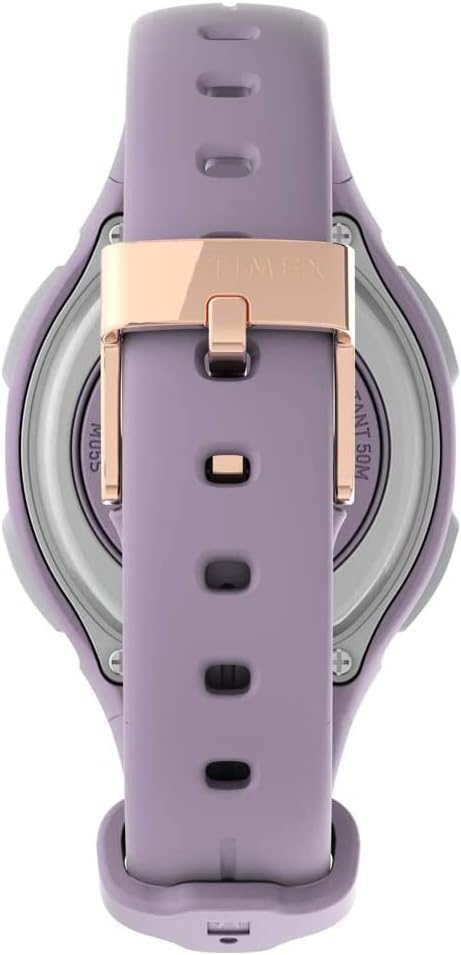
Abbildung 2.2: Seitenprofifile of the Timex Ironman watch. This image shows the watch from the side, highlighting its slim profile and the two control buttons on the left side of the case. The purple resin strap and rose gold-tone accents are clearly visible.
3. Einrichtung
3.1 Erstes Einschalten und Zeiteinstellung
- Upon first use, the watch may require initial setup.
- Halten Sie die SET/INDIGLO Taste, um in den Zeiteinstellungsmodus zu wechseln.
- Verwenden Sie die START/STOP/+ Und LAP/RESET/- Schaltflächen zum Anpassen von Werten.
- Drücken Sie die MODUS button to cycle through hours, minutes, date, and other settings.
- Drücken SET/INDIGLO again to save settings and exit.
3.2 Activity Tracking Setup
The watch includes activity tracking features. Ensure your personal profile (age, weight, height) is accurately set for optimal calorie and activity calculations. Refer to the watch's on-screen prompts or the detailed operating section for profile aufstellen.
4. Bedienungsanleitung
4.1 Grundlegende Zeit- und Datumsanzeige
In normal time mode, the watch displays the current time and date. Press the INDIGLO button briefly to activate the backlight.
4.2 Die Stoppuhr verwenden
- Drücken Sie die MODUS button until "STOPWATCH" or "CHRONO" appears.
- Drücken START/STOP/+ um mit der Zeitmessung zu beginnen.
- Drücken LAP/RESET/- to record a lap time (up to 10 laps memory).
- Drücken START/STOP/+ erneut, um anzuhalten/fortzusetzen.
- Drücken und halten LAP/RESET/- um die Stoppuhr zurückzusetzen.
4.3 Herzfrequenzüberwachung
To measure your heart rate, ensure the watch is worn snugly on your wrist. The watch uses an optical sensor. For accurate readings, ensure the sensor is clean and in direct contact with your skin. Some users may find it helpful to slightly moisten the skin where the sensor rests.

Abbildung 4.1: Hinteren view of the Timex Ironman watch. This image shows the back of the watch, detailing the metallic case back with engravings for "TIMEX", "IRONMAN", "WATER RESISTANT 50M", and the battery type "CR2032 BATTERY". The heart rate sensor is visible in the center. The purple strap and rose gold-tone buckle are also shown.
4.4 Aktivitätsverfolgung
The watch tracks steps, distance, and calories burned. These metrics are displayed on the watch face or accessible through specific modes. Ensure the watch is worn consistently for accurate data collection.
4.5 Alarmfunktion
Set a customizable alarm to alert you at a specific time. Navigate to the alarm mode using the MODUS button and follow the on-screen instructions to set the alarm time and activate it.
5. Wartung
5.1 Reinigung Ihrer Uhr
Reinigen Sie Ihre Uhr regelmäßig mit einem weichen, fusselfreien Tuch.amp cloth. Avoid using harsh chemicals or abrasive materials, which can damage the case or strap. For the heart rate sensor, gently wipe it with a clean, dry cloth.
5.2 Batteriewechsel
The watch uses a CR2032 Lithium Metal battery. When the battery is low, the display may dim or functions may become erratic. Battery replacement should ideally be performed by a qualified watch technician to ensure water resistance is maintained. If replacing yourself, carefully follow the instructions on the watch back for opening and closing the battery compartment.

Abbildung 5.1: Close-up of the watch back and battery compartment. This image provides a detailed view of the watch's rear, focusing on the battery compartment cover. Markings indicate "OPEN" and "CLOSE" directions, "TIMEX", "IRONMAN", "WATER RESISTANT 50M", and "CR2032 BATTERY".
5.3 Wasserbeständigkeit
Your watch is water resistant to 50 meters. This means it is suitable for recreational swimming in shallow water. It is not suitable for diving or snorkeling. Do not press any buttons while the watch is submerged, as this can compromise the water seal.
6. Fehlerbehebung
| Problem | Mögliche Ursache | Lösung |
|---|---|---|
| Das Display der Uhr ist leer oder schwach. | Schwache Batterie. | Ersetzen Sie die Batterie (CR2032). |
| Die Herzfrequenzmessungen sind ungenau. | Watch not snug, sensor dirty, or dry skin. | Ensure watch is snug. Clean sensor. Moisten skin under sensor. |
| Tasten reagieren nicht. | Watch may be in a locked mode or require a reset. | Refer to the operating section for button functions. If unresponsive, a soft reset (if available) or battery removal/reinsertion may be needed. |
| Activity tracking data seems incorrect. | Incorrect personal profile settings or inconsistent wear. | Verify personal profile settings (age, weight, height). Wear the watch consistently on your wrist. |
7. Spezifikationen
- Modellnummer: TW5M48300
- Gehäusedurchmesser: 33 mm
- Wasserbeständigkeit: 50 Meter (164 Fuß)
- Akku-Typ: 1 x CR2032 Lithium-Metall-Batterie (im Lieferumfang enthalten)
- Besondere Merkmale: Activity Tracking, Heart Rate Monitor, Sports Stopwatch (10 lap memory), Customizable Alarm, INDIGLO Backlight
- Konnektivität: Bluetooth
- Materialien: Resin case, resin strap
- Paketabmessungen: 12.6 x 7.8 x 6.6 cm
- Gewicht: 106 g
8. Garantie und Support
Timex provides a limited warranty for its products. Please refer to the warranty card included with your purchase or visit the official Timex webAuf der Website finden Sie detaillierte Garantiebedingungen speziell für Ihre Region.
For technical support, troubleshooting assistance beyond this manual, or service inquiries, please contact Timex customer service. Contact information can typically be found on the Timex official webauf der Website oder auf Ihrer Produktverpackung.
Extended warranty options may be available from third-party providers:
- 1 Jahr erweiterte Garantie von Salama Care (Zustellung per E-Mail)
- 2 Jahr erweiterte Garantie von Salama Care (Zustellung per E-Mail)
Please note that these extended warranties are provided by third parties and are subject to their terms and conditions.