
Perixx PERIBOARD-332
Perixx PERIBOARD-332 Wired Backlit USB Keyboard User Manual
Einführung
This manual provides detailed instructions for the setup, operation, maintenance, and troubleshooting of your Perixx PERIBOARD-332 Wired Backlit USB Keyboard. Please read this manual thoroughly before using the product to ensure optimal performance and longevity.

Image: The Perixx PERIBOARD-332 Wired Backlit USB Keyboard, showcasing dank seines kompakten Designs.
Packungsinhalt
Überprüfen Sie, ob alle Artikel im Paket vorhanden sind:
- Perixx PERIBOARD-332 Wired Backlit USB Keyboard
- Integriertes USB-Kabel
- Benutzerhandbuch (dieses Dokument)

Image: The Perixx PERIBOARD-332 keyboard, its integrated USB cable, the user manual, and the product packaging.
Installationsanweisungen
Schließen Sie die Tastatur an: Locate an available USB port on your computer (PC, laptop, tablet, or smartphone with appropriate adapter). Insert the USB cable from the PERIBOARD-332 into the USB port.
Treiberinstallation: The keyboard is plug-and-play and typically does not require additional drivers for basic functionality on Windows, macOS, Linux, or Chrome OS. Your operating system should automatically detect and configure the device.
Platzierung: Place the keyboard on a stable, flat surface. The compact design is ideal for small workspaces.

Image: A user typing on the Perixx PERIBOARD-332 keyboard, demonstrating its compact size and wired connection on a desk.
Bedienungsanleitung
Allgemeine Verwendung
The Perixx PERIBOARD-332 features a standard US English QWERTY layout with 84 keys. Its low-profile scissor keys provide a quiet and comfortable typing experience, similar to laptop keyboards. The compact design helps optimize desk space.

Image: A user typing on the Perixx PERIBOARD-332 keyboard, highlighting its compact size and ergonomic placement in a workspace.

Bild: Nahaufnahme view of the sculpted, low-profile scissor keys of the Perixx PERIBOARD-332, highlighting their design.
Function Keys (Fn Hotkeys)
The keyboard includes integrated Fn hotkeys for quick access to multimedia and system functions. These functions are primarily designed for Windows operating systems. For other operating systems (macOS, Linux, Chrome OS), their functionality may vary or require specific system settings/configurations.
- Fn+F1: Fn-Sperre
- Fn+F2: Backlight Brightness Adjustment (Cycle through levels)
- Fn+F3: Stumm
- Fn+F4: Lautstärke verringern
- Fn+F5: Lautstärke erhöhen
- Fn+F6: Vorheriger Titel
- Fn+F7: Abspielen/Pause
- Fn+F8: Nächster Titel
- Fn+F9: Pause
- Fn+F10: Rollen-Taste
- Fn+F11: Einfügen
- Fn+F12: Bildschirm drucken

Image: Diagram illustrating the integrated Fn hotkeys on the Perixx PERIBOARD-332, showing the function of each F-key when pressed with the Fn key.
Steuerung der Hintergrundbeleuchtung
The PERIBOARD-332 features white LED backlighting with adjustable brightness. To adjust the backlight brightness, press the Fn + F2 keys simultaneously. Repeatedly pressing this combination will cycle through different brightness levels (including off).
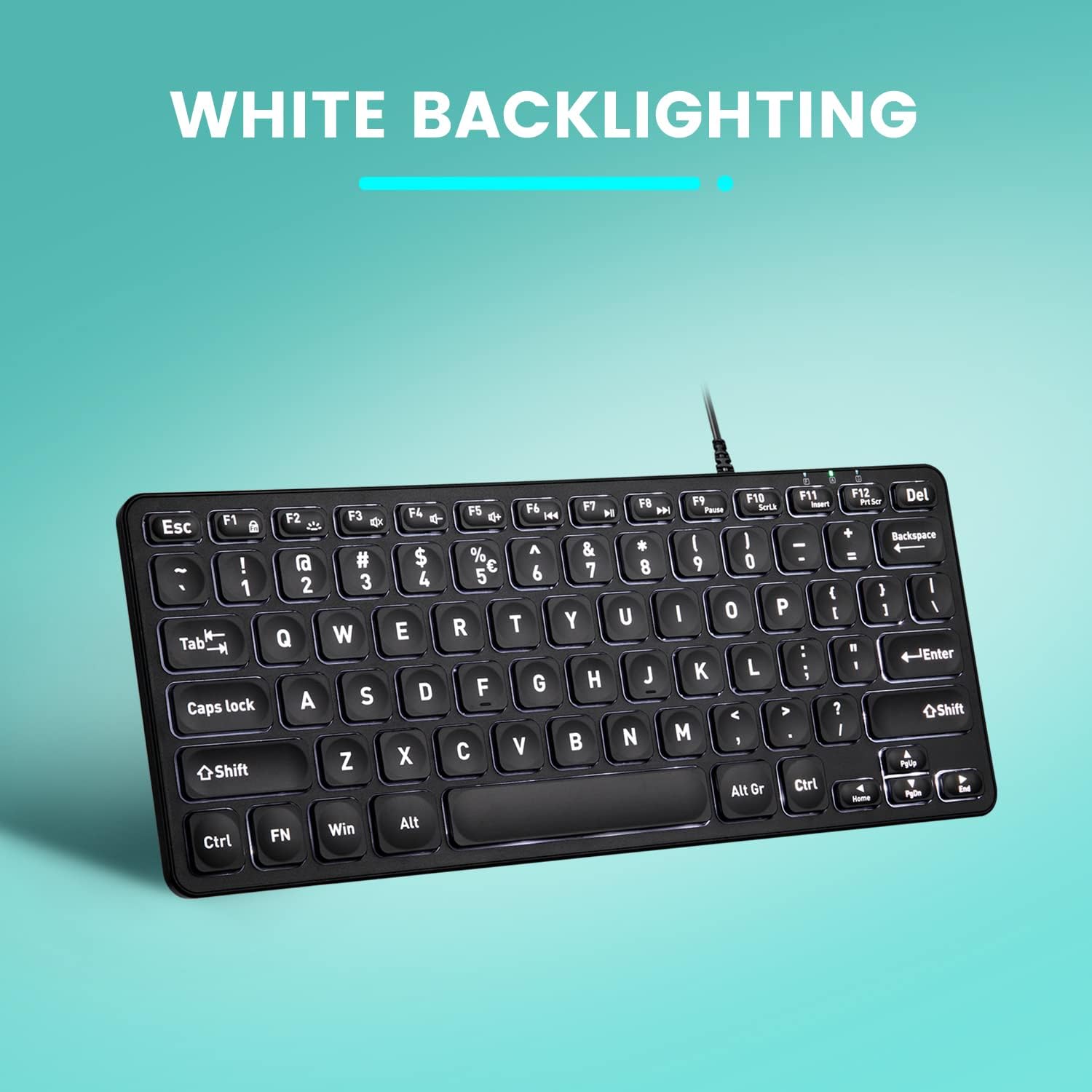
Bild: Draufsicht view of the Perixx PERIBOARD-332 keyboard with its white LED backlighting illuminated, showcasing the clear, large font on the keys.
Wartung
Um die Langlebigkeit und einwandfreie Funktion Ihrer Tastatur zu gewährleisten, befolgen Sie bitte diese Wartungsrichtlinien:
- Reinigung: Mit einem weichen, fusselfreien Tuch leichtampReinigen Sie die Tastaturoberfläche anschließend mit Wasser oder einer milden Reinigungslösung. Vermeiden Sie übermäßige Feuchtigkeit. Sprühen Sie keine Reinigungsmittel direkt auf die Tastatur.
- Staubentfernung: Verwenden Sie Druckluft, um Staub und Schmutz zwischen den Tasten zu entfernen.
- Verschütten vermeiden: Keep liquids away from the keyboard to prevent damage. The keyboard is not water-resistant.
- Lagerung: Bewahren Sie die Tastatur bei Nichtgebrauch in einer sauberen, trockenen Umgebung fern von extremen Temperaturen auf.
Fehlerbehebung
If you encounter issues with your Perixx PERIBOARD-332, refer to the following common solutions:
Tastatur reagiert nicht
- USB-Verbindung prüfen: Ensure the USB cable is securely plugged into both the keyboard and the computer's USB port. Try a different USB port.
- Starte den Computer neu: Manchmal lassen sich Verbindungsprobleme durch einen einfachen Neustart des Computers beheben.
- Test auf einem anderen Gerät: Connect the keyboard to another computer or device to determine if the issue is with the keyboard or the original computer.
Hintergrundbeleuchtung funktioniert nicht oder lässt sich nicht einstellen
- Check Brightness Setting: Drücken Fn + F2 repeatedly to cycle through all brightness levels, including off. Ensure it's not set to the lowest or off setting.
- Energiequelle: Ensure the keyboard is properly connected to a powered USB port.
Tasten funktionieren nicht richtig
- Saubere Tasten: Prüfen Sie, ob sich unter den betroffenen Tasten Ablagerungen oder Verstopfungen befinden. Verwenden Sie Druckluft, um diese zu entfernen.
- Softwarekonflikte: If specific keys are not working, check for any software or driver conflicts on your computer.
Multimedia Keys Not Working on macOS/Linux/Chrome OS
- Betriebssystemkompatibilität: The multimedia shortcut keys are primarily designed for Windows. On other operating systems, their functionality may vary or require specific system settings/configurations.
Technische Daten
| Besonderheit | Detail |
|---|---|
| Marke | Perixx |
| Modellnummer | PERIBOARD-332 |
| Konnektivitätstechnologie | USB (kabelgebunden) |
| Tastaturbeschreibung | US English QWERTY |
| Besonderheit | Backlit (White LED) |
| Schaltertyp | Scissor Switches |
| Anzahl der Schlüssel | 84 |
| Produktabmessungen (L x B x H) | 11.22" x 4.57" x 0.83" (28.5 cm x 11.6 cm x 2.1 cm) |
| Artikelgewicht | 0.79 lbs (12.3 Ounces / 350 grams approx.) |
| Kompatible Geräte | PC, Laptop, Tablet, Smartphone (with compatible USB port/adapter) |
| Betriebssystemkompatibilität | Windows 7, 8, 10, 11; macOS; Linux; Chrome OS |
| Material | Plastik |
Garantie und Support
Garantieinformationen
Your Perixx PERIBOARD-332 keyboard comes with a 12 Monate eingeschränkte Garantie from the date of purchase. This warranty covers manufacturing defects and workmanship under normal use. It does not cover damage caused by misuse, accidents, unauthorized modifications, or external factors.
Bitte bewahren Sie Ihren Kaufbeleg für Garantieansprüche auf.
Kundenservice
For technical assistance, warranty claims, or any questions regarding your Perixx product, please visit the official Perixx website or contact their customer support team. Contact information can typically be found on the Perixx webWebsite oder in der Produktverpackung.
Besuchen Sie auch die Perixx Store on Amazon für weitere Informationen und Supportressourcen.
Ask a question about this manual
Ask about setup, troubleshooting, compatibility, parts, safety, or missing instructions. Manuals+ will review the question and use this page’s manual context to help answer it.