
1. Einleitung
This manual provides essential instructions for the safe and efficient use of your mDesign Metal Curved Desk Lamp, Model 18875MDHS. Please read this manual thoroughly before assembly and operation, and retain it for future reference. This lamp is designed for indoor use only and is suitable for various settings such as home offices, bedrooms, and living rooms.
Wichtige Sicherheitsinformationen
- Vor dem Reinigen oder Auswechseln der Glühbirne muss immer die Stromzufuhr unterbrochen werden.
- Verwenden Sie dieses l . nichtamp with a dimmer switch unless specifically rated for it.
- Stellen Sie sicher, dass die lamp wird auf einer stabilen, ebenen Fläche platziert, um ein Umkippen zu verhindern.
- Vermeiden Sie es, das l freizulegenamp gegenüber Feuchtigkeit oder extremen Temperaturen.
- Verwenden Sie nur den angegebenen Lampentyp und die angegebene Wattzahl.tage, um Überhitzung und Schäden zu vermeiden.
- Halten Sie das Netzkabel von Wärmequellen, scharfen Kanten und feuchten Bereichen fern.
2. Packungsinhalt
Please check the package carefully to ensure all components are present and undamaged. If any parts are missing or damaged, do not proceed with assembly and contact customer support.
- Lamp Base with Power Cord and In-line Switch
- Lamp Arm
- Lamp Schatten
- Mounting Hardware (if applicable for assembly)

Abbildung 2.1: Überview of the mDesign Metal Curved Desk Lamp. This image shows the assembled lamp, which consists of a base, a curved arm, and a conical shade.
3. Aufbau und Montage
Follow these steps to assemble your desk lamp:
- Komponenten auspacken: Nehmen Sie alle Teile vorsichtig aus der Verpackung. Legen Sie sie auf eine saubere, ebene und stabile Oberfläche.
- L zusammenbauenamp Base and Arm: Befestigen Sie das lamp Arm nach lamp base. Ensure it is securely tightened to prevent wobbling. (Note: Some models may have pre-assembled bases and arms. If you encounter loose wiring, ensure connections are secure before proceeding, or contact support.)
- L anbringenamp Schatten: Sichern Sie das lamp Schatten an der Spitze des lamp Arm.
- Glühbirne einbauen:
- Stellen Sie sicher, dass die lamp ist vom Stromnetz getrennt.
- Screw a compatible light bulb into the lamp socket. Refer to the specifications section for bulb type and maximum wattage.
- Positionieren Sie das Lamp: Platzieren Sie das lamp on your desired surface, ensuring it is stable and the power cord can reach an outlet without being strained or obstructed.

Abbildung 3.1: This image illustrates the bulb requirements for the lamp. It clearly states "USES TYPE G BULBS MAXIMUM 40W".
4. Bedienungsanleitung
Operating your mDesign Desk Lamp ist geradeaus:
- Stromanschluss: Stecken Sie denampStecken Sie das Netzkabel in eine normale Steckdose.
- Ein-/Ausschalten: Locate the in-line switch on the power cord. Press the switch to turn the lamp An oder aus.
- Anpassen von Lamp Kopf: Die lamp head is designed to swivel, allowing you to direct the light as needed. Gently adjust the shade to your desired angle.
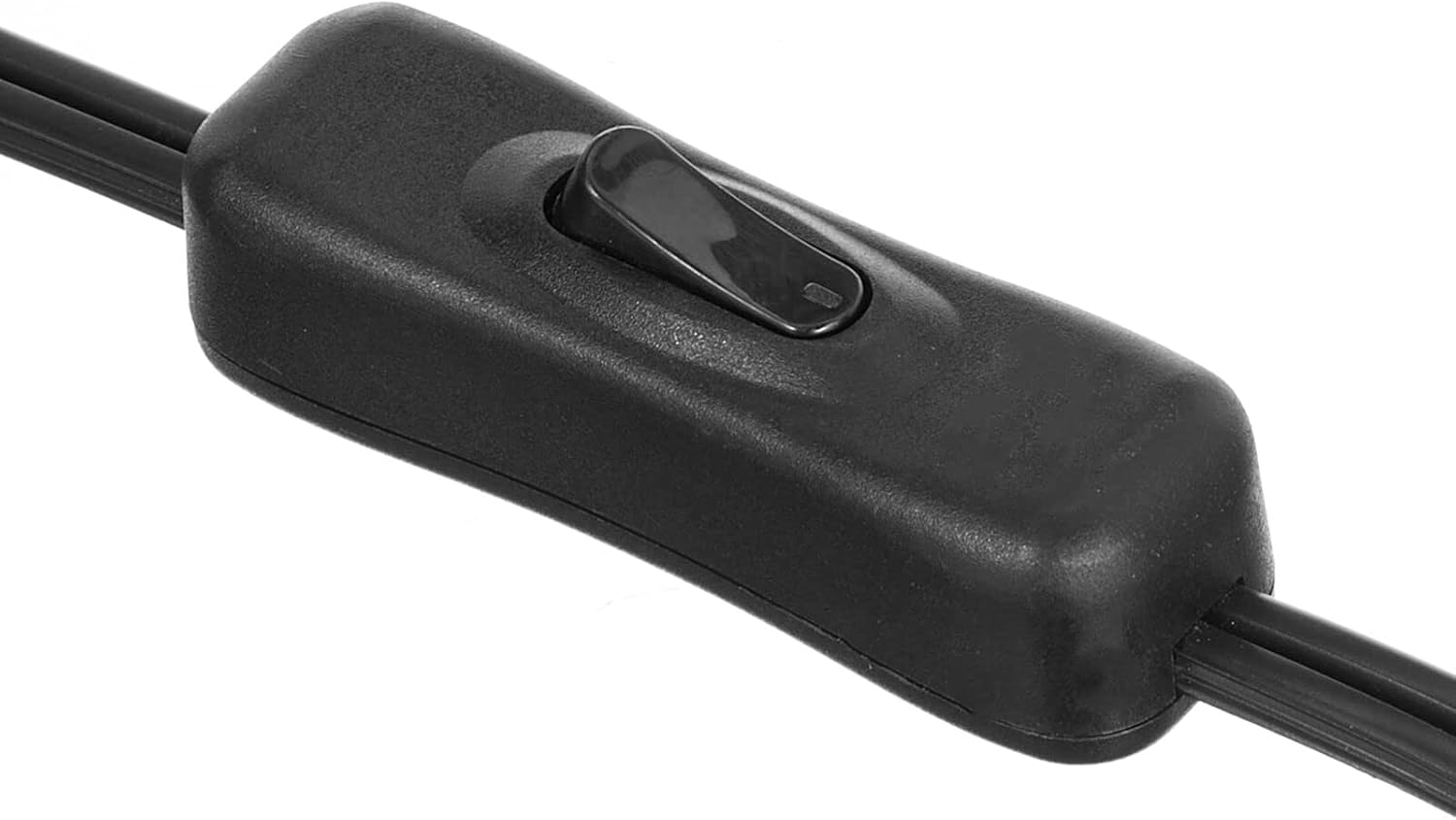
Abbildung 4.1: This image displays a close-up of the black in-line switch located on the power cord, used to turn the lamp an und aus.

Abbildung 4.2: This image demonstrates the adjustable nature of the lamp head, showing it swiveling to different positions to direct light.
5. Wartung
Reinigung
- Trennen Sie immer den lamp vor der Reinigung.
- Wischen Sie das lampWischen Sie die Oberfläche mit einem weichen, trockenen Tuch ab.
- Do not use abrasive cleaners, solvents, or polishing agents as they may damage the finish.
Glühlampenwechsel
- Stellen Sie sicher, dass die lamp Bevor Sie versuchen, die Glühbirne auszutauschen, ziehen Sie den Stecker und lassen Sie die Glühbirne vollständig abkühlen.
- Die alte Glühbirne vorsichtig aus der Fassung schrauben.
- Screw in a new bulb of the correct type (E26 base, Type G) and wattage (maximal 40W).
6. Fehlerbehebung
Sollten Sie Probleme mit Ihrem l habenampWeitere Informationen finden Sie in der folgenden Anleitung zur Fehlerbehebung:
| Problem | Mögliche Ursache | Lösung |
|---|---|---|
| Lamp geht nicht an. |
|
|
| Licht flackert. |
|
|
| Lamp ist instabil. |
|
|
7. Spezifikationen
| Besonderheit | Detail |
|---|---|
| Modellnummer | 18875MDHS |
| Marke | mDesign |
| Abmessungen (L x B x H) | 7 x 11 x 21 Zoll (17.8 x 27.9 x 53.3 cm) |
| Artikelgewicht | 2.2 Pfund (1 kg) |
| Material | Legierter Stahl, Metall |
| Ausführung | Poliert |
| Farbe | White/Soft Brass |
| Lampensockel | E26 |
| Maximal Watttage | 40 Watt |
| Empfohlener Lampentyp | Typ G |
| Stromquelle | Kabelgebundene Elektrik |
| Kontrollmethode | Inline-Schalter |
| Besonderheit | Einstellbares Lamp Kopf |
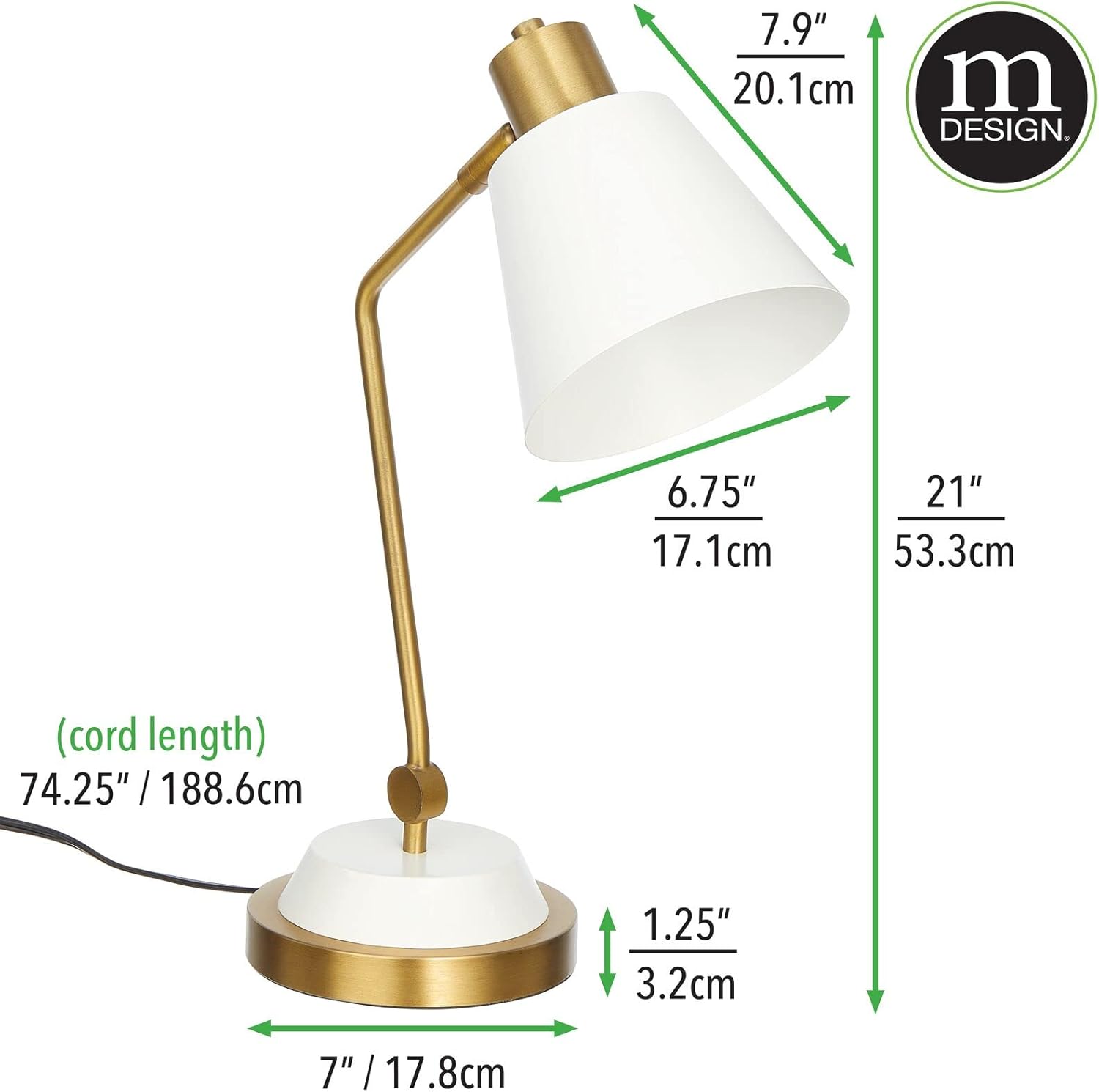
Abbildung 7.1: This image provides detailed measurements of the lamp, including height, width, depth, and cord length in both inches and centimeters.
8. Garantieinformationen
Specific warranty details for the mDesign Metal Curved Desk Lamp (Model 18875MDHS) are not provided in this manual. For information regarding warranty coverage, terms, and conditions, please refer to the product packaging or contact mDesign customer support directly.
9. Kundendienst
If you have any questions, require assistance with assembly, operation, or troubleshooting beyond the scope of this manual, please contact mDesign customer support. Contact information can typically be found on the product packaging or on the official mDesign webWebsite.
For more information about mDesign products, visit: mDesign Store on Amazon