
SMALLRIG 14670
SmallRig AP-10 Kohlefaser-Stativ – Benutzerhandbuch
Modell: 14670
Einführung
This manual provides detailed instructions for the proper use, setup, operation, and maintenance of your SmallRig AP-10 Carbon Fiber Tripod. Please read this manual thoroughly before using the product to ensure optimal performance and safety.
The SmallRig AP-10 Carbon Fiber Tripod is a lightweight and compact camera tripod designed for photographers and videographers. It features a detachable monopod, a 360° ball head, and a quick release plate, supporting a payload of up to 26.5 lbs.
Lieferumfang
- SmallRig Carbon Fiber Tripod x 1
- Storage Package x 1
- Benutzerhandbuch x 1
Hauptmerkmale
- Ultrakompaktes Design: Folds down to just 21.3 inches (57 mm in diameter) and weighs only 2.6 lbs, ideal for travel and outdoor photography.
- Strong & Reliable Carbon Fiber: Made from high-end carbon fiber, offering lightweight strength, corrosion, and abrasion resistance. Supports up to 26.4 lbs.
- 2-In-1 Tripod & Monopod: Easily converts into a monopod or walking stick. Adjustable height from 19.7" to 52.4" using quick release flip-locks.
- 360° Detachable Ball-Head: Features a quick-release panoramic ball head with 360° swivel and 90° tilt, damping adjustment knob, and 360° horizontal scale. Compatible with Arca-Swiss quick release plates.
- Innovative Expandability: Three 1/4" threaded holes on the bracket for attaching external accessories like magic arms, mobile phones, and monitors.
Installationshandbuch
1. Auspacken und Erstinspektion
Carefully remove all components from the storage package. Inspect the tripod for any signs of damage during transit. Ensure all listed components are present.
2. Ausziehen der Stativbeine
To extend the tripod legs, release the quick release flip-locks on each leg section. Extend the legs to the desired height. Securely close the flip-locks to ensure stability. The tripod can be adjusted from 19.7 inches to 52.4 inches.
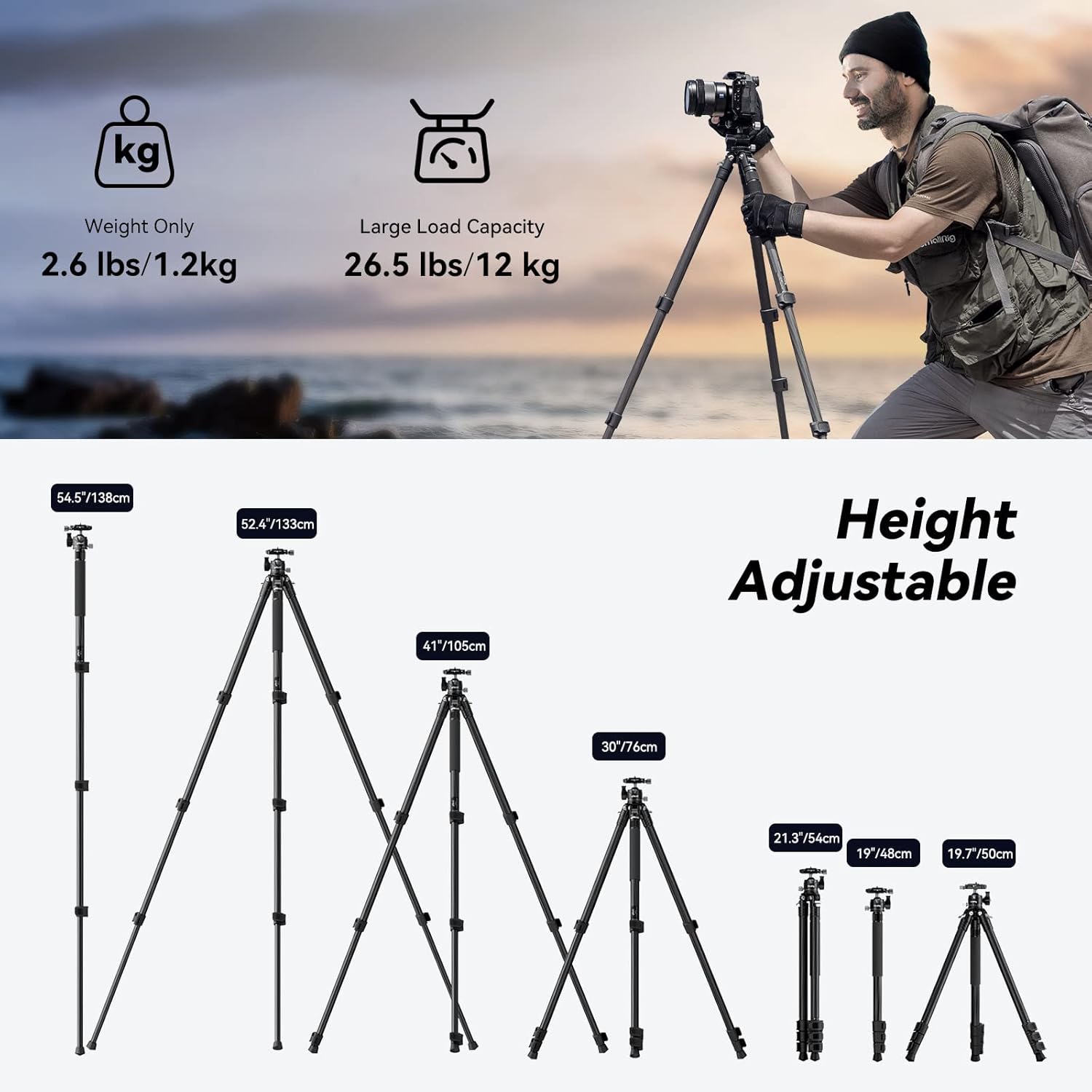
Figure 1: Illustration of the tripod's adjustable height settings, ranging from 19.7 inches to 52.4 inches, and its compact folded size of 21.3 inches. The image also highlights its lightweight nature (2.6 lbs) and large load capacity (26.5 lbs).
Video 1: Demonstrates the quick and easy process of extending the tripod legs using the flip-locks, showcasing the rapid adjustment from minimum to maximum height.
3. Einstellen der Beinwinkel
The tripod offers three alternative adjustment angles for its legs, allowing for versatile positioning, including ultra-low position shooting. Use the leg angle adjustment locks to set the desired spread.

Abbildung 2: Nahaufnahme view of the tripod's leg angle adjustment lock mechanism, illustrating how to change the leg spread for different shooting scenarios.
4. Attaching the Ball Head and Quick Release Plate
The tripod comes with a detachable ball head. Ensure it is securely mounted to the tripod base. The quick release plate attaches to your camera or device. Align the plate with the ball head's receiver and lock it into place using the quick release mechanism.

Abbildung 3: Eine umfassende view of the SmallRig AP-10 Carbon Fiber Tripod, highlighting the ball head and quick release plate components, along with the detachable monopod feature.
Video 2: Illustrates the process of attaching a camera to the quick release plate and securing it onto the ball head, demonstrating the ease of setup.
Bedienungsanleitung
1. Panoramaaufnahmen
The 360° panoramic ball head allows for smooth horizontal and vertical adjustments. Use the damping adjustment knob to control the movement and the 360° horizontal scale at the gimbal bottom for precise positioning.

Figure 4: Detailed diagram of the ball head, highlighting its 360° panoramic base, 90° tilt capability, quick locking knob, and 1/4"-20 screw QR plate for versatile shooting angles.
Video 3: Demonstrates the 360° panoramic shooting capability of the ball head, showing smooth rotation for capturing wide scenes.
2. Umbau zum Einbeinstativ
One of the tripod legs can be detached and combined with the ball head to form a monopod. This is ideal for situations requiring quick mobility or as a walking stick for hiking.
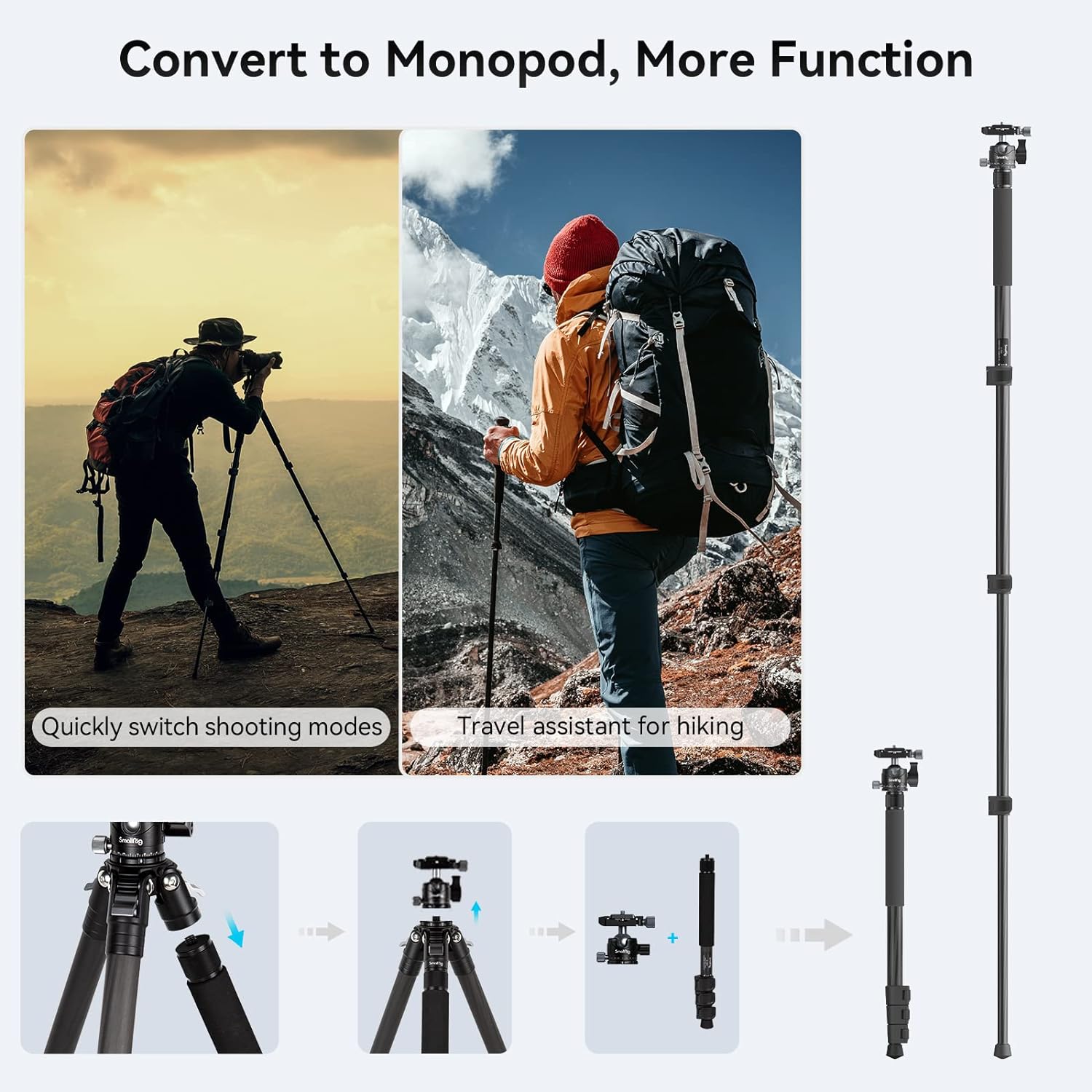
Figure 5: Visual guide illustrating the steps to convert the tripod into a monopod, showing the detachment of one leg and its reattachment with the ball head.
Video 4: Shows the transformation of the tripod into a monopod, demonstrating its versatility for different shooting needs and as a travel assistant.
3. Attaching External Accessories
The tripod features three 1/4"-20 threaded holes on the bracket. These allow for easy attachment of external accessories such as magic arms, mobile phone holders, or monitors, expanding your shooting capabilities.

Abbildung 6: Ein Bspample of the tripod with a smartphone attached via a magic arm to one of the 1/4"-20 threaded holes, demonstrating its expandability for various accessories.
Video 5: Illustrates the use of the 1/4"-20 threaded holes for attaching external accessories like magic arms and phone holders, enhancing the tripod's functionality.
Wartung
- Reinigung: Wischen Sie die Beine aus Kohlefaser und die Metallteile nach jedem Gebrauch mit einem weichen, trockenen Tuch ab. Bei hartnäckigem Schmutz verwenden Sie ein leicht dämpfendes Tuch.amp Mit einem Tuch und milder Seife abwischen und anschließend gründlich trocknen. Scharfe Chemikalien vermeiden.
- Schmierung: Periodically check the movement of the ball head and leg locks. If movement becomes stiff, apply a small amount of silicone-based lubricant to the moving parts. Do not over-lubricate.
- Lagerung: Store the tripod in its included storage bag in a cool, dry place away from direct sunlight and extreme temperatures. Ensure the tripod is clean and dry before storage.
- Inspektion: Regularly inspect all screws, bolts, and moving parts for tightness and wear. Tighten any loose fasteners. If any part is damaged, contact customer support for replacement.
- Detachable Foot Nails: The foot nails are detachable for cleaning or replacement. Ensure they are securely reattached after any maintenance.

Abbildung 7: Nahaufnahme view of the tripod leg sections, showing the quick release flip-locks and the detachable foot nails, emphasizing the carbon fiber material's corrosion and abrasion resistance.
Fehlerbehebung
| Problem | Mögliche Ursache | Lösung |
|---|---|---|
| Das Stativ ist instabil oder wackelig. | Leg locks not fully engaged; uneven surface; payload exceeds limit. | Ensure all flip-locks are securely closed. Place the tripod on a flat, stable surface. Verify your equipment's weight does not exceed 26.5 lbs. |
| Ball head movement is stiff. | Verschmutzungen oder Ablagerungen im Mechanismus; mangelnde Schmierung. | Clean the ball head thoroughly. Apply a small amount of silicone-based lubricant to the moving parts. |
| Quick release plate not securing camera. | Plate not properly seated; locking mechanism not engaged. | Ensure the quick release plate is fully inserted and aligned. Tighten the locking knob firmly. |
| Die Beinsegmente lassen sich nicht reibungslos aus- und einfahren. | Dirt or sand inside leg sections; flip-locks are too tight/loose. | Clean leg sections. Adjust the tension of the flip-locks if necessary (refer to maintenance section). |
Technische Daten
| Besonderheit | Detail |
|---|---|
| Technische Daten | 13.78 x 4.72 x 3.94 Zoll |
| Artikelgewicht | 2.59 Pfund (1.175 kg) |
| Modellnummer | 14670 |
| Marke | Kleiner Bohrer |
| Material | Kohlefaser |
| Gewichtsbeschränkung | 26.5 Pfund (12 kg) |
| Maximale Höhe | 52.4 Zoll (133.1 cm) |
| Mindesthöhe | 19.7 Zoll (50 cm) |
| Gefaltete Länge | 21.3 Zoll (54 cm) |
| Stativkopftyp | Kugelkopf |
| Beindurchmesser | 2.24 Zoll (57 mm) |
Garantie und Support
Informationen zu Garantie und Kundensupport finden Sie auf der offiziellen SmallRig-Website. webBesuchen Sie die Website oder kontaktieren Sie direkt den Kundenservice. Bewahren Sie Ihren Kaufbeleg für Garantieansprüche auf.
Weitere Ressourcen und Produktinformationen finden Sie auch auf der SmallRig Brand Store on Amazon.
Ask a question about this manual
Ask about setup, troubleshooting, compatibility, parts, safety, or missing instructions. Manuals+ will review the question and use this page’s manual context to help answer it.