
1. Einleitung
Thank you for choosing the DELLA Umbra Series 9000 BTU WiFi Mini Split AC with Heat Pump. This manual provides essential information for the safe and efficient operation, installation, and maintenance of your unit. Please read this manual thoroughly before installation and use, and retain it for future reference.
Wichtige Sicherheitsinformationen
This appliance is designed for professional installation only. Attempting DIY installation without proper qualifications may result in injury, property damage, or voiding the warranty. Always consult a qualified HVAC technician for installation and complex maintenance tasks.
- Stellen Sie sicher, dass das Netzteil den Spezifikationen des Geräts entspricht.
- Blockieren Sie keine Luftein- und -auslässe.
- Halten Sie Kinder und Haustiere vom Außengerät fern.
- Vor Wartungs- oder Reinigungsarbeiten die Stromzufuhr unterbrechen.
- Use only specified refrigerants (R32).
2. Produktüberschreitungview
The DELLA Umbra Series Mini Split AC is an energy-efficient system designed for cooling and heating spaces up to 450 sq.ft. It features WiFi connectivity, Alexa compatibility, and a heat pump for year-round comfort.
Hauptmerkmale:
- Energieeffizient: 19 SEER2 rating with DC Inverter technology for up to 30% power savings.
- Intelligente Funktionen: 4D airflow (up-down, left-right), I Feel mode, 24-hour timer, sleep mode, eco energy-saving mode, multiple fan speeds, turbo function.
- Smart-Sensor: Remote control senses room temperature for optimal comfort and energy savings.
- Leiser Betrieb: Arbeitet mit einem extrem leisen Geräuschpegel von 42 dBA.
- Breite Abdeckung: Cools and heats up to 450 sq.ft, operating in temperatures as low as 19°F.
- Kältemittel R32: Uses environmentally friendly R32 refrigerant.
Komponentendiagramm:

Figure 2.1: Main components included with the DELLA Umbra Series Mini Split AC.
Produkt View:

Figure 2.2: DELLA Umbra Series 9000 BTU WiFi Mini Split AC.
3. Einrichtung und Installation
Professional installation is mandatory for this system. This is not a DIY mini split AC. Line-set vacuuming is required during installation. Any alteration of line-set length requires adjusting freon levels. Please consult a qualified HVAC professional for proper installation to ensure safety and optimal performance.
Installation abgeschlossenview Video:
Video 3.1: General guidance on installing your DELLA Mini Split AC unit. This video is for informational purposes only; professional installation is required.
Key Installation Steps (Summary):
- Markierungsorte: Use the provided template to mark the locations for the line set wall hole and the mini split bracket.
- Montagehalterung: Securely attach the mini split bracket to the wall using the provided screws. Ensure the bracket is properly leveled.
- Routing Lines: Route the line set, drain hose, and electrical wiring through the wall opening.
- Montage der Inneneinheit: Securely mount the indoor mini split unit onto the bracket.
- Taping Lines: Für eine saubere und ordentliche Installation die Abflussschläuche und Leitungssets mit Klebeband zusammenkleben.
- Securing Electrical Wires: Befestigen Sie die elektrischen Leitungen mit Kabelbindern an den abgeklebten Leitungssätzen und dem Abflussschlauch.
- Positioning Outdoor Condenser: Place the outdoor condenser unit in its designated location.
- Connecting Line Set: Connect the unit line set to the condenser line set and tighten down firmly. Use a digital torque wrench if available to ensure proper tightening according to specifications.
- Elektrische Anschlüsse: Connect the electrical wires (red, black, green ground) to their corresponding terminals on the condenser unit. Each wire is designated with a specific letter and number.
- Das System saugen: Connect a vacuum pump to the system via a gauge. Open the valves on the gauge and activate the vacuum. Monitor the micron reading closely and close the valves once it reaches 350 microns. Turn off the vacuum pump.
- Wiederherstellung der Stromversorgung: Restore power to the outdoor unit.
- Initiating Cooling: Turn on the mini split unit and set it to the lowest cold setting. Allow a few minutes for the outdoor condenser fan to initiate.
- Opening Valves: Gradually open the high side (top) valve using a service wrench. Monitor the gauge as readings will decrease into the negative range. After the high side valve is open, promptly open the low side (bottom) valve. Monitor the gauge closely as the readings will increase, which is expected.
Your DELLA mini split unit installation is complete once these steps are followed and the unit is operating correctly.
Installationsvorbereitungview Video:
Video 3.2: Eine kurze Vorbemerkungview of the DELLA Mini Split AC installation process, highlighting key steps.
4. Bedienungsanleitung
Your DELLA Umbra Series Mini Split AC can be controlled via the included remote control, the Della+ mobile app, or voice commands through Alexa.
Fernbedienung:

Figure 4.1: DELLA Mini Split AC Remote Control.
Use the remote control to adjust temperature, select operating modes, set fan speed, and activate special functions like Sleep Mode or Turbo. Refer to the remote control's specific instructions for detailed button functions.
Della+ Mobile App:
The Della+ app allows you to control your unit remotely, set schedules, and utilize smart features like Geo-Location.
Video 4.2: Learn how to set up and customize Geo-Location using the Della+ App for smart AC controls.
Video 4.3: Eine kurze Vorbemerkungview demonstrating the features and interface of the Della+ App.

Figure 4.2: Della+ App Interface.
- Herunterladen: Suchen nach "Della+" in your mobile app store.
- Paarung: Follow the in-app instructions to pair your device with the AC unit.
- Modi: Select from Cool, Heat, Dry (dehumidify), Fan Only, or ECO mode.
- Lüftergeschwindigkeit: Adjust fan speed from Quiet, Low, Mid, High, to Turbo.
- Luftstrom: Control vertical and horizontal oscillation for optimal air distribution.
- Planung und Timer: Set weekly schedules or countdown timers for automatic operation.
- Geo-Location: Configure automatic AC control based on your location.
Sprachsteuerung (Alexa):
The unit seamlessly integrates with Amazon Alexa for convenient voice control. Ensure your Della+ app is linked to your Alexa account.

Figure 4.3: Voice Control Compatibility with Alexa.
5. Wartung
Regular maintenance ensures optimal performance and longevity of your DELLA Mini Split AC unit. Always disconnect power before performing any maintenance.
Filterreinigung:
The indoor unit features washable air filters. Clean them every two weeks or more frequently depending on usage and air quality.
- Öffnen Sie die Frontplatte der Inneneinheit.
- Entfernen Sie die Luftfilter.
- Waschen Sie die Filter mit lauwarmem Wasser und einem milden Reinigungsmittel.
- Gründlich abspülen und vollständig an der Luft trocknen lassen, bevor sie wieder eingesetzt werden.
- Schließen Sie die Frontblende.
Reinigung der Innengeräte:
Wischen Sie die Oberfläche des Innengeräts mit einem weichen, fusselfreien Tuch ab.amp cloth. Do not use harsh chemicals or abrasive cleaners. The unit also features PureClean tech to prevent dust buildup and defrost the indoor unit, contributing to cleaner air.
Abbildung 5.1: Intern view of the indoor unit highlighting PureClean technology.
Reinigung der Außeneinheit:
Periodically clean the outdoor unit's coils and fins to remove dirt, leaves, and debris. Use a soft brush or vacuum cleaner. Ensure the area around the outdoor unit is clear of obstructions for proper airflow.

Figure 5.2: Outdoor unit with gold-plated fins for corrosion prevention.
6. Fehlerbehebung
Bevor Sie den Kundendienst kontaktieren, lesen Sie bitte weiter.view Folgende häufige Probleme und Lösungen:
| Problem | Mögliche Ursache | Lösung |
|---|---|---|
| Gerät startet nicht. | Kein Strom, Sicherung ausgelöst, Batterien der Fernbedienung schwach. | Stromversorgung prüfen, Sicherungsautomat zurücksetzen, Batterien der Fernbedienung austauschen. |
| Unzureichende Kühlung/Heizung. | Verschmutzte Luftfilter, blockiertes Außengerät, falsche Betriebsart eingestellt, zu wenig Kältemittel. | Luftfilter reinigen, Verstopfungen am Außengerät beseitigen, richtigen Modus auswählen, Fachmann zur Kältemittelprüfung kontaktieren. |
| Ungewöhnliche Geräusche vom Gerät. | Lose Teile, Lüfterverstopfung, normale Betriebsgeräusche (z. B. Kältemittelstrom). | Check for loose parts or obstructions. If noise persists or is unusual, contact support. |
| Wasser tritt aus dem Innengerät aus. | Verstopfter Abflussschlauch, falscher Installationswinkel. | Check and clear drain hose. If issue persists, professional re-installation may be needed. |
| Fernbedienung funktioniert nicht. | Batterien leer, Fernbedienung außer Reichweite, Signalstörung. | Replace batteries, ensure clear line of sight to indoor unit, operate within range. |
For issues not listed here or if solutions do not resolve the problem, please contact DELLA customer support.
7. Spezifikationen
| Besonderheit | Detail |
|---|---|
| Modellnummer | 9K1VR-19S-JPB-I+O |
| Größe | 9,000 BTU - 115V -- 19 SEER2 |
| Kühlleistung | 9000 BTU/h |
| Heizleistung | 10000 BTU/h |
| Stromversorgung | 115V~/60Hz/1PH |
| Maximale Eingangsleistung | 1200 Watt |
| Luftstromvolumen | 560 m³/h |
| max. Sicherungsgröße | 20 A |
| Schallpegel | 42 Dezibel |
| Technische Daten | 31.18 x 7.91 x 11.5 Zoll |
| Artikelgewicht | 58.6 Pfund |
| Besondere Merkmale | Alexa and WiFi Enabled, DeHumidifier, Fast Cooling and Heating, Remote Control |
| Kältemitteltyp | R32 |

Abbildung 7.1: Produktabmessungen.
8. Garantie und Support
DELLA is committed to providing high-quality products and excellent customer service.
Eingeschränkte lebenslange Garantie:
Your DELLA Umbra Series Mini Split AC comes with a limited lifetime warranty, offering peace of mind against manufacturing defects. This warranty is designed to cover the product for its expected lifespan under normal use and service. Please refer to the warranty card included with your product for full terms and conditions.

Figure 8.1: DELLA Lifetime Coverage.
Kundendienst:
Our dedicated customer support team is available to assist you with any questions or concerns regarding your DELLA product.
- Telefonischer Support: Verfügbar Montag - Freitag, 6:00 - 17:00 Uhr PST.
- Live Chat: 24/7 support for immediate assistance.
Please have your model number (9K1VR-19S-JPB-I+O) and purchase information ready when contacting support.
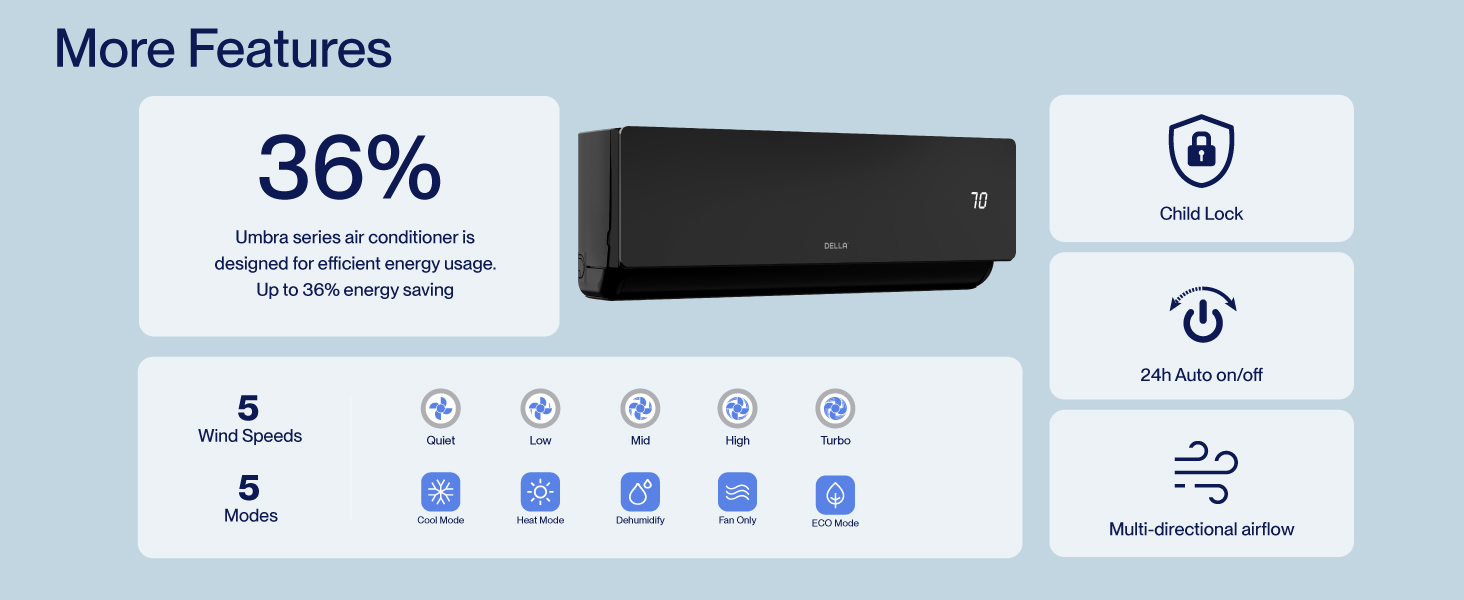
Figure 8.2: DELLA Customer Support Options.