
1. Einleitung
This manual provides instructions for the NETVIP Bluetooth Car Speaker, a wireless hands-free device designed for in-car communication and media playback. It supports Bluetooth connectivity, voice assistants, and TF card playback, offering a convenient and safe way to manage calls and audio while driving.
2. Packungsinhalt
Bitte überprüfen Sie, ob alle unten aufgeführten Artikel in Ihrem Paket enthalten sind:
- Bluetooth-Freisprecheinrichtung fürs Auto x 1
- 1 x USB-Kabel
- Magnetic Basement (Clip) x 1
- Schlüsselband x 1
- Benutzerhandbuch x 1
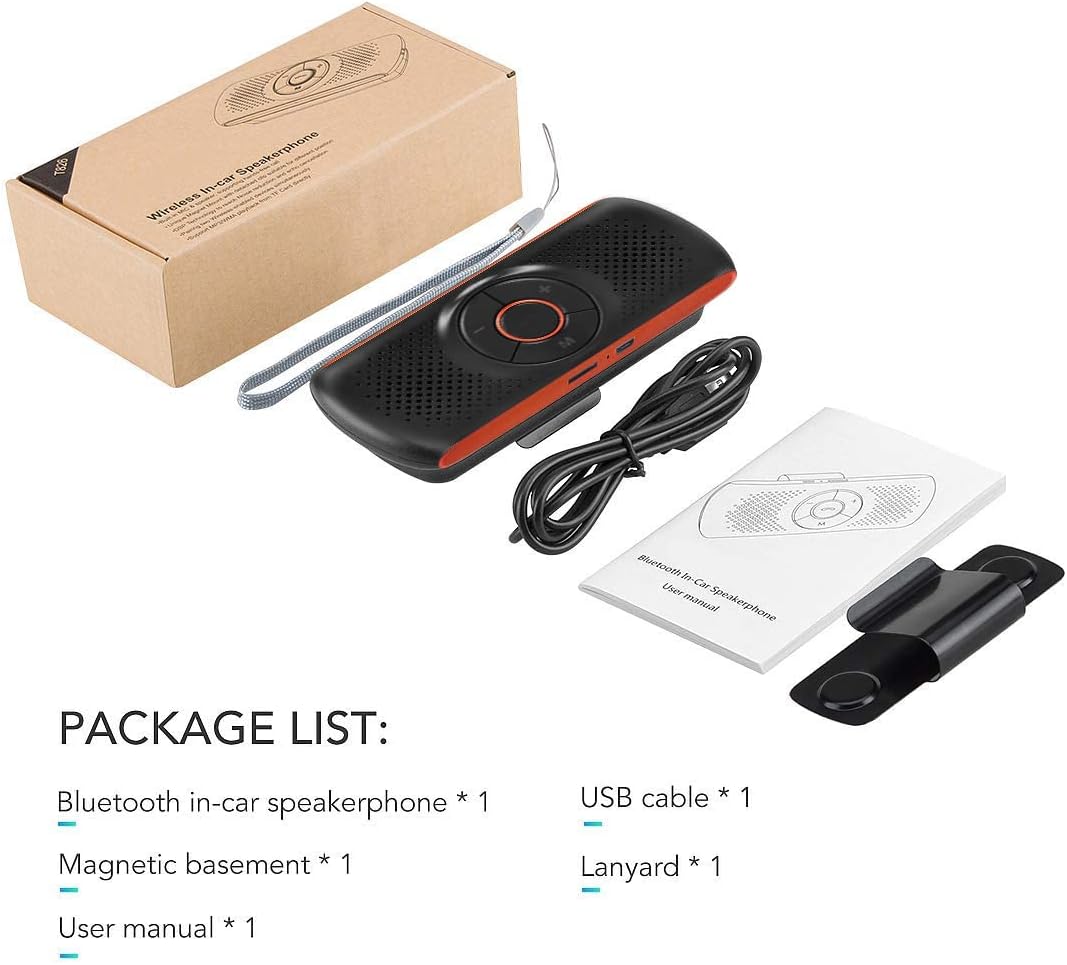
Image: Contents of the NETVIP Bluetooth Car Speaker package.
3. Produktmerkmale
- Freisprechen: Designed for safe communication while driving, allowing one-click call answering.
- Enhanced Bluetooth Connectivity: Features Bluetooth V4.2+EDR with echo noise reduction technology for clear audio.
- Sprachsteuerungsunterstützung: Compatible with Siri and Google Assistant for voice commands.
- Automatische Wiederverbindung: Automatically reconnects to your paired phone upon power-on.
- Einfache Installation: Back-clip design with a durable magnetic base for sun visor mounting.
- Multiple Media Options: Supports music playback via Bluetooth, TF card, or USB cable.
- Duale Telefonverbindung: Capable of connecting to two phones simultaneously.
4. Einrichtung
4.1 Aufladen des Geräts
Before initial use, fully charge the speakerphone using the provided USB cable. Connect the USB cable to the device's charging port and a standard USB power source (e.g., car charger, computer USB port). The charging indicator light will show the charging status.
4.2 Montage des Freisprechsystems
The speakerphone features a magnetic clip for easy attachment to your car's sun visor.
- Attach the magnetic basement clip to the back of the speakerphone.
- Slide the clip onto your car's sun visor. The magnetic connection allows for easy removal and reattachment.
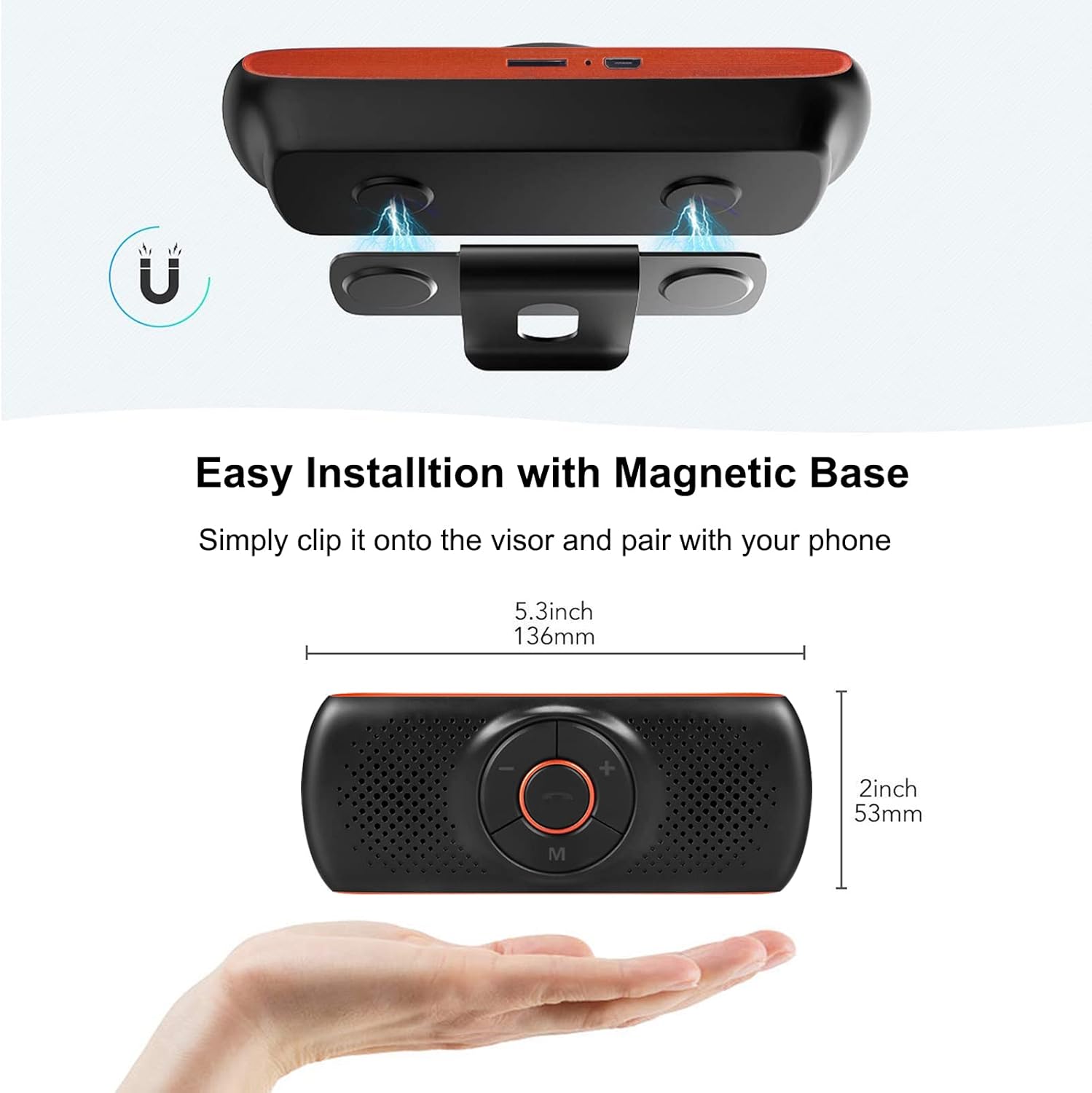
Image: Magnetic installation of the speakerphone on a car sun visor.
4.3 Bluetooth-Kopplung
To connect the speakerphone to your mobile phone:
- Ensure the speakerphone is charged and powered on.
- Aktivieren Sie Bluetooth auf Ihrem Mobiltelefon.
- Suchen nach available Bluetooth devices. The speakerphone will appear as "NETVIP" or a similar name.
- Select the speakerphone from the list to pair. A confirmation tone or voice prompt will indicate successful pairing.
- The device will automatically reconnect to the last paired phone when powered on and within range.
5. Bedienungsanleitung
5.1 Ein-/Ausschalten
- Zum Einschalten den Netzschalter gedrückt halten, bis die Kontrollleuchte aufleuchtet.
- Zum Ausschalten den Netzschalter gedrückt halten, bis die Kontrollleuchte erlischt.
5.2 Freisprechfunktion
When a call comes in, the speakerphone will announce the incoming call.
- Anruf annehmen: Press the phone button once.
- Anruf beenden: Press the phone button once during a call.
- Anruf ablehnen: Halten Sie die Telefontaste 2 Sekunden lang gedrückt.
- Wahlwiederholung letzte Nummer: Drücken Sie die Telefontaste zweimal.

Image: Driver using the NETVIP Bluetooth Car Speaker for hands-free communication.
5.3 Sprachassistent (Siri/Google Assistant)
The speakerphone supports voice commands through Siri or Google Assistant.
- Sprachassistenten aktivieren: Double-click the 'M' button to activate Siri or Google Assistant on your connected phone.
- Once activated, you can issue voice commands for tasks like making calls, sending messages, or getting directions.

Image: Illustrates using voice commands with Google Assistant and Siri via the speakerphone.
5.4 Musikwiedergabe
The speakerphone can play music from your phone via Bluetooth or directly from a TF card.
- Bluetooth Musik: Once paired, play music from your phone, and it will stream through the speakerphone.
- TF-Kartenwiedergabe: Legen Sie eine TF-Karte mit Audio ein. files into the designated slot. The speakerphone will automatically switch to TF card mode and begin playback.
- Lautstärkeregelung: Use the '+' and '-' buttons on the speakerphone to adjust the volume.

Image: Detail of the TF card slot on the speakerphone for direct music playback.
5.5 Connecting Two Phones Simultaneously
The speakerphone can maintain a connection with two mobile phones at the same time.
- Koppeln Sie das erste Telefon wie in Abschnitt 4.3 beschrieben.
- Nachdem das erste Telefon gekoppelt wurde, deaktivieren Sie Bluetooth auf dem ersten Telefon.
- Pair the second phone to the speakerphone.
- Re-enable Bluetooth on the first phone. Both phones should now be connected.
- The speakerphone will prioritize incoming calls from either connected device.

Image: Demonstrates the speakerphone's ability to connect to two mobile phones concurrently.
6. Wartung
To ensure the longevity and optimal performance of your NETVIP Bluetooth Car Speaker, follow these maintenance guidelines:
- Reinigung: Use a soft, dry cloth to clean the device. Avoid using abrasive cleaners, solvents, or harsh chemicals.
- Lagerung: Bewahren Sie das Gerät an einem kühlen, trockenen Ort fern von direkter Sonneneinstrahlung und extremen Temperaturen auf.
- Batteriepflege: Do not expose the battery to extreme heat or cold. Charge the device regularly, even if not in frequent use, to maintain battery health.
- Wasser vermeiden: Dieses Gerät ist nicht wasserdicht. Halten Sie es von Flüssigkeiten und Feuchtigkeit fern.
7. Fehlerbehebung
If you encounter issues with your speakerphone, refer to the following common problems and solutions:
| Problem | Mögliche Ursache | Lösung |
|---|---|---|
| Gerät lässt sich nicht einschalten | Schwache Batterie | Laden Sie das Gerät vollständig auf. |
| Kopplung mit dem Telefon nicht möglich | Bluetooth not enabled on phone; device not in pairing mode; too far from phone | Ensure phone Bluetooth is on. Power cycle the speakerphone. Move phone closer to device. |
| Kein Ton während Anrufen/Musik | Volume too low; device not connected; incorrect audio output selected on phone | Increase volume on both speakerphone and phone. Re-pair the device. Check phone's audio output settings. |
| Sprachassistent reagiert nicht | Not activated correctly; phone's voice assistant not enabled | Double-click 'M' button. Ensure Siri/Google Assistant is enabled on your phone. |
| Musik von der TF-Karte wird nicht abgespielt | TF-Karte nicht korrekt eingelegt; nicht unterstützt file Format | Reinsert TF card. Ensure audio files liegen in einem unterstützten Format vor. |
8. Spezifikationen
| Besonderheit | Spezifikation |
|---|---|
| Marke | NETVIP |
| Konnektivitätstechnologie | Bluetooth, USB |
| Bluetooth-Version | 4.2 + EDR |
| Stromquelle | Batteriebetrieben |
| Lautsprecherausgang | 3W |
| Batteriekapazität | 500 mAh Lithium-Ionen- |
| Akkuladezeit | Ungefähr 3 Stunden |
| Unterstützte Medientypen | TF-Karte |
| Montagetyp | Spoke Clip (Magnetic) |
| Steuerungstyp | Sprachsteuerung, Tasten |
| Kompatible Geräte | Smartphones, Car Stereo Systems |
| Eingangslautstärketage | 5 Volt (DC) |
9. Sicherheitshinweise
Bitte lesen und befolgen Sie die folgenden Sicherheitsrichtlinien:
- Avoid using the device near other wireless devices to prevent potential interference.
- Keep the battery away from extreme temperatures and high humidity.
- Dispose of the battery and product responsibly according to local regulations.
- Versuchen Sie nicht, das Gerät selbst zu zerlegen, zu reparieren oder zu verändern. Wenden Sie sich an qualifiziertes Servicepersonal.
- Ensure the device is securely mounted to avoid obstruction of vision or interference with vehicle controls.
10. Produktvideo
Watch this video for an introduction to the NETVIP Wireless In-Car Speakerphone:
Video: Eine Einführung überview of the NETVIP Wireless In-Car Speakerphone, demonstrating its features and usage.
11. Garantie und Support
For warranty information or technical support, please contact NETVIP customer service through the retailer's platform or the official NETVIP webWebsite. Bewahren Sie Ihren Kaufbeleg für Garantieansprüche auf.