
1. Einleitung
The Zelotes F17 Vertical Wireless Mouse is designed for enhanced comfort and productivity, featuring an ergonomic vertical design that promotes a natural hand posture. This manual provides comprehensive instructions for setting up, operating, maintaining, and troubleshooting your new mouse.

Image: The Zelotes F17 Vertical Wireless Mouse, showcasing its ergonomic design and the included USB receiver.
2. Packungsinhalt
Bitte überprüfen Sie, ob alle Artikel in Ihrem Paket vorhanden sind:
- 1 x Zelotes Wireless Vertical Mouse
- 1 x USB Empfänger
- 1 x Bedienungsanleitung (evtl. nicht in deutscher Sprache).
3. Installationsanleitung
Follow these steps to set up your Zelotes F17 Vertical Wireless Mouse:
- Batterien installieren: The mouse requires two AA batteries (not included). Locate the battery compartment on the underside of the mouse. Open the cover, insert the batteries according to the polarity indicators, and close the cover.
- USB-Empfänger abrufen: The USB receiver is conveniently stored next to the battery compartment. Gently pull it out.
- USB-Empfänger anschließen: Plug the USB receiver into an available USB port on your computer (Laptop, PC, Mac).
- Einschalten: Locate the On/Off switch on the underside of the mouse and slide it to the 'On' position. The mouse is plug-and-play, requiring no driver installation.

Image: The underside of the Zelotes F17 mouse, illustrating the battery compartment and the integrated storage slot for the USB receiver.
Video: A demonstration of the Zelotes F17 Vertical Wireless Mouse in use, highlighting its ergonomic grip and functionality.
4. Bedienungsanleitung
The Zelotes F17 mouse features 6 buttons and adjustable DPI settings for optimal control.
4.1 Ergonomischer Griff
The vertical design allows your hand to rest in a natural handshake position, reducing wrist and forearm strain during prolonged use.
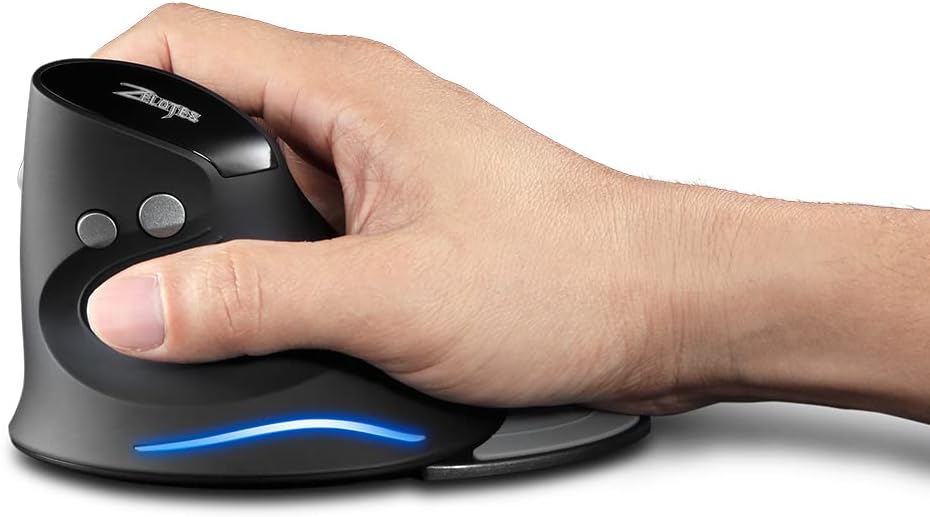
Image: A hand demonstrating the natural, ergonomic grip on the Zelotes F17 vertical mouse.
4.2 Tastenfunktionen
- Links Klick: Standardmäßige primäre Klickfunktion.
- Rechtsklick: Standardmäßige Sekundärklickfunktion.
- Scrollrad: Scrollen Sie nach oben oder unten und klicken Sie, um die Funktion der mittleren Schaltfläche zu nutzen.
- DPI-Taste: Cycles through DPI settings (1200/1600/2400 DPI).
- Vorwärts-/Rückwärtstasten: Located on the thumb side, these buttons allow for quick navigation in web Browser bzw file Entdecker.
4.3 einstellbare DPI
Press the DPI button (located near the scroll wheel) to switch between 1200, 1600, and 2400 DPI settings. This allows you to adjust the mouse sensitivity to suit your task, whether it's precise graphic design or fast-paced gaming.
4.4 Detachable Palm Rest
The Zelotes F17 includes a detachable palm rest for additional wrist support. You can easily attach or remove it based on your preference and comfort needs.

Image: The Zelotes F17 mouse with its detachable palm rest separated, illustrating the modular design.
5. Wartung
To ensure the longevity and optimal performance of your Zelotes F17 mouse, follow these maintenance guidelines:
- Reinigung: Verwenden Sie ein weiches, trockenes Tuch, um die Oberfläche der Maus abzuwischen. Bei hartnäckigem Schmutz leicht andrücken.ampBefeuchten Sie das Tuch mit Wasser oder einer milden Reinigungslösung. Vermeiden Sie scharfe Chemikalien oder scheuernde Materialien.
- Batteriewechsel: When the mouse's performance degrades or the LED illumination dims, it's time to replace the AA batteries. Refer to Section 3.1 for battery installation instructions.
- Lagerung: When not in use for extended periods, turn off the mouse to conserve battery life. Store the USB receiver in its dedicated slot on the underside of the mouse to prevent loss.
6. Fehlerbehebung
If you encounter issues with your Zelotes F17 mouse, try the following solutions:
| Problem | Mögliche Ursache | Lösung |
|---|---|---|
| Maus reagiert nicht | Low battery; USB receiver disconnected; Mouse is off. | Replace batteries; Re-insert USB receiver; Turn mouse On. |
| Unregelmäßige Cursorbewegung | Verschmutzter optischer Sensor; Ungeeignete Oberfläche; Niedriger Batteriestand. | Reinigen Sie den optischen Sensor; verwenden Sie ihn auf einer glatten, nicht reflektierenden Oberfläche; tauschen Sie die Batterien aus. |
| LED illumination not working | Low battery; Mouse is off. | Replace batteries; Turn mouse On. |
| DPI-Einstellung ändert sich nicht | Fehlfunktion der DPI-Taste. | Ensure the mouse is powered on and connected. If the issue persists, contact customer support. |
7. Spezifikationen
Key technical specifications for the Zelotes F17 Vertical Wireless Mouse:
| Besonderheit | Detail |
|---|---|
| Technische Daten | 4.33 x 3.39 x 3.15 Zoll |
| Artikelgewicht | 3.53 Unzen |
| Artikelmodellnummer | F17 |
| Marke | Zeloten |
| Farbe | Schwarz |
| Konnektivitätstechnologie | USB (2.4 GHz Drahtlos) |
| Besonderheit | Ergonomic Design, Removable Wrist Rest, LED Illumination |
| Bewegungserkennungstechnologie | Optisch |
| DPI-Einstellungen | 1200/1600/2400 DPI |
| Anzahl der Tasten | 6 |
| Stromquelle | 2 x AA-Batterien (nicht im Lieferumfang enthalten) |
| Kompatibilität | Win11, Win10, Win8, Win7, Mac OS |

Image: A diagram illustrating the dimensions of the Zelotes F17 Vertical Wireless Mouse.
8. Garantie und Support
For warranty information or technical support, please refer to the contact details provided on the product packaging or the official Zelotes webBewahren Sie Ihren Kaufbeleg als Kaufnachweis auf.