
1. Einleitung
Vielen Dank für Ihren Einkauf.asing the Aogamb D3000 Kids Alarm Clock. This device combines a digital alarm clock, Bluetooth speaker, wake-up light, and sleep sound machine to create a versatile and engaging experience for children's bedrooms. Please read this manual carefully to ensure proper use and maintenance of your device.
Packungsinhalt:
- Aogamb D3000 Alarm Clock
- USB-Ladekabel
- Bedienungsanleitung

Image: The Aogamb D3000 Alarm Clock, USB charging cable, and user manual are shown as included items.
2. Sicherheitshinweise
- Setzen Sie das Gerät keinen extremen Temperaturen, direkter Sonneneinstrahlung oder hoher Luftfeuchtigkeit aus.
- Halten Sie das Gerät von Wasser oder anderen Flüssigkeiten fern.
- Versuchen Sie nicht, das Gerät selbst zu zerlegen oder zu reparieren. Wenden Sie sich an den Kundendienst, um Hilfe zu erhalten.
- Verwenden Sie ausschließlich das mitgelieferte USB-Ladekabel oder ein zertifiziertes gleichwertiges Kabel.
- Stellen Sie sicher, dass das Gerät auf einer stabilen Oberfläche steht, um ein Umfallen zu verhindern.
3. Einrichtung
Erstladung
Before first use, fully charge the alarm clock using the provided USB cable. Connect the USB cable to the charging port on the back of the device and to a suitable USB power adapter (not included). The charging indicator light will be red during charging and turn blue when fully charged.
Bild: Eine Nahaufnahme view of the USB charging interface located on the back of the alarm clock.
Entfernung der Schutzfolie
Before operating the device, gently remove the transparent protective film from the black display lens.
Image: A hand is shown peeling off a transparent protective film from the black display area of the alarm clock.
4. Bedienungsanleitung
Kontrollen überview
Familiarize yourself with the buttons located on the top of the alarm clock:
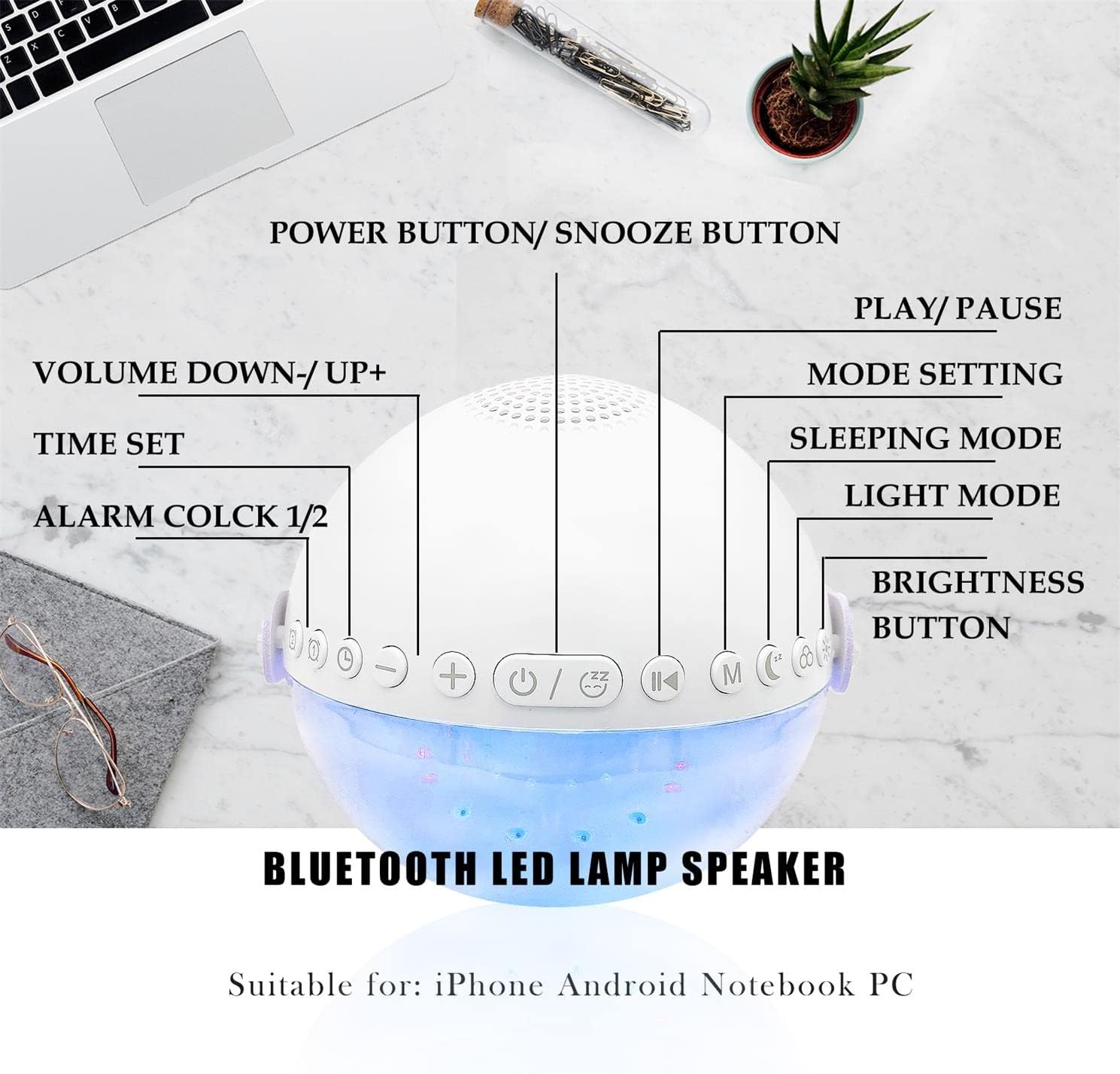
Abbildung: Draufsicht view of the alarm clock with labels pointing to each button: Power/Snooze, Volume Down/Up, Time Set, Alarm 1/2, Play/Pause, Mode Setting, Sleeping Mode, Light Mode, and Brightness Button.
- Power Button / Snooze Button: Press to power on/off. Short press during an alarm to activate snooze.
- Lautstärke verringern (-) / Lautstärke erhöhen (+): Kurz drücken, um die Lautstärke anzupassen.
- Zeiteinstellung: Drücken Sie diese Taste, um in den Zeiteinstellungsmodus zu gelangen.
- Alarm 1 / Alarm 2: Press to set or activate/deactivate Alarm 1 or Alarm 2.
- Abspielen / Pause: Controls media playback in Bluetooth or Sound Machine mode.
- Mode Setting (M): Press to cycle through modes (Bluetooth, Sound Machine).
- Schlafmodus: Activates sleep mode features.
- Lichtmodus: Cycles through light colors and effects.
- Helligkeitstaste: Adjusts display and light brightness.
Zeiteinstellung
- Drücken Sie die Zeiteinstellung Drücken Sie diese Taste. Die Stundenanzeige blinkt.
- Verwenden Sie die Lauter (+) or Lautstärke runter (-) Tasten zum Einstellen der Stunde.
- Drücken Zeiteinstellung Um die Stunde erneut zu bestätigen, wechseln Sie zur Minuteneinstellung.
- Verwenden Sie die Lauter (+) or Lautstärke runter (-) Tasten zum Einstellen der Minuten.
- Drücken Zeiteinstellung Zur Bestätigung und Beendigung der Zeiteinstellung noch einmal wiederholen.
- The clock supports a 24-hour format.
Alarmeinstellung (Doppelalarme)
The device features two independent alarms. You can customize ringtones, alarm volume, and light color/brightness for each.
- Drücken Sie die 1-Alarm or 2-Alarm button to select an alarm. The alarm icon will flash.
- Follow the time setting steps to set the desired alarm time.
- After setting the time, you can customize the alarm sound, volume, and wake-up light settings using the respective buttons (e.g., Lichtmodus, Lautstärke +/-).
- Drücken Sie die 1-Alarm or 2-Alarm button again to activate/deactivate the alarm. The alarm icon will appear/disappear on the display.
Image: Two panels illustrate customized alarm times: one for waking up at 7:30 AM and another for going to sleep at 10:00 PM, both for Monday to Friday.
Schlummerfunktion
Wenn ein Alarm ertönt, drücken Sie die Taste Power Button / Snooze Button to activate the snooze function. The alarm will pause for 5 minutes and then sound again. This can be repeated up to three times, after which the alarm will turn off automatically.
Image: The alarm clock is displayed with a clear indication of its snooze function.
Bluetooth-Lautsprechermodus
The alarm clock features advanced Bluetooth 5.0 technology for wireless audio streaming.
- Drücken Sie die Mode Setting (M) button repeatedly until the Bluetooth icon appears on the display.
- On your smartphone or Bluetooth-enabled device, search for "Aogamb D3000" in the Bluetooth settings and pair.
- Once connected, you can play music or audio from your device through the alarm clock speaker.
- Verwenden Sie die Abspielen / Pause Taste zur Steuerung der Wiedergabe.
- Verwenden Sie die Lauter (+) or Lautstärke runter (-) Tasten zum Einstellen der Lautstärke.

Image: A child and adult are shown with the alarm clock, which is wirelessly connected to a smartphone via Bluetooth, playing music.
Schlaf-Sound-Maschine
The alarm clock offers 8 soothing natural sounds to aid sleep or relaxation.
- Drücken Sie die Mode Setting (M) button repeatedly until the Sound Machine icon appears on the display.
- Drücken Sie kurz die Lauter (+) or Lautstärke runter (-) buttons to cycle through the 8 available sounds: Rain, Ocean Waves, Birds, Water Stream, White Noise, Cicada, Bonfire, Tick-Tock.
- Drücken Sie lange die Lauter (+) or Lautstärke runter (-) buttons to adjust the volume of the sleep sounds.
- Drücken Sie die Abspielen / Pause Taste zum Starten oder Stoppen des Tons.

Image: A child and adult are shown sleeping, with the alarm clock nearby. Icons for 8 natural sounds (Rain, Water Stream, Cicadas, Birds, Ocean Waves, White Noise, Bonfire, Tick-Tock) are displayed, indicating the sleep sound feature.
Wake-up Light / Night Light
The alarm clock features a touch-activated backlight and adjustable colored lights.
- Touch-Activated Backlight: Gently tap the device to activate the backlight for checking the time in the dark.
- Lichtmodus: Drücken Sie die Lichtmodus button to cycle through various light colors (Warm White, Green, Red, Blue, Orange, Yellow) and lighting effects (e.g., breathing lights, flashing light).
- Helligkeit anpassen: Drücken Sie die Helligkeitstaste to adjust the intensity of the light (3 levels: Low, Middle, High).

Image: The alarm clock is shown displaying various colorful night light options, including 9 different colors, 3 breathing light effects, and 1 flashing light, with adjustable brightness levels (Low, Middle, High).

Image: The alarm clock is shown with various light colors and brightness settings, illustrating its wake-up light functionality.
Sleep Trainer Function (Sun & Moon Icons)
The alarm clock features sun and moon icons on the LED display to help children understand day and night cycles, promoting better sleep habits. The sun icon indicates daytime, and the moon icon indicates nighttime.
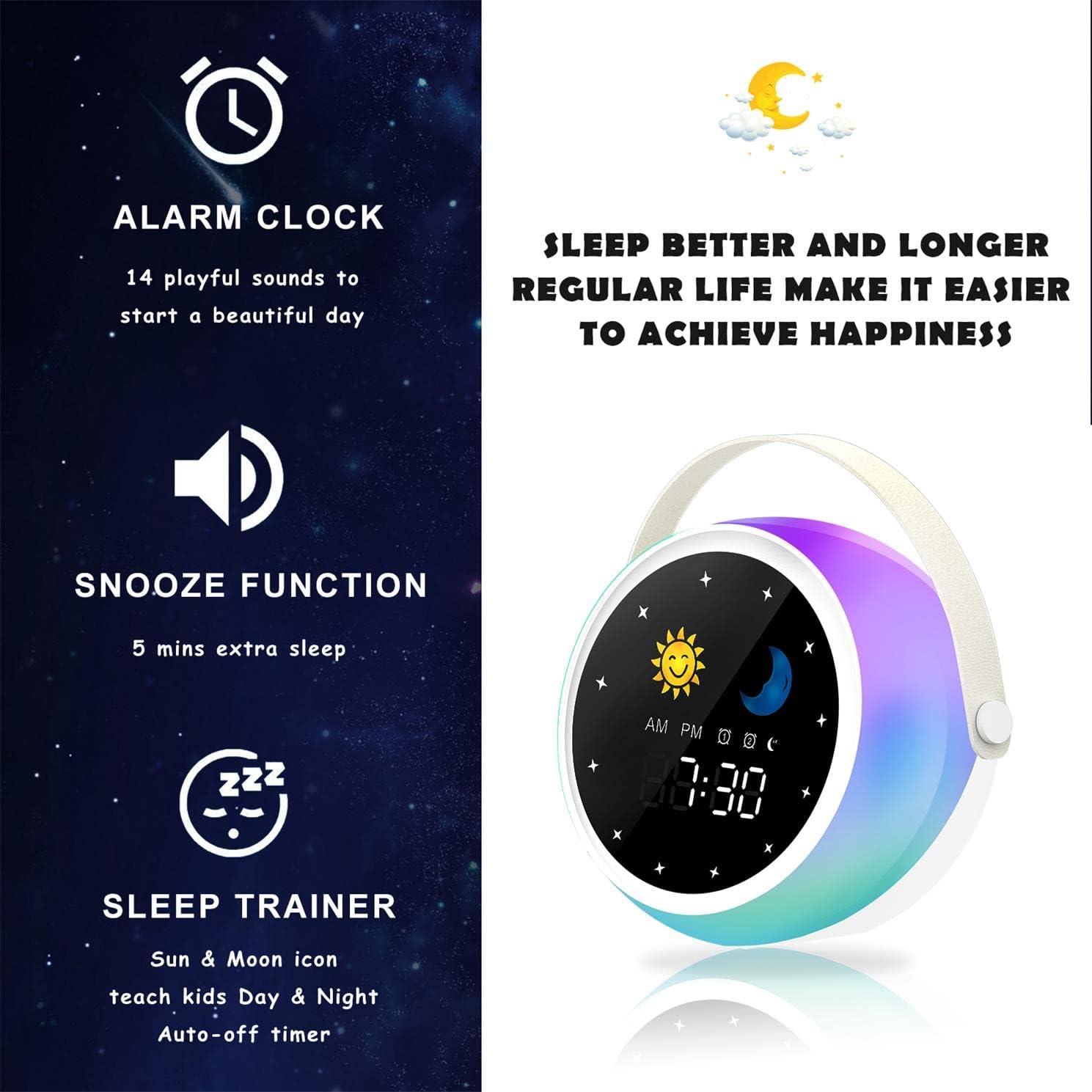
Image: A visual representation of the alarm clock's key features: alarm, snooze, and sleep trainer, with the sun and moon icons visible on the display to teach day and night.

Image: Two panels show the alarm clock display: one for sleep time (10:30 PM with moon icon) and one for wake-up time (7:00 AM with sun icon), illustrating the sleep trainer function.
5. Wartung
- Reinigen Sie das Gerät mit einem weichen, trockenen Tuch. Verwenden Sie keine Scheuermittel oder Lösungsmittel.
- Stellen Sie sicher, dass der Ladeanschluss frei von Staub und Schmutz ist.
- Bewahren Sie das Gerät an einem kühlen, trockenen Ort auf, wenn es längere Zeit nicht benutzt wird.
6. Fehlerbehebung
Gerät lässt sich nicht einschalten:
- Stellen Sie sicher, dass das Gerät vollständig aufgeladen ist. Verbinden Sie es mit dem USB-Kabel mit einer Stromquelle.
- Den Ein-/Ausschalter einige Sekunden lang gedrückt halten.
Probleme mit der Bluetooth-Kopplung:
- Make sure the alarm clock is in Bluetooth mode (Bluetooth icon visible).
- Ensure your smartphone or device's Bluetooth is enabled and within range.
- Try restarting both the alarm clock and your Bluetooth device.
- Entfernen Sie das Gerät aus der Bluetooth-Liste Ihres Telefons und versuchen Sie es erneut mit einer Kopplung.
Alarm ertönt nicht:
- Vergewissern Sie sich, dass der Alarm aktiviert ist (Alarmsymbol auf dem Display sichtbar).
- Check the alarm volume settings.
- Stellen Sie sicher, dass die Alarmzeit korrekt eingestellt ist.
7. Spezifikationen
| Marke | Aogamb |
| Modellnummer | T3000 - Die wunderbare Welt der Träume |
| Farbe | Weiß |
| Abmessungen (L x B x H) | 12 x 12.1 x 10.5 cm |
| Gewicht | 430 g |
| Material | Kristall |
| Anzeigetyp | Digitales |
| Stromquelle | Stromkabel |
| Besondere Merkmale | Alarm, Charging Port, Snooze, Bluetooth Speaker, Wake-up Light, Sleep Sound Machine |
| Batterien im Lieferumfang enthalten | NEIN |
8. Garantie und Support
This product comes with a standard manufacturer's warranty. For detailed warranty information, please refer to the product packaging or contact Aogamb customer support. If you encounter any issues or have questions not covered in this manual, please reach out to our support team for assistance.
Kontakt zum Kundendienst: Please refer to the contact information provided on the product packaging or the official Aogamb webWebsite.