
1. Einleitung
The Estink LED Tracing Light Pad is a versatile and ultra-thin device designed to assist with various artistic and design tasks. It provides an evenly lit surface, making tracing, sketching, and other detailed work easier and more comfortable. This manual will guide you through the setup, operation, and maintenance of your new light pad.
2. Sicherheitshinweise
- Setzen Sie das Gerät nicht Wasser oder übermäßiger Feuchtigkeit aus.
- Lassen Sie das Gerät nicht fallen und setzen Sie es keinen starken Stößen aus.
- Use only the provided USB cable and a compatible power adapter (5V/2A recommended).
- Außerhalb der Reichweite von kleinen Kindern aufbewahren.
- Versuchen Sie nicht, das Gerät selbst zu zerlegen oder zu reparieren. Wenden Sie sich bei Problemen an den Kundendienst.
3. Packungsinhalt
Bitte überprüfen Sie das Paket, um sicherzustellen, dass alle Artikel vorhanden sind:
- 1 x Estink LED Tracing Light Pad (A6 size)
- 1 x USB Power Cable (approximately 11 feet long)
- 1 x Netzteil
- Several sheets of flappable paper
- Various sizes of binding screws
- 1 x Portable Clip
4. Einrichtung
- Place the LED Tracing Light Pad on a flat, stable surface. The anti-slip rubber stands on the back will help keep it in place.
- Connect the Micro USB end of the provided USB cable into the port on the light pad.
- Connect the standard USB end of the cable to a power source. This can be a computer's USB port, a power bank, or a wall outlet using the included power adapter.
- An indicator LED will illuminate when the device is successfully powered.

Image: Power connection options for the Estink LED Tracing Light Pad.

Image: The light pad can be powered by a wall charger, power bank, or laptop.
5. Bedienungsanleitung
- Ein-/Ausschalten: Once connected to a power source, touch the power symbol button on the light pad once to turn it on or off.
- Helligkeit anpassen: To adjust the brightness, long-press the power symbol button. The brightness will gradually cycle through three levels: Minimum, Medium, and Maximum. Release the button when the desired brightness is reached.

Image: Touch sensor switch for power and brightness adjustment.
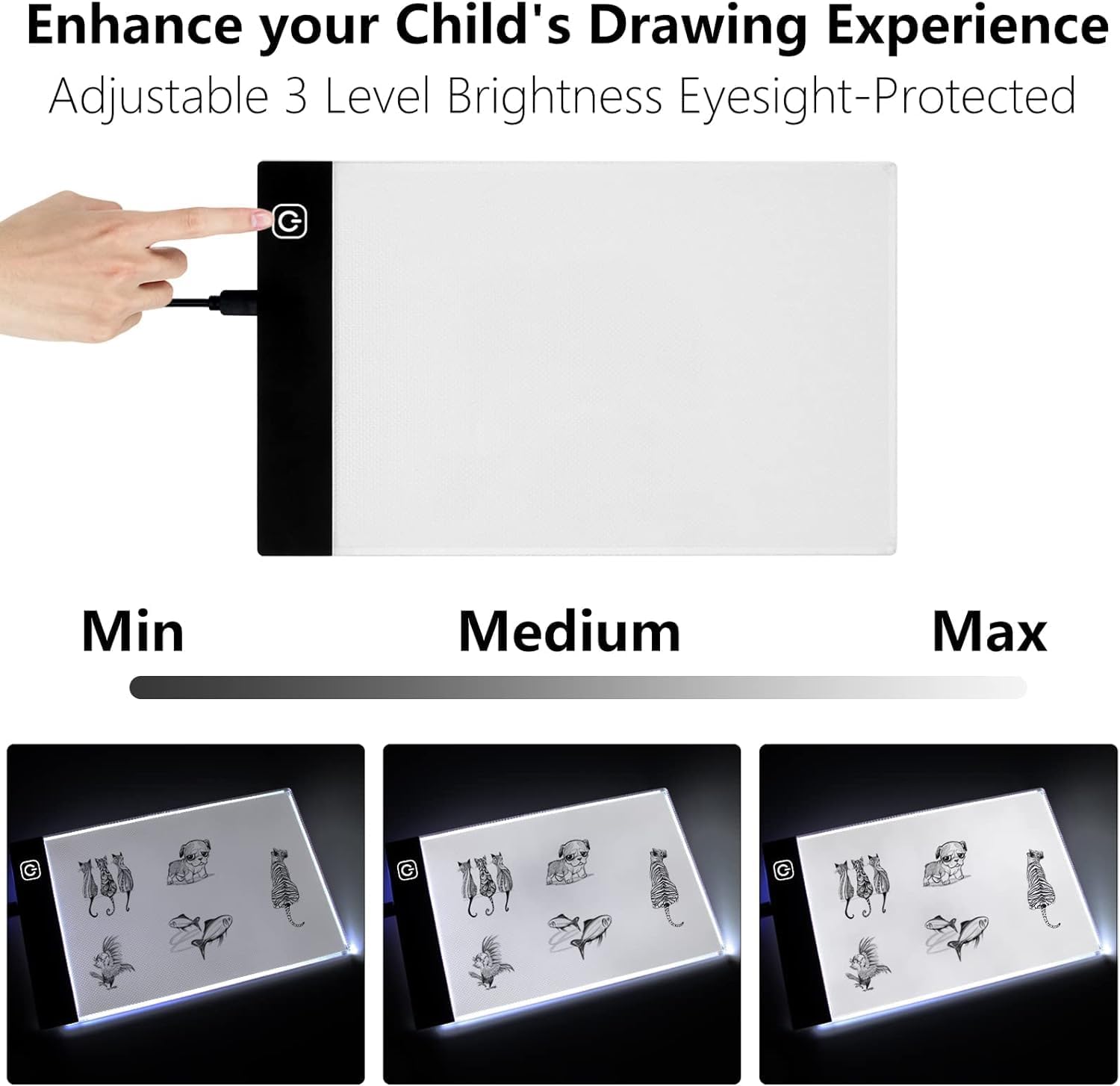
Image: Three adjustable brightness levels: Minimum, Medium, and Maximum.
6. Anwendungen
The Estink LED Tracing Light Pad is suitable for a wide range of creative and professional applications:
- Zeichnen & Skizzieren: Ideal for tracing existing designs, refining sketches, and creating new artwork.
- 2D Animation: Use with the included flappable paper and binding screws to create flip books and traditional animations.
- Calligraphy & Embossing: Provides a clear backlight for precise lettering and embossing work.
- Scrapbooking & Tattoo Transferring: Facilitates accurate placement and transfer of designs.
- Diamond Painting & Vinyl Weeding: The adjustable brightness helps in clearly seeing grids for diamond painting and intricate details for weeding vinyl cutouts.
- Designarbeit: Useful for fashion design, industrial design, and architectural design.
- Röntgen Viewing: Can be used for basic X-ray viewing due to its bright, even illumination.

Image: Various applications of the light pad, including diamond painting, 2D animation, and design.

Image: Additional uses for the light pad, such as children's drawing and calligraphy.

Image: The light pad is part of a flip book kit, including paper and binding screws.
Video: This video demonstrates the features and uses of the LED Tracing Pad, including its three brightness settings, ultra-thin design, and portability. It also shows the included accessories like the USB cable, power adapter, portable clip, and tracing sheets. The video highlights its versatility for artists, architects, hobbyists, and professionals.
7. Wartung
- Reinigung: To clean the surface of the light pad, use a soft, dry cloth. Avoid abrasive cleaners or solvents that could damage the surface.
- Lagerung: Due to its ultra-thin design (approximately 5mm thick), the light pad is easy to store. Keep it in a dry place, away from direct sunlight and extreme temperatures.

Image: The compact dimensions of the A6 light pad.
8. Fehlerbehebung
- Light Pad Not Turning On:
- Ensure the USB cable is securely connected to both the light pad and the power source.
- Verify that the power source (computer, power bank, or wall adapter) is functioning correctly.
- Versuchen Sie es gegebenenfalls mit einem anderen USB-Anschluss oder Netzteil.
- Helligkeit passt sich nicht an:
- Ensure you are long-pressing the power button to cycle through brightness levels, not just tapping it.
9. Spezifikationen
| Modellname | Estink LED |
| Artikelmodellnummer | Estink4r95skxqeg1028-11 |
| Hand Drawing Board Size | Approx. 12.9 x 8.5 cm / 5.1 x 3.3 inches (A6) |
| Material | Plexiglas |
| Dicke | Ca. 5 mm |
| Stromquelle | Stromversorgung über USB |
| Lichtquellentyp | Leuchtdiode (LED) |
| Artikelgewicht | 0.36 Kilogramm / 12.6 Unzen |
| USB-Kabellänge | Ca. 11 Fuß |
10. Garantie und Support
For warranty information and customer support, please refer to the product packaging or contact your retailer. Keep your purchase receipt for any warranty claims.