
1. Einleitung
This manual provides detailed instructions for the installation, operation, and maintenance of your DEKCO Solar Security Camera and Wireless Doorbell Camera system. Please read this manual thoroughly before using the product to ensure proper function and safety. Keep this manual for future reference.
2. Packungsinhalt
Prüfen Sie beim Auspacken, ob alle Komponenten vorhanden und in einwandfreiem Zustand sind.
- DEKCO Solar Security Camera
- Drahtlose Türklingelkamera
- Glockenspiel für den Innenbereich
- Solar Panel (integrated with camera)
- Montagehalterungen und Schrauben
- USB-Ladekabel
- Benutzerhandbuch (dieses Dokument)
3. Produktüberschreitungview
The DEKCO security system combines a solar-powered outdoor camera with a wireless doorbell camera to provide comprehensive home surveillance.
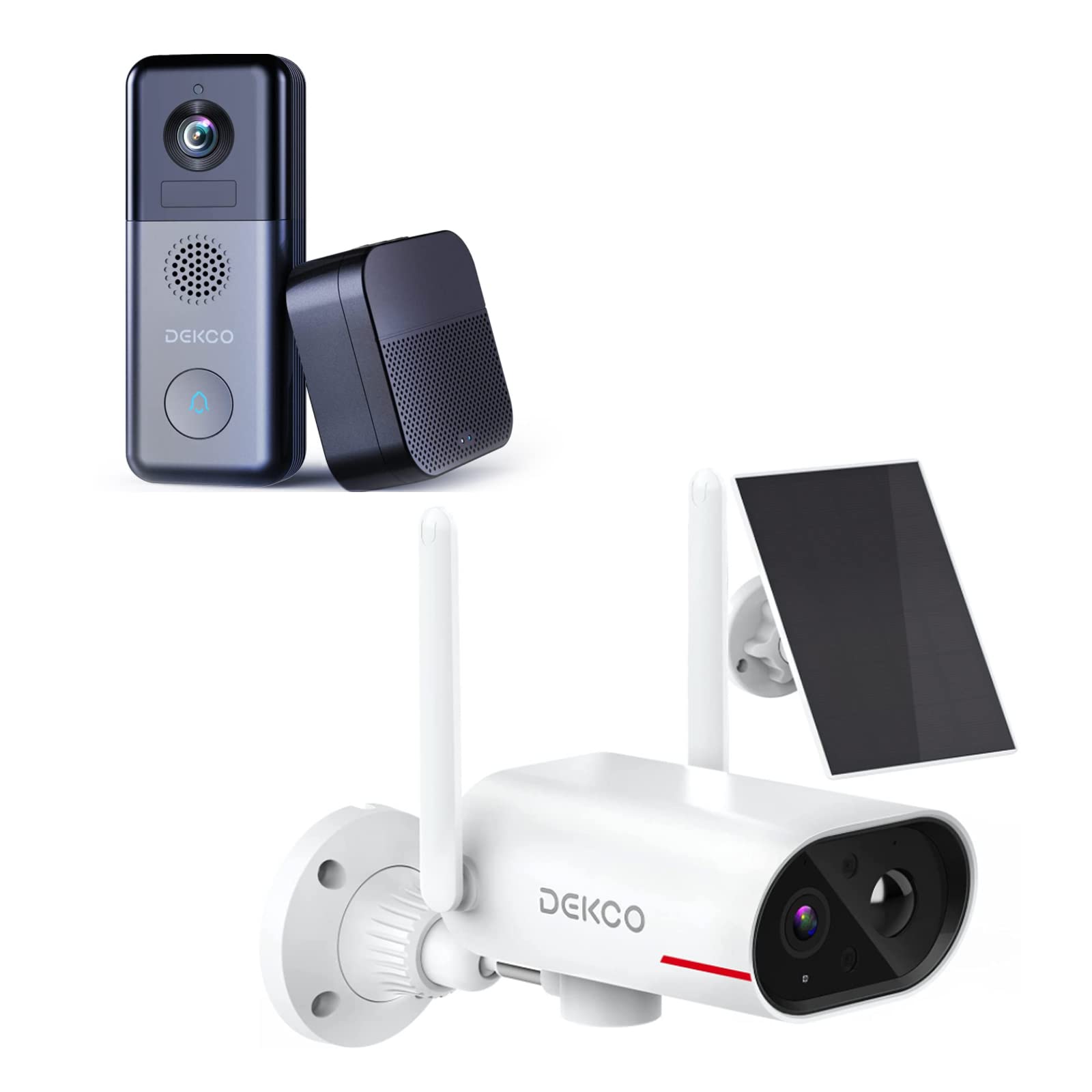
An image showing the DEKCO solar-powered security camera, the wireless doorbell camera, and its indoor chime unit. The security camera is white with two antennas and a solar panel, while the doorbell is dark grey with a camera lens and a call button. The chime is a compact black box.
3.1 Solar Security Camera Features
- 260° ViewBereich: Achieved through a 170° rotating design.
- 100 % kabellos: Flexible installation without power cables.
- Solarbetrieben: Integrated solar panel for continuous power with adequate sunlight.
- Nachtsicht: Features color night vision for clear images in low light.
- Lagerung: Supports Micro SD card and cloud storage (no monthly fees).
- Wasserdichtigkeit: IP65 for outdoor use.
3.2 Wireless Doorbell Camera Features
- 180 Tage Akkulaufzeit: Eingebauter wiederaufladbarer 10000-mAh-Akku für längere Nutzung.
- Zweiwege-Audio: Communicate with visitors remotely.
- Bewegungserkennung: Receive alerts for activity at your door.
- Funkgong: Connects to an indoor chime unit.
- Wasserdichtigkeit: IP65 for outdoor use.
4. Installationsanleitung
Follow these steps to set up your DEKCO security system.
4.1 App-Installation
- Download the DEKCO app from your smartphone's app store (available for Android and iOS).
- Registrieren Sie sich für ein neues Konto oder melden Sie sich an, falls Sie bereits eines besitzen.
4.2 Solar Security Camera Setup
- Grundgebühr: Before installation, fully charge the camera using the provided USB cable.
- Montage: Choose a location with good Wi-Fi signal and direct sunlight exposure for the solar panel. Use the mounting bracket and screws to securely attach the camera to a wall. Ensure the camera has a clear view des gewünschten Überwachungsbereichs.
- Paarung: Open the DEKCO app, select 'Add Device', and follow the on-screen instructions to connect the camera to your Wi-Fi network.
4.3 Wireless Doorbell Camera Setup
- Grundgebühr: Fully charge the doorbell camera using the provided USB cable.
- Montage: Install the doorbell camera at your desired location near your front door using the provided mounting hardware. Ensure it has a clear view und ein gutes WLAN-Signal.
- Paarung: In the DEKCO app, select 'Add Device' and follow the instructions to connect the doorbell camera to your Wi-Fi network.
- Glockenspiel-Setup: Plug the indoor chime unit into a power outlet. Follow the app's instructions to pair the chime with the doorbell camera. You can select different chime tones and adjust the volume through the app.
5. Bedienungsanleitung
Learn how to use the features of your DEKCO security system.
5.1 Solar Security Camera Operation
- Live View: Open the DEKCO app and select your camera to view lebe footage. You can manually pan/tilt the camera within its 260° range.
- Bewegungserkennung: The camera is configured for motion-only alerts. Adjust sensitivity settings in the app to optimize detection and minimize false alarms.
- Aufnahme: Motion-triggered events are recorded and stored on the Micro SD card (if installed) or in the cloud. Access recordings via the app's playback feature.
- Nachtsicht: The camera automatically switches to color night vision in low-light conditions.
5.2 Wireless Doorbell Camera Operation
- Anrufe entgegennehmen: When a visitor presses the doorbell button, your smartphone will receive a notification. Tap the notification to answer and engage in two-way audio communication.
- Bewegungserkennung: The doorbell camera detects motion and sends alerts to your phone. Review motion events in the app.
- Live View: Sie können eine Live-Übertragung starten. view of your front door at any time through the DEKCO app.
- Glockenspielfunktion: The indoor chime will sound when the doorbell button is pressed. Adjust settings in the app.
6. Wartung
Regular maintenance ensures optimal performance and longevity of your devices.
- Linsenreinigung: Periodically wipe the camera lenses and solar panel with a soft, damp Mit einem Tuch Staub und Schmutz entfernen. Scheuermittel vermeiden.
- Wirkungsgrad der Solarmodule: Ensure the solar panel is free from obstructions (leaves, snow, etc.) to maximize charging efficiency.
- Batteriezustand: While solar-powered, ensure the security camera receives sufficient sunlight. For the doorbell, monitor battery levels via the app and recharge when necessary.
- Firmware-Updates: Check the DEKCO app regularly for firmware updates. Install updates to ensure your devices have the latest features and security enhancements.
7. Fehlerbehebung
In diesem Abschnitt finden Sie Lösungen für häufig auftretende Probleme.
- Gerät stellt keine Verbindung zum WLAN her:
- Stellen Sie sicher, dass Ihr WLAN-Netzwerk mit 2.4 GHz arbeitet (5 GHz wird nicht unterstützt).
- Überprüfen Sie die Richtigkeit des WLAN-Passworts.
- Bringen Sie das Gerät näher an Ihren WLAN-Router heran.
- Restart your router and the device.
- Keine Bewegungserkennungsalarme:
- Überprüfen Sie, ob die Bewegungserkennung in den App-Einstellungen aktiviert ist.
- Passen Sie die Bewegungsempfindlichkeit an.
- Stellen Sie sicher, dass das Gerät frei ist view und ist nicht blockiert.
- Schlechte Videoqualität:
- Überprüfen Sie Ihre WLAN-Signalstärke.
- Reinigen Sie das Kameraobjektiv.
- Doorbell Battery Drains Quickly:
- Reduzieren Sie die Empfindlichkeit oder Frequenz der Bewegungserkennung.
- Stellen Sie sicher, dass das Gerät vor der Verwendung vollständig aufgeladen ist.
- Solar Camera Not Charging:
- Ensure the solar panel receives at least 1 hour of direct sunlight daily.
- Reinigen Sie die Oberfläche des Solarpanels.
8. Spezifikationen
| Besonderheit | Spezifikation |
|---|---|
| Marke | DEKCO |
| Modellnummer | B09TF8K2W8 |
| Konnektivitätstechnologie | Kabellos (Wi-Fi) |
| Stromquelle | Solar Powered (Camera), Battery (Doorbell) |
| Doorbell Battery Capacity | 10000 mAh |
| ViewAufnahmewinkel (Kamera) | 260° (170° rotating design) |
| Nachtsicht | Farb-Nachtsicht |
| Wasserdichtigkeit | IP65 |
| Kompatible Geräte | Smartphone (Android) |
| Alarmtyp | Nur Bewegung |
| Montagetyp | Wandhalterung |
| Videoaufnahmeformat | MPEG-4 |
9. Garantie und Support
For warranty information, technical support, or further assistance, please refer to the DEKCO official website or contact DEKCO customer service directly. Keep your purchase receipt as proof of purchase.