
1. Einleitung
This manual provides instructions for the AIDITIYMI RC902V Far1 Voice Remote Control, designed as a replacement for specific TCL Mini LED 8K Smart TV models. Please read this manual carefully to ensure proper setup and operation of your new remote control.
Packungsinhalt:
- 1 x AIDITIYMI RC902V Far1 Voice Remote Control
- Note: 2x AAA Alkaline Batteries are not included and must be purchased separately.
2. Einrichtung
2.1 Einlegen der Batterie
The remote control requires two (2) AAA alkaline batteries for operation. Ensure correct polarity when inserting batteries.
- Suchen Sie die Batteriefachabdeckung auf der Rückseite der Fernbedienung.
- Schieben Sie den Deckel nach unten, um das Fach zu öffnen.
- Legen Sie zwei neue AAA-Alkalibatterien ein und achten Sie dabei auf die richtige Polarität (+) und (-) im Batteriefach.
- Schieben Sie den Batteriefachdeckel wieder an seinen Platz, bis er sicher einrastet.

Image: Back of the remote control with the battery cover removed, illustrating the battery insertion points.

Image: Back of the remote control with the battery cover securely in place.
2.2 Koppeln der Fernbedienung
This remote control requires pairing with your TCL Mini LED 8K Smart TV to enable full functionality, especially voice control. The pairing process may vary slightly depending on your TV's software version. Refer to your TV's user manual for specific pairing instructions if these steps do not work.
- Vergewissern Sie sich, dass Ihr Fernseher eingeschaltet ist.
- Richten Sie die Fernbedienung auf den Fernseher.
- Halten Sie die "OK" button (center of the directional pad) and the "Heim" button (house icon) simultaneously for a few seconds.
- A pairing message should appear on your TV screen, indicating that the remote is pairing or has successfully paired.
- Once paired, test the remote's functions, including voice control, to confirm successful setup.
If pairing fails, try replacing the batteries or moving closer to the TV and repeating the steps.
3. Bedienungsanleitung
The AIDITIYMI RC902V Far1 remote control features a standard layout with dedicated buttons for various functions and quick access to popular streaming services.
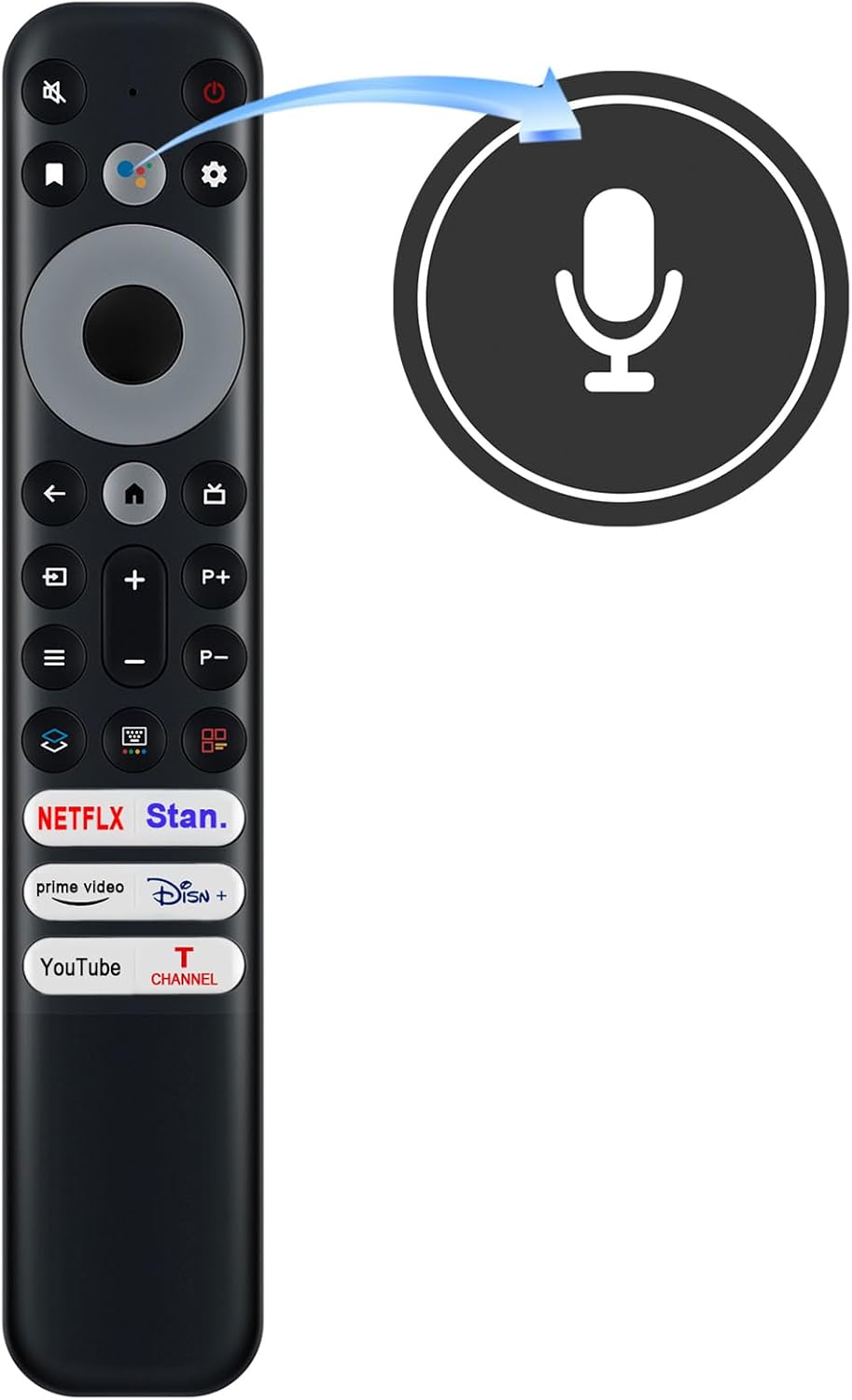
Bild: Vorderseite view of the remote control highlighting the voice control button.
3.1 Tastenfunktionen
- Netzschalter: Schaltet den Fernseher ein oder aus.
- Voice Control Button (Microphone Icon): Zum Aktivieren der Sprachsteuerung die Taste gedrückt halten. Sprechen Sie deutlich in die Fernbedienung.
- Steuerkreuz (Oben/Unten/Links/Rechts): Navigiert durch Menüs und wählt Optionen aus.
- OK-Taste: Bestätigt die Auswahl.
- Zurück-Schaltfläche: Kehrt zum vorherigen Bildschirm oder Menü zurück.
- Home-Schaltfläche (Haussymbol): Accesses the TV's main home screen.
- Lauter/Leiser (+/-): Passt die Lautstärke des Fernsehers an.
- Kanal Auf/Ab (P+/P-): Wechselt die Fernsehkanäle.
- Stummschaltfläche: Schaltet den TV-Ton stumm oder hebt die Stummschaltung auf.
- Einstellungsschaltfläche (Zahnradsymbol): Öffnet das Einstellungsmenü des Fernsehers.
- Eingabe-/Quellenschaltfläche: Wählt Eingangsquellen aus (HDMI, AV usw.).
- Spezielle App-Schaltflächen: Direct access to Netflix, Stan, Prime Video, Disney+, YouTube, and TCL Channel.

Bild: Abgewinkelt view der Fernbedienung, die das vollständige Tastenlayout anzeigt.
4. Wartung
4.1 Reinigen der Fernbedienung
Um das Aussehen und die Funktionalität der Fernbedienung zu erhalten:
- Wischen Sie die Oberfläche mit einem weichen, trockenen Tuch ab.
- Bei hartnäckigem Schmutz leicht dampReinigen Sie das Tuch mit Wasser oder einem milden, nicht scheuernden Reinigungsmittel.
- Verwenden Sie keine scharfen Chemikalien, Lösungsmittel oder scheuernde Reinigungspads, da diese die Oberfläche der Fernbedienung oder interne Komponenten beschädigen können.
4.2 Batteriewechsel
Replace batteries when the remote control's response becomes sluggish or stops working. Always replace both batteries at the same time with new AAA alkaline batteries. Do not mix old and new batteries or different types of batteries.
5. Fehlerbehebung
-
Fernbedienung reagiert nicht:
- Prüfen Sie, ob die Batterien korrekt und mit der richtigen Polarität eingelegt sind.
- Ersetzen Sie die alten Batterien durch neue AAA-Alkalibatterien.
- Stellen Sie sicher, dass sich keine Hindernisse zwischen der Fernbedienung und dem Infrarotempfänger des Fernsehers befinden.
- Koppeln Sie die Fernbedienung erneut mit dem Fernseher (siehe Abschnitt 2.2).
-
Sprachsteuerung funktioniert nicht:
- Ensure the remote is properly paired with the TV. Voice control requires a paired connection.
- Press and hold the voice control button while speaking.
- Sprechen Sie deutlich und in normaler Lautstärke.
- Überprüfen Sie die Einstellungen Ihres Fernsehers, um sicherzustellen, dass die Sprachsteuerung aktiviert ist.
-
Specific app buttons not working:
- Stellen Sie sicher, dass der Fernseher mit dem Internet verbunden ist.
- Verify that the apps are installed and updated on your TV.
- Some app buttons may require the remote to be fully paired.
6. Spezifikationen
| Marke | AIDITIYMI |
| Modellnummer | RC902V (Mfr Part Number: NCLIU-RC902V-TOTUS) |
| Kompatible Geräte | TCL Mini LED 8K Smart TV (Models: 65X925, 75X925) |
| Controllertyp | Sprachsteuerung |
| Konnektivitätstechnologie | Infrared (IR) and Bluetooth (for Voice Control) |
| Maximale Reichweite | 10 Meter |
| Stromquelle | 2 x AAA-Batterien (nicht im Lieferumfang enthalten) |
| Farbe | Schwarz |
| Besonderheit | Ergonomic Design, Voice Control, Dedicated App Buttons |
| Artikelgewicht | 0.07 Kilogramm |
7. Garantie und Support
For warranty information or technical support, please contact the seller or manufacturer directly through your purchase platform. Keep your purchase receipt or order number handy for faster service.
If you are unsure whether this remote control is compatible with your specific TV model, please reach out to the seller for assistance before purchase or use.