
1. Einleitung
Thank you for choosing the Xigmatek Lux M Micro-ATX Mini Tower PC Case. This manual provides detailed instructions for the installation, operation, and maintenance of your new PC chassis. Please read this manual carefully before beginning the assembly process to ensure proper installation and to maximize the performance and longevity of your system.
The Lux M case is designed to offer a robust and aesthetically pleasing housing for your computer components, featuring a tempered glass side panel, a metallic front panel with a unique cut-out pattern, and pre-installed fixed RGB fans for optimal cooling and visual appeal. It supports Micro-ATX and Mini-ITX motherboards and is compatible with various cooling solutions, including water cooling.
2. Sicherheitshinweise
Bitte beachten Sie bei der Installation und dem Betrieb die folgenden Sicherheitsvorkehrungen:
- Um einen Stromschlag zu vermeiden, trennen Sie vor dem Einbau oder Ausbau von Bauteilen immer die Stromversorgung von der Steckdose.
- Handle all components with care. Avoid touching circuit boards directly; hold them by their edges.
- Wear an anti-static wrist strap when handling sensitive electronic components to prevent electrostatic discharge (ESD) damage.
- Keep the case and components away from liquids, excessive heat, and direct sunlight.
- Sorgen Sie für ausreichende Belüftung rund um das PC-Gehäuse, um eine Überhitzung zu vermeiden.
- Keep small parts and screws out of reach of children.
3. Packungsinhalt
Bitte prüfen Sie, ob alle Artikel in Ihrem Paket enthalten sind. Sollten Artikel fehlen oder beschädigt sein, wenden Sie sich bitte an Ihren Händler.
- Xigmatek Lux M Micro-ATX Mini Tower PC Case
- Zubehörbox (mit Schrauben, Abstandshaltern, Kabelbindern usw.)
- Benutzerhandbuch (dieses Dokument)
4. Produktüberschreitungview
Familiarize yourself with the various parts of your Xigmatek Lux M PC case.
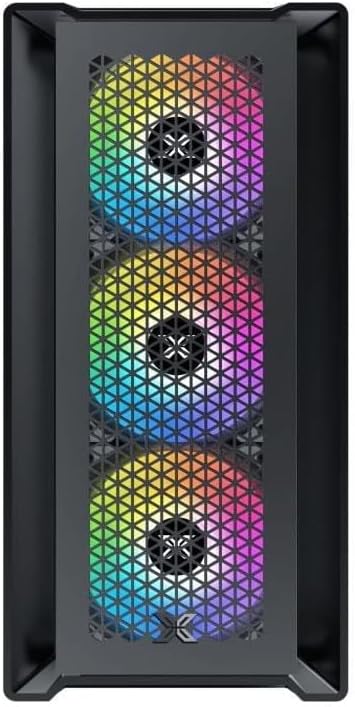
Abbildung 4.1: Vorderseite View. This image displays the front of the Xigmatek Lux M case, highlighting the metallic mesh panel with a triangular design and the three pre-installed 120mm fixed RGB fans.

Figure 4.2: Angled Top-Front View. This perspective shows the tempered glass side panel, offering a clear view of the interior, and the top panel with its I/O ports (USB, audio) and power button.
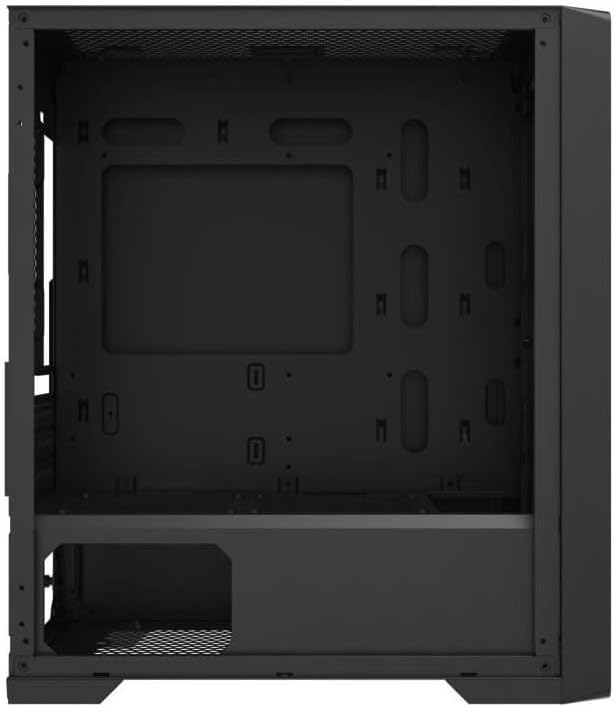
Abbildung 4.3: Innenraumaufteilung. The internal structure of the case, featuring the motherboard mounting tray, cutouts for cable management, and the power supply shroud at the bottom.
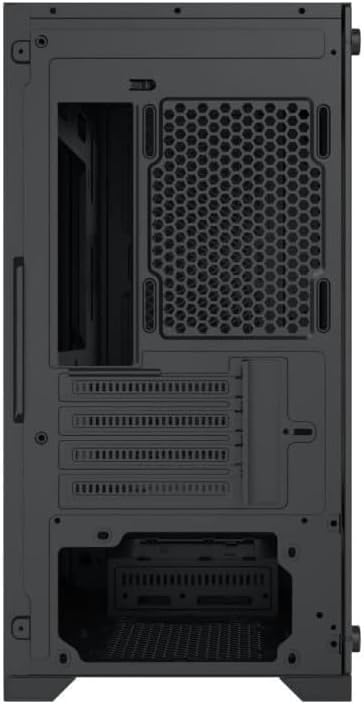
Abbildung 4.4: Rückseite View. This image illustrates the rear of the case, including the expansion slots for graphics cards and other add-in cards, the rear fan mounting area, and the power supply mounting bracket.
5. Einrichtung und Installation
Follow these steps to install your computer components into the Xigmatek Lux M case.
5.1. Vorbereitung des Falls
- Stellen Sie das Gehäuse auf eine ebene, stabile Oberfläche.
- Remove the tempered glass side panel by unscrewing the thumb screws and carefully lifting it off. Set it aside on a soft, non-abrasive surface.
- Remove the opposite steel side panel by unscrewing the thumb screws and sliding it backward.
5.2. Motherboard-Installation
The Lux M supports Micro-ATX and Mini-ITX motherboards.
- Installieren Sie die I/O-Blende (falls diese nicht bereits auf Ihrem Motherboard vorinstalliert ist) in die hintere Öffnung des Gehäuses.
- Align the motherboard with the pre-installed standoffs. Ensure all screw holes on the motherboard match the standoffs.
- Secure the motherboard using the provided motherboard screws. Do not overtighten.
5.3. Installation des Netzteils (PSU)
The PSU mounts at the rear bottom of the case.
- Slide the PSU into its designated compartment from the rear of the case.
- Align the PSU's screw holes with the holes on the case's rear panel.
- Befestigen Sie das Netzteil mit den mitgelieferten Schrauben.
5.4. Storage Drive Installation (2.5"/3.5" Drives)
The case supports 2x 2.5"/3.5" storage drives.
- Locate the drive cage beneath the PSU shroud or dedicated 2.5" mounting points behind the motherboard tray.
- For 3.5" HDDs, slide the drive into a drive tray (if applicable) and secure it with screws.
- For 2.5" SSDs, secure them directly to the mounting points using the provided screws.
5.5. Graphics Card (VGA) and Expansion Card Installation
Das Gehäuse unterstützt Grafikkarten mit einer Länge von bis zu 320 mm.
- Entfernen Sie die erforderlichen Erweiterungssteckplatzabdeckungen von der Rückseite des Gehäuses.
- Insert your graphics card or other expansion card into the appropriate PCIe slot on your motherboard.
- Secure the card to the case using the expansion slot screws.
5.6. Cooling System Installation (Optional)
The Lux M comes with 4x 120mm X24F fixed RGB fans. It supports additional cooling options.
- CPU-Kühler: Max height of 160mm. Install your CPU cooler according to its manufacturer's instructions.
- Kühlerhalterung: The case supports radiators of 360mm, 240mm, or 120mm. Refer to your radiator's manual for installation. Common mounting locations include the front and top panels.
5.7. Kabelmanagement
Nutzen Sie die Kabeldurchführungen und Befestigungspunkte hinter dem Mainboard-Tray, um die Kabel ordentlich zu verlegen. Dies verbessert die Luftzirkulation und die Optik.
5.8. Endmontage
- Once all components are installed and cables are managed, reattach the steel side panel and secure it with thumb screws.
- Carefully reattach the tempered glass side panel and secure it with thumb screws.
6. Bedienungsanleitung
After completing the installation, connect your peripherals (monitor, keyboard, mouse) and power cable to the PC. Press the power button located on the top panel of the case to start your system.
The pre-installed X24F RGB fans feature fixed RGB lighting, which will illuminate automatically upon system power-on. No additional software or controller is required for their basic operation.
Ensure that the case's ventilation is not obstructed to maintain optimal airflow and cooling performance.
7. Wartung
Regelmäßige Wartung trägt dazu bei, die Langlebigkeit und optimale Leistung Ihrer PC-Komponenten zu gewährleisten.
- Staubreinigung: Periodically clean dust filters (if present) and the interior of the case using compressed air or a soft brush. Dust accumulation can hinder airflow and lead to overheating.
- Außenreinigung: Wischen Sie die Außenflächen mit einem weichen, damp cloth. Avoid harsh chemicals that may damage the finish or tempered glass.
- Gehärtetes Glas: Clean the tempered glass panel with a glass cleaner and a microfiber cloth to avoid scratches and streaks.
8. Fehlerbehebung
Sollten während oder nach der Installation Probleme auftreten, beachten Sie bitte die folgenden gängigen Schritte zur Fehlerbehebung:
- Kein Strom:
- Stellen Sie sicher, dass das Netzkabel sowohl mit dem Netzteil als auch mit der Steckdose fest verbunden ist.
- Check that the PSU switch is in the 'ON' position.
- Überprüfen Sie, ob das Netzkabel des Frontpanels korrekt an den Frontpanel-Anschluss des Motherboards angeschlossen ist.
- Fans Not Spinning / RGB Not Lighting:
- Ensure all fan power cables are securely connected to the motherboard or a fan controller.
- For RGB, confirm that any necessary RGB headers are connected to the motherboard (though the included fans are fixed RGB and should light up with power).
- Keine Anzeigeausgabe:
- Verify that your monitor cable is connected to the graphics card (if installed) and not the motherboard's integrated graphics port.
- Setzen Sie die Grafikkarte wieder in ihren PCIe-Steckplatz ein.
- Überhitzung:
- Stellen Sie sicher, dass alle Gehäuselüfter laufen und richtig ausgerichtet sind, um einen optimalen Luftstrom (Zufuhr/Abfuhr) zu gewährleisten.
- Reinigen Sie alle Staubfilter und internen Bauteile.
- Verify that the CPU cooler is properly seated and making good contact with the CPU.
For more complex issues, consult your component manuals or seek assistance from Xigmatek support or a qualified technician.
9. Spezifikationen
| Besonderheit | Spezifikation |
|---|---|
| Marke | Xigmatek |
| Modellname | Lux M |
| Modellnummer | EN 48540-Norm |
| Gehäusetyp | Miniturm |
| Motherboard-Kompatibilität | Micro-ATX, Mini-ITX |
| Material | Tempered Glass (side panel), Metal (front panel) |
| Farbe | Schwarz |
| Vorinstallierte Lüfter | 4 x 120mm X24F Fixed RGB Fans |
| Kühlerhalterung | 360 mm, 240 mm, 120 mm |
| Maximale Höhe des CPU-Kühlers | 160 mm |
| Maximale VGA-Länge | 320 mm |
| Maximale Netzteillänge | 165 mm |
| Lagerplätze | 2x 2.5"/3.5" |
| Besondere Merkmale | RGB Lighting, Triangular Mesh Front Design |
10. Garantie und Support
Xigmatek products are manufactured to the highest quality standards. For warranty information and technical support, please refer to the warranty card included with your product or visit the official Xigmatek webBitte bewahren Sie Ihren Kaufbeleg für Garantieansprüche auf.
For further assistance, you may contact Xigmatek customer support through their official channels.