
PALOVUE iSound
PALOVUE Wireless Earbuds User Manual
Model: iSound
Your guide to setting up, operating, and maintaining your PALOVUE iSound Wireless Earbuds.
1. Einleitung
The PALOVUE iSound Wireless Earbuds are designed to provide a superior audio experience with advanced features for daily use. Equipped with Qualcomm CSR and Bluetooth 5.0 technology, these earbuds offer a stable and crystal-clear connection, supporting aptX HD sound quality. The CVC 8.0 Noise Cancelling technology with 4 built-in microphones ensures clear calls by effectively reducing ambient noise. Their ergonomic design and multiple ear-tip sizes provide a comfortable and secure fit for extended wear.
The iSound earbuds feature convenient one-step reconnection and intuitive one-touch operation. With up to 24 hours of playtime using the compact charging case, they are ideal for on-the-go listening. Further customization and control are available through the PALOVUE iSound APP.

Image: PALOVUE iSound Wireless Earbuds resting in their open charging case, showcasing ihr elegantes schwarzes Design.
2. Lieferumfang
Upon opening your PALOVUE iSound package, you will find the following components:
- Kabelloses Ladecase
- PALOVUE iSound Earbuds (Left and Right)
- Ear Tips (multiple sizes for a customizable fit)
- Ladekabel (USB-C)
- Schlüsselband
- Verpackungsbox
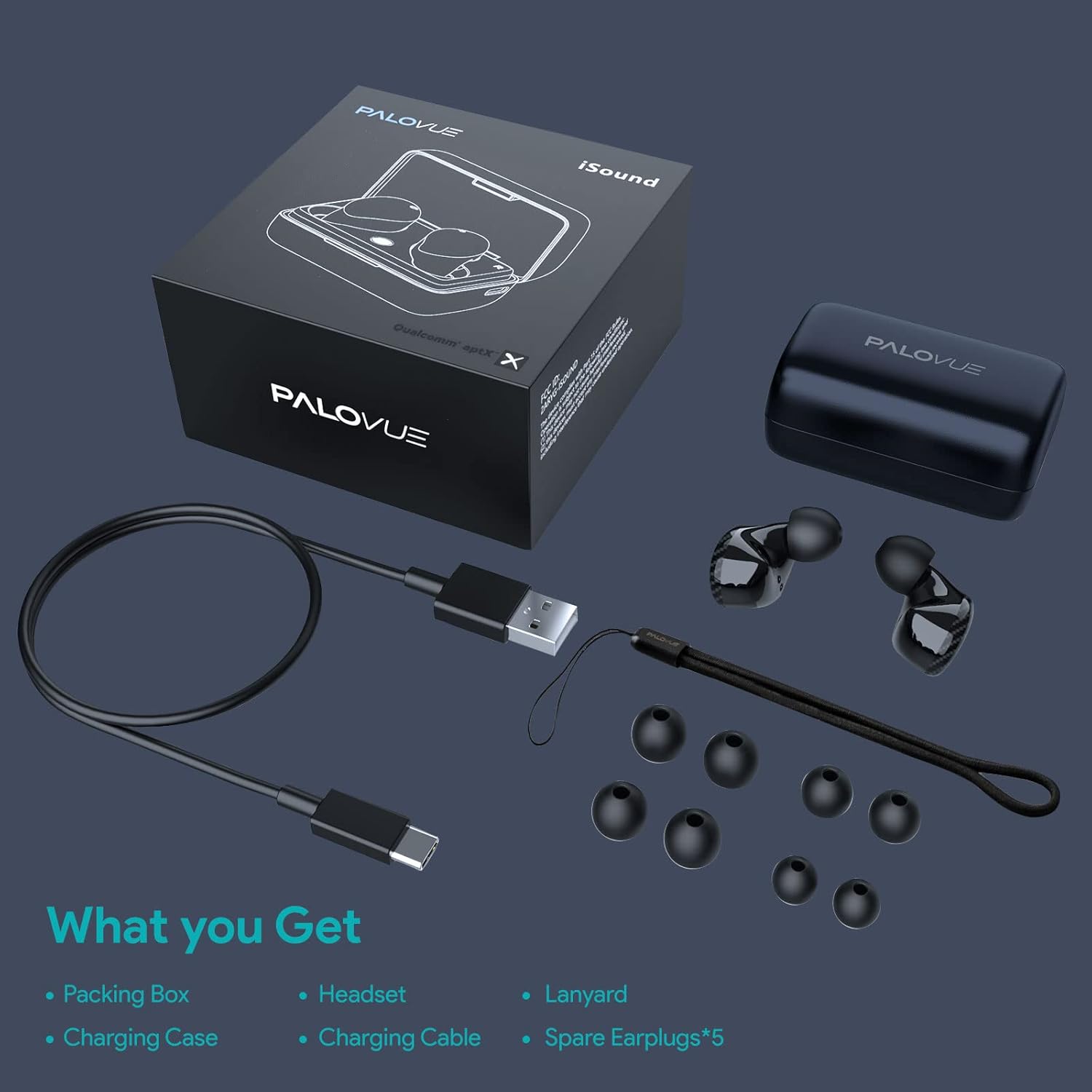
Image: A flat lay showing all items included in the PALOVUE iSound package: the packing box, charging case, earbuds, charging cable, lanyard, and five pairs of spare ear tips.
3. Installationsanleitung
3.1 Erstaufladung
Before first use, ensure both the earbuds and the charging case are fully charged. Place the earbuds into the charging case. Connect the provided USB-C cable to the charging case and a power source. The indicator lights on the case will show charging status. A full charge typically takes approximately 2 hours for the case.
3.2 Koppeln mit Ihrem Gerät
The PALOVUE iSound earbuds feature one-step reconnection for convenience.
- Öffnen Sie das Ladecase. Die Ohrhörer schalten sich automatisch ein und wechseln in den Kopplungsmodus.
- Öffnen Sie auf Ihrem Smartphone oder Bluetooth-fähigen Gerät die Bluetooth-Einstellungen.
- Suchen nach "PALOVUE iSound" in the list of available devices and select it to connect.
- Sobald die Verbindung hergestellt ist, hören Sie eine akustische Bestätigung, und die Ohrhörer sind einsatzbereit.
- Für die nächste Verwendung öffnen Sie einfach das Ladecase, und die Ohrhörer verbinden sich automatisch mit dem zuletzt gekoppelten Gerät.
Video: A detailed guide demonstrating the connection and operation of the PALOVUE iSound earbuds, including initial pairing steps and touch control functions.
4. Bedienung Ihrer Ohrhörer
4.1 Berührungssteuerung
The PALOVUE iSound earbuds feature intuitive touch controls on each earbud. The specific functions can be customized via the PALOVUE iSound APP.
| Aktion | Linker Ohrhörer | Rechter Ohrhörer |
|---|---|---|
| Einmaliges Tippen | Lautstärke verringern | Lautstärke erhöhen |
| Doppeltippen | Musik abspielen/pausieren, Anruf annehmen/beenden | Musik abspielen/pausieren, Anruf annehmen/beenden |
| Langes Drücken | Previous Song, Reject Call | Next Song, Reject Call |
Video: A short demonstration of the touch controls for the PALOVUE iSound earbuds, showing how to adjust volume, skip tracks, and manage calls.
4.2 Using the PALOVUE iSound APP
Enhance your experience by downloading the PALOVUE iSound APP. The app allows you to:
- Customize touch control functions (e.g., volume, track control, call management).
- Passen Sie die Equalizer-Einstellungen (EQ) für einen personalisierten Klang an.files (Male Vocals, Electronic, Jazz, Rock, Classical, Female Vocals, Original, Customize).
- Check battery levels of each earbud.
- Access device information and firmware updates.

Image: A woman wearing PALOVUE iSound earbuds, illustrating their comfortable fit and suitability for daily use.

Bild: Eine explodierte view diagram of the PALOVUE iSound earbud, detailing its internal structure and emphasizing Qualcomm AptX and Deep Bass sound capabilities.
5. Wartung
To ensure the longevity and optimal performance of your PALOVUE iSound Wireless Earbuds, follow these maintenance guidelines:
- Reinigung: Reinigen Sie die Ohrhörer und das Ladecase regelmäßig mit einem weichen, trockenen und fusselfreien Tuch. Verwenden Sie keine Scheuermittel oder Lösungsmittel. Entfernen Sie Ohrenschmalz oder Ablagerungen vorsichtig mit einer kleinen, weichen Bürste oder einem Wattestäbchen von den Ohrstöpseln und dem Lautsprechergitter.
- Lagerung: Bewahren Sie die Ohrhörer bei Nichtgebrauch im Ladecase auf, um sie vor Staub, Schmutz und Beschädigungen zu schützen.
- Batteriepflege: Avoid fully depleting the battery frequently. For long-term storage, charge the earbuds and case to about 50% to preserve battery health.
- Wasserbeständigkeit: The earbuds are rated IPX4 for water resistance, meaning they are protected against splashing water from any direction. They are designed for sports and can withstand sweat and light rain, but they are not suitable for swimming or submersion in water. Ensure the earbuds are dry before placing them back in the charging case.
Video: A short promotional video highlighting the compact size and powerful features of the iSound True Wireless Earbuds, including their IPX4 water resistance.
6. Fehlerbehebung
If you encounter issues with your PALOVUE iSound Wireless Earbuds, try the following solutions:
6.1 Probleme bei der Kopplung
- Ohrhörer stellen keine Verbindung her: Ensure Bluetooth is enabled on your device. Place earbuds back in the case, close it, wait a few seconds, then open it again to re-initiate pairing mode.
- Nur ein Ohrhörer funktioniert: Try placing both earbuds back in the charging case, closing the lid, and then reopening it. Ensure both earbuds have sufficient charge.
- Ohrhörer werden nicht in der Bluetooth-Liste angezeigt: Turn off Bluetooth on your device, then turn it back on. Restart your device if necessary.
6.2 Probleme mit der Tonqualität
- Niedrige Lautstärke: Increase the volume on both your earbuds (via touch control) and your connected device.
- Verzerrter Klang: Ensure the earbuds are within Bluetooth range of your device. Check for obstructions between the earbuds and your device.
- Schlechte Anrufqualität: Ensure the microphones are not obstructed. CVC 8.0 Noise Cancelling technology helps, but extreme noise environments can still affect clarity.
6.3 Battery and Charging Issues
- Ohrhörer laden nicht: Ensure the charging contacts on the earbuds and inside the case are clean and dry. Try a different charging cable or power adapter.
- Gehäuse lädt nicht: Prüfen Sie, ob das Ladekabel und die Stromquelle ordnungsgemäß funktionieren.
6.4 How to Reset Your Earbuds
Sollten weiterhin Probleme auftreten, kann ein Zurücksetzen auf die Werkseinstellungen diese möglicherweise beheben:
- Legen Sie beide Ohrhörer in das Ladeetui.
- Press and hold the reset button on the charging case (usually located inside or near the charging port) until the indicator lights on the earbuds flash red and green alternately.
- Release the button and wait until only the green light flashes, indicating the reset is complete.
- Remove the earbuds from the case and attempt to re-pair them with your device.
Refer to the "PALOVUE iSound Connection operation guide" video in the Setup section for a visual demonstration of the reset process.
7. Spezifikationen
| Besonderheit | Detail |
|---|---|
| Marke | PALOVUE |
| Modellname | I Klinge |
| Konnektivitätstechnologie | Kabellos (Bluetooth 5.0) |
| Drahtlose Kommunikationstechnologie | Bluetooth |
| Chipsatz | Qualcomm CSR QCC3020 |
| Lärmschutz | CVC 8.0 Noise Cancellation (for calls) |
| Mikrofone | 4-Mics |
| Steuerungstyp | Touch-Steuerung |
| Platzierung des Ohrs | Im Ohr |
| Formfaktor | Im Ohr |
| Akkulaufzeit (Ohrhörer) | Bis zu 6 Stunden (ca.) |
| Gesamtspielzeit (mit Hülle) | Bis zu 24 Stunden |
| Ladezeit (Case) | 2 Stunden |
| Bluetooth-Reichweite | Bis zu 10 Meter (32.8 Fuß) |
| Wasserbeständigkeit | IPX4 (spritzwassergeschützt) |
| Material | Silicone (Ear Tips) |
| Artikelgewicht | 1.76 Unzen |
| Kompatible Geräte | Smartphones, Tablets, Laptops, Desktop-Computer, Smart-TVs, Autoradiosysteme |
8. Garantie und Support
PALOVUE products typically come with a manufacturer's warranty. Please refer to the warranty card included in your product packaging for specific terms and conditions, including warranty period and coverage details. For technical support, troubleshooting assistance, or warranty claims, please contact PALOVUE customer service through their official webWebsite oder die in Ihrer Produktdokumentation angegebenen Kontaktinformationen.
You can also visit the official PALOVUE store on Amazon for more information and support: PALOVUE Amazon Store.
Zugehörige Dokumente - I Klinge
 |
PALOVUE iSound Wireless Earbuds User Guide Official user guide for PALOVUE iSound wireless earbuds, covering setup, pairing, controls, charging, troubleshooting, specifications, and regulatory information. |
 |
Power Q25 Pro Wasserdichte kabellose Sport-Ohrhörer – Benutzerhandbuch Ausführliche Bedienungsanleitung für die wasserdichten, kabellosen Sport-Ohrhörer Power Q25 Pro. Erfahren Sie mehr über Funktionen, Bluetooth-Kopplung, Aufladen, Produktspezifikationen, Sicherheitshinweise und die Behebung häufiger Probleme. |
 |
Denon AH-GC30 Wireless Noise Cancelling Headphones User Manual Comprehensive user manual for the Denon AH-GC30 wireless over-ear headphones. Learn about setup, Bluetooth pairing, music playback, making and receiving calls, noise cancelling features, ambient sound mixing, USB connectivity, troubleshooting, and technical specifications. |
 |
Häufig gestellte Fragen zu den kabellosen Ohrhörern I11: Reichweite, Konnektivität und Funktionen Häufig gestellte Fragen zu den kabellosen Bluetooth-Ohrhörern I11, die Themen wie Bluetooth-Reichweite, Kopplung mit neuen Geräten, Eignung für Fitness, iPhone-Kompatibilität, Akkulaufzeit, Wasserdichtigkeit (IPX7) und Ohrstöpselgrößen abdecken. |
 |
PALOVUE SportSound Benutzerhandbuch Dieses Benutzerhandbuch bietet umfassende Anweisungen für die kabellosen PALOVUE SportSound Ohrhörer und deckt alle Produktfunktionen ab.viewKoppeln, Tragen, Laden, App-Nutzung, Fehlerbehebung und FCC-Warnhinweise. Verfügbar in mehreren Sprachen. |
 |
Avantree BTHS-AS90P High-End-Wireless-ANC-Kopfhörer – Benutzerhandbuch Dieses Benutzerhandbuch bietet umfassende Anweisungen für die Avantree BTHS-AS90P High-End-Wireless-ANC-Kopfhörer und deckt das Produkt über 10000 Funktionen ab.view, Spezifikationen, grundlegende Bedienung, LED-Anzeigen, Geräuschunterdrückung, Bluetooth-Konnektivität, Qualcomm aptX-Funktionen, kabelgebundene Nutzung, Laden, Kopplungsverlauf und Fehlerbehebung. |
Ask a question about this manual
Ask about setup, troubleshooting, compatibility, parts, safety, or missing instructions. Manuals+ will review the question and use this page’s manual context to help answer it.