
Wichtige Sicherheitsinformationen
Please read this manual carefully before assembly and use to ensure safe operation and to prevent damage to the product or injury to yourself.
- Die maximale Tragfähigkeit darf nicht überschritten werden. 100 kgÜberlastung kann zu Instabilität und Schäden führen.
- Ensure all cables are properly managed and secured to prevent tripping hazards or damage during height adjustments.
- Halten Sie Kinder und Haustiere während des Betriebs vom Schreibtisch fern.
- Do not place hands or other body parts near moving parts of the desk frame during height adjustment.
- Only use the desk for its intended purpose as a workstation.
- Überprüfen Sie regelmäßig alle Schrauben und Bolzen, um sicherzustellen, dass sie fest angezogen sind.
Produkt überview
The FLEXISPOT E1B Electric Standing Desk is designed to provide a versatile and ergonomic workspace. It features a robust dual-motor system for smooth height adjustments and a durable tabletop.
Hauptmerkmale:
- Doppelmotorsystem: Ensures stable and efficient height adjustment at 25 mm/s.
- Höhenbereich: Adjustable from 70 cm to 119 cm to suit various user heights and work preferences.
- Tragfähigkeit: Supports up to 100 kg, accommodating multiple monitors and office equipment.
- Speichervoreinstellungen: Control panel with memory functions for saving preferred height settings.
- High-Quality Tabletop: 160x80cm black tabletop, made in the EU from FSC-certified MDF with scratch-resistant high-pressure laminate.
Packungsinhalt
Before starting assembly, verify that all components listed below are present and undamaged. If any parts are missing or damaged, please contact customer support.
- Desk Frame (E1B) components (legs, feet, crossbar, motor, control box)
- Tabletop (DT1608-BLACK-EU18)
- Control Panel with Memory Functions
- Netzteil und Kabel
- Montagezubehör (Schrauben, Bolzen, Inbusschlüssel)
- Kabelmanagement-Zubehör
- Bedienungsanleitung
Aufbau- und Montageanleitung
Assembly is designed to be straightforward. It is recommended to assemble the desk on a soft, clean surface to prevent scratches. Two people are recommended for easier assembly.
Schritt 1: Komponenten auspacken
Nehmen Sie alle Teile vorsichtig aus der Verpackung und legen Sie sie aus. Vergleichen Sie sie mit der Packungsinhaltsliste.
Schritt 2: Den Schreibtischrahmen zusammenbauen
- Attach the lifting columns to the crossbar using the provided screws.
- Befestigen Sie die Tischfüße an der Unterseite der Hubsäulen.
- Mount the control box to the designated area on the frame.
- Connect the motor cables from the lifting columns to the control box.
- Verbinden Sie das Kabel des Bedienfelds mit dem Steuergerät.

Image: The FLEXISPOT E1B desk frame in black and white, illustrating the height adjustment range from 70cm to 119cm, highlighting the dual motor system, 25mm/s adjustment speed, and low noise operation (less than 50dB).
Schritt 3: Tischplatte anbringen
Carefully place the tabletop upside down on a soft surface. Position the assembled desk frame onto the tabletop, aligning the pre-drilled holes. Secure the tabletop to the frame using the provided screws.

Image: A FLEXISPOT desk with a black tabletop, featuring a laptop, books, and a pen holder, demonstrating a functional and organized workspace.
Step 4: Connect Power and Cable Management
Connect the power adapter to the control box and then to a power outlet. Use the included cable management accessories to organize and secure all cables, preventing them from interfering with the desk's movement.
Bedienungsanleitung
Systemsteuerung überview:
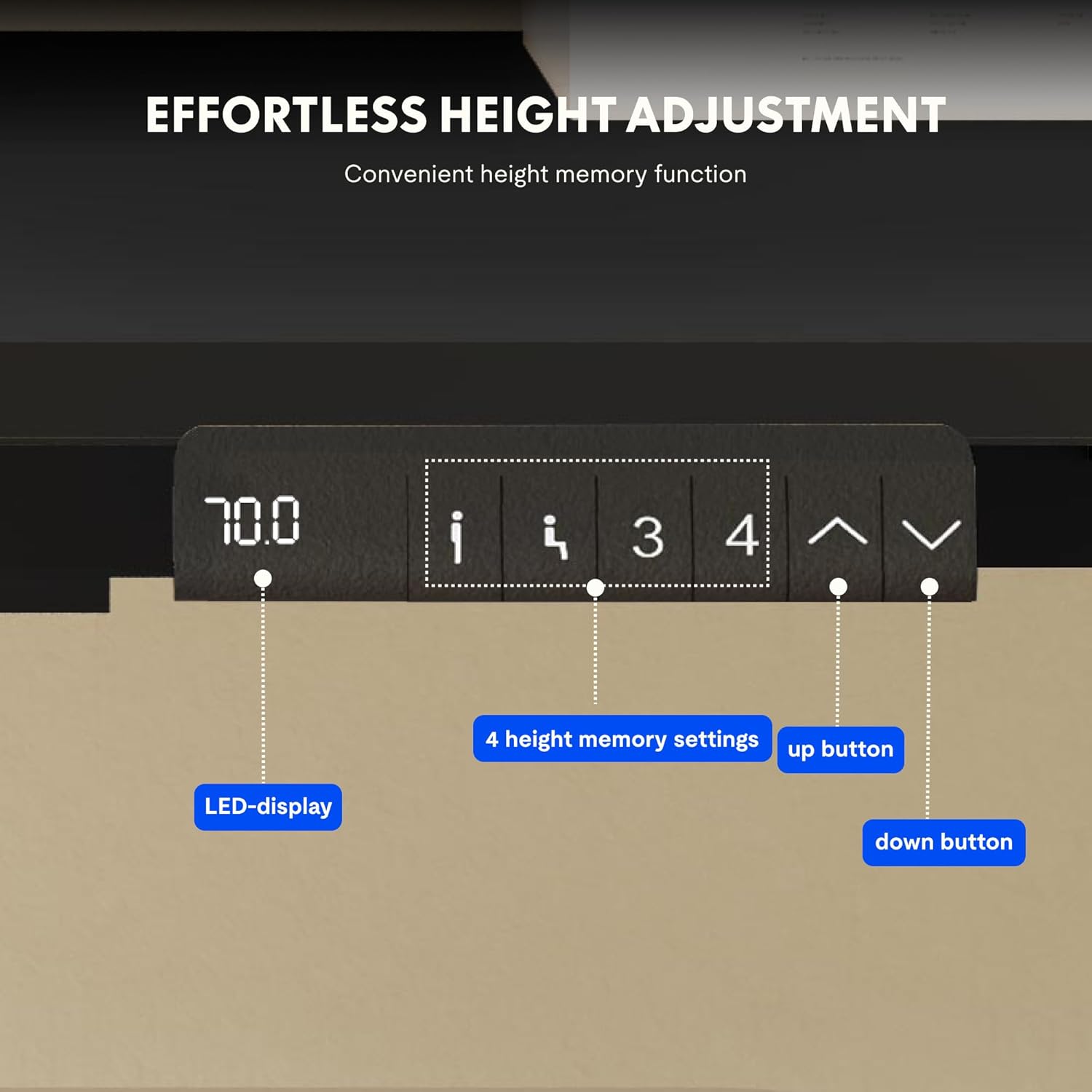
Image: Close-up of the FLEXISPOT desk control panel, showing the LED display for current height, up and down arrow buttons for manual adjustment, and four numbered buttons for saving and recalling height memory presets.
Manual Height Adjustment:
- Halten Sie die Pfeil nach oben (^) Knopf zum Anheben des Schreibtisches.
- Halten Sie die Pfeil nach unten (v) Knopf zum Absenken des Schreibtisches.
- Lassen Sie den Knopf in der gewünschten Höhe los. Das LED-Display zeigt die aktuelle Höhe an.
Voreinstellungen für Speicherplätze festlegen:
- Stellen Sie den Schreibtisch mithilfe der Auf-/Ab-Pfeile auf die gewünschte Höhe ein.
- Drücken Sie die "M" or "SATZ" Schaltfläche (falls verfügbar, andernfalls mit Schritt 3 fortfahren).
- Drücken Sie eine der nummerierten Speichertasten (1, 2, 3 oder 4) within 3 seconds. The display will show "S-" followed by the number, indicating the height is saved.
Voreinstellungen abrufen:
Simply press the desired numbered memory button (1, 2, 3 oder 4Der Schreibtisch fährt automatisch auf die gespeicherte Höhe.
Reset-Funktion:
If the desk encounters an error or does not move smoothly, a reset may be required. Press and hold the "Runter" button until the desk reaches its lowest position, then release and press it again for 5-10 seconds until the display shows "RST" or "E-1" and then returns to the lowest height. The desk will then reset to its factory lowest position.
Wartung
- Reinigung: Wischen Sie die Schreibtischoberfläche und den Rahmen mit einem weichen, fusselfreien Tuch ab.amp Tuch. Vermeiden Sie Scheuermittel oder aggressive Chemikalien.
- Inspektion: Überprüfen Sie regelmäßig alle Schrauben und Verbindungen auf festen Sitz. Ziehen Sie sie gegebenenfalls nach.
- Kabelmanagement: Ensure cables remain tidy and do not obstruct the desk's movement.
- Gewichtsverteilung: Distribute weight evenly on the tabletop to prevent strain on the motors and frame.
Fehlerbehebung
| Problem | Mögliche Ursache | Lösung |
|---|---|---|
| Der Schreibtisch bewegt sich nicht. | Power cable disconnected; control box error; overloaded desk. | Check power connections. Perform a reset (see Operating Instructions). Reduce weight on the desk. |
| Der Schreibtisch wackelt ungleichmäßig oder macht ungewöhnliche Geräusche. | Loose connections; obstruction; uneven weight distribution. | Check all screws and connections. Remove any obstructions. Redistribute weight evenly. Perform a reset. |
| Auf dem Display wird ein Fehlercode angezeigt (z. B. E01, E02). | Interner Systemfehler. | Perform a reset. If the error persists, contact customer support. |
| Speichervoreinstellungen funktionieren nicht. | Voreinstellungen wurden nicht korrekt gespeichert. | Re-save the memory presets following the instructions. |
Technische Daten
| Besonderheit | Detail |
|---|---|
| Marke | FLEXISPOT |
| Modellnummer | E1B+DT1608-BLACK-EU18 |
| Abmessungen der Tischplatte (L x B) | 160 cm x 80 cm |
| Höhenverstellbereich | 70 cm - 119 cm |
| Tragfähigkeit | 100 kg |
| Anpassungsgeschwindigkeit | 25 mm/s |
| Motortyp | Doppelmotoren |
| Tischplattenmaterial | FSC-certified MDF with high-pressure laminate |
| Rahmenmaterial | Legierter Stahl |
| Farbe | Black Tabletop + Black Frame |
Garantie und Support
FLEXISPOT products are manufactured to high-quality standards. For warranty information and customer support, please refer to the official FLEXISPOT webWebsite oder wenden Sie sich an Ihren Händler.
- Garantie: Specific warranty terms may vary by region and product. Please check your purchase documentation or the manufacturer's webWebsite für Details.
- Kundendienst: For technical assistance, missing parts, or operational questions, please visit the FLEXISPOT Markenshop oder kontaktieren Sie deren offizielle Supportkanäle.