
DOOMAY 5293UK
DOOMAY Digitaler Wecker – Benutzerhandbuch
Modell: 5293UK
Marke: DOOMAY
1. Einleitung
Vielen Dank für Ihren Einkauf.asing the DOOMAY Digital Alarm Clock. This compact and versatile alarm clock is designed for convenience and readability, featuring an adjustable LCD display, snooze function, weekend mode, and temperature display. This manual will guide you through the setup, operation, and maintenance of your new alarm clock to ensure optimal performance.
2. Sicherheitshinweise
- Halten Sie das Gerät von Wasser und Umgebungen mit hoher Luftfeuchtigkeit fern.
- Setzen Sie die Uhr weder direkter Sonneneinstrahlung noch extremen Temperaturen aus.
- Versuchen Sie nicht, das Gerät selbst zu zerlegen oder zu reparieren. Wenden Sie sich zur Reparatur an qualifiziertes Fachpersonal.
- Verwenden Sie ausschließlich den angegebenen Batterietyp (2 x AAA-Batterien).
- Wenn das Gerät längere Zeit nicht verwendet wird, entfernen Sie die Batterien, um ein Auslaufen zu verhindern.
- Bewahren Sie Batterien außerhalb der Reichweite von Kindern auf.
3. Packungsinhalt
- DOOMAY Digital Alarm Clock (1 unit)
- AAA-Batterien (2 Stück)
- Benutzerhandbuch (dieses Dokument)
4. Produktüberschreitungview
Familiarize yourself with the components and controls of your DOOMAY Digital Alarm Clock.
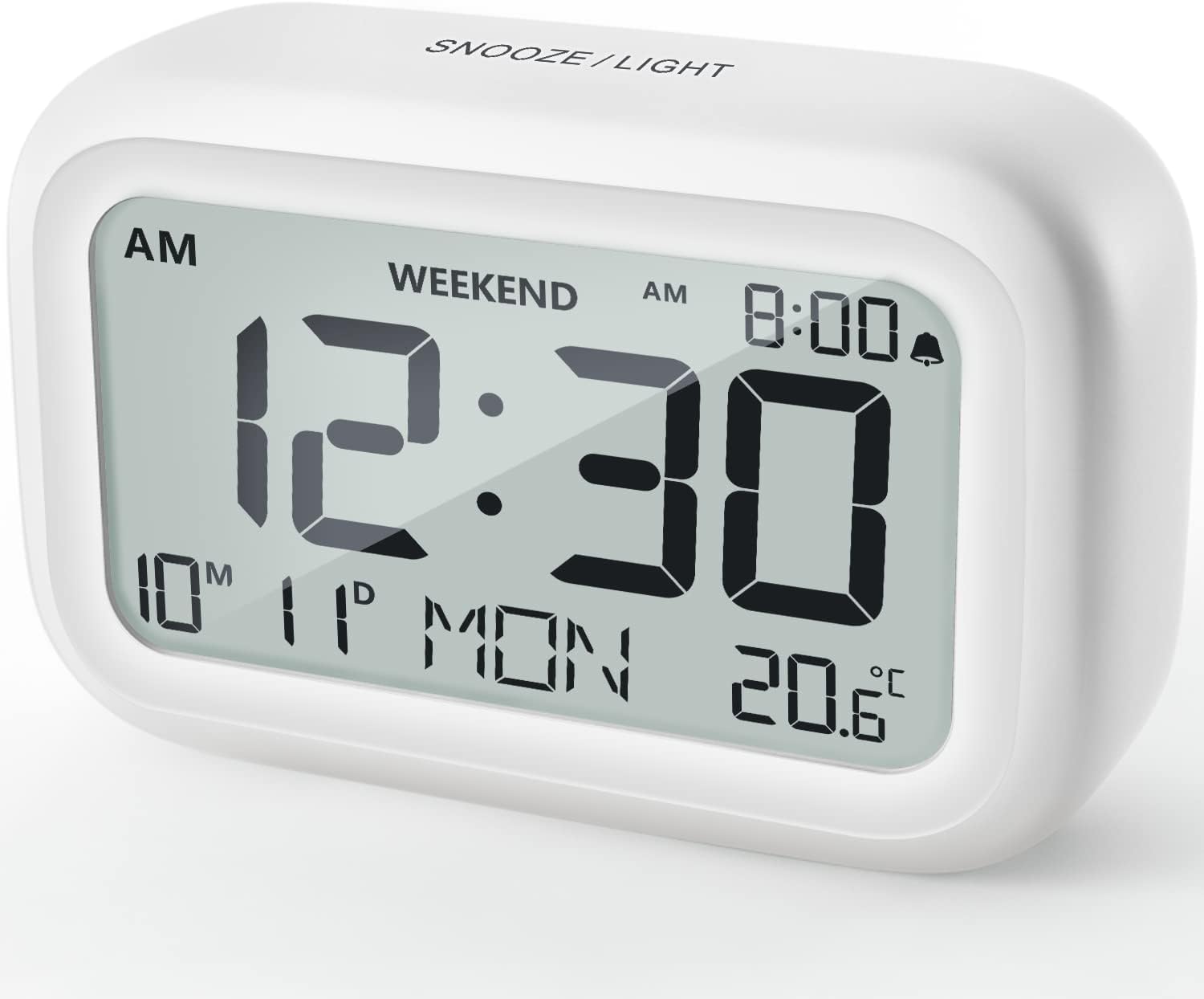
Abbildung 4.1: Vorderseite View des Weckers
This image displays the front of the DOOMAY Digital Alarm Clock, highlighting its large, clear LCD screen. The screen shows the current time (12:30), AM indicator, day of the week (MON), date (10th month, 11th day), and indoor temperature (20.6°C). The top of the clock has a "SNOOZE/LIGHT" button.

Abbildung 4.2: Hauptmerkmale im Überblickview
This diagram illustrates the main functionalities of the alarm clock: 12/24H time display, calendar, alarm setting, adjustable volume, snooze function, backlight, weekend mode, and temperature display. The clock itself is shown on a wooden table, displaying 7:00 AM, Friday, and 28.8 degrees.

Abbildung 4.3: Bedienelemente auf der Rückseite
This image shows the rear of the alarm clock, detailing the various control buttons and the battery compartment. Buttons are clearly labeled for: 12/24H time format, Alarm setting, Weekend mode, Date setting, Minus (-) for decreasing values, Plus (+) for increasing values, and °C/°F for temperature unit selection. The battery compartment is visible, designed for two AAA batteries.
Bedienelemente und Anzeige:
- LCD Anzeige: Shows time, date, day of week, AM/PM indicator, alarm status, and temperature.
- Schlummer-/Lichttaste (oben): Activates snooze function during alarm; illuminates backlight for 5 seconds.
- 12/24H Button (Back): Schaltet zwischen 12-Stunden- und 24-Stunden-Zeitformat um.
- ALARM Button (Back): Wechselt in den Alarmeinstellungsmodus.
- WEEKEND Button (Back): Activates/deactivates weekend mode.
- DATE Button (Back): Wechselt in den Datumseinstellungsmodus.
- MINUS (-) Button (Back): Decreases values during setting; adjusts alarm volume.
- PLUS (+) Button (Back): Increases values during setting; adjusts alarm volume.
- °C/°F Button (Back): Schaltet zwischen Celsius und Fahrenheit als Temperatureinheiten um.
5. Einrichtung
5.1 Einlegen der Batterie
- Öffnen Sie die Abdeckung des Batteriefachs auf der Rückseite der Uhr.
- Legen Sie zwei (2) AAA-Batterien ein und achten Sie dabei auf die richtige Polarität (+ und -).
- Schließen Sie den Batteriefachdeckel fest.
- The display will light up, and the clock will be ready for initial setup. A low battery symbol will appear when batteries need replacement. If the display shows "8888" flashing, it's also an indication to change batteries.
5.2 Erste Zeit- und Datumseinstellung
- Zeit einstellen:
- Drücken Sie die 12/24 Uhr button to switch between 12-hour (with AM/PM) and 24-hour formats.
- Halten Sie die 12/24 Uhr Die Taste 3 Sekunden lang gedrückt halten, um in den Zeiteinstellungsmodus zu gelangen. Die Stundenziffern blinken.
- Verwenden Sie die + or - Tasten zum Einstellen der Stunde.
- Drücken Sie die 12/24 Uhr Drücken Sie die Taste erneut, um die Stunde zu bestätigen und zur Minuteneinstellung zu wechseln. Die Minutenziffern blinken.
- Verwenden Sie die + or - Tasten zum Einstellen der Minuten.
- Drücken Sie die 12/24 Uhr button one more time to exit time setting.
- Datum einstellen:
- Halten Sie die DATUM button for 3 seconds to enter date setting mode. The year digits will flash.
- Verwenden Sie die + or - Tasten, um das Jahr einzustellen.
- Drücken Sie die DATUM button again to confirm the year and move to month setting.
- Adjust the month using + or -.
- Drücken DATUM again to move to day setting.
- Passen Sie den Tag an mit + or -.
- Drücken DATUM one more time to exit date setting. The day of the week will automatically adjust.
6. Bedienungsanleitung
6.1 Wecker stellen
- Halten Sie die ALARM Die Taste 3 Sekunden lang gedrückt halten. Die Weckzeitanzeige blinkt.
- Verwenden Sie die + or - Tasten zum Einstellen der gewünschten Weckzeit.
- Drücken Sie die ALARM Drücken Sie die Taste erneut, um die Stunde zu bestätigen und zur Minuteneinstellung zu wechseln. Die Minutenanzeige des Alarms blinkt.
- Verwenden Sie die + or - Tasten zum Einstellen der gewünschten Alarmminute.
- Drücken Sie die ALARM button one more time to exit alarm setting. The alarm icon (bell symbol) will appear on the display, indicating the alarm is active.
- To turn the alarm ON/OFF, simply press the ALARM button once. The bell icon will appear/disappear.
6.2 Schlummerfunktion
When the alarm sounds, gently tap the large SNOOZE / LICHT button on the top of the clock. The alarm will pause for 9 minutes and then sound again. This can be repeated multiple times.

Figure 6.1: Activating Snooze
This image demonstrates how to activate the snooze function by touching the top of the alarm clock. The text highlights that this action provides an additional 9 minutes of sleep after the alarm sounds.
To completely turn off the alarm after it sounds (without snoozing), press any button on the back of the clock.
6.3 Weekend Mode
The weekend mode allows the alarm to sound only from Monday to Friday, preventing it from ringing on Saturday and Sunday.

Figure 6.2: Weekend Mode Activated
This image shows the alarm clock display with the "WEEKEND" indicator prominently displayed, signifying that the weekend mode is active. The accompanying text clarifies that in this mode, the alarm will only sound from Monday to Friday, ensuring undisturbed weekends.
- To activate Weekend Mode, press the WOCHENENDE button once. The "WEEKEND" indicator will appear on the display.
- To deactivate Weekend Mode, press the WOCHENENDE button again. The "WEEKEND" indicator will disappear.
6.4 Adjustable Alarm Volume
The alarm clock offers two volume levels: Low (70 dB) and High (85 dB).

Figure 6.3: Alarm Volume Levels
This image visually represents the two available alarm volume settings: L01 (85 dB) for a louder alarm and L02 (70 dB) for a softer alarm. The alarm clock is shown in a bedroom setting, emphasizing its use as a bedside device.
- Drücken Sie im normalen Zeitanzeigemodus die Taste + or - buttons to cycle between the two alarm volume levels. The current volume level will be briefly displayed.
6.5 Hintergrundbeleuchtungsfunktion
To illuminate the display in low light conditions, simply tap the SNOOZE / LICHT button on the top of the clock. The backlight will activate for approximately 5 seconds, providing clear visibility of the time and other information.
Figure 6.4: Backlight in Action
This image provides a side-by-side comparison of the alarm clock's display. On the left, the clock is shown in a well-lit environment. On the right, the same clock is shown in a dark setting with its 5-second backlight activated, demonstrating how the display becomes clearly visible at night.
6.6 Temperaturanzeige
The clock displays the indoor temperature. You can switch between Celsius (°C) and Fahrenheit (°F) units.
- To change the temperature unit, press the ° C / ° F Knopf auf der Rückseite der Uhr.
7. Wartung
7.1 Reinigung
Wischen Sie die Uhr mit einem weichen, trockenen Tuch ab. Verwenden Sie keine Scheuermittel oder Lösungsmittel, da diese die Oberfläche beschädigen können.
7.2 Batteriewechsel
When the low battery indicator appears on the display, or if the display shows "8888" flashing, it is time to replace the batteries. Follow the steps in Section 5.1 Battery Installation to replace the two AAA batteries.
8. Fehlerbehebung
| Problem | Mögliche Ursache | Lösung |
|---|---|---|
| Das Display ist leer oder dunkel. | Die Batterien sind leer oder falsch eingelegt. | Ersetzen Sie die Batterien durch neue AAA-Batterien und achten Sie dabei auf die richtige Polarität. |
| Der Alarm ertönt nicht. | Alarm is not activated, or Weekend Mode is ON. | Ensure the alarm icon is displayed. Check if Weekend Mode is active and deactivate if necessary. |
| Die Schlummerfunktion funktioniert nicht. | Not tapping the SNOOZE/LIGHT button correctly. | Ensure a firm, brief tap on the top SNOOZE/LIGHT button when the alarm is sounding. |
| Datum/Uhrzeit sind falsch. | Not set correctly or batteries were removed. | Refer to Section 5.2 Initial Time and Date Setting to re-set. |
9. Spezifikationen
| Besonderheit | Detail |
|---|---|
| Modellnummer | 5293UK |
| Marke | DOOMAY |
| Abmessungen (L x B x H) | 10.9 x 3.81 x 6.9 cm (4.29 x 1.5 x 2.72 Zoll) |
| Gewicht | 127.01 Gramm (0.28 Pfund) |
| Material | Acrylnitril-Butadien-Styrol (ABS) |
| Stromquelle | 2 x AAA-Batterien (im Lieferumfang enthalten) |
| Anzeigetyp | Digital LCD |
| Alarmlautstärke | Low (70 dB), High (85 dB) |
| Schlummerdauer | 9 Мinuten |
| Dauer der Hintergrundbeleuchtung | 5 Sekunden |
| Temperatureinheiten | Celsius (°C) / Fahrenheit (°F) |
10. Garantie und Support
DOOMAY products are designed for reliability and performance. For any questions, technical support, or warranty claims, please contact your retailer or visit the official DOOMAY webHilfe finden Sie auf unserer Website. Bitte bewahren Sie Ihren Kaufbeleg für Garantiezwecke auf.
For further information, you may visit the brand's Amazon store page: DOOMAY Store on Amazon
Ask a question about this manual
Ask about setup, troubleshooting, compatibility, parts, safety, or missing instructions. Manuals+ will review the question and use this page’s manual context to help answer it.