
1. Produktüberschreitungview
The Warrior 18V Cordless 3/8 Inch Drill/Driver Kit is designed for various drilling and driving tasks around the home and workshop. This versatile tool features a variable speed trigger, an electric brake, and 20 torque clutch settings for precise control. A keyless chuck allows for quick and easy bit changes, and a built-in LED light illuminates the work area for improved visibility in dark corners. The included 18V Lithium-Ion battery is interchangeable with other 18 Volt Warrior tools, offering convenience and flexibility.
Hauptmerkmale:
- Variable speed, reversible operation
- Electric brake for immediate stopping
- 20 torque clutch settings for diverse applications
- Keyless chuck for quick bit changes
- Integrated LED light for enhanced visibility
- 18 Volt Lithium-Ion battery, interchangeable with other Warrior 18V tools
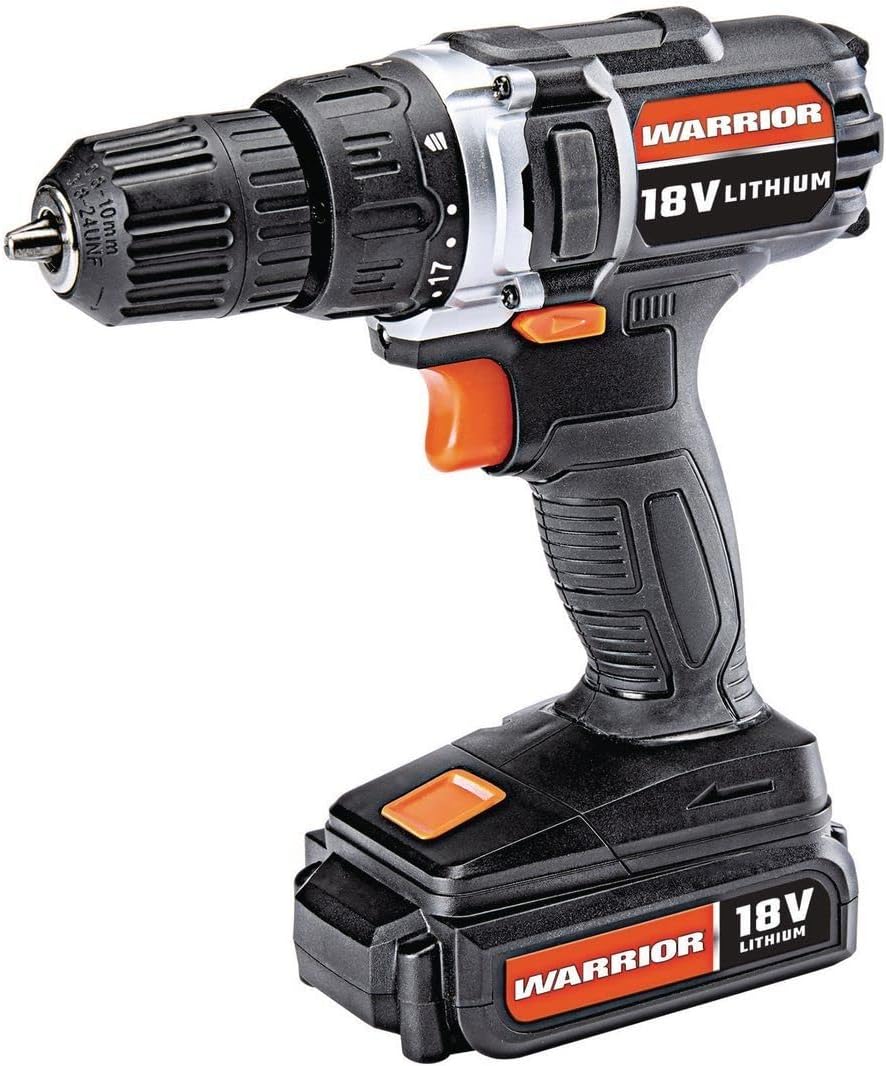
Figure 1: The Warrior 18V Cordless 3/8 Inch Drill/Driver Kit, showcasing sein kompaktes Design und seine wichtigsten Funktionen.
2. Einrichtung
2.1 Akkuladung und Installation
- Laden des Akkus: Connect the provided barrel charger to the charging port located on the battery pack. Plug the charger into a standard electrical outlet. The indicator light on the charger will show the charging status (e.g., red for charging, green for fully charged). Ensure the battery is fully charged before first use.
- Einsetzen der Batterie: Align the battery pack with the base of the drill handle. Slide the battery into place until it clicks securely. Ensure it is firmly seated to prevent accidental detachment during operation.
- Batterie entfernen: Press the battery release buttons (typically on the sides of the battery pack) and slide the battery out of the drill handle.
2.2 Einsetzen und Entfernen von Bohrern
- Öffne den Chuck: Rotate the front collar of the keyless chuck counter-clockwise until the jaws are wide enough to accept the desired drill bit or driver bit.
- Setzen Sie das Bit ein: Insert the shank of the drill bit or driver bit into the chuck jaws. Ensure the bit is centered and inserted as far as possible without touching the chuck body.
- Spannfutter festziehen: Rotate the front collar of the chuck clockwise until the jaws firmly grip the bit. For maximum grip, give it an extra twist by hand.
- Entfernen Sie das Bit: Rotate the front collar of the chuck counter-clockwise to loosen the jaws and remove the bit.

Abbildung 2: Überview of the drill's features, including the 20 clutch settings, LED light, variable speed, and lightweight design.
3. Bedienungsanleitung
3.1 Ein-/Ausschalten und Drehzahlregelung
- To start the drill, press the trigger switch. The speed of the drill is controlled by the amount of pressure applied to the trigger; pressing it further increases the speed.
- To stop the drill, release the trigger switch. The electric brake will engage, stopping the chuck rotation quickly.
3.2 Vorwärts-/Rückwärtsdrehung
- Der Vorwärts-/Rückwärts-Wahlschalter befindet sich oberhalb des Abzugs.
- Den Schalter nach links schieben für Vorwärtsdrehung (zum Bohren und Eindrehen von Schrauben).
- Den Schalter nach rechts schieben, um die Drehrichtung umzukehren (zum Entfernen von Schrauben oder Herausdrehen von Bohrern).
- Wenn sich der Schalter in der Mittelstellung befindet, ist der Auslöser verriegelt, wodurch ein versehentliches Einschalten verhindert wird.
3.3 Torque Clutch Settings
- The torque clutch ring is located behind the chuck. It has 20 numbered settings and a drill symbol.
- Rotate the ring to select the desired torque setting. Lower numbers provide less torque, suitable for smaller screws and softer materials to prevent over-driving or stripping. Higher numbers provide more torque for larger screws and harder materials.
- For drilling applications, select the drill symbol setting for maximum torque.
3.4 LED-Arbeitsleuchte
- The integrated LED work light automatically illuminates when the trigger is pressed, providing light to the work surface.

Figure 3: The Warrior 18V Cordless Drill in use, demonstrating its application for household tasks like installing a grab bar.
4. Wartung
4.1 Allgemeine Reinigung
- Keep the tool's air vents clean and free of debris to ensure proper motor cooling.
- Wischen Sie das Werkzeug mit einem sauberen, trockenen Tuch ab.amp Tuch. Verwenden Sie keine scharfen Chemikalien oder Scheuermittel.
- Regularly inspect the chuck jaws for wear and clean any accumulated dust or debris.
4.2 Pflege und Lagerung der Batterie
- Lagern Sie die Batterie an einem kühlen, trockenen Ort, geschützt vor direkter Sonneneinstrahlung und extremen Temperaturen.
- Für die Langzeitlagerung wird empfohlen, den Akku auf etwa 50 % seiner Kapazität aufzuladen.
- Avoid completely draining the battery before recharging, as this can reduce its lifespan.
5. Fehlerbehebung
5.1 Drill Does Not Operate
- Stellen Sie sicher, dass die Batterie vollständig geladen und richtig eingesetzt ist.
- Prüfen Sie, ob sich der Vorwärts-/Rückwärts-Wahlschalter nicht in der mittleren (verriegelten) Position befindet.
- Verify that the charger is disconnected from the battery when attempting to operate the drill.
5.2 Reduced Power or Performance
- Der Akku ist möglicherweise schwach. Laden Sie den Akku auf.
- The torque clutch setting may be too low for the task. Adjust to a higher setting or the drill mode.
- Ensure the drill bit is sharp and appropriate for the material being worked on.
6. Spezifikationen
| Besonderheit | Spezifikation |
|---|---|
| Marke | Krieger |
| Modellnummer | Warior-XXX |
| Stromquelle | Batteriebetrieben |
| Bandtage | 18 Volt |
| Batteriezellentyp | Lithium-Ionen |
| Maximale Drehzahl | 900 U/min |
| Drehmomenteinstellungen | 20 Kupplungseinstellungen |
| Spannfuttertyp | Schlüsselloses Spannfutter |
| Bohrleistung Holz | 1 Zoll |
| Artikelgewicht | 2.47 Pfund |
| Material | Plastik |
| Besondere Merkmale | Variable Geschwindigkeit, LED-Beleuchtung |
| UPC | 798993496886 |
7. Garantie und Support
Specific warranty information and customer support contact details were not provided in the product data. Please refer to the product packaging or the manufacturer's official webAuf dieser Website finden Sie die aktuellsten Garantiebedingungen und Supportoptionen.