
1. Einleitung
Vielen Dank für Ihren Einkauf.asing the Inscabin D2/D4 Internet Radio. This device offers a versatile audio experience, combining access to thousands of internet radio stations with modern connectivity options like Bluetooth and Spotify Connect. Please read this manual carefully to ensure proper setup and operation of your new radio.
2. Sicherheitshinweise
- Um Brände oder Stromschläge zu vermeiden, setzen Sie das Gerät weder Regen noch Feuchtigkeit aus.
- Öffnen Sie nicht das casing. Alle Wartungsarbeiten sind qualifiziertem Personal zu überlassen.
- Sorgen Sie für ausreichende Belüftung rund um das Gerät. Blockieren Sie keine Belüftungsöffnungen.
- Verwenden Sie nur das mit dem Gerät mitgelieferte Netzteil.
- Das Gerät sollte nicht direkter Sonneneinstrahlung, Wärmequellen oder starken Magnetfeldern ausgesetzt werden.
- Reinigen Sie das Gerät mit einem weichen, trockenen Tuch. Verwenden Sie keine Scheuermittel oder Lösungsmittel.
3. Packungsinhalt
Carefully unpack your Inscabin D2/D4 Internet Radio and check that all items are present and in good condition. If any items are missing or damaged, please contact your retailer.
- Inscabin D2/D4 Internet Radio Unit
- Netzteil
- Fernbedienung
- Benutzerhandbuch (dieses Dokument)
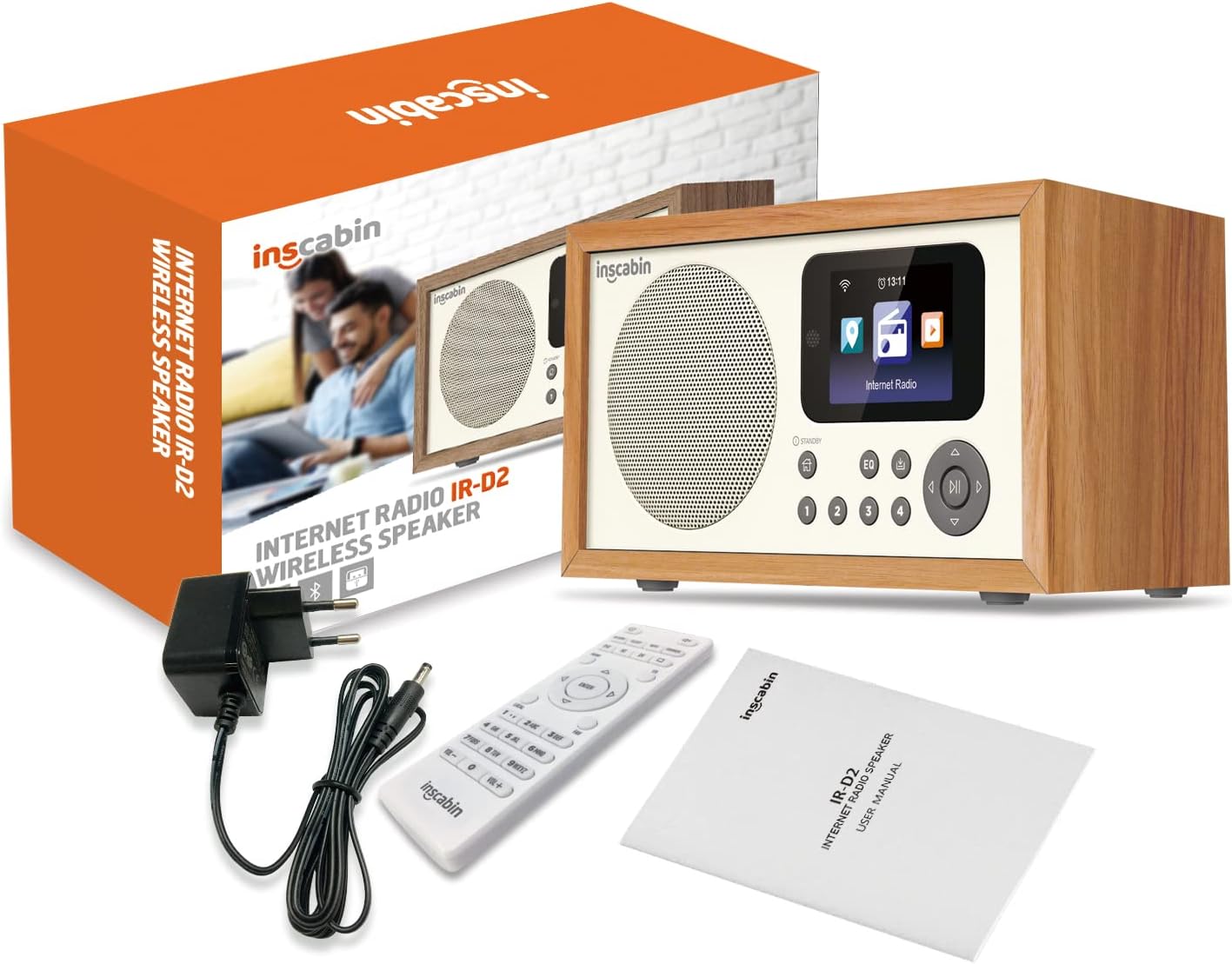
Image: The Inscabin D2/D4 Internet Radio, power adapter, remote control, and user manual as included in the product packaging.
4. Produktüberschreitungview
Familiarize yourself with the main components and controls of your Inscabin D2/D4 Internet Radio.

Bild: Vorderseite view of the Inscabin D2/D4 Internet Radio, showing the speaker grille on the left, a color display screen on the right, and various control buttons below the screen. The screen displays icons for different functions like Internet Radio.
4.1 Bedienelemente auf der Vorderseite
- Lautsprecher: Audio-Ausgang.
- Farb-TFT-Display: Shows program information, track details, album art, and weather.
- Standby-Taste: Schaltet das Gerät ein oder aus.
- Home "Button: Kehrt zum Hauptmenü zurück.
- EQ-Taste: Greift auf die Equalizer-Einstellungen zu.
- Voreingestellte Tasten (1-4): Quick access to saved radio stations.
- Navigationsschaltflächen (Hoch, Runter, Links, Rechts, OK): Zur Menünavigation und -auswahl.
- Wiedergabe-/Pause-Taste: Steuert die Wiedergabe.
4.2 Anschlüsse auf der Rückseite
The rear panel typically includes the power input and potentially other ports like auxiliary input/output.
5. Einrichtung
5.1 Stromanschluss
- Connect the supplied power adapter to the DC IN port on the back of the radio.
- Stecken Sie das Netzteil in eine normale Steckdose.
- Press the Standby button to power on the unit.
5.2 Initial Setup (Wi-Fi and Language)
Beim ersten Einschalten führt Sie das Radio durch den Ersteinrichtungsprozess.
- Sprachauswahl: Use the navigation buttons to select your preferred language and press OK.
- Netzwerkeinrichtung: Das Radio sucht nach verfügbaren WLAN-Netzwerken. Wählen Sie Ihr Netzwerk aus der Liste aus.
- Passwort eingeben: Use the navigation buttons to enter your Wi-Fi password. Press OK to confirm.
- The radio will attempt to connect to the internet. Once connected, the Wi-Fi icon will appear on the display.
6. Bedienungsanleitung
6.1 Internetradio
Greifen Sie auf Tausende von Radiosendern aus aller Welt zu.
- From the main menu, select "Internet Radio" using the navigation buttons and press OK.
- Sie können die Sender nach Standort oder Genre durchsuchen oder die Suchfunktion nutzen.
- Select a station and press OK to start playback.
- To save a station as a preset, press and hold one of the preset buttons (1-4) until the display confirms it's saved.
6.2 Bluetooth-Modus
Streamen Sie Audio kabellos von Ihrem Smartphone oder Tablet.
- From the main menu, select "Bluetooth" and press OK. The radio will enter pairing mode.
- Aktivieren Sie auf Ihrem Smartphone oder Tablet Bluetooth und suchen Sie nach verfügbaren Geräten.
- Select "Inscabin D2/D4" (or similar name) from the list to pair.
- Once connected, you can play audio from your device through the radio.
6.3 Spotify Connect
Steuern Sie Ihre Spotify-Musik direkt über die Spotify-App.
- Stellen Sie sicher, dass Ihr Radio und das Gerät, auf dem die Spotify-App läuft, mit demselben WLAN-Netzwerk verbunden sind.
- Öffne die Spotify-App auf deinem Smartphone oder Tablet.
- Spiele einen Song ab und tippe auf das Symbol „Verfügbare Geräte“ (normalerweise ein Lautsprecher- oder Computersymbol).
- Select your Inscabin D2/D4 radio from the list of available devices.
- Your Spotify audio will now play through the radio, controlled by your app.
6.4 Doppelwecker
Richten Sie bis zu zwei unabhängige Alarme ein.
- From the main menu, navigate to "Alarm" or "Settings" and then "Alarm".
- Wählen Sie Alarm 1 oder Alarm 2.
- Set the alarm time, source (e.g., buzzer, internet radio station), volume, and frequency (daily, once, weekdays, weekends).
- Stellen Sie sicher, dass der Alarm aktiviert ist.
6.5 App-Steuerung
Control your radio using a dedicated smartphone application (e.g., UNDOK app).
- Download the compatible control app (e.g., UNDOK) from your device's app store.
- Ensure your smartphone and the radio are connected to the same Wi-Fi network.
- Open the app and follow the on-screen instructions to discover and connect to your Inscabin D2/D4 radio.
- You can now control various functions of the radio, such as changing stations, adjusting volume, and managing presets, directly from your smartphone.
7. Wartung
- Reinigung: Use a soft, dry, lint-free cloth to clean the radio's surface. Do not use liquid or aerosol cleaners.
- Lagerung: Wenn Sie das Radio über einen längeren Zeitraum lagern, trennen Sie es vom Netzteil und bewahren Sie es an einem kühlen, trockenen Ort auf.
- Software-Updates: Periodically check the radio's settings menu for available software updates to ensure optimal performance and access to new features.
8. Fehlerbehebung
| Problem | Mögliche Ursache | Lösung |
|---|---|---|
| Kein Strom | Netzteil nicht angeschlossen oder Steckdose defekt. | Überprüfen Sie die Stromanschlüsse. Versuchen Sie eine andere Steckdose. |
| Keine Verbindung zum WLAN möglich | Falsches Passwort, schwaches Signal oder Routerproblem. | Überprüfen Sie das WLAN-Passwort. Bringen Sie das WLAN-Gerät näher an den Router heran. Starten Sie den Router neu. |
| Internet radio stations not playing | No internet connection, station offline, or buffering. | Check Wi-Fi connection. Try other stations. Internet speed may be slow. |
| Die Bluetooth-Kopplung schlägt fehl | Device not in pairing mode, or too far away. | Ensure radio is in Bluetooth pairing mode. Keep devices within range. |
| Klangverzerrung | Volume too high, poor signal, or EQ settings. | Adjust volume. Check signal strength. Reset EQ settings. |
9. Spezifikationen
| Besonderheit | Detail |
|---|---|
| Marke | Kabine |
| Modellnummer | 054114379934 |
| Farbe | D2-WT |
| Konnektivitätstechnologie | Bluetooth, Wi-Fi (Internet Radio) |
| Besondere Merkmale | Portable, Wireless, Dual Alarm, Spotify Connect, App Control |
| Kompatible Geräte | Smartphone, Tablet |
| Stromquelle | Netzkabel (Netzadapter) |
| Im Lieferumfang enthaltene Komponenten | Netzteil |
| Empfohlene Verwendung | Music, Podcasts, Internet Radio, Bluetooth Speaker |
| Anzeige | Color TFT Screen |
| Abmessungen (ca.) | 210 mm (Breite) x 110 mm (Höhe) x 90 mm (Tiefe) |

Image: The Inscabin D2/D4 Internet Radio with approximate dimensions: 210mm width, 110mm height, and 90mm depth.
10. Garantie und Support
For warranty information and customer support, please refer to the documentation provided with your purchase or visit the official Inscabin website. Information regarding spare parts availability and software update guarantees is not available at this time.