
FLEXISPOT F8L
FLEXISPOT Gasfeder-Monitorarm F8L – Benutzerhandbuch
Model: F8L | Brand: FLEXISPOT
1. Einleitung
Thank you for choosing the FLEXISPOT F8L Gas Spring Monitor Arm. This manual provides detailed instructions for the safe and efficient installation, operation, and maintenance of your new monitor arm. Please read this manual thoroughly before use and keep it for future reference.
Hauptmerkmale:
- Detachable VESA plate for easy monitor attachment.
- Adjustable height for ergonomic viewing, reducing neck, eye, and back strain.
- Wide range of motion for tilt, swivel, and rotation, allowing optimal viewwinkeln.
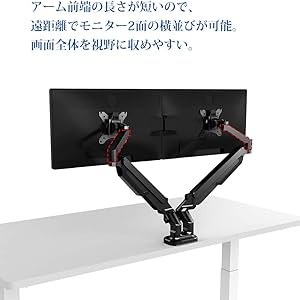
- Compact design suitable for narrow desks, enabling side-by-side monitor placement at a distance.
- Supports VESA standards: 75x75mm and 100x100mm.
- Compatible with monitors from 17" to 36" and weighing between 2-9kg.

This image shows the FLEXISPOT F8L Gas Spring Monitor Arm in white, supporting a monitor. The arm is extended, demonstrating its adjustable nature and sleek design.
2. Sicherheitshinweise
- Vor der Montage sicherstellen, dass alle Teile vorhanden und unbeschädigt sind. Nicht verwenden, wenn Teile fehlen oder defekt sind.
- Do not exceed the maximum weight capacity of 9kg (19.8 lbs) or the maximum screen size of 36 inches. Overloading can cause instability and potential injury.
- Install the monitor arm on a stable and sturdy desk surface that can support the combined weight of the arm and your monitor.
- Perform all adjustments slowly and carefully. Avoid sudden movements that could cause the monitor to swing or fall.
- Halten Sie Kinder und Haustiere vom Installationsbereich fern.
- If you encounter any difficulties during installation or operation, refer to the troubleshooting section or contact customer support.
3. Packungsinhalt
Bitte überprüfen Sie, ob alle Komponenten in Ihrem Paket enthalten sind:
- Monitorarm-Baugruppe
- Schreibtisch Clamp Base
- Tüllenmontagebasis
- VESA-Platte
- Hardware-Set (Schrauben, Unterlegscheiben, Inbusschlüssel)
- Kabelmanagement-Clips
- Bedienungsanleitung
4. Einrichtung und Installation
The FLEXISPOT F8L monitor arm supports two installation methods: C-clamp and Grommet mount. Choose the method suitable for your desk.
4.1 Choosing Your Mounting Method

This diagram illustrates the two primary ways to attach the monitor arm to your desk: the C-clamp method (bottom right) for desk edges and the grommet mount method (top right) for desks with existing cable holes. The grommet mount requires a hole size of 8.5-70mm, and both methods support a desk thickness of 20-100mm.
- C-Clamp Montieren: Ideal for desks with edges. Supports desk thickness from 20mm to 100mm.
- Ösenbefestigung: Requires an existing hole in your desk (diameter 8.5mm to 70mm). Supports desk thickness from 20mm to 100mm.
4.2 Attaching the Monitor Arm to Your Desk
- Für C-Clamp Montieren:
- Befestigen Sie die C-clamp Basis zum Hauptpfosten des Monitorarms.
- Positionieren Sie dieamp on the edge of your desk and tighten the knob until it is securely fastened.
- Für Ösenmontage:
- Assemble the grommet mount base and insert it through the hole in your desk.
- Secure it from underneath the desk using the provided plate and nut.
4.3 Attaching the Monitor to the Arm

This image demonstrates the detachable VESA plate feature. The VESA plate can be easily removed from the monitor arm, allowing you to attach it to the back of your monitor first, and then slide the monitor with the plate onto the arm for a simpler installation process.
- Befestigen Sie die VESA-Platte am Monitor:
- Remove the VESA plate from the monitor arm by lifting it upwards.
- Richten Sie die VESA-Platte an den Befestigungslöchern auf der Rückseite Ihres Monitors aus (75x75mm oder 100x100mm).
- Befestigen Sie die Platte mit den passenden Schrauben aus dem Montagesatz am Monitor. Nicht zu fest anziehen.
- Monitor an Arm befestigen:
- Carefully slide the monitor (with the attached VESA plate) onto the arm's mounting head until it clicks into place.
- Ensure the monitor is securely seated before releasing es.
5. Betrieb und Anpassungen
The FLEXISPOT F8L monitor arm offers a wide range of adjustments to achieve your optimal viewErfahrung.
5.1 Einstellung der Gasfederspannung
The gas spring tension needs to be adjusted according to your monitor's weight to ensure smooth and stable movement. If the monitor sags or springs up too easily, adjust the tension screw located on the arm joint (often covered by a plastic cap).
- Use the provided Allen wrench to turn the screw.
- Drehen im Uhrzeigersinn to increase tension (for heavier monitors).
- Drehen gegen den uhrzeigersinn to decrease tension (for lighter monitors).
- Justieren Sie den Monitor schrittweise, bis er nach dem Loslassen in Position bleibt.
5.2 Monitor Position Adjustments

This diagram illustrates the extensive range of motion for the monitor arm, including 360° rotation, 180° horizontal swivel, and tilt adjustment from -90° to 15°. These features allow for precise positioning of your monitor.
- Höhenverstellung: Gently push or pull the monitor up or down to adjust its vertical position. The gas spring will hold it in place.
- Neigungseinstellung: Tilt the monitor screen up or down from -90° to 15° to reduce glare and optimize viewing-Winkel.
- Schwenkeinstellung: Swivel the monitor arm horizontally up to 180° to share your screen or change viewing-Richtung.
- Rotationseinstellung: Rotate the monitor 360° between landscape and portrait orientations.
This illustration compares typical poor posture when using a fixed monitor stand (left) versus the improved ergonomic posture achievable with a monitor arm (right). By allowing flexible height and angle adjustments, the monitor arm helps reduce strain on the neck, eyes, and back.
6. Wartung
- Regularly check all screws and connections to ensure they are tight and secure. Retighten if necessary.
- Reinigen Sie den Monitorarm mit einem weichen, fusselfreien Tuch.amp Mit einem Tuch abwischen. Vermeiden Sie scheuernde Reiniger oder Lösungsmittel, die die Oberfläche beschädigen könnten.
- Do not lubricate the gas spring mechanism. It is designed to be maintenance-free.
7. Fehlerbehebung
| Problem | Mögliche Ursache | Lösung |
|---|---|---|
| Der Monitor hängt durch oder bleibt nicht auf der gewünschten Höhe. | Die Gasfederspannung ist für das Gewicht des Monitors zu gering. | Increase gas spring tension by turning the adjustment screw clockwise with the provided Allen wrench. |
| Monitor is difficult to push down or springs up too quickly. | Die Gasfederspannung ist für das Gewicht des Monitors zu hoch. | Decrease gas spring tension by turning the adjustment screw counter-clockwise with the provided Allen wrench. |
| Der Monitor wackelt oder fühlt sich instabil an. | Montageklamp/grommet is not tight enough, or VESA screws are loose. | Stellen Sie sicher, dass der Schreibtisch sauberamp/grommet mount is securely tightened. Check and tighten all VESA mounting screws on the back of the monitor. |
| Cannot attach VESA plate to monitor. | Falsches VESA-Muster oder falsche Schraubengröße. | Verify your monitor's VESA pattern (75x75mm or 100x100mm). Use the correct screws from the hardware kit. |
8. Spezifikationen
| Besonderheit | Detail |
|---|---|
| Modell | F8L |
| VESA-Kompatibilität | 75x75mm, 100x100mm |
| Kompatibilität mit Bildschirmgrößen | 17" - 36" |
| Tragfähigkeit | 2 - 9 kg (4.4 - 19.8 lbs) |
| Neigungsbereich | -90° bis +15° |
| Schwenkbereich | 180° |
| Drehung | 360° (Querformat zu Hochformat) |
| Montagetyp | C-Clamp oder Tüllenhalterung |
| Tischplattenstärke (Clamp/Grommet) | 20 mm - 100 mm |
| Maximale Armverlängerung | Ca. 62 cm (24.4 Zoll) |
| Max Height from Desk | Ca. 51 cm (20.1 Zoll) |

This diagram provides key dimensions of the monitor arm, including a maximum height of approximately 51cm and a maximum horizontal extension of approximately 62cm, illustrating its reach and adjustability.
9. Garantie und Kundendienst
FLEXISPOT provides a 1 Jahr Garantie from the date of purchase for this product. This warranty covers manufacturing defects and material flaws under normal use.
For any questions, concerns, or issues regarding your FLEXISPOT F8L Gas Spring Monitor Arm, please contact our customer support team:
- E-Mail: contact@flexispot.jp
- Please provide your purchase details and a description of the issue for faster assistance.
Ask a question about this manual
Ask about setup, troubleshooting, compatibility, parts, safety, or missing instructions. Manuals+ will review the question and use this page’s manual context to help answer it.