
FLEXISPOT EC5S-FR+PR1808-Black
FLEXISPOT Enhanced Standing Desk
Bedienungsanleitung
Model: EC5S-FR+PR1808-Black
Produkt überview
The FLEXISPOT Enhanced Standing Desk is an electric, motorized, height-adjustable desk designed to promote a healthy work-life balance. It features a robust dual-motor system and a three-section leg design, offering a wide height adjustment range from 62 cm to 127 cm. This desk is suitable for users ranging from 110 cm to 203 cm in height.
Zu den Hauptmerkmalen gehören:
- Wide Height Adjustment: From 62 cm to 127 cm, accommodating various user heights.
- Leistungsstarkes Doppelmotorsystem: Ensures smooth and quick height transitions with a lifting speed of 3.5 cm/s.
- Hohe Tragfähigkeit: Supports up to 160 kg, ideal for multiple monitors and heavy equipment.
- Intelligentes Bedienfeld: Features three programmable memory height presets and a timed reminder function for regular movement.
- Antikollisionssystem: Automatically stops and retracts when an obstacle is detected, preventing damage and injury.
- Durable and Certified Materials: FSC-certified desktop meeting E0 environmental standards, ensuring safety and sustainability.

Figure 1: FLEXISPOT Enhanced Standing Desk, highlighting its robust design and 160kg load capacity.
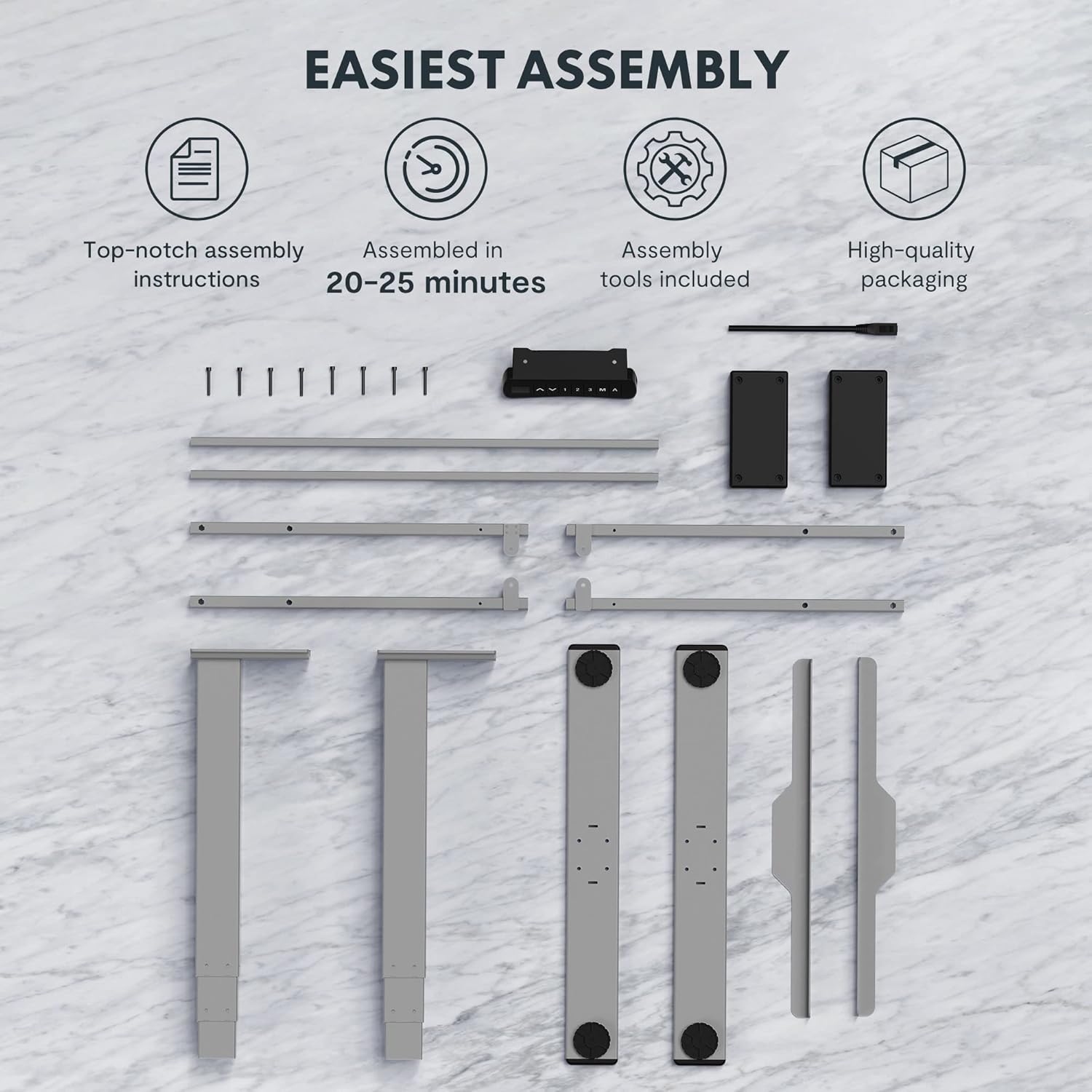
Figure 2: Available desktop options and material certifications, including FSC-certified wood.
Sicherheitswarnungen
Please read and understand all safety warnings before operating the desk to prevent injury or damage to the product.
- Collision Protection: The desk is equipped with an anti-collision system. If an obstacle is detected during movement, the tabletop will stop and retract slightly. Do not intentionally obstruct the desk's movement.
- Überlastwarnung: Do not exceed the maximum load capacity of 160 kg. Overloading can damage the motor and frame.
- Kinder und Haustiere: Keep children and pets away from the desk during operation. Moving parts can cause injury.
- Stromversorgung: Ensure the power cord is properly connected and not damaged. Do not operate the desk with a damaged cord or plug.
- Ebene Oberfläche: Always operate the desk on a stable and level surface to prevent tipping.
- Spielraum: Ensure there is adequate clearance around the desk when adjusting height to avoid pinching or crushing objects or body parts.
Einrichtung und Montage
The FLEXISPOT Enhanced Standing Desk is designed for easy assembly. All necessary tools and detailed instructions are included in the packaging. Typical assembly time is approximately 20-25 minutes.
- Komponenten auspacken: Carefully remove all parts from the packaging. Verify that all components listed in the assembly instructions are present.
- Rahmen zusammenbauen: Follow the step-by-step instructions to assemble the desk frame, including the three-section lifting columns and crossbars.
- Desktop anbinden: Securely attach the desktop to the assembled frame using the provided screws.
- Bedienfeld und Stromversorgung anschließen: Connect the control panel and power supply according to the wiring diagram in the instructions.
- Kabelmanagement: Use the included cable management accessories to organize and secure all cables.

Figure 3: Desk components laid out for assembly, illustrating the ease of setup with included tools and clear instructions.

Figure 4: Illustration of the desk's stable and durable design, featuring three lifting columns and a wide height adjustment range.
Bedienungsanleitung
The smart control panel allows for easy and precise height adjustments and includes convenient memory functions.

Figure 5: The smart control panel, featuring a digital display, height adjustment buttons, and memory presets.
- Höhe einstellen: Verwenden Sie die Nach oben (▲) Und Runter (▼) arrow buttons on the control panel to raise or lower the desk to your desired height. The current height will be displayed on the digital screen.
- Voreinstellungen für Speicherplätze festlegen:
- Adjust the desk to your preferred height (e.g., sitting height).
- Drücken Sie die "M" Drücken Sie diese Taste. Im Display erscheint „S-“.
- Drücken Sie eine der nummerierten Speichertasten ("1", "2", oder "3") innerhalb von 3 Sekunden. Die Höhe ist nun in dieser Voreinstellung gespeichert.
- Voreinstellungen abrufen: Press the desired numbered memory button ("1", "2", oder "3"Der Schreibtisch fährt automatisch auf die gespeicherte Höhe.
- Timed Reminder Function: The control panel includes a reminder function to prompt you to change positions. Refer to the detailed assembly manual for instructions on how to activate and set the reminder interval.
- Antikollisionsfunktion: The desk will automatically stop and reverse slightly if it encounters an obstruction during height adjustment. This feature is designed for safety and cannot be disabled.
Wartung
Regular maintenance ensures the longevity and optimal performance of your FLEXISPOT standing desk.
- Reinigung: Wischen Sie die Schreibtischoberfläche und den Rahmen mit einem weichen, fusselfreien Tuch ab.amp Mit einem Tuch abwischen. Vermeiden Sie die Verwendung von scharfen Chemikalien oder Scheuermitteln, die die Oberfläche beschädigen könnten.
- Kabelmanagement: Überprüfen Sie regelmäßig, ob alle Kabel sicher verlegt sind und nicht eingeklemmt oder verheddert sind.
- Befestigungsmaterial: Überprüfen Sie gelegentlich alle Schrauben und Bolzen auf festen Sitz. Ziehen Sie sie gegebenenfalls nach.
- Motor and Frame: Keep the motor and lifting columns free from dust and debris. Do not lubricate the lifting columns unless specifically instructed by FLEXISPOT support.
Fehlerbehebung
Sollten Sie Probleme mit Ihrem Schreibtisch haben, beachten Sie bitte die folgenden gängigen Schritte zur Fehlerbehebung:
| Problem | Mögliche Ursache | Lösung |
|---|---|---|
| Der Schreibtisch bewegt sich nicht. | Power cord disconnected, motor error, or overload. | Check power connection. Unplug and replug the desk. Reduce weight on the desk. Refer to the full manual for error codes. |
| Der Schreibtisch wackelt ungleichmäßig. | Uneven load, loose connections, or calibration issue. | Distribute weight evenly. Check all frame connections. Perform a reset/calibration as per the detailed manual. |
| Der Antikollisionsschutz wird häufig aktiviert. | Obstruction in path, or sensitivity setting. | Ensure clear path for desk movement. Check the detailed manual for anti-collision sensitivity adjustment (if available). |
For more complex issues or error codes not listed, please consult the comprehensive user manual provided with your product or contact FLEXISPOT customer support.
Technische Daten
Detailed technical specifications for the FLEXISPOT Enhanced Standing Desk (Model: EC5S-FR+PR1808-Black).
| Besonderheit | Detail |
|---|---|
| Marke | FLEXISPOT |
| Modellnummer | EC5S-FR+PR1808-Black |
| Farbe | Grau + Schwarz |
| Material | Metal (Frame), Engineered Wood (Top) |
| Schreibtisch-Design | Stehpult |
| Form | Rechteckig |
| Höhenverstellbereich | 62 cm - 127 cm |
| Hubsäulen | 3 Abschnitte |
| Motortyp | Doppelmotor |
| Maximale Tragfähigkeit | 160 kg |
| Hubgeschwindigkeit | 3.5 cm/s |
| Besondere Merkmale | Electric, Adjustable, Memory Presets, Reminder Function, Anti-Collision |
| Zertifizierungen | IGR, CE, TÜV, FSC (for desktop) |
| Kompatibilität der Rahmenbreite | 110-170 cm |
| Tabletop Compatibility (Width x Depth) | 120-200 cm x 60-80 cm |

Figure 6: Adjustable frame range and compatible tabletop dimensions.

Figure 7: Illustration of the upgraded load capacity, now supporting up to 160 kg.
Garantie und Support
FLEXISPOT is committed to providing high-quality products. This desk has undergone extensive testing, including over 20,000 stress tests, and holds European certifications such as IGR, CE, and TÜV, ensuring its safety and durability.
For warranty information, technical support, or any inquiries, please contact FLEXISPOT customer service through their official website or the retailer where you purchased the product. Please have your model number (EC5S-FR+PR1808-Black) and purchase details ready when contacting support.
Ask a question about this manual
Ask about setup, troubleshooting, compatibility, parts, safety, or missing instructions. Manuals+ will review the question and use this page’s manual context to help answer it.