
FLEXISPOT EC5B-EU3+PR1206-Black
FLEXISPOT EC5 Standing Desk User Manual
Model: EC5B-EU3+PR1206-Black
Einführung
This manual provides comprehensive instructions for the assembly, operation, maintenance, and troubleshooting of your FLEXISPOT EC5 Standing Desk. Please read this manual thoroughly before use to ensure proper setup and safe operation.

Figure 1: FLEXISPOT EC5 Standing Desk with a black tabletop and black frame, set up in an office environment.
The FLEXISPOT EC5 is an electric height-adjustable desk designed to promote a healthier work environment by allowing seamless transitions between sitting and standing positions. It features a robust dual-motor system, a smart control panel with memory presets, and a durable construction.
Hauptmerkmale:
- Three-tier frame for height adjustment from 60.5cm to 125cm.
- Supports heavy loads up to 125kg (or 160kg with upgraded design).
- Smooth and quiet lifting speed of 38mm/second.
- Programmable digital memory with 3 preset options for customized heights.
- Collision protection system for enhanced safety.
- Durable MDF tabletop with scratch-resistant laminate.
Einrichtung und Montage
The FLEXISPOT EC5 Standing Desk is designed for straightforward assembly. All necessary tools are included, and detailed instructions are provided to guide you through the process, typically taking 20-25 minutes.
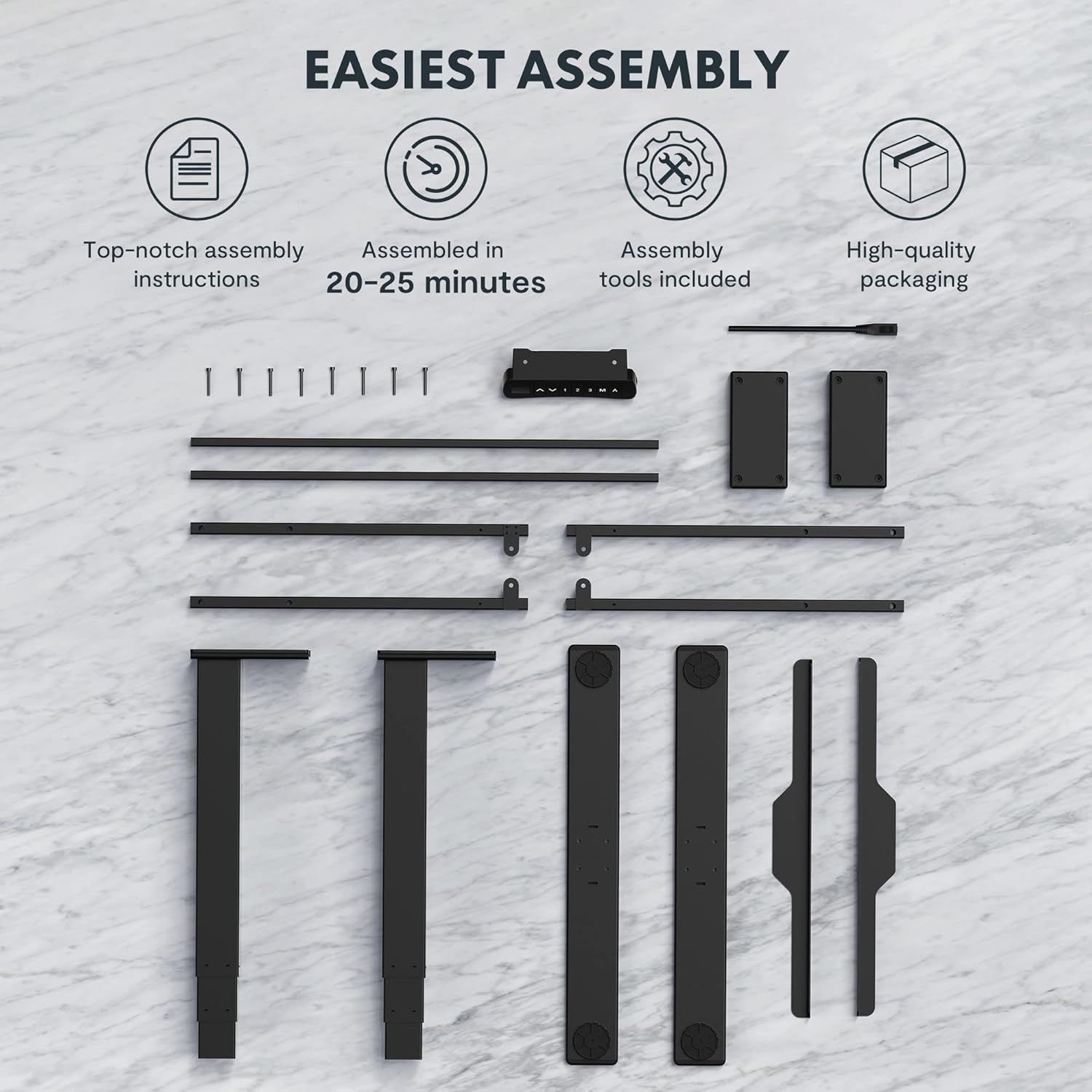
Figure 2: All components and tools required for assembling the FLEXISPOT EC5 Standing Desk.
Packungsinhalt:
- Desk Frame (legs, crossbars)
- Tabletop (if included in package)
- Control Panel with Cable
- Netzteil und Kabel
- Montagezubehör (Schrauben, Bolzen)
- Montagewerkzeuge (z. B. Inbusschlüssel)
- Bedienungsanleitung
Montageschritte (Allgemein)view):
- Packen Sie alle Komponenten aus und überprüfen Sie sie anhand der Stückliste.
- Assemble the desk legs to the crossbars, ensuring all connections are secure.
- Attach the assembled frame to the tabletop using the provided screws.
- Mount the control panel to the underside of the tabletop in an accessible location.
- Connect all cables (motor cables to control box, control panel cable to control box, power cable to control box).
- Ensure all cables are neatly managed and secured to prevent snagging.
- Place the desk in its desired location, ensuring it is on a level surface.
For detailed, step-by-step assembly instructions, please refer to the separate assembly guide included in your product packaging.
Bedienungsanleitung
The FLEXISPOT EC5 Standing Desk features an intuitive control panel for easy height adjustment and memory functions.

Figure 3: The EC5 control panel, featuring height display, up/down buttons, and memory presets.
Grundlegende Bedienung:
- Höhe einstellen: Verwenden Sie die ▲ Und ▼ arrows on the control panel to raise or lower the desk to your desired height. The current height will be displayed on the digital screen.
- Höhenbereich: The desk can be adjusted from a minimum height of 60.5 cm (23.8 inches) to a maximum height of 125 cm (49.2 inches).
Speichervoreinstellungen:
The EC5 desk allows you to save up to three preferred height settings for quick adjustments.
- Speichern einer Voreinstellung:
- Stellen Sie den Schreibtisch auf die gewünschte Höhe ein.
- Drücken Sie die "M" Drücken Sie diese Taste. Im Display erscheint „S-“.
- Within 3 seconds, press the desired number button ("1", "2", oder "3") to save the current height to that preset. The display will show "S-1", "S-2", or "S-3" to confirm.
- Voreinstellung aufrufen:
- Drücken Sie einfach die entsprechende Zifferntaste ("1", "2", oder "3"Der Schreibtisch fährt automatisch auf die gespeicherte Höhe.
Antikollisionsfunktion:
The desk is equipped with an anti-collision system. If the desk encounters an obstacle while moving up or down, it will automatically stop and reverse slightly to prevent damage. Ensure the area around the desk is clear during operation.
Wartung
Regular maintenance ensures the longevity and optimal performance of your FLEXISPOT EC5 Standing Desk.
- Reinigung: Wischen Sie die Schreibtischoberfläche und den Rahmen mit einem weichen, fusselfreien Tuch ab.amp Verwenden Sie kein scheuerndes Reinigungsmittel oder aggressive Chemikalien, die die Oberfläche beschädigen könnten.
- Kabelmanagement: Periodically check that all cables are securely connected and neatly organized to prevent tangling or damage.
- Befestigungsmaterial: Occasionally check all screws and bolts to ensure they are tight. Retighten if necessary, but do not overtighten.
- Gewichtskapazität: Do not exceed the maximum weight capacity of 125kg (or 160kg for upgraded models) to prevent damage to the motors and frame.
- Umfeld: Use the desk in a dry indoor environment. Avoid exposure to extreme temperatures or high humidity.
Fehlerbehebung
If you encounter issues with your FLEXISPOT EC5 Standing Desk, refer to the following common problems and solutions:
| Problem | Mögliche Ursache | Lösung |
|---|---|---|
| Der Schreibtisch bewegt sich nicht. | Stromkabel nicht angeschlossen, Motorkabel lose, Überlastung. | Check all cable connections. Ensure power is supplied. Reduce weight on desk if overloaded. |
| Der Schreibtisch wackelt ungleichmäßig oder macht ungewöhnliche Geräusche. | Uneven load, loose fasteners, obstruction. | Distribute weight evenly. Check and tighten all fasteners. Clear any obstructions. |
| Das Digitaldisplay zeigt einen Fehlercode an. | Systemstörung, Sensorproblem. | Refer to the full troubleshooting guide in your product manual for specific error codes. Try unplugging the desk for 10 seconds and plugging it back in to reset. |
| Die Antikollisionsfunktion ist zu empfindlich oder funktioniert nicht. | Sensor calibration needed, obstruction. | Ensure no constant obstructions. Consult the full manual for anti-collision sensitivity adjustment or reset procedures. |
If the problem persists after attempting these solutions, please contact FLEXISPOT customer support.
Produktspezifikationen
Detailed technical specifications for the FLEXISPOT EC5 Standing Desk:
| Besonderheit | Spezifikation |
|---|---|
| Marke | FLEXISPOT |
| Modellnummer | EC5B-EU3+PR1206-Black |
| UPC | 810072812643 |
| Höhenverstellbereich | 60.5 cm - 125 cm (23.8" - 49.2") |
| Hubgeschwindigkeit | 38 mm/Sekunde |
| Maximale Gewichtskapazität | 125 kg (275 lbs) - Upgraded models may support up to 160 kg |
| Anzahl der Motoren | 2 |
| Rahmen Stages | 3 |
| Bedienfeld | Digital display with 3 memory presets |
| Tabletop Dimensions (H x W x D) | 2.5 x 140 x 70 cm (0.98"T x 55.12"B x 27.56"H) |
| Tischplattenmaterial | MDF with high pressure scratch resistant laminate |
| Grundmaterial | Engineered Wood (for tabletop), Metal (for frame) |
| Farbe | Schwarz |
| Montage erforderlich | Ja |
| Garantietyp | Beschränkt |

Figure 4: The EC5 desk frame is designed for stability and can support significant weight, with some models supporting up to 160KG.
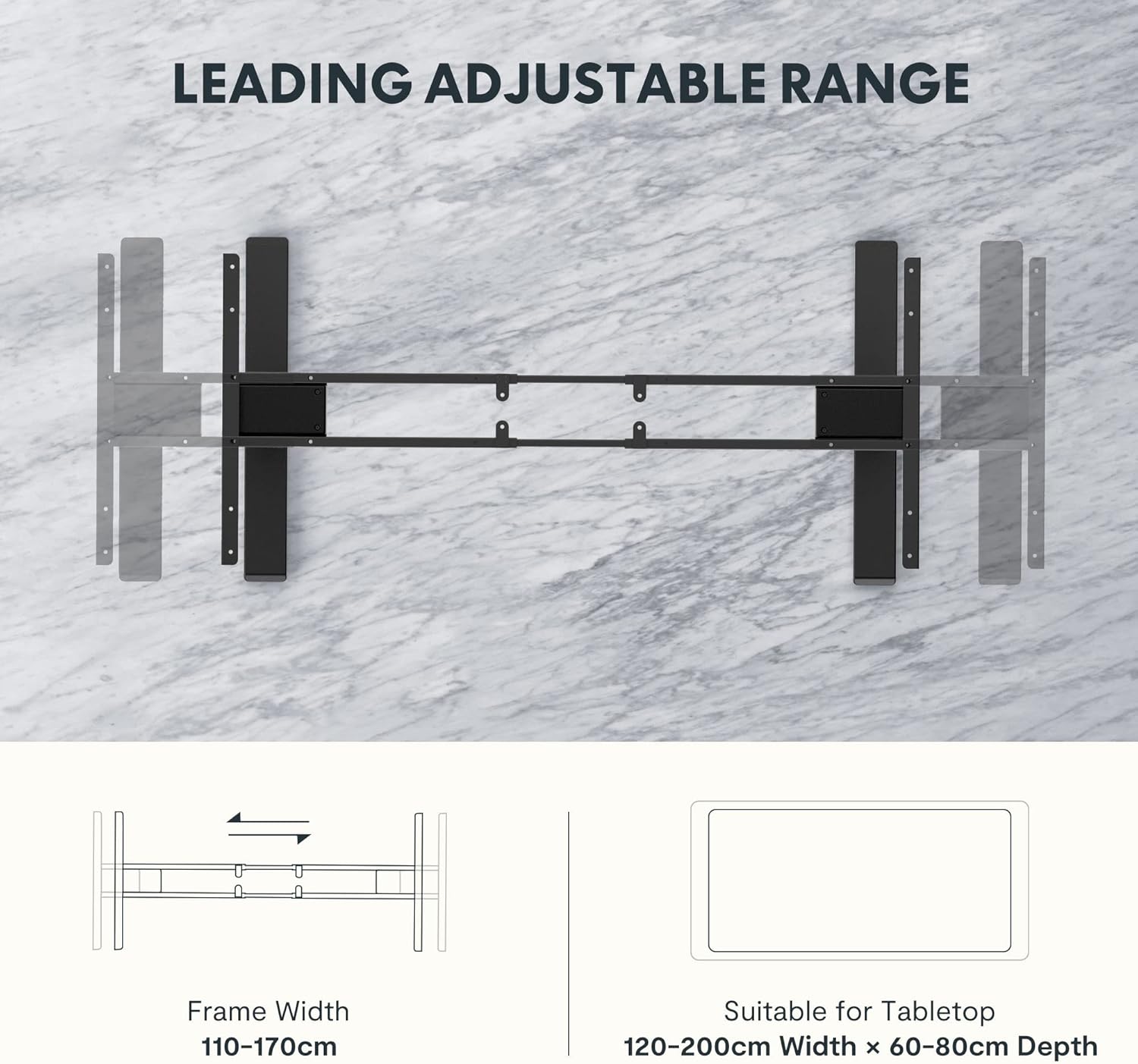
Figure 5: The adjustable frame accommodates various tabletop sizes, offering flexibility for different workspace needs.
Garantie und Support
Garantieinformationen:
The FLEXISPOT EC5 Standing Desk comes with a Eingeschränkte Garantie. Please refer to the warranty card included with your product for specific terms, conditions, and duration of coverage. This warranty typically covers manufacturing defects in materials and workmanship under normal use.
Kundendienst:
For technical assistance, warranty claims, or any questions regarding your FLEXISPOT EC5 Standing Desk, please contact FLEXISPOT customer support. You can typically find contact information on the FLEXISPOT official webauf der Website oder auf Ihrer Produktverpackung.
When contacting support, please have your model number (EC5B-EU3+PR1206-Black) and proof of purchase readily available.
Ask a question about this manual
Ask about setup, troubleshooting, compatibility, parts, safety, or missing instructions. Manuals+ will review the question and use this page’s manual context to help answer it.