
Shargeek STM2E-1
Shargeek STORM2 Slim Tragbares Ladegerät – Benutzerhandbuch
Modell: STM2E-1
Einführung
This manual provides comprehensive instructions for the safe and efficient use of your Shargeek STORM2 Slim Portable Charger. Please read this manual thoroughly before operating the device and retain it for future reference.
The Shargeek STORM2 Slim is a high-capacity portable power bank featuring a unique transparent design and an IPS display screen. It offers 130W max output with 100W USB-C and 30W USB-A ports, suitable for charging various devices including laptops, tablets, and smartphones.

Image: The Shargeek STORM2 Slim portable charger, showcasing its transparent design that reveals internal components and the included yellow USB-C to USB-C cables.
Produkteigenschaften
- Transparentes Design: The see-through casing reveals the internal battery and circuit layout, highlighting the device's engineering.
- IPS Display Screen: A clear screen provides real-time information on battery life, output distribution, temperature, operation hours, and active ports.
- Hohe Kapazität: 20000mAh battery capacity, capable of multiple charges for various devices.
- Schnelles Laden: Features a 100W USB-C PD port and a 30W USB-A port, supporting 130W max output for rapid charging.
- Universelle Kompatibilität: Charges laptops, phones, tablets, and other devices with USB-C or USB ports.

Bild: Eine detaillierte view of the Shargeek STORM2 Slim's IPS LCD screen, showing various data points such as input/output wattage, Bdtage, current, battery level, and temperatures.
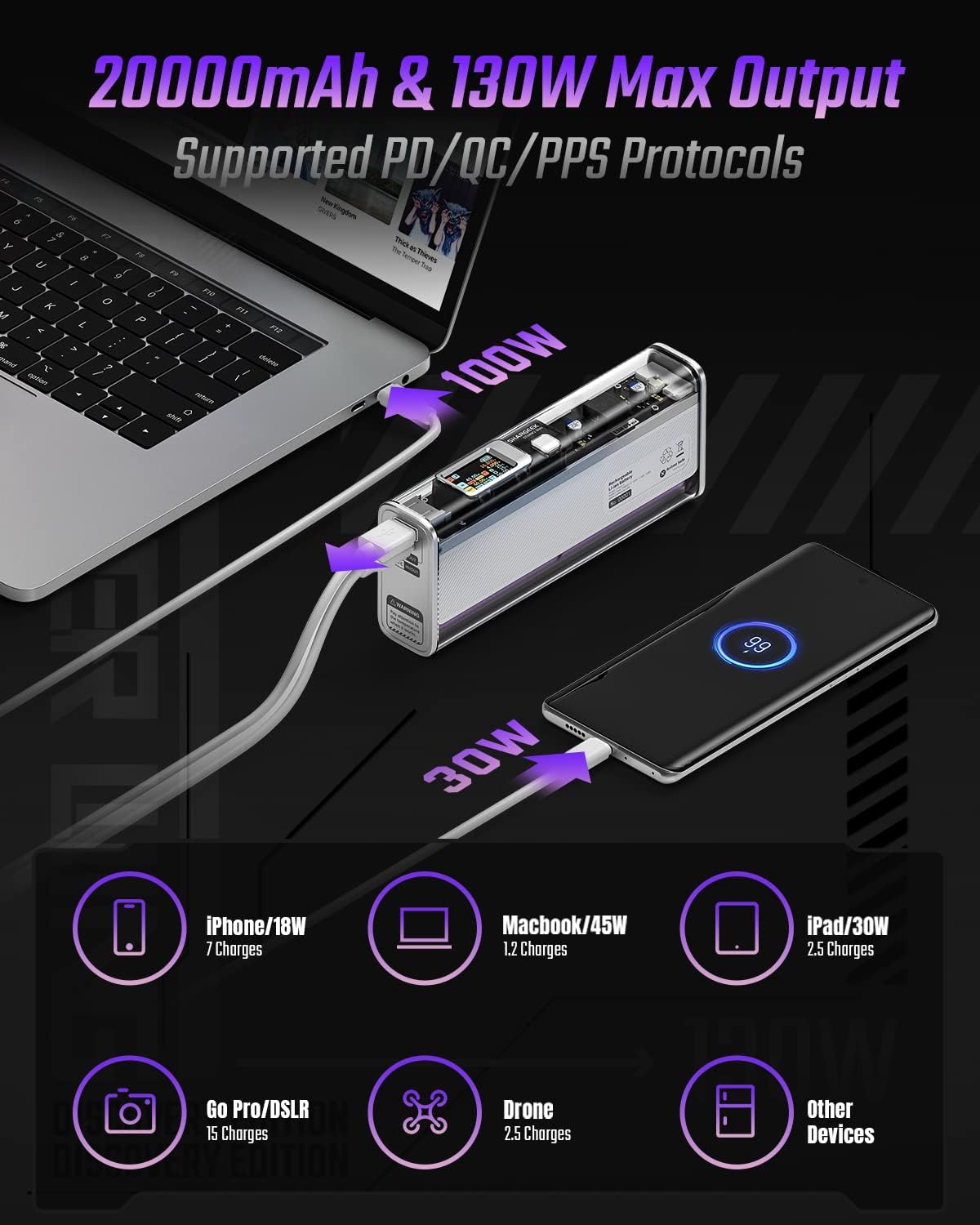
Image: The Shargeek STORM2 Slim connected via USB-C to a laptop for 100W charging and via USB-A to a smartphone for 30W charging, demonstrating its dual-port capability.
Einrichtung und erste Verwendung
Packungsinhalt:
- Shargeek STORM2 Slim Portable Charger
- USB-C-auf-USB-C-Kabel
- Benutzerhandbuch (dieses Dokument)
Erstladung:
- Before first use, fully charge your STORM2 Slim.
- Connect the provided USB-C to USB-C cable to the USB-C port on the STORM2 Slim.
- Connect the other end of the cable to a compatible USB-C power adapter (not included) with a minimum of 100W output for fastest charging.
- The IPS screen will display charging status and battery percentage. The device is fully charged when the screen indicates 100%.
- A full recharge typically takes approximately 90 minutes with a 100W power adapter.
Bedienungsanleitung
Ladegeräte:
- Identify the appropriate charging cable for your device (USB-C to USB-C or USB-A to device-specific cable).
- Connect one end of the cable to your device and the other end to the corresponding port (USB-C or USB-A) on the STORM2 Slim.
- The IPS screen will automatically activate and display the charging output (watts, volts, amps) for the connected device(s).
- The STORM2 Slim can charge two devices simultaneously using both the USB-C and USB-A ports.
Understanding the IPS Screen:
The IPS screen provides detailed real-time information. Use the physical button on the side of the power bank to navigate through different display modes or access settings.
- Input/Output Dashboard: Shows power input (IN) when charging the power bank and power output (OUT) when charging devices, including wattage, Bdtage und Stromstärke für jeden Port.
- Batteriestand: Zeigt den verbleibenden Batteriestand in Prozent antage and a visual icon.
- Bandtage & Strom: Detailed readings for the internal battery cells.
- Temperatur: Shows the internal circuit board and battery temperatures.
- Laufzeit: A resettable timer indicating the duration of current operation.
To access menus: Long-press the button. So navigieren Sie: Short-press. Auswählen: Long-press.
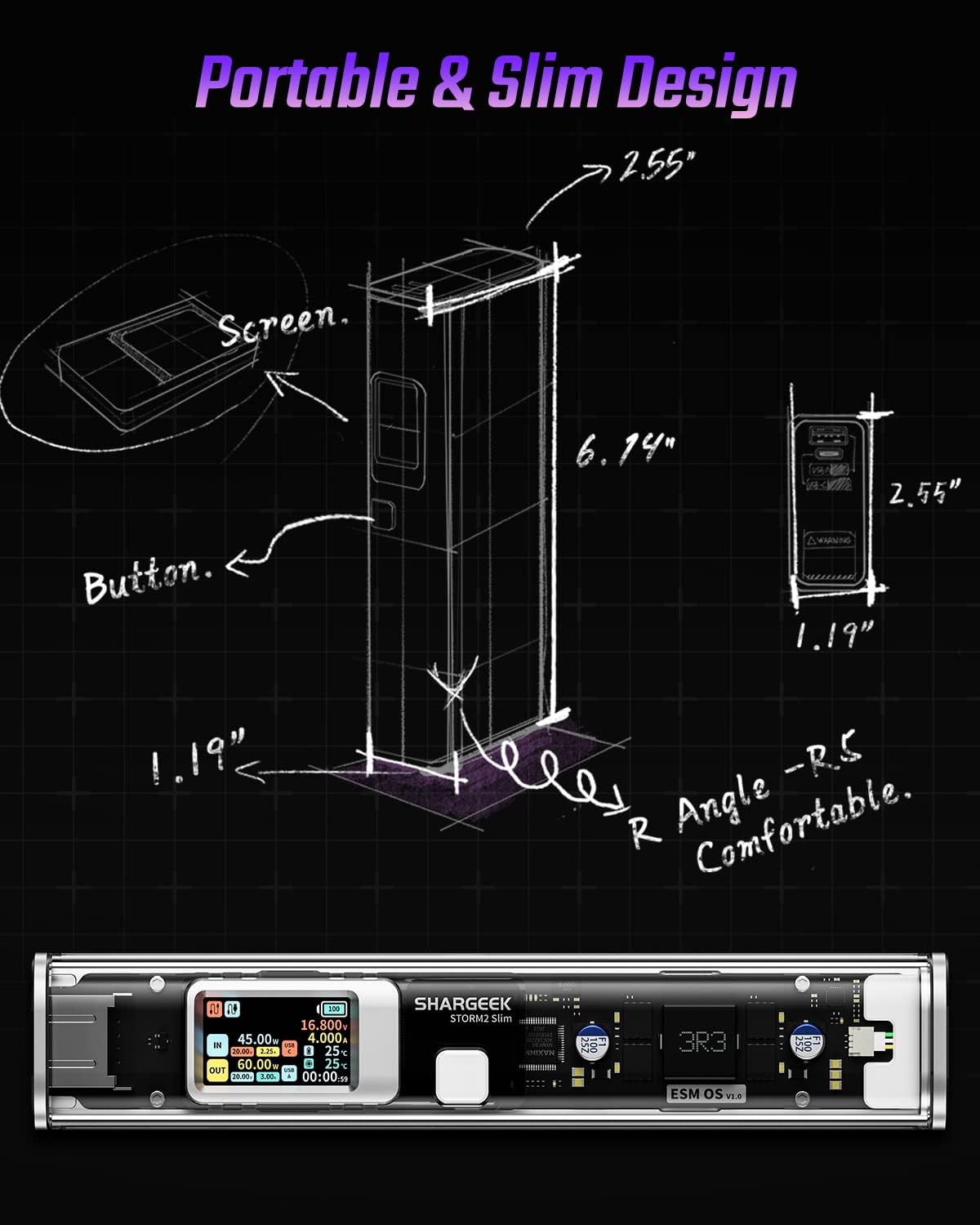
Image: A technical drawing illustrating the dimensions of the Shargeek STORM2 Slim and pointing out the screen and button locations.
Wartung
- Reinigung: Reinigen Sie die Außenseite der Powerbank mit einem weichen, trockenen Tuch. Vermeiden Sie die Verwendung von scharfen Chemikalien oder Scheuermitteln.
- Lagerung: Lagern Sie das Gerät an einem kühlen, trockenen Ort, geschützt vor direkter Sonneneinstrahlung, extremen Temperaturen und hoher Luftfeuchtigkeit.
- Batteriepflege: To prolong battery life, avoid fully discharging the power bank frequently. Recharge it when the battery level is low. If storing for extended periods, charge it to approximately 50-70% every 3-6 months.
- Vermeiden Sie Tropfen: While designed with an aluminum alloy frame for durability, avoid dropping the device as it may damage internal components or the transparent casing.
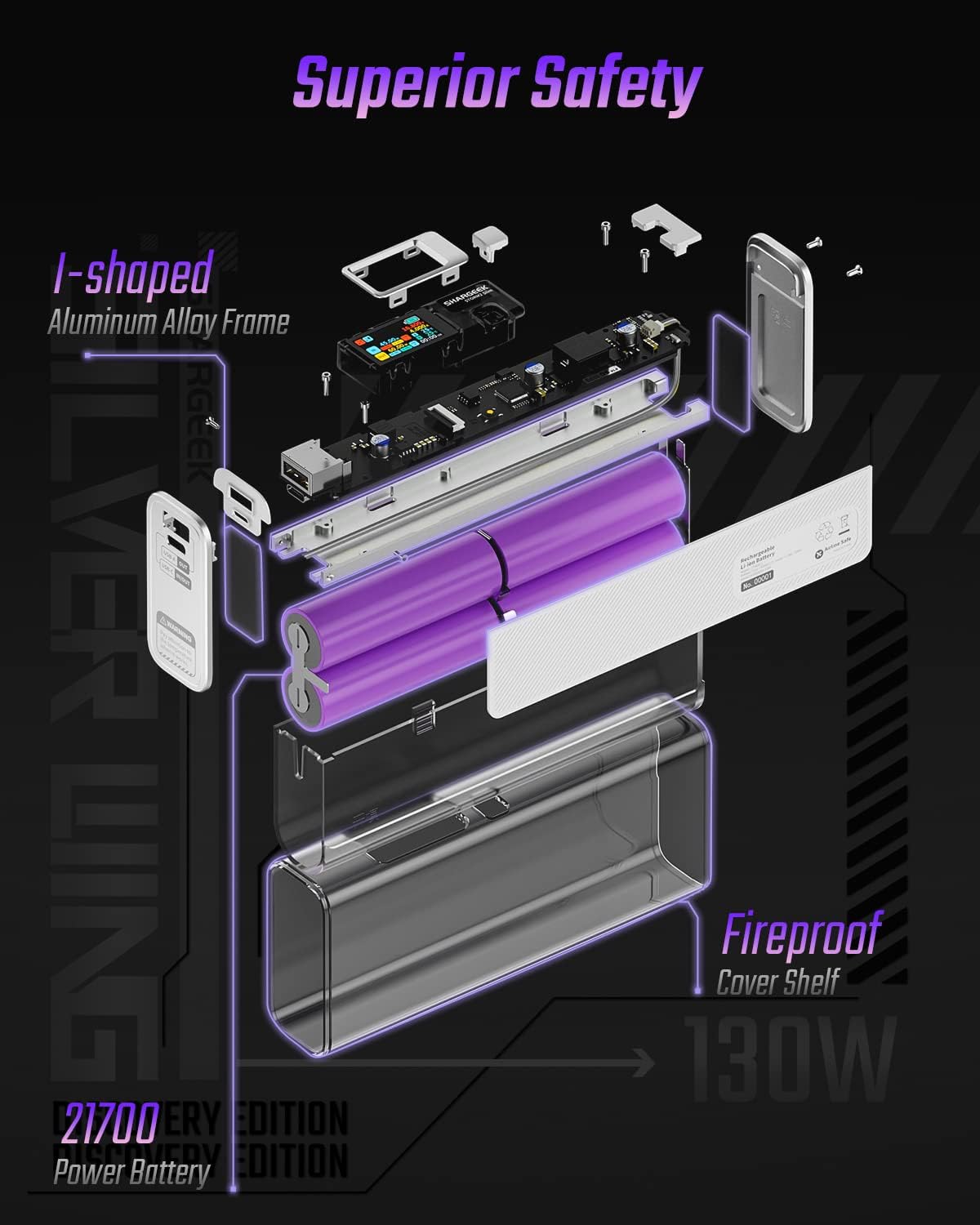
Image: An exploded diagram of the Shargeek STORM2 Slim, illustrating its internal structure including the I-shaped aluminum alloy frame, fireproof cover shelf, and 21700 power batteries, highlighting its robust construction.
Fehlerbehebung
| Problem | Mögliche Ursache | Lösung |
|---|---|---|
| Das Gerät lädt nicht über die Powerbank. | Low power bank battery; incompatible cable; device not properly connected; device requires more power than available. | Recharge the STORM2 Slim. Ensure cable is fully inserted and compatible. Check device power requirements against power bank output. Try a different cable or port. |
| Powerbank lädt nicht. | Charging cable or adapter faulty; power bank port damaged. | Try a different USB-C cable and power adapter. Ensure the adapter meets the recommended power output (e.g., 100W). If problem persists, contact support. |
| IPS screen is blank or unresponsive. | Power bank is off; temporary software glitch. | Press the button to activate the screen. If unresponsive, try connecting a device to charge or connecting the power bank to a charger to see if it activates. If problem persists, contact support. |
| Langsamer Ladevorgang. | Kabel unterstützt kein Schnellladen; Gerät unterstützt kein Schnellladen; mehrere Geräte angeschlossen. | Ensure you are using a high-quality USB-C PD cable. Verify your device supports fast charging. Charging multiple devices simultaneously may reduce individual charging speeds. |
Technische Daten
- Modellnummer: STM2E-1
- Batteriekapazität: 20000 mAh
- Maximale Leistung: 130 W
- USB-C-Ausgang: Leistungsabgabe (PD) bis zu 100 W
- USB-A Ausgang: Bis zu 30 W
- Eingang: USB-C (up to 100W PD)
- Anzeige: IPS-Bildschirm
- Abmessungen: 3 x 6.5 x 15.59 cm (ungefähr 1.18 x 2.56 x 6.14 Zoll)
- Gewicht: Ca. 689 g (1.52 lbs)
- Akku-Typ: Lithium-Ionen
Garantie und Support
Garantieinformationen:
Shargeek products are covered by a limited warranty against defects in materials and workmanship. Please refer to the warranty card included with your purchase or visit the official Shargeek webAuf der Webseite finden Sie die detaillierten Garantiebedingungen.
Kundendienst:
For technical assistance, troubleshooting, or warranty claims, please contact Shargeek customer support through their official webWebsite oder die Kontaktinformationen, die auf Ihrer Produktverpackung angegeben sind.
Official Shargeek Store Link: Shargeek Official Store
Sicherheitshinweise
- Das Gerät darf weder Wasser, Feuchtigkeit noch extremen Temperaturen ausgesetzt werden.
- Das Gerät darf nicht auseinandergenommen, verändert oder selbst repariert werden. Dadurch erlischt die Garantie und es können Schäden oder Verletzungen entstehen.
- Außerhalb der Reichweite von Kindern aufbewahren.
- Verwenden Sie ausschließlich zertifizierte und kompatible Ladekabel und -adapter.
- Lassen Sie das Gerät nicht fallen und setzen Sie es keinen starken Stößen aus.
- Dispose of the device responsibly according to local regulations for electronic waste.
Ask a question about this manual
Ask about setup, troubleshooting, compatibility, parts, safety, or missing instructions. Manuals+ will review the question and use this page’s manual context to help answer it.