
1. Einleitung
Vielen Dank für Ihren Einkauf.asing the Depusheng U6 Audio Mixer. This 6-channel DJ sound controller is designed for versatile audio mixing, recording, and live streaming applications. It features a built-in USB audio interface, Bluetooth connectivity, and U-Disk playback/recording capabilities. This manual provides essential information for safe operation, setup, and optimal performance of your device. Please read it thoroughly before use and retain it for future reference.
2. Sicherheitshinweise
- Energiequelle: Use only the specified power adapter or a compatible USB power source. Ensure the voltagEs entspricht den Geräteanforderungen.
- Wasser und Feuchtigkeit: Setzen Sie den Mixer weder Wasser, Regen noch übermäßiger Feuchtigkeit aus. Stellen Sie keine mit Flüssigkeit gefüllten Gegenstände auf das Gerät.
- Belüftung: Sorgen Sie für ausreichende Belüftung. Blockieren Sie keine Belüftungsöffnungen.
- Hitze: Halten Sie das Gerät von Wärmequellen wie Heizkörpern, Heizregistern, Öfen oder anderen wärmeerzeugenden Geräten fern.
- Reinigung: Nur mit einem trockenen Tuch reinigen. Verwenden Sie keine Flüssigreiniger oder Aerosolreiniger.
- Wartung: Versuchen Sie nicht, dieses Produkt selbst zu warten. Überlassen Sie alle Wartungsarbeiten qualifiziertem Servicepersonal.
- Phantomspeisung: When using condenser microphones, ensure +48V phantom power is activated only when necessary and that the microphone is compatible.
3. Packungsinhalt
Bitte überprüfen Sie, ob alle folgenden Artikel in Ihrem Paket enthalten sind:
- Depusheng U6 Audio Mixer
- USB-Stromkabel
- Bedienungsanleitung
4. Produktüberschreitungview
The Depusheng U6 is a compact 6-channel mixer designed for various audio applications. It features multiple input and output options, integrated effects, and digital connectivity.
4.1 Bedienelemente und Anschlüsse auf der Vorderseite
The front panel provides access to all mixing controls and primary input/output ports.

Bildbeschreibung: Eine detaillierte view of the Depusheng U6 Audio Mixer's front panel, showing all knobs, faders, buttons, and the digital display for USB/Bluetooth functions. Key controls include GAIN, HIGH, LOW, EFX, PEAK, VOL for each channel, along with DELAY, REPEAT, and MAIN volume controls. The USB port and Bluetooth indicator are also visible.
- MIC/LINE-Eingänge (Kanäle 1-4): Combo jacks supporting both XLR and 1/4" (6.35mm) inputs for microphones or line-level instruments.
- +48V PHANTOM: Taste zur Aktivierung der +48V Phantomspeisung für Kondensatormikrofone auf den Kanälen 1-4.
- DAZUGEWINNEN: Passt die Eingangsempfindlichkeit für jeden Kanal an.
- HOCH NIEDRIG: 2-band equalizer for adjusting treble and bass frequencies for each channel.
- Effekt: Sends signal to the built-in effects processor (DELAY/REPEAT).
- PEAK-LED: Leuchtet auf, wenn das Eingangssignal zu hoch ist, was auf eine mögliche Übersteuerung hinweist.
- LAUTSTÄRKE: Channel volume control.
- S/S (Stereo Input 5/6): 1/4" stereo inputs for connecting line-level devices.
- REC/MAIN OUT (RCA): Stereo RCA outputs for recording or connecting to external devices.
- MAIN OUT (1/4"): Stereo 1/4" outputs for connecting to power ampVerstärker oder Aktivlautsprecher.
- USB-Anschluss: For U-Disk playback/recording and connection to a computer as an audio interface.
- MODE/BT (Bluetooth): Button to switch between USB, Bluetooth, and other modes.
- PLAY/PAUSE, PREVIOUS, NEXT: Controls for U-Disk and Bluetooth playback.
- VERZÖGERUNG/WIEDERHOLUNG: Controls for adjusting the built-in delay effect.
- CLIP-LED: Indicates output signal clipping.
- POWER LED: Zeigt an, dass das Gerät eingeschaltet ist.
- HAUPTSÄCHLICH: Master-Lautstärkeregler für den Hauptausgang.
- TELEFON: Lautstärkeregler für Kopfhörer.
- Kopfhöreranschluss: 1/4" stereo output for monitoring.
4.2 Input Interface Types

Bildbeschreibung: Nahaufnahme view of the input jacks on the Depusheng U6 Audio Mixer, illustrating both the 6.5mm (1/4 inch) and XLR connection types for microphones and line-level devices. This image highlights the versatility of the combo input jacks.
- 6.5mm (1/4") Interface: For connecting instruments or line-level audio sources.
- XLR-Schnittstelle: For connecting microphones, providing a balanced connection.
5. Einrichtung
5.1 Stromversorgung des Mischers
The Depusheng U6 mixer can be powered via its USB port.

Bildbeschreibung: This image demonstrates two methods of powering the Depusheng U6 Audio Mixer via USB: connecting it to a computer's USB port or to a portable power bank. This highlights the flexibility of its power options.
- Connect the provided USB cable to the mixer's USB power input.
- Connect the other end of the USB cable to a computer's USB port or a USB power adapter (not included) connected to a wall outlet, or a power bank.
- The POWER LED on the mixer will illuminate when power is supplied.
5.2 Grundlegende Verbindungen
Die typischen Anschlusskonfigurationen entnehmen Sie bitte dem untenstehenden Diagramm.

Bildbeschreibung: A comprehensive diagram illustrating various connection possibilities for the Depusheng U6 Audio Mixer. It shows connections for a computer, condenser microphone, dynamic microphone, wireless microphone receiver, power amplifier, passive speakers, and headphones, demonstrating a complete audio setup.
- Mikrofone: Connect dynamic or condenser microphones to the MIC/LINE inputs (Channels 1-4) using XLR cables. Activate +48V phantom power for condenser microphones.
- Instrumente/Leitungsgeräte: Connect instruments or other line-level devices to the MIC/LINE inputs (Channels 1-4) using 1/4" cables, or to the S/S (Stereo Input 5/6) using 1/4" stereo cables.
- Output to Speakers/AmpReiniger: Connect the MAIN OUT (1/4") to your power ampVerstärker oder Aktivlautsprecher.
- Kopfhörer: Schließen Sie Kopfhörer zum Abhören an die PHONE-Buchse an.
- Computer: Connect the mixer's USB port to your computer for use as an audio interface.
6. Bedienungsanleitung
6.1 Wireless Bluetooth Streaming
The U6 mixer supports wireless Bluetooth audio streaming from compatible devices.
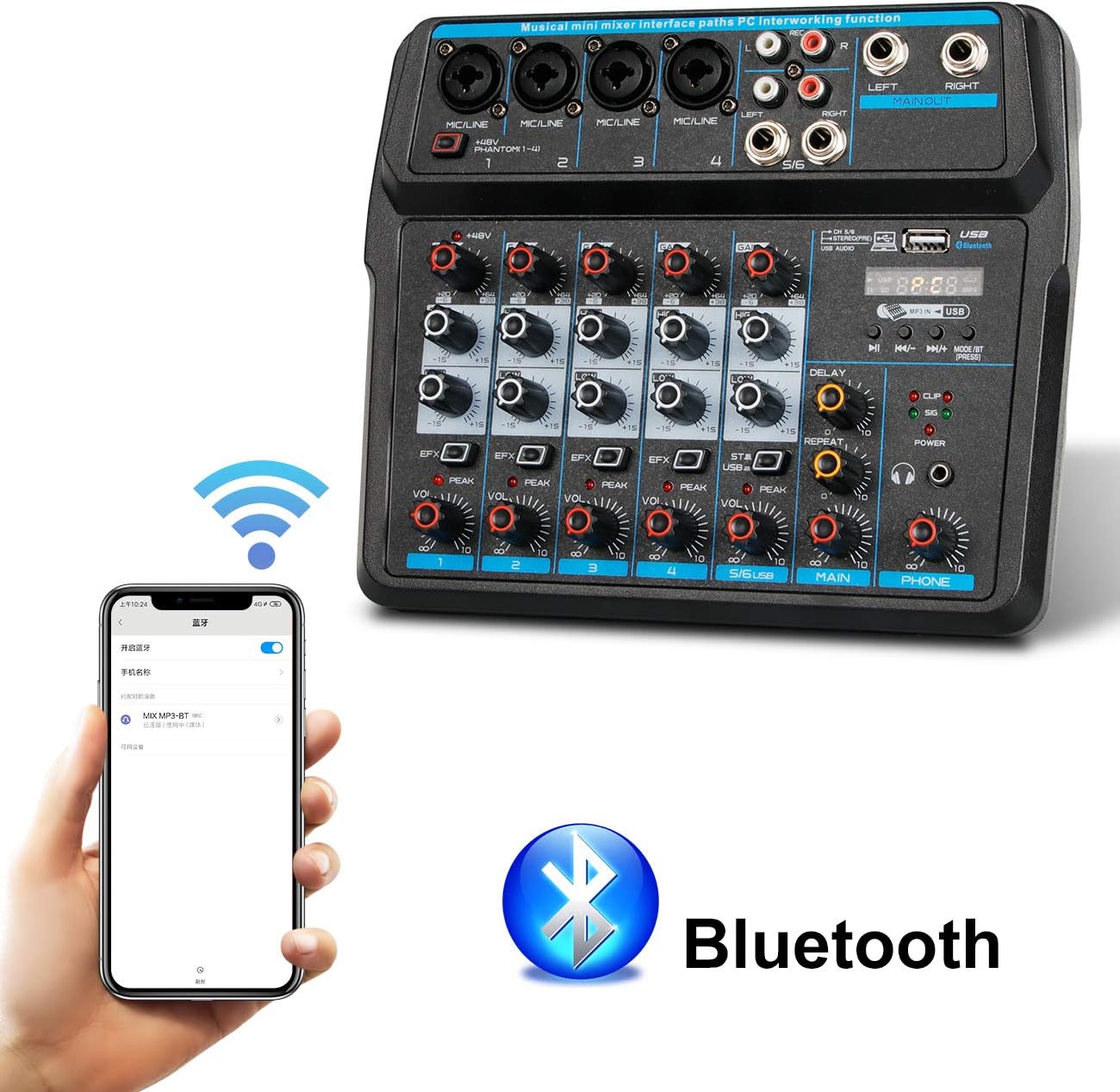
Bildbeschreibung: This image shows a smartphone displaying its Bluetooth settings, with the Depusheng U6 Audio Mixer (labeled 'U6 MP3-BT') available for connection. A large Bluetooth logo is also present, indicating the wireless connectivity feature.
- Drücken Sie die MODE/BT button on the mixer until the Bluetooth indicator lights up and the display shows 'BT'.
- Aktivieren Sie auf Ihrem Mobilgerät (Smartphone, Tablet usw.) Bluetooth und suchen Sie nach verfügbaren Geräten.
- Select 'U6 MP3-BT' from the list to pair.
- Once paired, you can stream audio wirelessly from your device to the mixer. Bluetooth operates effectively within approximately 1.5 feet.
6.2 USB Audio Interface (PC Recording/Playback)
The U6 mixer can function as an external sound card for your computer.

Bildbeschreibung: This diagram illustrates how to connect the Depusheng U6 Audio Mixer to a laptop via USB for both playback and recording. It shows audio signals flowing from the computer to the mixer (background music) and from the mixer to the computer (for recording), with a close-up of the USB connection port on the mixer.
- Verbinden Sie den Mixer über ein USB-Kabel mit Ihrem PC.
- The mixer will be recognized as a USB audio device by your computer.
- In your computer's sound settings or DAW (Digital Audio Workstation) software (e.g., Pro Tools, Logic Pro X, GarageBand, Audacity), select the U6 mixer as the input and output audio device.
- You can now record audio from the mixer's inputs to your computer or play back audio from your computer through the mixer.
6.3 U-Disk Playback and Recording
The mixer supports direct playback of audio files from a USB flash drive (U-Disk) and recording to it.

Bildbeschreibung: This image highlights the U-Disk functionality of the Depusheng U6 Audio Mixer. It shows a USB flash drive inserted into the mixer's USB port, with text indicating its capabilities: 1. Play MP3/WAV/WMA/FLAC files, and 2. Record audio. The mixer's digital display shows '88:88', likely indicating playback time or a menu option.
- Wiedergabe: Insert a U-Disk containing audio files (MP3/WAV/WMA/FLAC) into the USB port. The mixer will automatically switch to U-Disk mode or you may need to press MODE/BT. Use the PLAY/PAUSE, PREVIOUS, and NEXT buttons to control playback.
- Aufnahme: To record to a U-Disk, ensure it is inserted and the mixer is in U-Disk mode. Follow the specific recording instructions in the full manual (if available) or typically press and hold the PLAY/PAUSE button to initiate recording.
6.4 Using Effects (DELAY and REPEAT)
The U6 mixer includes built-in DELAY and REPEAT effects to enhance your audio.
- Verwenden Sie die EFX knob on each channel to send a portion of that channel's signal to the effects processor.
- Passen Sie die VERZÖGERUNG Drehknopf zur Steuerung der Verzögerungszeit des Effekts.
- Passen Sie die WIEDERHOLEN Drehknopf zur Steuerung der Anzahl der Wiederholungen des Delay-Effekts.
- The overall level of the effects return can be controlled via a dedicated EFX return knob (if present) or integrated into the main mix.
7. Wartung
- Reinigung: Use a soft, dry cloth to clean the surface of the mixer. Do not use abrasive cleaners, waxes, or solvents.
- Lagerung: Bei längerer Nichtbenutzung sollte der Mixer an einem kühlen, trockenen Ort, fern von direkter Sonneneinstrahlung und extremen Temperaturen aufbewahrt werden.
- Kabelpflege: Always grasp the connector, not the cable, when unplugging. Avoid bending or kinking cables excessively.
8. Fehlerbehebung
If you encounter issues with your Depusheng U6 Audio Mixer, refer to the following common problems and solutions:
| Problem | Mögliche Ursache | Lösung |
|---|---|---|
| Keine Tonausgabe |
|
|
| Mikrofon funktioniert nicht |
|
|
| Bluetooth stellt keine Verbindung her |
|
|
| USB recording/playback issues |
|
|
9. Spezifikationen
| Besonderheit | Spezifikation |
|---|---|
| Marke | Depusheng |
| Modellnummer | U6 |
| Anzahl der Kanäle | 6 |
| Konnektivitätstechnologie | Bluetooth, USB |
| Audioeingang | XLR, 1/4" (6.35 mm) |
| Stromquelle | USB-Kabel |
| Artikelgewicht | 1.02 Kilogramm |
| Verpackungsabmessungen | 29.3 x 24.3 x 9.2 cm |
| Hardware-Schnittstelle | Bluetooth |
10. Garantie und Support
Depusheng products are designed for reliability and performance. This product comes with a standard manufacturer's warranty. For specific warranty terms and conditions, please refer to the documentation provided at the time of purchase or contact your retailer.
If you require technical support or have questions not covered in this manual, please contact Depusheng customer service through the retailer where you purchased the product. Please have your model number (U6) and purchase information ready.