
1. Einleitung
The HALNY HL-1GE GPON is a 1-port ONU/ONT client terminal designed for installation in FTTH (Fiber To The Home) networks. This product utilizes GPON (Gigabit-Capable Passive Optical Network) technology and complies with current ITU-T standards. The HALNY HL-1GE GPON offers one Gigabit RJ-45 port (1 x RJ45 1000Mbs) and one SC/APC B optical port. The manufacturer has ensured the versatility of operating modes. HALNy ONT/ONU can function as both a typical bridge (SFU) and a router (HGU) with NAT functionality, which makes the device ideal for any FTTH network variant. HALNY devices are compatible with third-party equipment, ensuring high versatility.
2. Produktmerkmale
- Standardkompatibilität: The product operates with GPON technology and meets current ITU-T standards.
- Vielseitige Betriebsarten: The ONT/ONU can function as a typical bridge (SFU) or as a router (HGU) with NAT function, making the device ideal for any FTTH network variant.
- High Functionality: The HALNY HL-1GE 1x RJ45 1000 Mbps uses a single fiber (single mode) for broadband services.
- Große Bandbreite: The PON interface complies with ITU-T G.984.5, providing 2.5 Gbps downstream and 1.25 Gbps upstream. Gigabit service is delivered via the LAN interface.
- Idealer Ersatz: This product is an ideal replacement for many devices operating with ONT (Optical Network Terminal) technology.
3. Packungsinhalt
The HALNY HL-1GE GPON ONT package typically includes the following:
- HALNY HL-1GE GPON ONT Device
- Netzteil
- (Other accessories may vary by region or retailer)

Figure 3.1: HALNY HL-1GE GPON ONT device with its power adapter and packaging.
4. Physikalische Beschreibung
Familiarize yourself with the physical components and indicators of your HALNY HL-1GE GPON ONT.
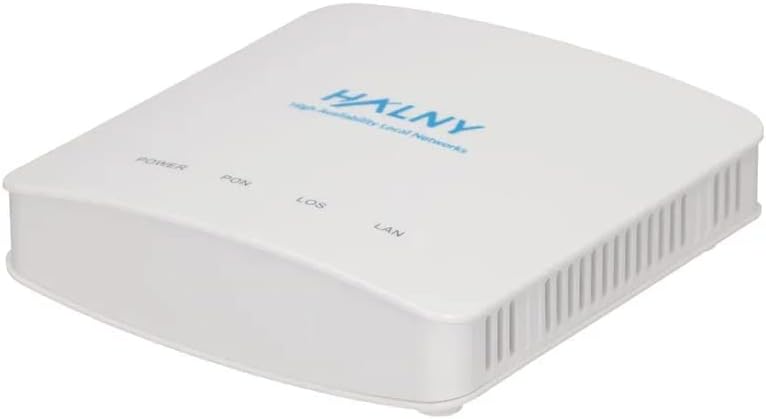
Abbildung 4.1: Oben view of the HL-1GE GPON ONT with LED indicators for Power, PON, LOS, and LAN.

Abbildung 4.2: Rückseite view of the HL-1GE GPON ONT, showing the power input, Gigabit Ethernet port, and SC/APC optical port.
4.1. LED-Anzeigen
- LEISTUNG: Indicates power status. Green when powered on.
- PON: Indicates GPON registration status. Green when successfully registered with the OLT.
- LOS (Signalverlust): Indicates optical signal status. Red when no optical signal is detected or signal is too weak.
- LAN: Indicates Ethernet port status. Green when connected to a device, blinking when data is being transmitted.
4.2. Häfen
- Leistungsaufnahme: Wird an das mitgelieferte Netzteil angeschlossen.
- LAN (RJ-45): Gigabit Ethernet port for connecting to a computer, router, or other network device.
- Optical Port (SC/APC): Connects to the fiber optic cable from your service provider.
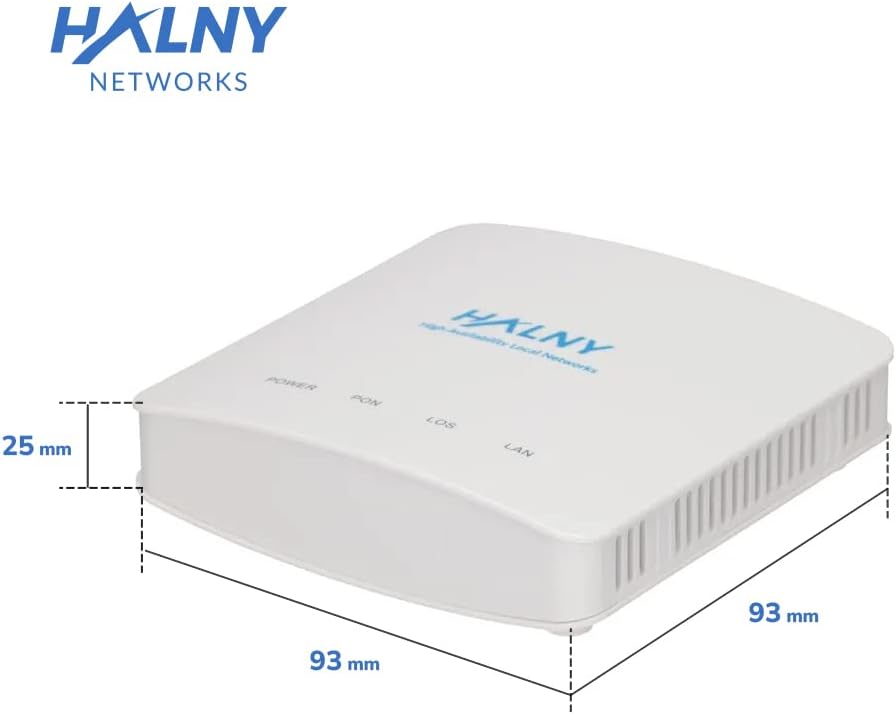
Figure 4.3: Dimensions of the HL-1GE GPON ONT.
5. Einrichtung und Installation
Follow these steps to set up your HALNY HL-1GE GPON ONT:
- Stromanschluss: Connect the provided power adapter to the power input port on the rear of the ONT, then plug the adapter into a power outlet. The POWER LED should illuminate green.
- Optical Fiber Connection: Carefully connect the fiber optic cable from your service provider to the SC/APC optical port on the ONT. Ensure the connector is clean and properly seated. The PON LED should eventually turn green, indicating successful registration with the OLT. If the LOS LED is red, there is an issue with the optical signal.
- Ethernet-Verbindung: Connect an Ethernet cable from the LAN port on the ONT to your computer, router, or other network device. The LAN LED should illuminate green.

Figure 5.1: Connection diagram for the HL-1GE GPON ONT.
Once all connections are made and the PON LED is solid green, your ONT is ready for operation. Further configuration (e.g., setting up router mode, Wi-Fi if applicable to your network setup) will depend on your Internet Service Provider's requirements.
6. Betriebsarten
The HALNY HL-1GE GPON ONT supports two primary operating modes:
6.1. Bridge Mode (SFU - Single Family Unit)
In Bridge Mode, the ONT acts as a simple bridge, passing network traffic directly between the optical network and the connected Ethernet device (e.g., your personal router). It does not perform NAT (Network Address Translation) or routing functions. This mode is typically used when you have your own router that handles all routing, Wi-Fi, and firewall functionalities.
6.2. Router Mode (HGU - Home Gateway Unit)
In Router Mode, the ONT functions as a Home Gateway Unit, performing NAT, routing, and potentially other gateway functions. This mode allows the ONT to directly manage IP addresses for multiple devices on your local network. It is often used when the ONT is the primary device providing network services to your home or small office. Configuration for this mode is typically managed by your Internet Service Provider.

Figure 6.1: The HL-1GE GPON ONT in an operational setup.

Figure 6.2: The HL-1GE GPON ONT integrated into a network with another router.
7. Spezifikationen
| Besonderheit | Beschreibung |
|---|---|
| Marke | Halny |
| Modellname | HL-1GE |
| Modellnummer | HL-1GE GPON |
| Maße | 11.3 x 10.7 x 6.2 cm |
| Gewicht | 200 Gramm |
| Datenübertragungsrate | 1000 Megabit per second (LAN) |
| PON-Schnittstelle | ITU-T G.984.5 compliant, 2.5 Gbps downstream, 1.25 Gbps upstream |
| Optischer Anschluss | SC/APC B |
| LAN-Anschlüsse | 1 x RJ45 10/100/1000 Mbps |
| Betriebsarten | Bridge (SFU) and Router (HGU) with NAT |
| Kompatible Geräte | PC, Smartphone, Tablet, Laptop |
| Konnektivitätstechnologie | Ethernet |
| Farbe | Weiß |
8. Fehlerbehebung
This section provides solutions to common issues you might encounter with your HALNY HL-1GE GPON ONT.
8.1. LED-Anzeigestatus
- POWER LED is Off:
- Ensure the power adapter is securely connected to the ONT and a working power outlet.
- Überprüfen Sie, ob die Steckdose funktioniert.
- LOS LED is Red:
- This indicates a loss of optical signal.
- Check the fiber optic cable connection to the ONT. Ensure it is clean, undamaged, and securely seated.
- Do not attempt to clean the fiber optic connector yourself unless you have proper tools and training, as this can damage the fiber. Contact your Internet Service Provider (ISP) for assistance, as this issue often requires their intervention.
- PON LED is Off or Blinking:
- If the PON LED is off, the ONT is not registered with the OLT (Optical Line Terminal) at your ISP's end.
- If it's blinking, it's attempting to register.
- Ensure the LOS LED is not red. If it is, resolve the optical signal issue first.
- Contact your ISP to verify service activation and OLT configuration.
- LAN LED is Off:
- Ensure the Ethernet cable is securely connected between the ONT's LAN port and your connected device (PC, router).
- Check the status of the connected device's Ethernet port.
- Versuchen Sie es mit einem anderen Ethernet-Kabel.
8.2. Kein Internetzugang
- Verify all LED indicators are in their normal operating state (POWER: Green, PON: Green, LOS: Off, LAN: Green/Blinking).
- Restart the ONT by unplugging the power adapter, waiting 10 seconds, and plugging it back in.
- Restart your connected device (PC, router).
- If using a separate router, ensure it is properly configured and receiving an IP address from the ONT (if in bridge mode) or handling NAT correctly (if ONT is in router mode).
- Contact your Internet Service Provider for further assistance if the issue persists.
9. Wartung
To ensure optimal performance and longevity of your HALNY HL-1GE GPON ONT, follow these simple maintenance guidelines:
- Reinigung: Reinigen Sie die Außenseite des Geräts mit einem weichen, trockenen Tuch. Verwenden Sie keine flüssigen Reiniger oder Sprays.
- Belüftung: Ensure the device is placed in a well-ventilated area. Do not block the ventilation slots.
- Umfeld: Das Gerät sollte nicht direkter Sonneneinstrahlung, Wärmequellen oder übermäßiger Feuchtigkeit ausgesetzt werden.
- Kabelmanagement: Ensure all cables are neatly arranged and not under strain or bent sharply, especially the fiber optic cable.
- Firmware-Updates: Firmware updates are typically managed by your Internet Service Provider. Do not attempt to update firmware yourself unless instructed by your ISP.
10. Garantie und Support
For warranty information and technical support regarding your HALNY HL-1GE GPON ONT, please refer to the documentation provided at the time of purchase or contact your Internet Service Provider (ISP). Your ISP is typically responsible for the support and maintenance of the ONT device as part of your service agreement.
For general information about HALNY products, you may visit the official HALNY Networks webWebsite.