
1. Einleitung
This manual provides essential information for the safe and efficient use of your Konka 32 Inch HD Standard TV, model KE32MS314. Please read these instructions thoroughly before operating the television and retain them for future reference.
2. Sicherheitshinweise
- Stromversorgung: Stellen Sie sicher, dass der Fernseher an eine Wechselstromversorgung mit 100-240 V, 50/60 Hz angeschlossen ist.
- Belüftung: Blockieren Sie keine Lüftungsöffnungen. Sorgen Sie für ausreichend Platz um den Fernseher herum, um eine gute Luftzirkulation zu gewährleisten.
- Wasser und Feuchtigkeit: Setzen Sie den Fernseher weder Regen noch Feuchtigkeit aus. Stellen Sie keine mit Flüssigkeiten gefüllten Gegenstände, wie z. B. Vasen, auf den Fernseher.
- Wärmequellen: Halten Sie den Fernseher von Wärmequellen wie Heizkörpern, Heizlüftern, Öfen oder anderen Geräten (einschließlich) fern. ampKonverter (Lüfter), die Wärme erzeugen.
- Reinigung: Ziehen Sie vor der Reinigung den Netzstecker des Fernsehers. Verwenden Sie ein weiches, trockenes Tuch. Verwenden Sie keine flüssigen oder Aerosol-Reinigungsmittel.
- Blitz: Ziehen Sie bei Gewittern oder längerer Nichtbenutzung den Netzstecker des Fernsehers.
- Wartung: Versuchen Sie nicht, dieses Produkt selbst zu warten. Überlassen Sie alle Wartungsarbeiten qualifiziertem Servicepersonal.
3. Packungsinhalt
Überprüfen Sie, ob alle Artikel im Paket vorhanden sind:
- Konka KE32MS314 32-Inch HD LED TV
- Fernbedienung
- Netzkabel
- Benutzerhandbuch (dieses Dokument)
- Desktop Stand (if included)
4. Einrichtung
4.1 Auspacken
Carefully remove the TV and all accessories from the packaging. Keep the packaging materials for future transport or storage.
4.2 Ständermontage (optional)
If you are using the desktop stand, attach it securely to the bottom of the TV using the provided screws. Ensure the stand is stable before placing the TV on a flat surface.
4.3 Wandmontage (optional)
If you plan to wall-mount the TV, refer to the instructions provided with your wall-mount bracket. Ensure the bracket is compatible with the TV's VESA mounting pattern and is installed by qualified personnel.
4.4 Geräte anschließen
The TV offers various connection ports for external devices. Refer to the image below for port identification and connect your devices accordingly.
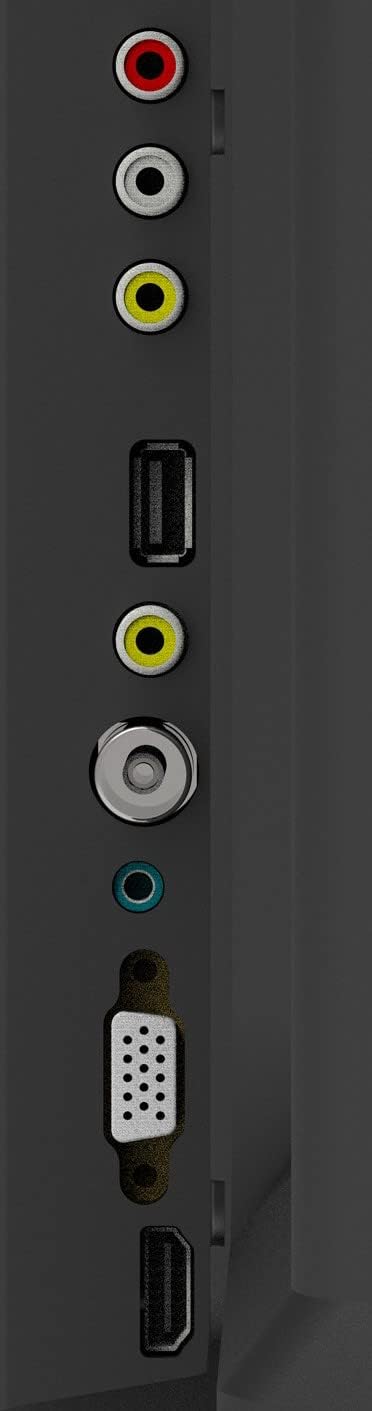
Abbildung 1: TV-Anschlussbuchsen
- Antenneneingang: Connect your aerial or cable TV signal to this port.
- HDMI-Eingänge (2): Connect devices such as Blu-ray players, game consoles, or set-top boxes. One HDMI input supports Audio Return Channel (ARC).
- VGA-Eingang: Schließen Sie einen Computer als Monitor an.
- Mini Component / AV Input: Connect older devices using component (YPbPr) or composite (AV) cables.
- USB Inputs (2): Schließen Sie USB-Speichergeräte zur Medienwiedergabe an.
- Kopfhöreranschluss: Schließen Sie Kopfhörer für privates Hören an.
5. Betrieb
5.1-Fernbedienung
The included remote control allows you to operate all functions of your TV. Insert two AAA batteries (not included) into the battery compartment, ensuring correct polarity.

Abbildung 2: Layout der Fernbedienung
- LEISTUNG: Schaltet den Fernseher ein oder aus.
- EINGANG: Wählt die Eingangsquelle aus (HDMI, AV, VGA usw.).
- Zifferntasten (0-9): Kanäle direkt auswählen.
- LAUTSTÄRKE +/-: Regelt die Lautstärke.
- PROG +/-: Wechselt die Kanäle.
- SPEISEKARTE: Greift auf das Hauptmenü zu.
- Navigationstasten (Auf/Ab/Links/Rechts): Navigieren Sie durch die Menüoptionen.
- EINGEBEN: Bestätigt die Auswahl.
- EXIT: Beendet das aktuelle Menü oder die aktuelle Funktion.
- INFO: Zeigt Kanalinformationen an.
- STUMM: Schaltet den Ton stumm oder hebt die Stummschaltung auf.
5.2 Ersteinrichtung
Upon first power-on, the TV will guide you through an initial setup process. This typically includes selecting your language, country, and performing an automatic channel scan for available broadcasts.
5.3 Grundfunktionen
- Ein-/Ausschalten: Press the POWER button on the remote or the TV's control panel.
- Auswahl der Eingangsquelle: Press the INPUT button repeatedly to cycle through available input sources, or use the menu to select.
- Lautstärkeregelung: Verwenden Sie die Tasten VOL +/- .
- Kanalauswahl: Use the PROG +/- buttons or the number buttons.
5.4 Menünavigation
Press the MENU button to access the main menu. Use the navigation buttons to move between options and ENTER to select. Adjust settings such as picture mode, sound mode, and channel settings. Press EXIT to close the menu.
5.5 Audiomodi
The TV features 5 audio modes to optimize sound for different content types:
- Standard
- Musik
- Film
- Sport
- User (customizable settings)
6. Wartung
6.1 Reinigung des Bildschirms
Wischen Sie den Bildschirm vorsichtig mit einem weichen, fusselfreien Tuch ab. Bei hartnäckigen Flecken leicht andrücken.ampen the cloth with water or a specialized screen cleaner (ensure it's safe for LED screens) and wipe gently. Do not apply pressure or use abrasive materials.
6.2 Reinigen des Gehäuses
Wipe the TV cabinet with a soft, dry cloth. Avoid using strong detergents or solvents, as they may damage the finish.
7. Fehlerbehebung
Sollten Sie Probleme mit Ihrem Fernseher haben, beachten Sie bitte die folgenden häufigen Probleme und Lösungen:
| Problem | Mögliche Lösung |
|---|---|
| Kein Strom | Prüfen Sie, ob das Netzkabel fest mit dem Fernseher und der Steckdose verbunden ist. Stellen Sie sicher, dass die Steckdose funktioniert. |
| Kein Bild, aber Ton ist vorhanden | Vergewissern Sie sich, dass die richtige Eingangsquelle ausgewählt ist. Überprüfen Sie die Kabelverbindungen zu externen Geräten. |
| Kein Ton, aber ein Bild ist vorhanden. | Check the volume level and ensure the TV is not muted. Verify audio settings in the menu. |
| Fernbedienung funktioniert nicht | Tauschen Sie die Batterien aus. Stellen Sie sicher, dass sich keine Hindernisse zwischen der Fernbedienung und dem Infrarotsensor des Fernsehers befinden. |
| Schlechte Bildqualität | Check antenna connection or source device cables. Adjust picture settings in the TV menu. |
8. Spezifikationen
Detailed specifications for the Konka KE32MS314 TV:
| Besonderheit | Detail |
|---|---|
| Modellnummer | KE32MS314 |
| Bildschirmgröße | 32 Zoll |
| Display-Technologie | LED |
| Auflösung | 720p (HD) |
| Bildwiederholrate | 60 Hz |
| Viewing-Winkel | 178 Grad |
| Audiosystem | 2 x 8W Stereophonic |
| Audiomodi | Standard, Music, Movie, Sport, User |
| Konnektivität | 2 HDMI (including ARC), 2 USB, VGA, Mini Component/AV, Antenna Input, Headphone Jack, Ethernet |
| Besondere Merkmale | Flat Display, D3 Image Noise Reduction, Automatic Volume Level Maintenance |
| Unterstützte Internetdienste | YouTube |
| Produktabmessungen (mit Ständer) | 73.2 cm (B) x 20.7 cm (T) x 47.9 cm (H) (ca.) |
| Produktgewicht | 4.5 kg |
9. Garantie und Support
For warranty information and technical support, please refer to the warranty card included with your product or contact Konka customer service. Keep your purchase receipt as proof of purchase for warranty claims.