
1. Einleitung
This manual provides comprehensive instructions for the DEKCO DC4L 2K Outdoor Security Camera. It covers product features, installation procedures, operational guidelines, maintenance tips, troubleshooting solutions, and detailed technical specifications. Please read this manual thoroughly before using the camera to ensure proper setup and optimal performance.

Image 1.1: DEKCO DC4L Outdoor Security Cameras.
2. Produktüberschreitungview
The DEKCO DC4L is a wired outdoor security camera designed for robust surveillance. It features 2K resolution, color night vision, and a 180° pan capability to cover wide areas. Key functionalities include dual-band WiFi connectivity, AI human detection, and flexible storage options.
Hauptmerkmale:
- 2K Ultra-Clear Spotlight Color Night Vision: Captures clear, vibrant color images even in low-light conditions.
- Stable Dual-Band WiFi Connection: Supports both 2.4GHz and 5GHz networks for reliable connectivity.
- Flexible Speicheroptionen: Offers local storage via Micro SD card (8-128GB) and cloud storage services for 24/7 continuous recording.
- Intelligente KI-Personenerkennung: Advanced algorithms accurately identify human figures, reducing false alarms from other movements.
- 180° Horizontal Pan: Bietet einen weiten 270°-Blickwinkel. viewEinfallswinkel für eine umfassende Flächenabdeckung.
- Wasserdichtigkeitsklasse IP65: Für den Außeneinsatz konzipiert, staub- und wasserbeständig.
- Zweiwege-Audio: Enables communication through the camera via the mobile application.
- Smart Home Integration: Compatible with Amazon Alexa and Google Home devices.

Bild 2.1: Überview of DEKCO DC4L Camera Features.
3. Einrichtung
3.1 Physische Installation
The DEKCO DC4L camera is designed for wall mounting. Ensure the installation location provides a clear view of the desired monitoring area and is within range of your WiFi network and a power source. The camera is wired and requires a continuous power supply; it is not battery-powered or solar-powered.
- Wählen Sie einen Standort: Select a suitable outdoor location for mounting, considering coverage, power access, and WiFi signal strength.
- Montieren Sie die Kamera: Use the provided mounting hardware to securely attach the camera to a wall. Adjust the bracket to achieve the desired initial angle.
- Strom anschließen: Connect the camera to a 5V DC power source using the included adapter.

Image 3.1: Camera Installation.

Image 3.2: Wired Camera Installation Overview.
3.2 App-Installation und Kontoerstellung
The DEKCO DC4L camera operates with a dedicated mobile application, often referred to as the CloudEdge app. Download the app from your device's app store (iOS or Android) and follow the on-screen instructions to create an account.
3.3 WiFi-Verbindung
The camera supports both 2.4GHz and 5GHz WiFi networks for flexible and stable connectivity.
- Einschalten: Ensure the camera is powered on and in pairing mode (refer to app instructions for specific indicator lights).
- Gerät hinzufügen: Open the app, select 'Add Device', and follow the prompts to connect your camera to your home WiFi network.
- Wählen Sie Netzwerk: Choose your 2.4GHz or 5GHz WiFi network and enter the password.

Image 3.3: 2.4GHz WiFi Connection.
3.4 Installation der Micro-SD-Karte
For local storage, install a Micro SD card (8GB to 128GB, Class 10 or higher recommended) into the designated slot on the camera.
- Steckplatz suchen: Identify the Micro SD card slot on the camera body.
- Karte einführen: Führen Sie die Micro-SD-Karte vorsichtig in den Steckplatz ein, bis sie einrastet.
- Karte formatieren: Within the app settings, navigate to storage options and format the newly inserted SD card.

Image 3.4: Micro SD Card Installation.
4. Bedienungsanleitung
4.1 Live View
Access the live video feed from your camera through the mobile application.
- Öffne App: Launch the DEKCO app on your smartphone.
- Select Camera: Tap on the desired camera from your device list to view sein Live-Feed.

Bild 4.1: Live View auf dem Smartphone.
4.2 Schwenksteuerung
The camera offers a 180° horizontal pan function, providing a 270° viewing-Winkel.
- Zugriffskontrollen: Während im Leben view, use the on-screen controls to pan the camera horizontally.
- Automatischer Tempomat: Enable the 'Auto Cruise' feature in the app settings for the camera to automatically pan across a predefined area at 60-minute intervals.

Image 4.2: 270° Viewing Angle with 180° Horizontal Pan.

Image 4.3: Auto Cruise Functionality.
4.3 Nachtsicht
The camera features 2K Ultra-Clear Spotlight Color Night Vision, providing clear and detailed images even in complete darkness.
- Automatische Aktivierung: Die Nachtsichtfunktion schaltet sich normalerweise bei schwachen Lichtverhältnissen automatisch ein.
- Spotlight-Modus: The integrated spotlight can be activated to provide full-color night vision.

Image 4.4: 2K QHD Color Night Vision.
4.4 KI-gestützte Personenerkennung und Warnmeldungen
The camera uses advanced AI algorithms to accurately detect human figures, minimizing false alarms from other moving objects.
- Erkennung aktivieren: In the app's 'Alarm Management' settings, enable 'Motion Detection' and set the sensitivity (Low, Medium, High).
- Meldungen erhalten: The app will send push notifications to your smartphone when human motion is detected.
- Abschreckung: The camera can be configured to activate a spotlight and siren upon detection to deter unwanted activity.

Image 4.5: AI Human Detection for Fewer False Positives.

Image 4.6: Alarm Management Settings.

Image 4.7: Deterrence Features (Spotlight, Push, Siren).
4.5 Aufnahme
The camera supports 24/7 continuous recording and motion-activated recording, with options for local Micro SD card storage or cloud storage.
- Kontinuierliche Aufnahme: Records continuously to the Micro SD card or cloud service.
- Ereignisaufzeichnung: Es wird nur aufgezeichnet, wenn eine Bewegung erkannt wird, wodurch Speicherplatz gespart wird.
- Wiedergabe: Auf aufgezeichnetes Foo zugreifentage through the app's playback feature, with a timeline for easy navigation.

Image 4.8: 24/7 Continuous Recording and Micro SD Storage.
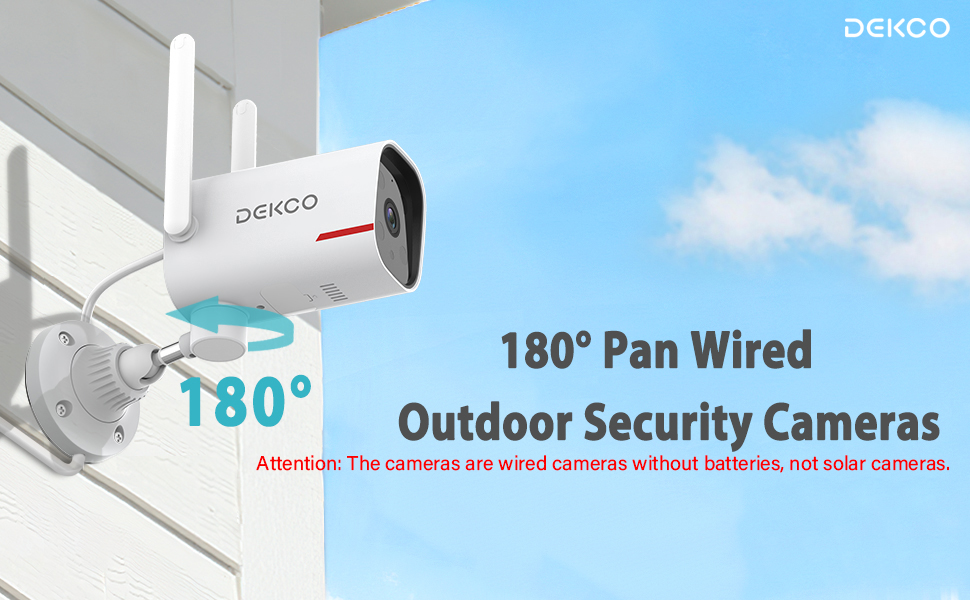
Image 4.9: 24/7 Home Monitoring.
4.6 Zwei-Wege-Audio
Utilize the built-in microphone and speaker for two-way communication through the camera.
- Gegensprechanlage aktivieren: Im Live viewTippen Sie auf das Mikrofonsymbol, um durch die Kamera zu sprechen.
- Hören: Das Mikrofon der Kamera nimmt Geräusche aus dem überwachten Bereich auf.
4.7 Smart-Home-Integration
The DEKCO DC4L camera is compatible with Amazon Alexa and Google Home smart devices.
- Konto verknüpfen: Follow the instructions in your Alexa or Google Home app to link your DEKCO account.
- Sprachsteuerung: Verwenden Sie Sprachbefehle, um view das Kamerabild auf kompatiblen Smart-Displays.
4.8 Gemeinsame Nutzung des Kamerazugriffs
You can share access to your camera with family members or trusted individuals through the app.
- Access Sharing Settings: In the app, navigate to the camera settings and find the 'Share Device' option.
- Invite Users: Follow the prompts to invite other users to view Ihr Kamerabild.
4.9 ONVIF/RTSP Support (Advanced Users)
For advanced users, the camera supports ONVIF/RTSP protocols, allowing integration with Network Video Recorders (NVRs) or other surveillance software.
- In der App aktivieren: Enable ONVIF/RTSP functionality within the camera's settings in the mobile app.
- Configure NVR: Refer to your NVR or software documentation for instructions on adding an ONVIF/RTSP camera.
5. Wartung
5.1 Reinigung
Regelmäßige Reinigung trägt dazu bei, eine optimale Bildqualität zu erhalten und die Lebensdauer der Kamera zu verlängern.
- Linse: Gently wipe the camera lens with a soft, lint-free cloth. Avoid abrasive cleaners.
- Körper: Reinigen Sie das Kameragehäuse mit einem Reinigungstuch.amp Tuch, um Staub und Schmutz zu entfernen.
5.2 Firmware-Updates
Periodically check for and install firmware updates through the mobile application to ensure your camera has the latest features and security enhancements.
5.3 SD-Kartenverwaltung
To ensure continuous recording, regularly check the status of your Micro SD card in the app. Format the card periodically or replace it if it becomes corrupted or reaches its end of life.
6. Fehlerbehebung
If you encounter issues with your DEKCO DC4L camera, refer to the following common troubleshooting steps:
- Kamera offline: Check the power connection and WiFi signal strength. Restart the camera and your router. Ensure the camera is connected to the correct 2.4GHz or 5GHz WiFi network.
- SD-Karte nicht erkannt: Ensure the SD card is correctly inserted and formatted within the app. Try a different compatible SD card if the issue persists.
- Schlechte Bildqualität: Clean the camera lens. Check your network connection speed.
- Falscher Alarm: Adjust the AI Human Detection sensitivity settings in the app.
- Rosa View: If the camera displays a pink image, try restarting the camera. If the issue persists, contact customer support as it may indicate a hardware fault.
- Pan Control Not Working: Ensure the camera has a stable network connection. For ONVIF/RTSP users, ensure the camera firmware is up to date, as this can resolve compatibility issues.
If these steps do not resolve your issue, please contact DEKCO customer support for further assistance.
7. Spezifikationen
| Besonderheit | Spezifikation |
|---|---|
| Modellname | DC4L |
| Montagetyp | Wandhalterung |
| Auflösung der Videoaufnahme | 2K |
| Anzahl der Artikel (in der Packung) | 1 (for this model variant) |
| Im Lieferumfang enthaltene Komponenten | Adapter |
| Drahtlose Kommunikationstechnologie | Wi-Fi (2.4 GHz & 5 GHz) |
| Formfaktor | Kuppel |
| Viewing-Winkel | 270 Degrees (180° Pan) |
| Nachtsichtbereich | 32 Fuß |
| Bildfrequenz | 30 fps |
| Material | Metall |
| Bandtage | 5 Volt (DC) |
| Produktabmessungen (L x B x H) | 20.5 x 9.98 x 9.98 cm |
| Artikelgewicht | 1.99 kg |
| Art der Glühbirne | Infrarot |
| Besondere Merkmale | Nachtsicht, KI-Personenerkennung, Zwei-Wege-Audio |
| Verwendung im Innen- und Außenbereich | Im Freien |
| Stromquelle | Kabelgebundene Elektrik |
| Kompatible Geräte | Smartphone (Android, iPhone), Amazon Alexa, Google Home |
8. Gewährleistung
The DEKCO DC4L camera comes with a 1 Jahr Garantie from the date of purchase. Please retain your proof of purchase for warranty claims. The warranty covers manufacturing defects and malfunctions under normal use. It does not cover damage caused by misuse, accidents, unauthorized modifications, or natural disasters.
9. Unterstützung
For technical assistance, product inquiries, or warranty claims, please contact DEKCO customer support. Refer to the contact information provided with your product packaging or visit the official DEKCO webSite für Supportressourcen.