
1. Einleitung
This manual provides essential information for the safe and effective use of your Huawei Watch Fit 2 Smartwatch. Please read this manual thoroughly before using the device and retain it for future reference.
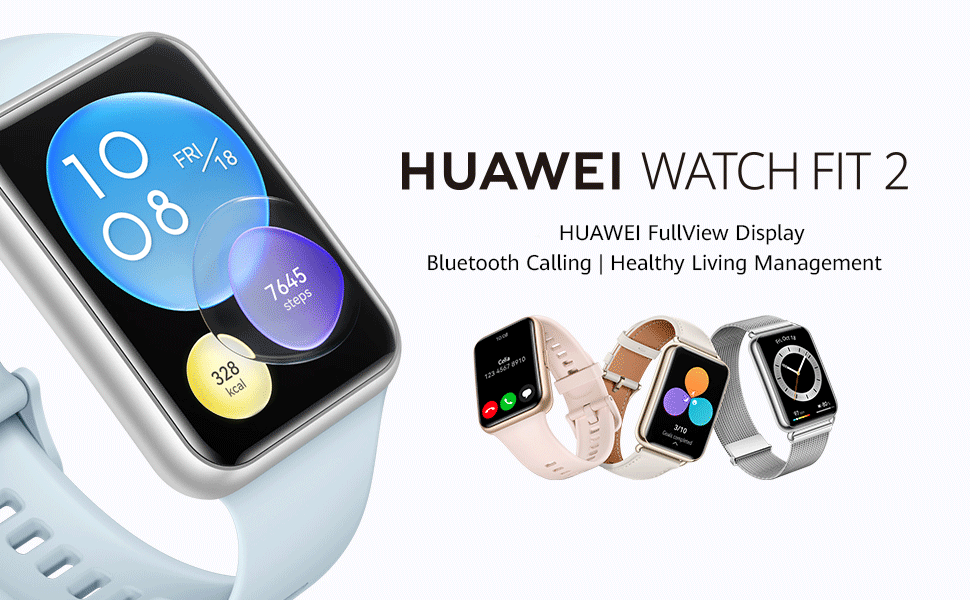
Image: Huawei Watch Fit 2 Smartwatch, showcasing sein schlankes Design und sein brillantes Display.
2. Lieferumfang
Prüfen Sie, ob alle Artikel in der Produktverpackung vorhanden sind:
- Uhr x 1
- Charging Cradle (including the charging cable) x 1
- Kurzanleitung x 1
- Safety Information x 1
- Garantiekarte x 1
3. Einrichtung
3.1. Aufladen der Uhr
Before initial use, fully charge your Huawei Watch Fit 2. Connect the charging cradle to a power source and place the watch onto the cradle, ensuring the magnetic contacts align. The watch display will indicate charging status.

Image: The Huawei Watch Fit 2 being charged on its magnetic cradle.
3.2. Koppeln mit Ihrem Telefon
- Laden Sie die Huawei Health-App on your smartphone (compatible with Android and iOS devices).
- Open the Huawei Health App and navigate to the device pairing section.
- Turn on your Huawei Watch Fit 2.
- Select your watch from the list of available devices in the app and follow the on-screen instructions to complete the pairing process.
3.3. Die Uhr tragen
Wear the watch comfortably on your wrist, ensuring the sensors on the back are in contact with your skin. Adjust the strap for a snug fit to ensure accurate heart rate and SpO2 monitoring.

Bild: Rückseite view of the Huawei Watch Fit 2, highlighting the sensor array for health tracking.
4. Bedienung Ihrer Uhr
4.1. Anzeige und Navigation
The Huawei Watch Fit 2 features a 1.74-inch FullView AMOLED touchscreen display. Swipe up, down, left, or right to navigate through menus, notifications, and widgets. Press the side button to return to the home screen or access the app list.

Image: The watch display showing a grid of application icons.
4.2. Bluetooth-Anrufe
With Bluetooth calling support, you can answer or reject calls directly from your wrist when connected to your smartphone. The watch also supports quick message replies and importing contacts.

Image: A user interacting with the watch to manage an incoming Bluetooth call.
4.3. Musikwiedergabe
The watch supports independent music playback. You can store music directly on the watch and listen via connected Bluetooth headphones, allowing you to enjoy music without carrying your phone.

Image: The watch screen showing music playback interface with controls.
4.4. Sprachassistent
Utilize the integrated voice assistant for quick commands, setting reminders, checking weather, and more. Simply activate the voice assistant and speak your request.

Image: The watch display indicating the voice assistant is active and listening.
4.5. Fernauslöser für die Kamera
Control your smartphone's camera remotely using your watch. This feature is useful for group photos or capturing shots from a distance.

Image: A user taking a photo with their smartphone using the watch as a remote shutter.
4.6. Workout Modes and Health Tracking
The watch offers 97 workout modes and comprehensive health management features, including:
- Accurate heart rate monitoring
- HUAWEI TruSleep 2.0 sleep tracking
- SpO2 (blood oxygen saturation) monitoring
- Stress-Tracking
- Quick-Workout Animations and voice-guided warm-up stretches for 7 common workouts.

Image: The watch screen showing active workout tracking with heart rate and calorie data.
5. Wartung
5.1. Wasserbeständigkeit
The Huawei Watch Fit 2 has an IP67 water resistance rating, making it suitable for daily use and light water activities. Avoid prolonged submersion or use in hot water, saunas, or steam rooms, as this may compromise the water resistance.
5.2. Reinigung und Pflege
- Reinigen Sie das Uhrendisplay und das Armband regelmäßig mit einem weichen, fusselfreien Tuch.amp Tuch.
- Vor dem Aufladen sicherstellen, dass die Ladekontakte auf der Rückseite der Uhr sauber und trocken sind.
- Setzen Sie die Uhr keinen extremen Temperaturen oder aggressiven Chemikalien aus.
6. Fehlerbehebung
6.1. Verbindungsprobleme
- Stellen Sie sicher, dass Bluetooth auf Ihrem Smartphone aktiviert ist und sich die Uhr in Reichweite befindet.
- Starten Sie sowohl Ihre Uhr als auch Ihr Smartphone neu.
- If issues persist, unpair and re-pair the watch via the Huawei Health App.
6.2. Ungenaue Gesundheitsdaten
- Achten Sie darauf, dass die Uhr eng am Handgelenk anliegt und die Sensoren ordnungsgemäßen Kontakt mit Ihrer Haut haben.
- Clean the sensor area regularly to remove dirt or sweat buildup.
- Update the Huawei Health App and watch firmware to the latest versions.
6.3. Kurze Akkulaufzeit
- Reduzieren Sie die Bildschirmhelligkeit und die Bildschirm-Einschaltzeit.
- Disable unnecessary notifications or background app refreshes.
- Beschränken Sie die kontinuierliche Herzfrequenzmessung oder die Nutzung von GPS, wenn diese nicht erforderlich ist.
7. Spezifikationen
| Besonderheit | Detail |
|---|---|
| Modellname | Huawei Watch Fit 2 |
| Anzeige | 1.74-inch AMOLED, 454 x 454 Resolution |
| Betriebssystem | Android |
| Speicherkapazität | 32 GB |
| Konnektivitätstechnologie | Bluetooth, USB |
| Besondere Merkmale | GPS, Heart Rate Monitor, Notifications, Sleep Monitor, Touchscreen, Voice Assistant |
| Armbandmaterialtyp | Silikon |
| Wasserbeständigkeit | IP67, 1 Metre Depth |
| Durchschnittliche Batterielebensdauer | 10 Days (typical use) |
| Artikelabmessungen | 46 x 34 x 11 Millimeter |
| Artikelgewicht | 26 Gramm |
| Kompatible Telefonmodelle | Android-Geräte, iOS-Geräte |
8. Garantie und Support
8.1. Garantieinformationen
The Huawei Watch Fit 2 comes with a 1 Jahr HerstellergarantieDie detaillierten Garantiebedingungen entnehmen Sie bitte der beiliegenden Garantiekarte.
8.2. Kundendienst
For further assistance, technical support, or warranty claims, please contact Huawei customer service or visit the official Huawei support webWebsite.
Kontaktinformationen des Importeurs:
Rajendera Trading Corporation, 8 C FLOOR 2ND PLOT 192 KITAB MAHAL DADABHAI NAWROJI ROAD NEW EXCELSIOR CINEMA, FORT MUMBAI-4000051. MAHARASHTRA.
Kontakt: +91 22 66159295
Email Id: accounts@rtcindia.net.
Kontaktdaten des Herstellers:
Goertek Inc NO. 268 DONGFANG ROAD HIGH-TECH INDUSTRIAL DEVELOPMENT DISTRICT WEIFANG SHANDONG CHINA SHANDONG,China-261031
9. Produktüberschreitungview Video
Video: Ein überview of the Huawei Watch Fit 2, showcasing its design, key features, and various functionalities.