
OMOTON WK003
OMOTON 2.4GHz Wireless AZERTY Keyboard Instruction Manual
Modell: WK003
Marke: OMOTON
1. Einleitung
Thank you for choosing the OMOTON 2.4GHz Wireless AZERTY Keyboard. This ultra-slim, silent keyboard is designed for comfortable and efficient typing across various Windows operating systems. This manual provides detailed instructions for setting up, operating, maintaining, and troubleshooting your new keyboard to ensure optimal performance.
2. Packungsinhalt
Please check the package contents carefully. If any items are missing or damaged, please contact OMOTON customer support.
- 1 x OMOTON 2.4GHz Wireless AZERTY Keyboard
- 1 x USB Empfänger
- 1 x Benutzerhandbuch
3. Installationsanleitung
Befolgen Sie diese Schritte, um Ihre OMOTON-Funktastatur einzurichten:
- Batterien installieren: Open the battery compartment on the back of the keyboard. Insert two AAA batteries (not included), ensuring correct polarity. Close the compartment.
- USB-Empfänger einstecken: Locate the USB receiver, which is magnetically stored in the battery compartment. Plug the USB receiver into an available USB port on your computer.

Image: Battery compartment with USB receiver and AAA batteries.
- Einschalten: Slide the ON/OFF switch located on the top right side of the keyboard to the "ON" position.
- Verbinden: Your computer should automatically detect and install the necessary drivers for the keyboard. No additional software is required.

Image: Plug & Play setup with USB receiver.
Die Tastatur ist jetzt einsatzbereit.
4. Bedienungsanleitung
4.1 Grundlegendes Tippen
Simply begin typing. The keyboard features a standard AZERTY layout for familiar use.
4.2 Fn Lock Function
The keyboard includes a convenient Fn Lock function. By default, the F1-F12 keys perform their standard function. To access the multimedia shortcuts directly without pressing the Fn key, activate the Fn Lock.
- Activate/Deactivate Fn Lock: Drücken Fn + Échap simultaneously. When activated, the multimedia functions (e.g., volume control, home page) will be directly accessible by pressing F1-F12. When deactivated, F1-F12 will perform their standard functions, and multimedia actions will require pressing Fn + Fx.

Image: Fn Lock function and multimedia keys.
4.3 Multimedia-Kurzbefehle
The keyboard provides 12 multimedia shortcuts for quick access to common functions. These can be used directly when Fn Lock is active, or by pressing Fn in combination with the respective F-key when Fn Lock is inactive.
| Schlüssel | Funktion |
|---|---|
| F1 | Stumm |
| F2 | Lautstärke verringern |
| F3 | Lautstärke erhöhen |
| F4 | Vorheriger Titel |
| F5 | Abspielen/Pause |
| F6 | Nächster Titel |
| F7 | Brightness Down (System Dependent) |
| F8 | Brightness Up (System Dependent) |
| F9 | Suche |
| F10 | Startseite |
| F11 | Kopie |
| F12 | Paste |
4.4 Kompatibilität
This keyboard is compatible with Windows 11, 10, 8, 7, XP, and Vista, making it suitable for a wide range of desktop and laptop computers.
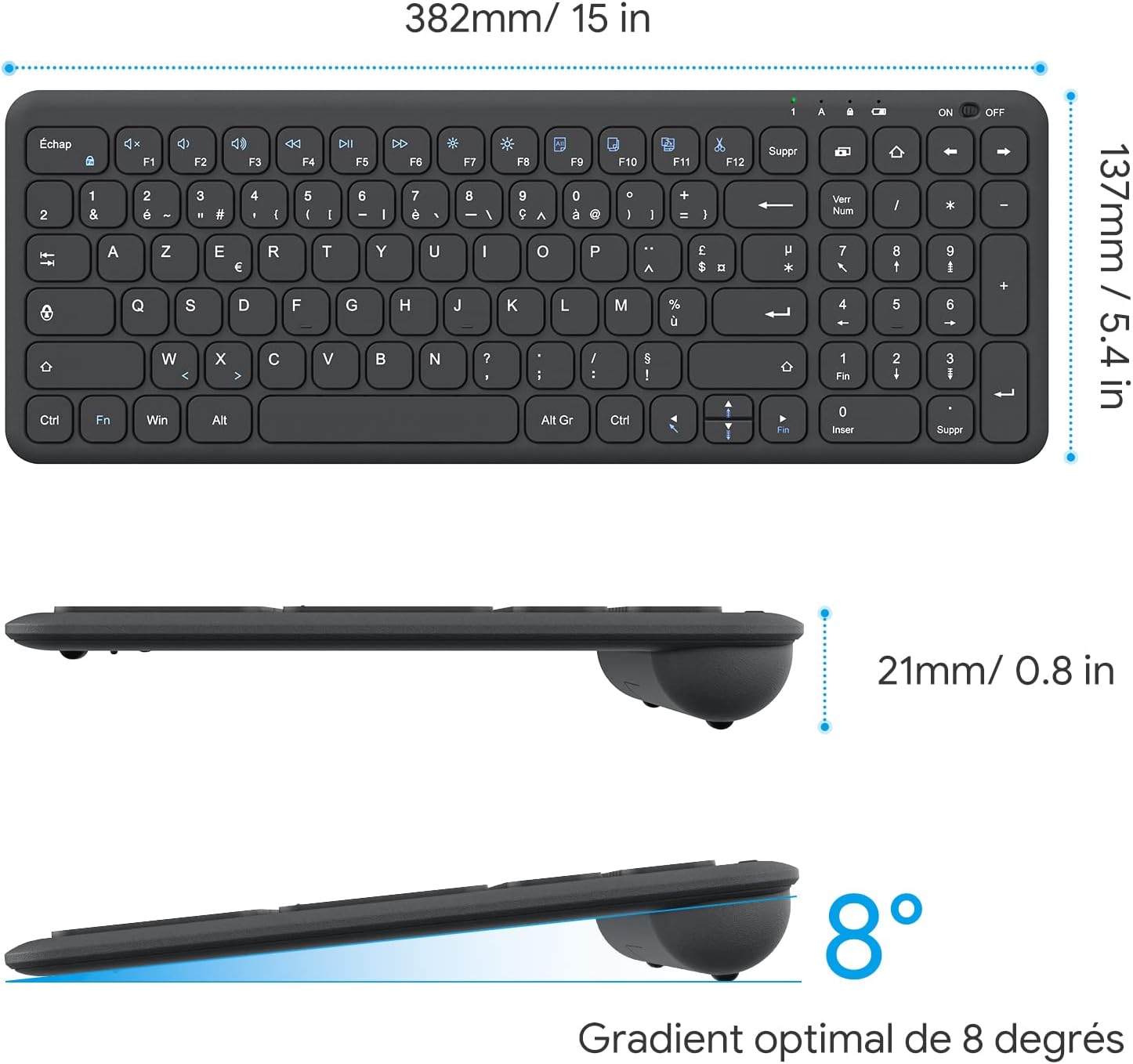
Image: Keyboard compatibility with Windows systems.
5. Wartung
5.1 Batteriewechsel
When the keyboard's performance degrades or the indicator light flashes, it's time to replace the batteries. Open the battery compartment on the back and replace the two AAA batteries with new ones, observing polarity.
5.2 Reinigung
Um Ihre Tastatur zu reinigen, wischen Sie die Oberfläche vorsichtig mit einem weichen, fusselfreien Tuch ab.amp cloth. Avoid using harsh chemicals or abrasive materials. Ensure the keyboard is turned off before cleaning.
5.3 USB-Empfängerspeicher
For convenience and to prevent loss, the USB receiver can be magnetically stored inside the keyboard's battery compartment when not in use or during transport.
6. Fehlerbehebung
Sollten Sie Probleme mit Ihrer Tastatur haben, beachten Sie bitte die folgenden gängigen Lösungsansätze:
- Tastatur reagiert nicht:
- Stellen Sie sicher, dass die Tastatur eingeschaltet ist.
- Prüfen Sie, ob die Batterien richtig eingesetzt sind und ausreichend geladen sind. Tauschen Sie sie gegebenenfalls aus.
- Vergewissern Sie sich, dass der USB-Empfänger fest an einen funktionierenden USB-Anschluss Ihres Computers angeschlossen ist. Versuchen Sie es mit einem anderen USB-Anschluss.
- Starten Sie Ihren Computer neu.
- Lagging or intermittent input:
- Ensure the keyboard is within the effective operating range (up to 10 meters) of the USB receiver.
- Reduce potential interference by moving the keyboard closer to the receiver or away from other wireless devices (e.g., Wi-Fi routers, cordless phones).
- Check battery level. Low batteries can affect wireless performance.
- Bestimmte Tasten funktionieren nicht:
- Reinigen Sie den Bereich um die betroffene Taste vorsichtig, um eventuelle Verunreinigungen zu entfernen.
- If the issue persists, contact OMOTON customer support for further assistance.
7. Spezifikationen
Detailed technical specifications for the OMOTON Wireless AZERTY Keyboard:
| Besonderheit | Detail |
|---|---|
| Marke | OMOTON |
| Modell | WK003 |
| Konnektivitätstechnologie | 2.4 GHz kabellos (USB-Empfänger) |
| Tastaturlayout | AZERTY |
| Kompatible Geräte | PC, Desktop, Laptop |
| Kompatible Betriebssysteme | Windows 11/10/8/7/XP/Vista |
| Besondere Merkmale | 12 Multimedia Shortcuts, Fn Lock, Silent Keys, Ultra-Slim Design, Magnetic USB Receiver Storage |
| Farbe | Schwarz |
| Stromquelle | 2 x AAA-Batterien (nicht enthalten) |
| Abmessungen (L x B x H) | 38.1 x 13.7 x 2 cm (15 x 5.4 x 0.8 Zoll) |
| Anzahl der Schlüssel | 99 |
| Schlüsselschalter-Typ | Tactile (Scissor-mechanism) |
| Optimal Gradient | 8 Grad |

Image: Keyboard dimensions and ergonomic design.

Image: Scissor-mechanism key design.
8. Garantieinformationen
OMOTON products typically come with a manufacturer's warranty. Please refer to the warranty card included with your product or visit the official OMOTON webDie vollständigen Garantiebedingungen finden Sie auf der Website. Bewahren Sie Ihren Kaufbeleg als Kaufnachweis für eventuelle Garantieansprüche auf.
9. Kundendienst
If you have any questions, require technical assistance, or experience issues not covered in this manual, please do not hesitate to contact OMOTON customer support. You can usually find contact information on the OMOTON official weboder über den Händler, bei dem Sie das Produkt gekauft haben.
Ask a question about this manual
Ask about setup, troubleshooting, compatibility, parts, safety, or missing instructions. Manuals+ will review the question and use this page’s manual context to help answer it.