
1. Einleitung
Thank you for choosing the PRIXTON Cinema Mini Projector. This compact and versatile projector is designed to provide an immersive viewing experience for movies, games, and presentations. Its multiple connectivity options and portable design make it ideal for various environments. Please read this manual carefully before using the projector to ensure proper operation and to maximize its lifespan.
2. Sicherheitshinweise
- Stromversorgung: Verwenden Sie ausschließlich das angegebene Netzteil. Stellen Sie sicher, dass die Lautstärketage ist mit Ihrer Region kompatibel.
- Belüftung: Die Lüftungsöffnungen dürfen nicht blockiert werden. Sorgen Sie für ausreichend Platz um den Projektor herum, um eine ordnungsgemäße Luftzirkulation zu gewährleisten und eine Überhitzung zu vermeiden.
- Augensicherheit: Schauen Sie nicht direkt in die Projektorlinse, wenn der lamp ist eingeschaltet. Das helle Licht kann Augenschäden verursachen.
- Wasser und Feuchtigkeit: Schützen Sie den Projektor vor Wasser, Regen und übermäßiger Luftfeuchtigkeit. Bedienen Sie ihn nicht mit nassen Händen.
- Reinigung: Vor der Reinigung die Stromzufuhr unterbrechen. Ein weiches, trockenes Tuch verwenden. Flüssige Reinigungsmittel vermeiden.
- Platzierung: Stellen Sie den Projektor auf eine stabile, ebene Fläche. Vermeiden Sie direkte Sonneneinstrahlung und die Nähe zu Wärmequellen.
- Kinder: Bewahren Sie den Projektor und sein Zubehör außerhalb der Reichweite von Kindern auf.
3. Packungsinhalt
Bitte überprüfen Sie, ob alle Artikel in Ihrem Paket vorhanden sind:
- PRIXTON Cinema Mini Projektor
- Fernbedienung
- Netzteil
- Bedienungsanleitung
4. Produktüberschreitungview
Familiarize yourself with the various parts of your PRIXTON Cinema Mini Projector.
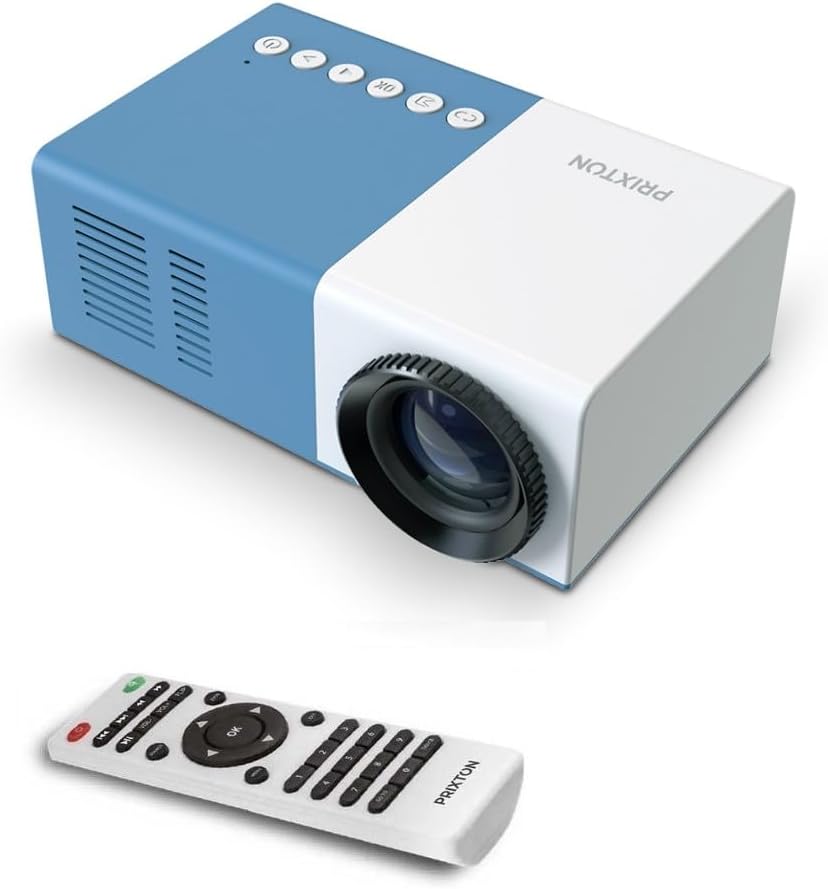
Abbildung 4.1: Vorne und oben View of the PRIXTON Cinema Mini Projector with its remote control. The projector is blue and white, showing the lens, control buttons, and the included remote.
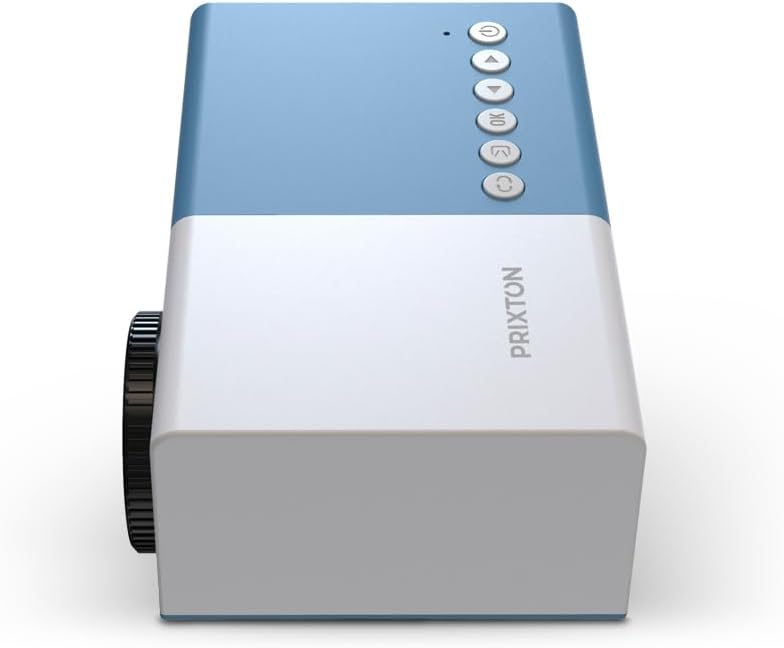
Abbildung 4.2: Spitze view of the projector, highlighting the control buttons (Power, Menu, OK, Navigation) and the focus wheel on the side.
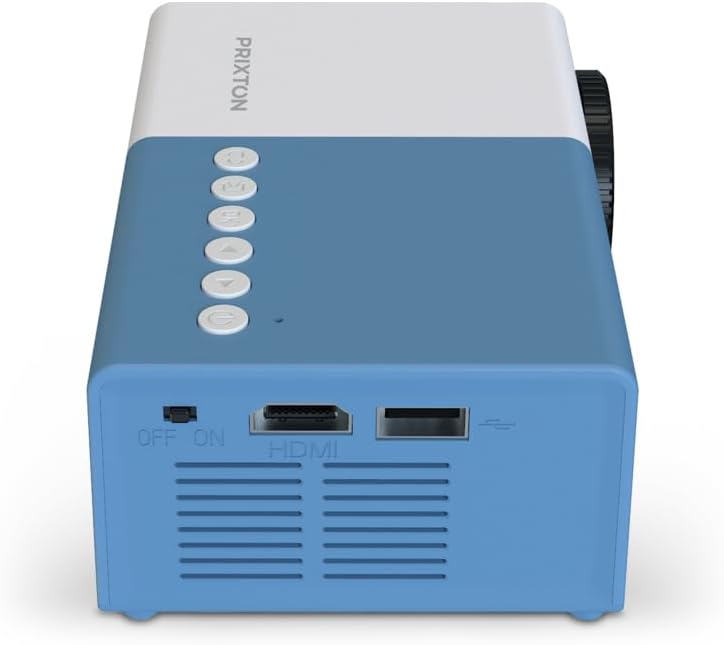
Abbildung 4.3: Hinteren view of the projector, showing the power switch, HDMI port, USB port, and ventilation grilles.

Abbildung 4.4: Seite view of the projector, displaying the MicroSD card slot, AV In port, and additional ventilation.
Komponenten:
- Linse: Projiziert das Bild auf den Bildschirm.
- Fokusrad: Passt die Bildschärfe an.
- Bedientasten: Power, Menu, OK, and navigation buttons for on-device control.
- Stromschalter: Schaltet den Projektor ein oder aus.
- HDMI-Anschluss: Connects to devices like laptops, streaming sticks, and game consoles.
- USB-Anschluss: Zur Medienwiedergabe von USB-Laufwerken.
- MicroSD-Steckplatz: For media playback from MicroSD cards.
- AV-Eingang: Verbindet sich über ein AV-Kabel mit älteren Geräten.
- Integrierter Lautsprecher: Bietet Audioausgabe.
5. Einrichtung
5.1 Stromanschluss
- Schließen Sie das Netzteil an den Stromeingangsanschluss des Projektors an.
- Stecken Sie das Netzteil in eine Wandsteckdose.
- Flip the power switch on the projector to the 'ON' position. The power indicator light should illuminate.
5.2 Platzierung und Projektion
Place the projector on a stable surface, ensuring the lens is facing the projection surface (wall or screen).

Abbildung 5.1: Illustration of projection distance and screen size. The projector can project images between 24 and 60 inches, with a maximum distance of 2 meters from the surface.
- For optimal image quality, ensure the room is dark.
- The projector can display images from 24 inches to 60 inches.
- The optimal projection distance is up to 2 meters (approximately 6.5 feet). Adjust the distance to achieve your desired screen size.
6. Betrieb
6.1 Ein-/Ausschalten
- So schalten Sie das Gerät ein: After connecting power, press the Power button on the projector or the remote control.
- So schalten Sie das Gerät aus: Drücken Sie den Netzschalter erneut. Bestätigen Sie das Herunterfahren, falls Sie dazu aufgefordert werden.
6.2 Fokuseinstellung
After powering on, the image may appear blurry. Use the focus wheel located on the side of the projector to sharpen the image until it is clear.
6.3 Quellenauswahl
To select an input source (HDMI, USB, MicroSD, AV):
- Press the 'Source' or 'Input' button on the remote control or the projector.
- Use the navigation buttons to highlight your desired input source.
- Drücken Sie „OK“, um Ihre Auswahl zu bestätigen.
7. Konnektivität
The PRIXTON Cinema Mini Projector offers multiple ways to connect your devices.
7.1 HDMI-Anschluss
Connect devices such as laptops, streaming sticks (e.g., Chromecast, Fire TV Stick), game consoles, or Blu-ray players using an HDMI cable.
- Connect one end of the HDMI cable to your device and the other end to the HDMI port on the projector.
- Select 'HDMI' as the input source (refer to Section 6.3).
7.2 USB- und MicroSD-Wiedergabe
The projector supports direct media playback from USB drives and MicroSD cards.
- Insert your USB drive into the USB port or your MicroSD card into the MicroSD slot.
- Select 'USB' or 'MicroSD' as the input source.
- Navigieren Sie durch die files using the remote control and select the media you wish to play.
7.3 AV In Connection
For older devices that use composite video and stereo audio (RCA), connect them via the AV In port.
- Connect the AV cable from your device to the AV In port on the projector.
- Select 'AV' as the input source.
8. Audioausgang
The projector features an integrated stereo speaker, providing audio for your content. Volume can be adjusted using the remote control.

Abbildung 8.1: The PRIXTON Cinema Mini Projector in use, projecting content in a living room environment, demonstrating its portability and ease of setup for home entertainment.
9. Wartung
9.1 Reinigung der Linse
Verwenden Sie ein weiches, fusselfreies Tuch, das speziell für optische Linsen entwickelt wurde. Verwenden Sie keine Scheuermittel und üben Sie keinen übermäßigen Druck aus, da dies die Linse zerkratzen kann.
9.2 Reinigung des Projektorgehäuses
Wipe the exterior of the projector with a soft, dry cloth. Avoid using chemical cleaners that may damage the finish.
9.3 Belüftung
Regularly check that the ventilation grilles are free from dust and debris to ensure proper heat dissipation and prevent overheating.
9.4 Speicherung
When not in use, store the projector in a cool, dry place, away from direct sunlight and extreme temperatures. If possible, use the original packaging or a protective case.
10. Fehlerbehebung
Sollten Sie Probleme mit Ihrem Projektor haben, beachten Sie bitte die folgenden häufig auftretenden Probleme und Lösungen.
| Problem | Mögliche Ursache | Lösung |
|---|---|---|
| Kein Bild auf dem Bildschirm | No power; Incorrect input source; Cable not connected. | Check power connection and switch; Select correct input source; Ensure HDMI/AV/USB cable is securely connected. |
| Bild ist verschwommen | Fokus nicht eingestellt; Projektor zu nah/zu weit entfernt. | Adjust the focus wheel; Adjust projection distance. |
| Kein Ton | Volume too low; Muted; Source device audio issue. | Increase volume; Unmute projector; Check audio settings on source device. |
| Fernbedienung funktioniert nicht | Batteries low/dead; Obstruction; Remote not aimed at sensor. | Replace batteries; Remove obstructions; Aim remote directly at the projector's IR sensor. |
| Der Projektor überhitzt und schaltet sich ab. | Blockierte Belüftung; Längere Nutzung. | Stellen Sie sicher, dass die Lüftungsschlitze frei sind; Lassen Sie den Projektor abkühlen; Betreiben Sie ihn in einem gut belüfteten Bereich. |
11. Spezifikationen
Technical specifications for the PRIXTON Cinema Mini Projector.
| Besonderheit | Spezifikation |
|---|---|
| Marke | Prixton |
| Modellnummer | Cinema Mini |
| Farbe | Blau |
| Projektionstechnik | LED |
| Native Auflösung | QVGA 320 x 240 |
| Unterstützte Auflösung | Up to Full HD (1920 x 1080) |
| Helligkeit | 900 Lumen (15 ANSI Lumen) |
| Projektionsgröße | 24" - 60" |
| Projektionsabstand | Bis zu 2 Meter |
| Konnektivität | HDMI, USB, MicroSD, AV In |
| Audioausgang | Integrierter Stereolautsprecher |
| Besondere Merkmale | Leicht, tragbar |
| Im Lieferumfang enthaltene Komponenten | Fernbedienung |
12. Garantie und Support
For warranty information, please refer to the documentation provided at the time of purchase or contact your retailer. Information regarding spare parts availability and software updates is not available in this manual. For further assistance or technical support, please visit the official PRIXTON webWebsite oder wenden Sie sich an den Kundendienst.