
Zunate KX-T2035CID Wired Landline Phone User Manual
Model: KX-T2035CID
Einführung
Welcome to your new Zunate KX-T2035CID wired landline phone. This manual provides comprehensive instructions for the setup, operation, maintenance, and troubleshooting of your device to ensure optimal performance and a clear communication experience.
Packungsinhalt
Bitte überprüfen Sie, ob alle unten aufgeführten Artikel in Ihrem Paket enthalten sind:
- 1 x Wired Landline Phone Base
- 1 x Mobilteil
- 1 x Spiralkabel für Mobilteil
- 1 x RJ11 Telephone Line Cord (Standard)
- 1 x RJ11 Telephone Line Cord (UK Plug, if applicable)
- 1 x Benutzerhandbuch

This image displays all items included in the package: the phone base, handset, coiled cord, standard telephone line cord, and a UK-specific telephone line cord.
Aufstellen
Anschließen des Telefons
- Connect one end of the coiled cord to the handset and the other end to the handset port on the phone base.
- Connect one end of the telephone line cord to the LINIE port on the phone base.
- Verbinden Sie das andere Ende des Telefonkabels mit der Telefonbuchse an Ihrer Wand.
- If using the dual port feature, connect a second device (e.g., fax machine, another phone) to the EXT port on the phone base using an additional telephone line cord.

This image shows the side of the phone base with two RJ11 ports labeled "LINE" and "EXT" for connecting to the wall jack and an additional device, respectively.
Wandmontage (optional)
The phone base is designed with keyholes on the bottom for optional wall mounting.
- Install two screws (not included) into the wall, spaced appropriately for the keyholes on the phone's base.
- Align the keyholes with the screw heads and slide the phone downwards to secure it.
- Ensure the handset cradle is reversed to hold the handset securely when wall-mounted.
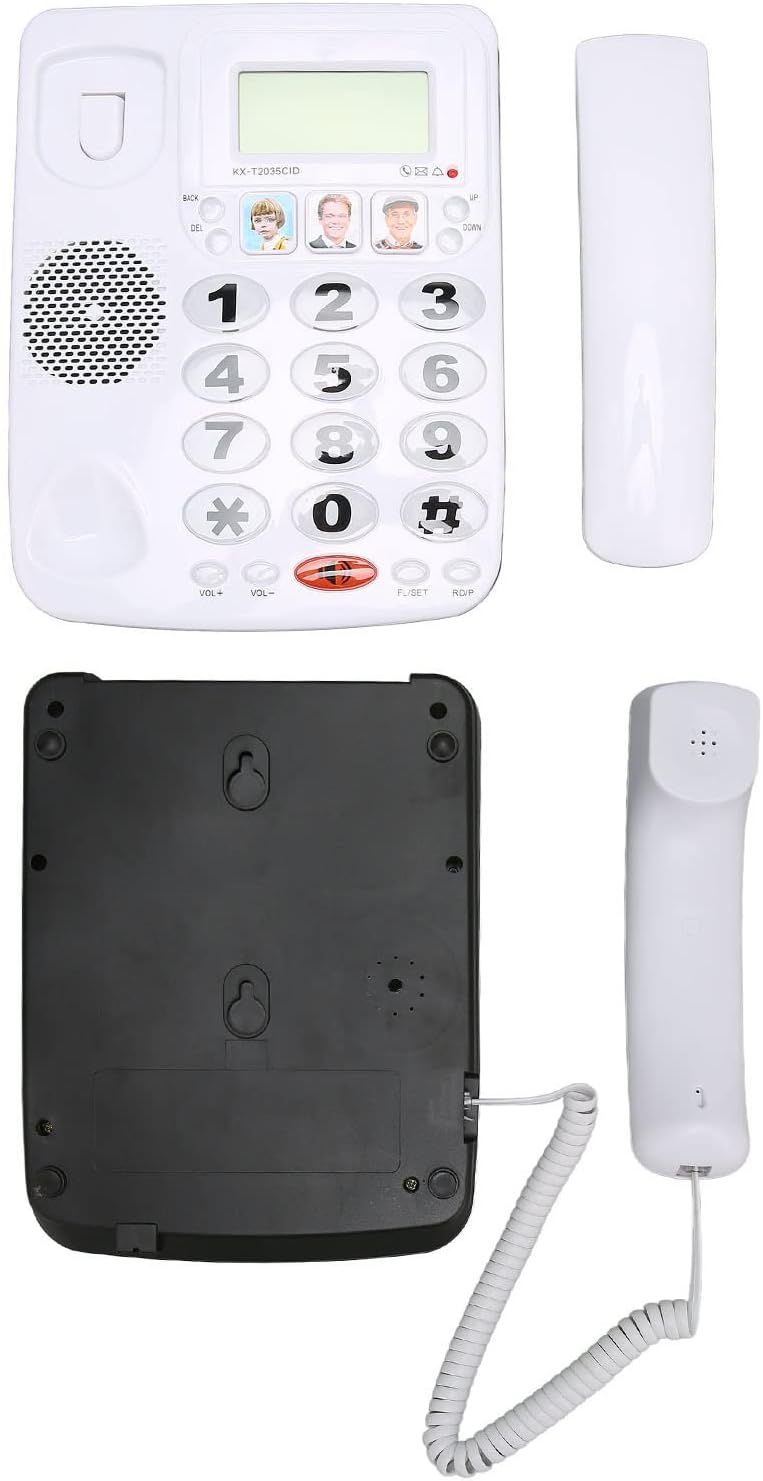
This image displays the underside of the phone base, highlighting the keyhole slots for wall mounting and the overall construction.
Bedienungsanleitung
Einen Anruf tätigen
- Nehmen Sie den Hörer ab.
- Wählen Sie die gewünschte Telefonnummer über die Tastatur.
- Warten Sie, bis die Anrufverbindung hergestellt ist.
- Um das Gespräch zu beenden, legen Sie den Hörer wieder auf die Ladeschale.
Einen Anruf entgegennehmen
- Wenn das Telefon klingelt, heben Sie den Hörer ab, um den Anruf anzunehmen.
- Um das Gespräch zu beenden, legen Sie den Hörer wieder auf die Ladeschale.
Wahlwiederholungsfunktion
Um die zuletzt gewählte Nummer erneut anzurufen:
- Nehmen Sie den Hörer ab.
- Press the "RDP" (Redial) button. The phone will automatically dial the last number.
Stummschaltung
During a call, you can temporarily mute your microphone:
- Press the "MUTE" button. The other party will not hear you, but you can still hear them.
- Press the "MUTE" button again to unmute your microphone.
Lautstärkeregelung
To adjust the handset volume during a call:
- Use the "VOL+" and "VOL-" buttons located on the phone base.

This close-up image shows the large, easy-to-read buttons on the phone's keypad, including the "VOL+", "VOL-", "MUTE", and "RDP" (Redial) buttons.
Speed Dial / Memory Dial
The phone allows you to store up to 3 frequently used numbers for quick dialing using the dedicated memory buttons.
- Um eine Zahl zu speichern: Lift the handset, dial the number, then press and hold one of the three picture memory buttons until a confirmation tone is heard.
- So wählen Sie eine gespeicherte Nummer: Lift the handset, then press the desired picture memory button. The phone will automatically dial the stored number.

This image shows the phone's main interface, highlighting the large numeric keypad and the three dedicated memory buttons, which can be customized with pictures for quick dialing.
Hauptmerkmale
Clear-Sound-Technologie
This phone incorporates noise reduction technology to ensure clear audio quality during calls, minimizing background interference for enhanced communication.

A person is shown using the Zunate KX-T2035CID phone in a professional environment, illustrating its use for clear communication.
Dual Port Design
The phone features a dual RJ11 port design, allowing you to connect both the phone line from the wall and an additional device (such as a fax machine, answering machine, or another telephone) simultaneously.
This image highlights the two RJ11 ports on the side of the phone, enabling connection to both the main telephone line and an extension device.
Wartung
To ensure the longevity and proper functioning of your Zunate KX-T2035CID phone, follow these simple maintenance guidelines:
- Clean the phone's surface regularly with a soft, damp Mit einem Tuch abwischen. Vermeiden Sie scheuernde Reiniger oder Lösungsmittel.
- Schützen Sie das Telefon vor übermäßiger Feuchtigkeit, Staub und direkter Sonneneinstrahlung.
- Do not attempt to disassemble the phone. Refer to qualified service personnel for repairs.
- Ensure cords are not tangled or pinched to prevent damage.
Fehlerbehebung
If you encounter any issues with your phone, please refer to the table below for common problems and their solutions.
| Problem | Lösung |
|---|---|
| Kein Wählton | Check all cable connections. Ensure the telephone line cord is securely plugged into both the phone and the wall jack. Test with another phone if possible to rule out line issues. |
| Anrufer nicht hören / Anrufer kann mich nicht hören | Adjust the volume using the "VOL+" and "VOL-" buttons. Ensure the "MUTE" function is not active. Check handset cord connection. |
| Telefon klingelt nicht | Ensure the ringer volume is not set to minimum or off (if applicable). Check line connection. |
| Last number redial not working | Ensure a number was successfully dialed prior to attempting redial. |
Technische Daten
| Besonderheit | Detail |
|---|---|
| Marke | Zunate |
| Modell | KX-T2035CID |
| Typ | Wired Landline Phone |
| Material | Acrylnitril-Butadien-Styrol (ABS) |
| Farbe | Weiß |
| Anrufer-ID | Ja |
| Mehrlinienbetrieb | Ja |
| Rauschunterdrückung | Ja |
| Herstellerteilenummer | Zunateizbc48u9mx1404-12 |
Garantie und Support
For warranty information and technical support, please refer to the documentation provided with your purchase or contact Zunate customer service directly. Specific warranty details are not available in this manual.
For further assistance, please visit the Zunate official webBesuchen Sie die Website oder kontaktieren Sie deren Supportkanäle.