
Produkt überview
This document provides instructions for the ZdalaMit 0212-62622-00R replacement remote control. This remote is designed to function with various Polaroid TV/DVD Combo models, offering a direct replacement without requiring complex programming. Simply install batteries, and the remote is ready for use.

Front view of the ZdalaMit 0212-62622-00R replacement remote control, showing all buttons and layout.
Aufstellen
1. Einlegen der Batterien
The remote control requires two (2) 1.5V AAA Alkaline batteries (not included). Ensure correct polarity when inserting the batteries.
- Suchen Sie das Batteriefach auf der Rückseite der Fernbedienung.
- Schieben Sie die Abdeckung des Batteriefachs nach unten oder in die durch einen Pfeil angegebene Richtung, um sie zu öffnen.
- Insert two AAA batteries, matching the positive (+) and negative (-) terminals as shown inside the compartment.
- Bringen Sie die Abdeckung des Batteriefachs wieder an und achten Sie darauf, dass sie hörbar einrastet.
Notiz: No programming is required for this replacement remote. Once batteries are installed, it is ready for use with compatible Polaroid TV/DVD Combo models.
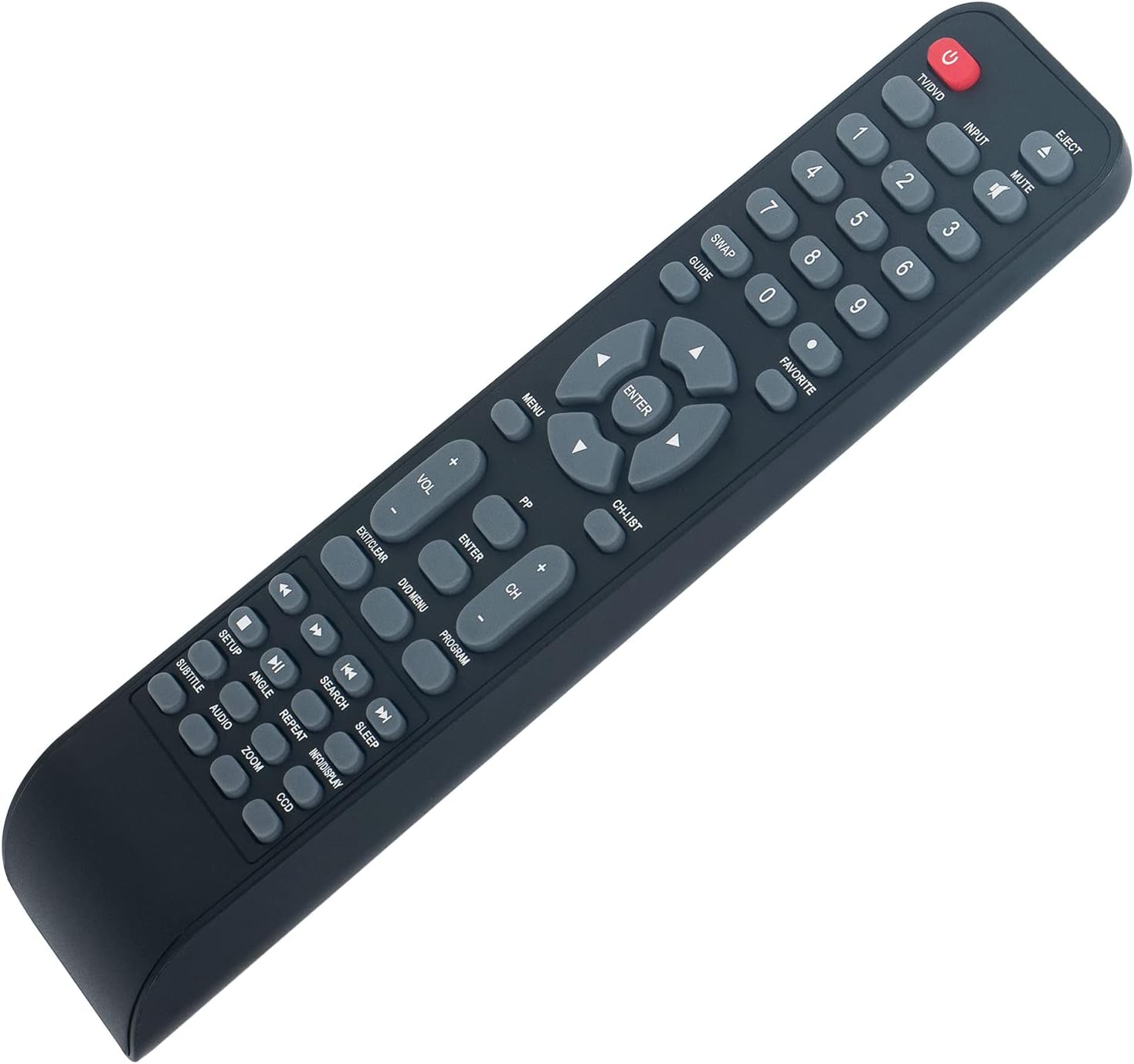
Abgewinkelt view of the remote control, illustrating its ergonomic design and button layout for easy handling during battery installation.
Bedienungsanleitung
Point the remote control directly at the infrared sensor on your Polaroid TV/DVD Combo unit for optimal performance. Ensure there are no obstructions between the remote and the unit.
Grundfunktionen
- TV/DVD (Power): Press to turn the TV/DVD Combo unit on or off.
- EINGANG: Selects the input source (e.g., TV, DVD, HDMI if applicable).
- STUMM: Schaltet den Ton stumm oder hebt die Stummschaltung auf.
- Zifferntasten (0-9): Used for direct channel selection or entering numerical values.
- LAUTSTÄRKE +/-: Regelt die Lautstärke.
- CH +/-: Schaltet den Fernsehkanal hoch oder runter.
- SPEISEKARTE: Accesses the main menu of the TV or DVD player.
- Pfeiltasten (Oben, Unten, Links, Rechts): Navigiert durch die Menüoptionen.
- EINGEBEN: Bestätigt eine Auswahl im Menü.
- EXIT/CLEAR: Exits a menu or clears an entry.
DVD/Media Playback Functions
- AUSWERFEN: Ejects the DVD from the player.
- DVD-MENÜ: Accesses the DVD disc menu.
- ABSPIELEN/PAUSE (►/❚❚): Startet oder pausiert die Wiedergabe.
- STOP (■): Stoppt die Wiedergabe.
- ZURÜCKSPULEN (◀◀): Spulet die Wiedergabe zurück.
- SCHNELLVORGANG (►►): Schneller Vorlauf der Wiedergabe.
- PREVIOUS (◀❚): Skips to the beginning of the current track/chapter or the previous one.
- NEXT (❚►): Springt zum nächsten Titel/Kapitel.
- WIEDERHOLEN: Repeats a track, chapter, or entire disc.
- SUCHEN: Initiates a search function within media.
- UNTERTITEL: Schaltet die Untertitelanzeige ein/aus.
- AUDIO: Ändert Audiospuren oder Sprachen.
- WINKEL: Changes camera angle on compatible DVDs.
- ZOOMEN: Zooms in or out on the picture.
- INFO/DISPLAY: Zeigt Informationen zum aktuellen Programm oder Medium an.
Wartung
- Reinigung: To clean the remote control, wipe it with a soft, dry cloth. Do not use liquid cleaners or abrasive materials, as these can damage the surface or internal components.
- Batteriewechsel: Replace batteries when the remote's response becomes sluggish or stops working. Always replace both batteries at the same time with new AAA Alkaline batteries. Do not mix old and new batteries, or different types of batteries.
- Lagerung: If the remote control will not be used for an extended period, remove the batteries to prevent leakage, which can cause damage to the remote. Store the remote in a cool, dry place away from direct sunlight and extreme temperatures.
Fehlerbehebung
| Problem | Mögliche Ursache | Lösung |
|---|---|---|
| Fernbedienung reagiert nicht | Dead or incorrectly installed batteries. Obstruction between remote and TV/DVD Combo. Remote is too far from the unit. | Replace batteries with new AAA Alkaline batteries, ensuring correct polarity. Remove any objects blocking the line of sight to the TV/DVD Combo's IR sensor. Move closer to the unit (within 33 feet). |
| Einige Funktionen funktionieren nicht | The specific function may not be supported by your particular Polaroid TV/DVD Combo model. | This remote is a replacement designed for a range of Polaroid TV/DVD Combo models. While it offers broad compatibility, some advanced or model-specific functions may not be fully supported on all units. Refer to your original TV/DVD Combo manual for specific feature compatibility. |
| Tasten kleben oder reagieren nicht | Schmutz oder Ablagerungen unter den Tasten. | Gently clean the remote control surface with a soft, dry cloth. Avoid pressing buttons excessively hard. |
Technische Daten
- Modell: 0212-62622-00R
- Marke: ZdalaMit
- Kompatibilität: Polaroid TV/DVD Combo models (TDAC-01933, TDAC-02212, TLAC-03212, 4641-TLXB, TDAC-03212B, TDAC-03212W, TLAC-02255, TDAC01933, TDAC02212, TLAC02255, TDAC03212B, TDAC03212W, TLAC03212, 4641TLXB)
- Stromversorgung: 2 x 1.5V AAA-Alkaline-Batterien (nicht im Lieferumfang enthalten)
- Konnektivitätstechnologie: Infrarot (IR)
- Maximale Reichweite: Ungefähr 33 Fuß (10 Meter)
- Button Quantity: 18
- Farbe: Schwarz
- Abmessungen (L x B x H): 8.34" x 1.99" x 0.55" (21.18 cm x 5.05 cm x 1.4 cm)
- Artikelgewicht: 40 Gramm (ohne Batterien)
Garantie und Support
This ZdalaMit remote control comes with a 1 Jahr Garantie from the date of purchase. This warranty covers manufacturing defects under normal use. It does not cover damage caused by misuse, accidents, unauthorized modifications, or battery leakage.
For technical support, warranty claims, or any questions regarding your remote control, please contact the seller directly through the platform where the purchase was made. Please have your order number ready when contacting support.