
Lavaudio DS220
Lavaudio DS220 HiFi Bluetooth-Empfänger – Benutzerhandbuch
Model: DS220 | Brand: Lavaudio
1. Einleitung
This manual provides detailed instructions for the setup, operation, and maintenance of your Lavaudio DS220 HiFi Bluetooth Receiver. Please read this manual thoroughly before using the device to ensure proper functionality and to maximize your audio experience. The DS220 is designed to seamlessly integrate high-resolution Bluetooth audio into your existing home stereo system.
2. Sicherheitshinweise
- Setzen Sie das Gerät nicht Wasser oder übermäßiger Feuchtigkeit aus.
- Vermeiden Sie, das Gerät in der Nähe von Wärmequellen oder in direktem Sonnenlicht aufzustellen.
- Verwenden Sie nur das mitgelieferte Netzteil und die mitgelieferten Kabel.
- Versuchen Sie nicht, das Gerät selbst zu zerlegen oder zu reparieren. Überlassen Sie alle Wartungsarbeiten qualifiziertem Fachpersonal.
- Sorgen Sie während des Betriebs für ausreichende Belüftung rund um das Gerät.
3. Packungsinhalt
Bitte überprüfen Sie, ob alle unten aufgeführten Artikel in Ihrem Paket enthalten sind:
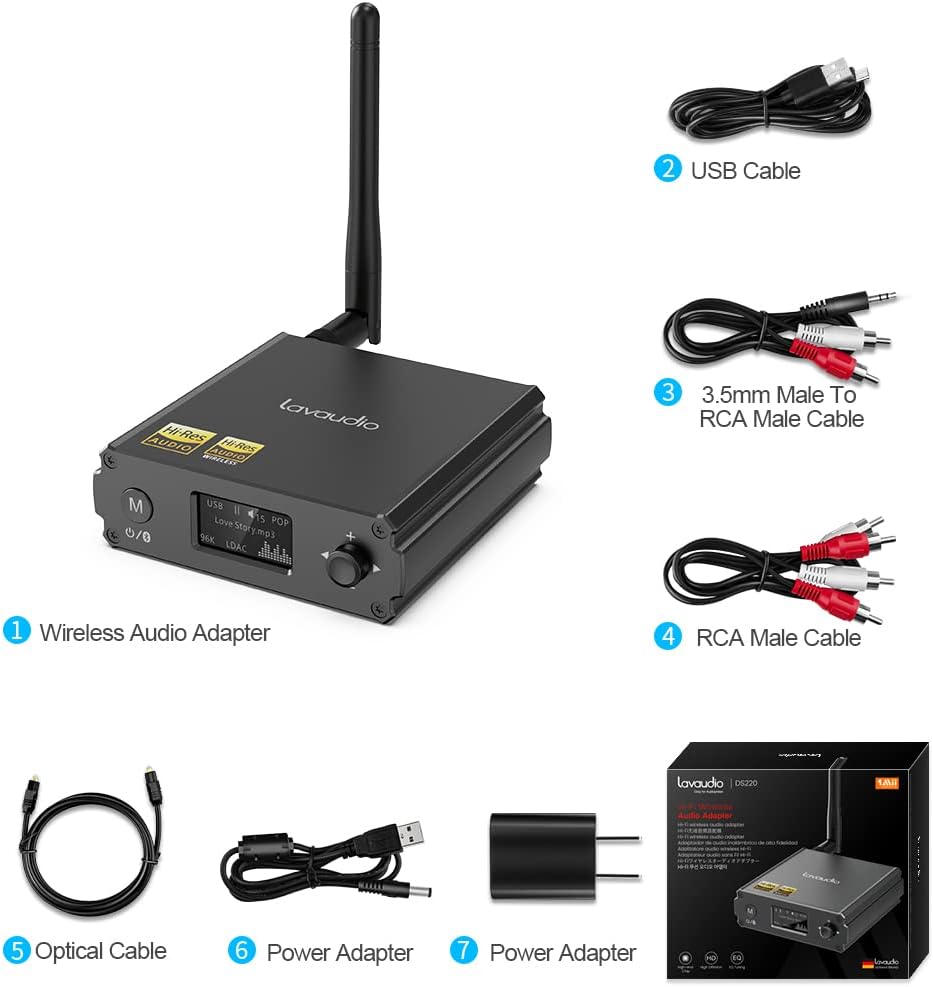
Image: Contents of the Lavaudio DS220 package, including the receiver, cables, and power adapter.
- Lavaudio DS220 HiFi Bluetooth Receiver x 1
- USB-Ladekabel x 1
- 3.5mm Female to 2RCA Splitter Cable x 1
- 2RCA auf 2RCA Stereo-Audiokabel x 1
- Optisches Audiokabel x 1
- Netzteil x 1
- Benutzerhandbuch x 1
4. Produktüberschreitungview
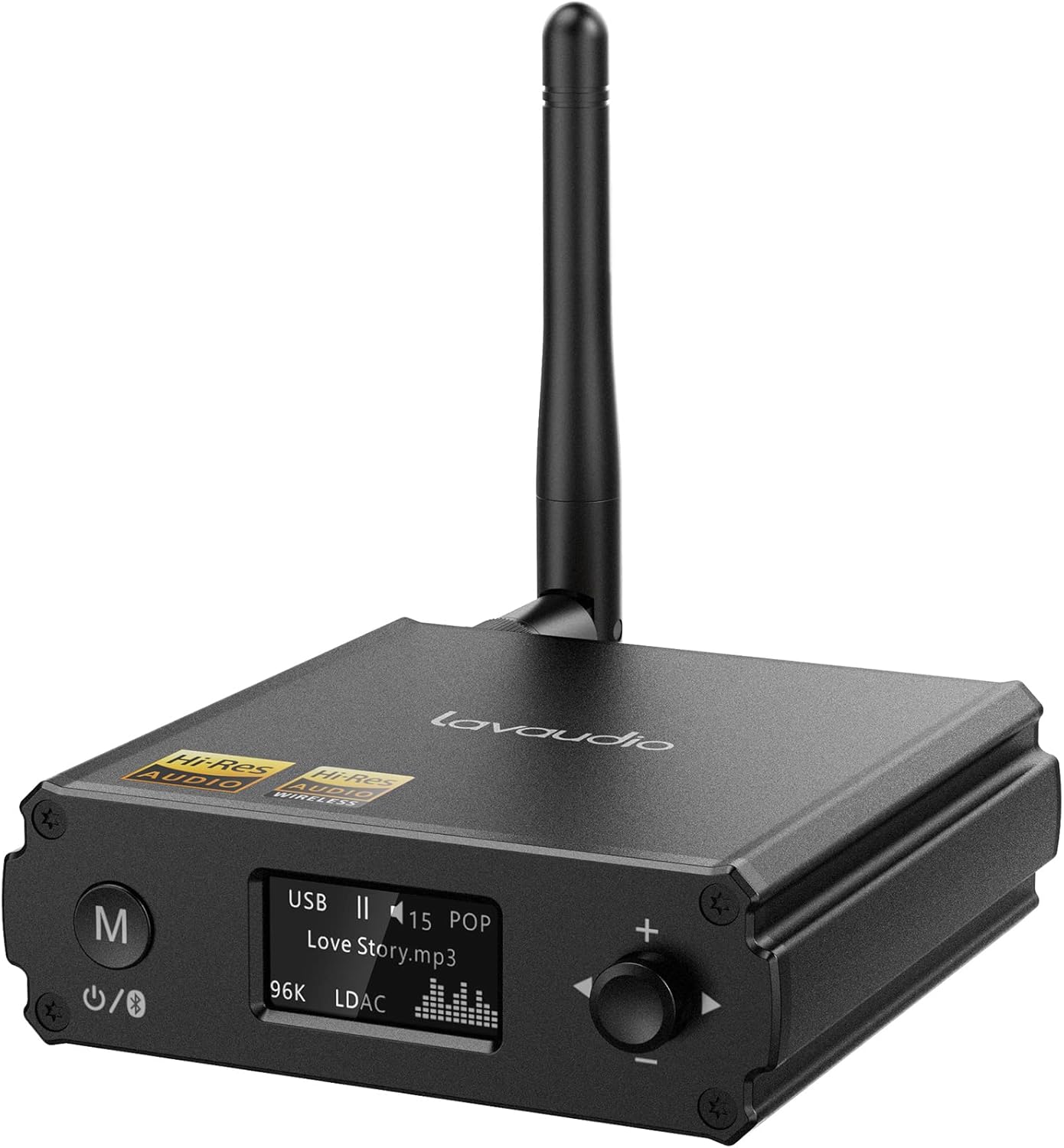
Bild: Vorderseite view of the Lavaudio DS220 HiFi Bluetooth Receiver with its antenna.
4.1 Bedienelemente und Anzeige auf der Vorderseite

Image: Close-up of the DS220's OLED display and control buttons.
- M-Taste: Press and hold for 2 seconds to enter pairing mode. Press and hold for 4 seconds to power off. Press and hold for 10 seconds to perform a factory reset.
- OLED-Anzeige: Shows current mode (USB, Bluetooth), track information, volume level, and EQ mode.
- Rotary Knob (+/-): Adjusts volume. Press to cycle through EQ modes.
4.2 Anschlüsse auf der Rückseite

Bild: Rückseite view of the DS220 showing its various output and input ports.
- Gleichstrom 5V: Stromeingangsanschluss.
- OPTISCHER AUSGANG: Optischer digitaler Audioausgang.
- R-RCA OUT-L: Analog RCA stereo audio output.
- USB-IN: USB Type-C input for connecting to a computer or other audio source.
5. Einrichtung
5.1 Erstes Einschalten
Connect the provided power adapter to the DC 5V port on the DS220 and plug it into a power outlet. The device will automatically power on and enter pairing mode for first-time use.
5.2 Anschluss an Ihr Audiosystem
The DS220 offers flexible output options to connect to your ampVerstärker oder Aktivlautsprecher:
- Verwendung von RCA-Kabeln: Connect the 2RCA to 2RCA stereo audio cable from the R-RCA OUT-L ports on the DS220 to the corresponding RCA input ports (e.g., AUX IN) on your ampVerstärker oder Aktivlautsprecher.
- Using Optical Cable: Connect the optical audio cable from the OPT OUT port on the DS220 to the optical input port on your ampLifier oder DAC.
Stellen Sie sicher, dass Ihre amplifier or audio system is set to the correct input mode (e.g., AUX, Optical) corresponding to your connection.
6. Bedienungsanleitung

Image: Step-by-step visual guide for connecting, pairing, playing, and adjusting EQ.
6.1 Bluetooth IN Mode

Image: Detailed guide for Bluetooth IN mode setup.
- Einschalten: Ensure the DS220 is powered on. For first-time use, it will automatically enter pairing mode, indicated by a quickly flashing Bluetooth icon on the OLED display.
- Enter Pairing Mode (if not first-time use): If the device is already connected or in standby, press and hold the 'M' button for 2 seconds until the Bluetooth icon flashes rapidly.
- Paarung: On your smartphone, tablet, or other Bluetooth audio source, enable Bluetooth and search for available devices. Select "DS220" from the list to connect.
- Musik abspielen: Once connected, the Bluetooth icon will stop flashing and remain solid. You can now play audio from your connected device through the DS220.
6.2 USB IN Mode

Image: Diagram illustrating USB IN mode setup.
To use the DS220 as a USB DAC:
- Connect the provided USB cable from your computer/laptop or other audio source device to the USB IN port on the DS220.
- Connect the DS220's RCA or Optical output to your ampVerstärker oder Aktivlautsprecher.
- The DS220 will automatically switch to USB audio mode. You can now play audio from your computer through the DS220.
6.3 EQ Mode and Volume Control
- EQ-Modus: Press the rotary knob to cycle through various EQ modes such as Rock, Pop, Jazz, etc. The selected EQ mode will be displayed on the OLED screen. You can also adjust Bass and Treble settings within the EQ menu.
- Lautstärkeregelung: Durch Drehen des Knopfes im Uhrzeigersinn wird die Lautstärke erhöht, durch Drehen gegen den Uhrzeigersinn verringert.
7. Audio Quality and Codecs
The Lavaudio DS220 supports various high-definition audio codecs to ensure optimal sound quality:

Image: Comparison of audio bitrates for various codecs supported by the DS220.
- LDAC: Supports up to 24bit/96 kHz sampling rate with a bitrate of 990 kbps, offering high-resolution wireless audio.
- aptX-HD: Supports up to 24bit/48 kHz sampling rate with a bitrate of 576 kbps, providing high-definition audio over Bluetooth.
- AAC: Supports up to 16bit/96 kHz sampling rate with a bitrate of 264 kbps.
- SBCs: Supports up to 16bit/48 kHz sampling rate with a bitrate of 328 kbps, a standard Bluetooth audio codec.

Image: The DS220 integrated into a home stereo setup for high-definition audio.
The DS220 features a Qualcomm 5125 Bluetooth chip and an ESS ES9018K2M DAC chip for superior audio processing.
8. Fehlerbehebung
Beachten Sie die folgenden häufigen Probleme und Lösungen:
- Q1: How to enter pairing mode?
- A: For first-time use, the Lavaudio DS220 automatically enters pairing mode after power-on. To manually enter pairing mode, press and hold the 'M' button for 2 seconds until the Bluetooth icon on the display flashes rapidly.
- Q2: What does it mean when the Bluetooth icon slowly flashes?
- A: A slowly flashing Bluetooth icon indicates that the DS220 is in standby mode.
- Q3: Why do I have a sound problem when connecting DS220 by optical output?
- A: If your device does not support a 96K sample rate, try switching LDAC off. This often resolves sound issues. To do this, find DS220 in your phone's Bluetooth list, click to open the drop-down list, and switch LDAC to off. Ensure you use a power adapter for power supply to eliminate ground loop noise.
9. Spezifikationen
| Marke | Lavaudio |
| Modellnummer | DS220 |
| Konnektivitätstechnologie | Bluetooth |
| Controllertyp | Tastensteuerung |
| Kompatible Geräte | Personalcomputer, Smartphone |
| Audioausgabemodus | Stereo |
| Surround Sound-Kanalkonfiguration | 2.0 |
| Ausgangsleistung | 5 Watt |
| Anzahl der Kanäle | 2 |
| Artikelgewicht | 12.6 Unzen |
| Verpackungsabmessungen | 5.63 x 4.92 x 2.4 Zoll |
10. Wartung
To ensure the longevity and optimal performance of your Lavaudio DS220, follow these maintenance guidelines:
- Reinigung: Reinigen Sie die Außenseite des Geräts mit einem weichen, trockenen Tuch. Verwenden Sie keine flüssigen Reiniger oder Sprays.
- Lagerung: Bei längerer Nichtbenutzung sollte das Gerät an einem kühlen, trockenen Ort, vor direkter Sonneneinstrahlung und extremen Temperaturen geschützt aufbewahrt werden.
- Handhabung: Behandeln Sie das Gerät mit Sorgfalt. Vermeiden Sie es, es fallen zu lassen oder starken Stößen auszusetzen.
11. Garantie und Support
For warranty information and technical support, please refer to the official Lavaudio webBesuchen Sie die Website oder kontaktieren Sie den Kundenservice. Bewahren Sie Ihren Kaufbeleg als Kaufnachweis für eventuelle Garantieansprüche auf.
Hinweis: Auf Grundlage der bereitgestellten Daten waren keine offiziellen Produktvideos zum Einbetten verfügbar.
Ask a question about this manual
Ask about setup, troubleshooting, compatibility, parts, safety, or missing instructions. Manuals+ will review the question and use this page’s manual context to help answer it.