
Easyfone T300
Easyfone T300 4G Klapphandy – Benutzerhandbuch
Modell: T300
1. Einleitung
Thank you for choosing the Easyfone T300 4G Flip Phone. This manual provides essential information for setting up, operating, and maintaining your device. Designed with ease of use in mind, the T300 offers clear communication, enhanced safety features, and a user-friendly interface, making it ideal for seniors.
2. Sicherheitshinweise
Bitte lesen Sie diesen Abschnitt sorgfältig durch, bevor Sie Ihr Telefon benutzen, um einen sicheren und ordnungsgemäßen Betrieb zu gewährleisten.
- Batteriesicherheit: Use only Easyfone approved batteries and chargers. Do not short-circuit, puncture, or expose the battery to extreme temperatures. Dispose of batteries properly.
- Gehörschutz: Vermeiden Sie längeres Hören bei hoher Lautstärke, um Gehörschäden zu vermeiden.
- Fahrsicherheit: Benutzen Sie Ihr Handy nicht während der Fahrt. Die Sicherheit im Straßenverkehr hat immer Vorrang.
- Medizinische Geräte: Halten Sie einen Sicherheitsabstand zwischen Ihrem Telefon und medizinischen Geräten wie Herzschrittmachern ein. Konsultieren Sie Ihren Arzt und den Gerätehersteller für spezifische Richtlinien.
- Wasserbeständigkeit: Dieses Telefon ist nicht wasserdicht. Vermeiden Sie den Kontakt mit Flüssigkeiten.
3. Packungsinhalt
Ensure all items are present in your Easyfone T300 package:

Image: Contents of the Easyfone T300 package, showing the T300 phone, user manual, 1500mAh battery, charging dock, USB cable, charger, and a lanyard.
- Easyfone T300 4G Flip Phone
- Benutzerhandbuch (dieses Dokument)
- 1500mAh Lithium-Ionen-Akku
- Ladestation
- USB-Kabel
- Netzteil (Ladegerät)
- Schlüsselband
4. Installationsanleitung
4.1 Telefonierenview

Image: The Easyfone T300 in its open position, displaying the main 2.4-inch screen, the large, clearly labeled keypad, and the side volume and power buttons.
Familiarize yourself with the phone's components:
- Externer Bildschirm: Displays time, date, battery status, and caller ID when closed.
- Hauptbildschirm: 2.4-inch HD display for menus, messages, and calls.
- Tastenfeld: Large, backlit buttons with voice announcement for easy dialing. Includes dedicated keys for SOS, FM radio, and alarm.
- SOS-Taste: Located on the back for emergency calls and GPS location sharing.
- Lautstärketasten: On the side for adjusting call and ringtone volume.
- Ladeanschluss: Micro USB port on the side.
4.2 Installation der SIM-Karte und des Akkus
- Rückseite entfernen: Die Rückseite des Telefons vorsichtig aufhebeln.
- Sim Karte einlegen: Locate the SIM card slot. Insert your 4G compatible SIM card with the gold contacts facing down, ensuring it clicks into place.
- Batterie einlegen: Align the battery contacts with the phone's terminals and gently press the battery into its compartment.
- Rückseite ersetzen: Snap the back cover firmly back into place.
4.3 Aufladen des Telefons
The Easyfone T300 comes with a convenient charging dock.

Image: The Easyfone T300 phone securely placed in its charging dock, positioned on a wooden surface, indicating it is ready for charging.
- Verbinden Sie das USB-Kabel mit dem Netzteil und anschließend mit der Ladestation.
- Stecken Sie das Netzteil in eine Wandsteckdose.
- Place the Easyfone T300 into the charging dock. Ensure the phone is properly seated; the external screen will show a charging indicator.
- Alternatively, you can charge the phone directly using the Micro USB cable connected to the phone's side port.
5. Bedienungsanleitung
5.1 Ein-/Ausschalten
- Einschalten: Halten Sie die rote Taste „Anruf beenden/Ein/Aus“ gedrückt, bis der Bildschirm aufleuchtet.
- Ausschalten: Press and hold the red End Call/Power button until the power off options appear, then select 'Power Off'.
5.2 Anrufe tätigen und entgegennehmen
- Einen Anruf tätigen: Dial the number using the large keypad. The phone will announce each digit as you press it. Press the green Call button to initiate the call.
- Empfangen eines Anrufs: Simply open the flip to answer an incoming call. To end a call, close the flip or press the red End Call button.
5.3 Speed Dial with Photo Contacts
The T300 supports 8 speed dial contacts with associated photos for easy recognition.

Image: An illustration demonstrating the speed dial feature, showing the phone's screen with a contact photo and a visual representation of speed dial numbers (1-9) linked to names like 'Dad', 'Mom', 'Jack', etc.
- Einrichten: Navigate to the 'Contacts' menu, select 'Speed Dial', and assign contacts to numbers 2-9. You can add a photo for each contact.
- Kurzwahl verwenden: Press and hold the assigned number key (2-9) to quickly dial the corresponding contact.
5.4 SOS-Notruffunktion
The dedicated SOS button provides immediate assistance in emergencies.

Image: The Easyfone T300 phone with a prominent SOS icon, accompanied by a world map indicating GPS location tracking and emergency contact points.
- Einrichten: Go to 'SOS Settings' in the menu to add up to 5 emergency contacts.
- SOS aktivieren: In an emergency, press and hold the SOS button on the back of the phone for 3 seconds. The phone will automatically call the emergency contacts in sequence and send an SMS with your GPS location.
5.5 FM Radio and Alarm
- FM Radio: Press the dedicated FM radio button to quickly access the radio. Use the navigation keys to tune stations.
- Alarm: Access the 'Alarm' function from the main menu to set multiple alarms.
5.6 Nachrichten
Zum Senden und Empfangen von SMS:
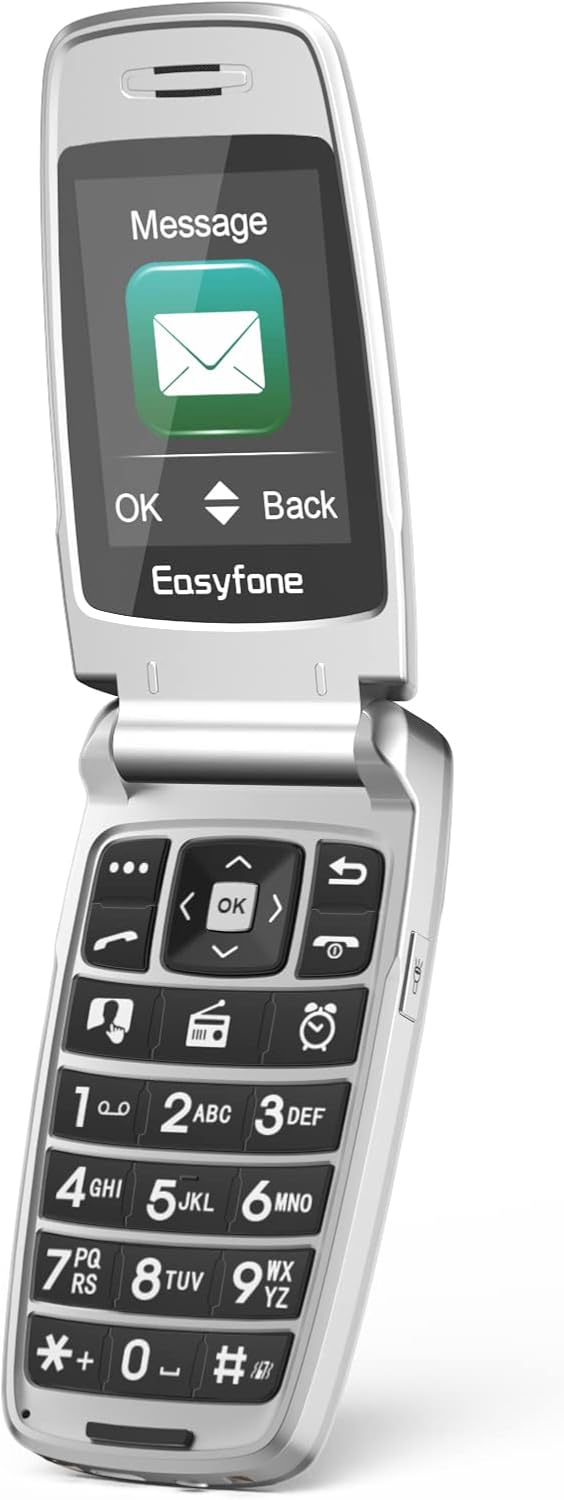
Image: The Easyfone T300 phone opened, showing the main screen displaying the 'Message' menu with a large envelope icon, and 'OK' and 'Back' options.
- Navigieren Sie zum Menü „Nachrichten“.
- Wählen Sie „Nachricht schreiben“, um eine neue SMS zu verfassen.
- Use the keypad to type your message.
- Select 'Send' and choose the recipient from your contacts or enter a number.
6. Wartung
- Reinigung: Reinigen Sie die Oberfläche des Telefons mit einem weichen, trockenen Tuch. Verwenden Sie keine flüssigen Reiniger oder Sprays.
- Batteriepflege: Um die Akkulaufzeit zu verlängern, vermeiden Sie häufiges vollständiges Entladen des Akkus. Laden Sie das Telefon regelmäßig auf.
- Lagerung: Bewahren Sie das Telefon an einem kühlen, trockenen Ort fern von direkter Sonneneinstrahlung und extremen Temperaturen auf.
- Software-Updates: Keep your phone's software updated if prompted, to ensure optimal performance and security.
7. Fehlerbehebung
Sollten Sie Probleme mit Ihrem Easyfone T300 haben, beachten Sie bitte die folgenden häufig auftretenden Probleme und Lösungen:
| Problem | Mögliche Ursache | Lösung |
|---|---|---|
| Das Telefon lässt sich nicht einschalten | Niedriger Batteriestand; Batterie nicht richtig eingesetzt | Charge the phone for at least 30 minutes; Re-insert the battery. |
| Anrufe können nicht getätigt/empfangen werden. | No SIM card; SIM card not active; Out of network coverage | Ensure SIM card is inserted and active; Check network signal; Contact your service provider. |
| Schlechte Anrufqualität | Weak signal; Obstruction; Speaker/microphone issues | Move to an area with better signal; Ensure nothing is blocking the speaker/microphone. |
| Telefon wird nicht aufgeladen | Charger/cable faulty; Phone not seated correctly in dock | Try a different charger/cable; Ensure phone is properly placed in the charging dock. |
| SOS-Funktion funktioniert nicht | No emergency contacts set; No network signal | Set up emergency contacts in SOS settings; Ensure phone has network coverage. |
If the problem persists, please contact Easyfone customer support.
8. Spezifikationen
| Besonderheit | Detail |
|---|---|
| Marke | Easyfone |
| Modellname | T300 |
| Betriebssystem | Easyfone OS |
| Hauptbildschirmgröße | 2.4 Zoll |
| Externe Bildschirmgröße | 1.44 Zoll |
| Auflösung | 320 x 240 Pixel |
| Batteriekapazität | 1500 mAh Lithium-Ionen- |
| Zellulartechnologie | 4G (Kompatibel mit 2G/3G/4G-Netzbetreibern) |
| Konnektivität | Bluetooth, Micro-USB |
| Besondere Merkmale | Integrated GPS, Photo Speed Dial, Charging Dock, Hearing Aid Compatible (M4/T4), SOS Button |
| RAM-Größe | 64 MB |
| Speicherkapazität | 16 GB (Internal, for contacts/messages) |
9. Garantie und Support
Easyfone products are designed for reliability and performance. For warranty information, please refer to the warranty card included in your product packaging or visit the official Easyfone website. For technical support, troubleshooting assistance, or service inquiries, please contact Easyfone customer service through the contact details provided on the official webWebsite oder Ihre Einkaufsplattform.
Ask a question about this manual
Ask about setup, troubleshooting, compatibility, parts, safety, or missing instructions. Manuals+ will review the question and use this page’s manual context to help answer it.