
1. Einleitung
Vielen Dank für Ihren Einkauf.asing the Lenco SCD-341 Portable CD-Radio. This device combines a CD player, DAB+ and FM radio, and Bluetooth connectivity in a compact design. This manual provides essential information for safe and efficient use of your new audio system. Please read it thoroughly before operation and retain it for future reference.
2. Sicherheitshinweise
- Um Brände oder Stromschläge zu vermeiden, setzen Sie das Gerät weder Regen noch Feuchtigkeit aus.
- Sorgen Sie für ausreichende Belüftung. Blockieren Sie keine Belüftungsöffnungen.
- Verwenden Sie nur das mit dem Gerät mitgelieferte Netzteil.
- Öffnen Sie nicht das casing. Alle Wartungsarbeiten sind qualifiziertem Personal zu überlassen.
- Vermeiden Sie es, das Gerät in der Nähe von Wärmequellen oder in direktem Sonnenlicht aufzustellen.
- Halten Sie das Gerät von starken Magnetfeldern fern.
3. Packungsinhalt
Bitte prüfen Sie, ob alle Artikel vorhanden und in gutem Zustand sind:
- Lenco SCD-341 Portable CD-Radio Unit
- Netzteil
- Benutzerhandbuch (dieses Dokument)
- Kurzanleitung
4. Produktüberschreitungview
The Lenco SCD-341 features a user-friendly interface with clearly labeled buttons and an LCD display.

Abbildung 1: Vorderseite view of the Lenco SCD-341, showing the main controls, LCD display, and stereo speakers.

Figure 2: Lenco SCD-341 with its integrated handle and telescopic antenna extended for radio reception.
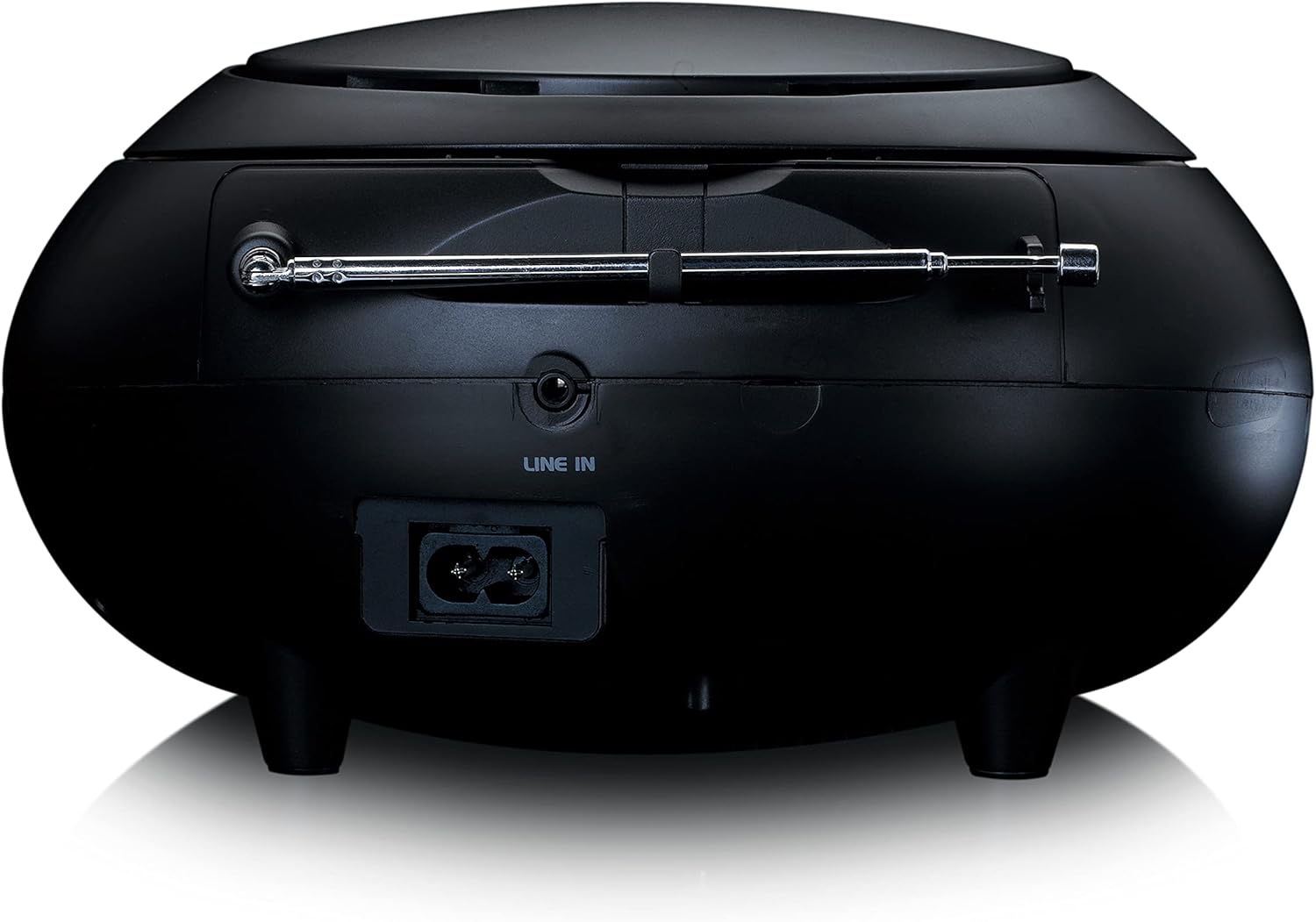
Abbildung 3: Rückseite view of the Lenco SCD-341, highlighting the power input and LINE IN audio port.
5. Einrichtung
5.1 Stromanschluss
The Lenco SCD-341 can be powered by the included AC adapter or by batteries.
- Wechselstromversorgung: Connect the supplied power adapter to the AC IN socket on the rear of the unit (refer to Figure 3) and plug the other end into a standard wall outlet.
- Batterieleistung: Open the battery compartment on the bottom of the unit. Insert the required number of C-type batteries (not included), ensuring correct polarity. Close the compartment securely.
5.2 Antenneneinrichtung
For optimal DAB+ and FM radio reception, fully extend the telescopic antenna located on the rear of the unit. Adjust its position for the best signal.
6. Bedienungsanleitung
6.1 Ein-/Ausschalten
Drücken Sie die LEISTUNG Taste, um das Gerät ein- oder auszuschalten.
6.2 CD-Wiedergabe
- Drücken Sie die QUELLE button repeatedly until "CD" is displayed on the LCD screen.
- Den Deckel des CD-Fachs durch vorsichtiges Anheben öffnen.
- Legen Sie eine CD mit der beschrifteten Seite nach oben auf die Spindel.
- Close the CD compartment lid. The unit will begin reading the CD.
- Verwenden Sie die WIEDERGABE/PAUSE, STOPPEN, NACH VORNE SPULEN, Und RÜCKWÄRTS ÜBERSPRINGEN Tasten zur Steuerung der Wiedergabe.

Abbildung 4: Oben view of the Lenco SCD-341 with the CD compartment open, showing a CD being inserted.
6.3 DAB+ Radiobetrieb
- Drücken Sie die QUELLE button repeatedly until "DAB" is displayed.
- The unit will automatically scan for available DAB+ stations. This may take a few moments.
- Sobald der Scanvorgang abgeschlossen ist, verwenden Sie die TUNE +/- Tasten zur Navigation durch die verfügbaren Stationen.
- Um einen Sender als Voreinstellung zu speichern, halten Sie die Taste gedrückt. VOREINSTELLUNG Taste, dann verwenden TUNE +/- eine voreingestellte Nummer auswählen und drücken VOREINSTELLUNG zur Bestätigung erneut.
6.4 FM-Radiobetrieb
- Drücken Sie die QUELLE button repeatedly until "FM" is displayed.
- Halten Sie die TUNE +/- buttons to automatically scan for the next available station. Briefly press to manually tune.
- Um einen Sender als Voreinstellung zu speichern, halten Sie die Taste gedrückt. VOREINSTELLUNG Taste, dann verwenden TUNE +/- eine voreingestellte Nummer auswählen und drücken VOREINSTELLUNG zur Bestätigung erneut.
6.5 Bluetooth-Kopplung
- Drücken Sie die QUELLE button repeatedly until "Bluetooth" is displayed. The unit will enter pairing mode, indicated by a flashing Bluetooth icon on the display.
- On your external device (smartphone, tablet), enable Bluetooth and search for available devices.
- Select "Lenco SCD-341" from the list of found devices.
- Once paired, the Bluetooth icon on the unit's display will stop flashing and remain solid. You can now play audio from your device through the Lenco SCD-341.
6.6 Lautstärkeregelung
Verwenden Sie die BAND +/- Tasten zur Einstellung des Audioausgangspegels.
7. Wartung
- Reinigung: Reinigen Sie die Außenseite des Geräts mit einem weichen, trockenen Tuch. Verwenden Sie keine Scheuermittel oder Lösungsmittel.
- CD-Linsenpflege: Sollten Probleme bei der CD-Wiedergabe auftreten, verwenden Sie eine handelsübliche CD-Linsenreinigungs-CD.
- Lagerung: When not in use for extended periods, disconnect the power adapter and remove batteries. Store the unit in a cool, dry place.
8. Fehlerbehebung
| Problem | Mögliche Ursache | Lösung |
|---|---|---|
| Kein Strom | Netzteil nicht angeschlossen; Batterien leer oder falsch eingelegt. | Überprüfen Sie den Anschluss des Netzteils; tauschen Sie die Batterien aus oder stellen Sie die richtige Polarität sicher. |
| Kein Ton | Lautstärke zu niedrig; falsche Quelle ausgewählt; Kopfhörer angeschlossen. | Increase volume; select correct source (CD, DAB, FM, Bluetooth); disconnect headphones. |
| CD wird nicht abgespielt | CD falsch eingelegt; CD verschmutzt oder zerkratzt; CD-Format wird nicht unterstützt. | Reinsert CD correctly; clean or replace CD; ensure CD is a standard audio CD. |
| Schlechter Radioempfang | Antenne nicht ausgefahren oder schlecht positioniert; starke Störungen. | Fully extend and adjust antenna; move unit away from other electronic devices. |
| Bluetooth-Kopplung fehlgeschlagen | Bluetooth not enabled on external device; device too far; unit not in pairing mode. | Ensure Bluetooth is on and discoverable; move device closer; select Bluetooth source on unit. |
9. Spezifikationen
| Modellnummer | SCD-341 |
| Marke | Lenco |
| Abmessungen (L x B x H) | 21.5 x 21 x 11.5 cm |
| Gewicht | 1.09 kg |
| Stromquelle | AC (adapter included) / Battery-Powered |
| Tuner-Technologie | DAB+, UKW |
| Konnektivität | Bluetooth |
| Audioausgabemodus | Stereo |
| Anzeigetyp | LCD |
| Ausgangsleistung | 3 Watt RMS |

Figure 5: Dimensions of the Lenco SCD-341 unit.
10. Garantie und Support
For warranty information and technical support, please refer to the warranty card included in your package or visit the official Lenco webWebsite.
Hersteller: Lenco GmbH
Ursprungsland: Hongkong
11. Offizielle Produktvideos
Watch this official video for a visual guide to the Lenco SCD-341.
Video 1: A 360-degree product view of the Lenco SCD-341, showcasing sein Design und seine Funktionen aus allen Blickwinkeln.