
GOOZEEZOO 2.8inch tinysa
GOOZEEZOO V0.3.1 Portable Tiny SA Spectrum Analyzer Instruction Manual
Model: 2.8inch tinysa
Marke: GOOZEEZOO
Einführung
This manual provides detailed instructions for the operation and maintenance of your GOOZEEZOO V0.3.1 Portable Tiny SA Spectrum Analyzer. This handheld device offers frequency analysis from 100kHz to 960MHz across MF/HF/VHF/UHF inputs, featuring ESD protection and a 2.8-inch touch screen. It also functions as a signal generator.
1. Einrichtung
1.1 Packungsinhalt
Überprüfen Sie, ob alle Artikel in Ihrem Paket vorhanden sind:
- 1x Tiny Spectrum Analyzer
- Antenne
- USB-Kabel
- SMA Cables (2x)
- Stift
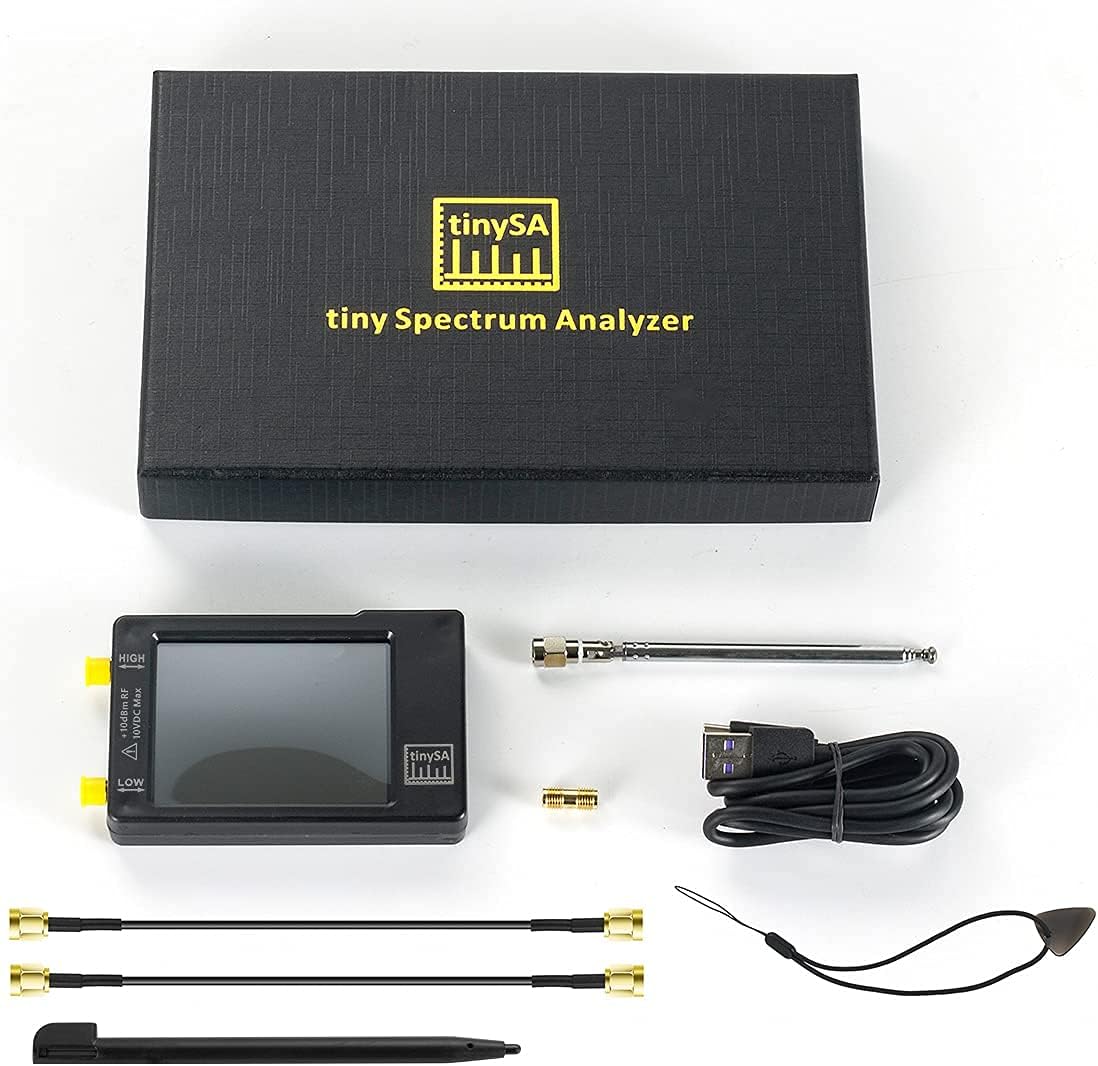
Figure 1: Included components of the Tiny SA Spectrum Analyzer.
1.2 Physische Überlastungview
The device features a 2.8-inch touch screen for user interaction. Input and output ports are clearly labeled. The unit includes a multi-functional jog switch for navigation and control.

Abbildung 2: Vorderseite view of the Tiny SA Spectrum Analyzer highlighting the touch screen and controls.
1.3 Erstaufladung
Before first use, fully charge the device. Charging time is approximately 1 hour using a 500mA minimum USB port or USB charger. A fully charged battery provides at least 2 hours of operation.
2. Bedienungsanleitung
2.1 Benutzeroberfläche und Anzeige
The device features a 320x240 pixel, 2.8-inch 16-bit RGB resistive touch screen. Navigation is primarily via touch control and a jog switch. The display shows scan points covering the frequency range.

Figure 3: Display showing firmware version V0.3.1 with ESD protection enabled.
2.2 Frequency Range and Input Modes
The Tiny SA Spectrum Analyzer operates with two inputs:
- MF/HF/VHF Input: 0.1MHz - 350MHz (High quality)
- UHF-Eingang: 240MHz - 960MHz (Lesser quality)
Switchable resolution bandpass filters are available for both ranges, between 2.6kHz and 640kHz. The fastest scanning speed is achieved with an RBW of 300kHz or wider, at approximately 2 scans per second. Scanning speed decreases with increased frequency span and decreased RBW.
2.3 Signalgeneratorfunktion
When not in spectrum analyzer mode, the device can function as a signal generator:
- MF/HF/VHF Sinus Output: 0.1 MHz – 350 MHz
- UHF Square Wave Output: 240 MHz – 960 MHz
It includes a built-in calibration signal generator for automatic self-test and low input calibration. An optional square wave output with a fundamental at -25dBm can be connected to the high input/output. Frequencies can be set to 1MHz, 2MHz, 4MHz, 10MHz, 15MHz, or 30MHz.

Figure 4: Device operating as a signal generator.
2.4 PC-Steuerung
The USB interface supports the Serial over USB (CDC) protocol, allowing for a range of commands to perform measurements or update internal settings. Drivers for Windows install automatically. Linux drivers are built into the kernel. Two software applications are available for PC control, both capable of capturing the device's screen.

Figure 5: PC control setup with Windows and Linux.
2.5 Frequency Calibration
Frequency calibration ensures accurate measurements. This process involves measuring the internal reference frequency and applying a correction. The video below demonstrates how to perform frequency calibration using an external frequency counter.
Video 1: This video demonstrates the frequency calibration process for the Tiny SA Spectrum Analyzer. It shows how to connect an external frequency counter to measure the internal reference frequency, input the correction value into the device, and verify the corrected output frequency. The video highlights the importance of accurate frequency reference for precise measurements.
2.6 High Input Level Calibration
Calibrating the high input level is crucial for accurate power measurements. This procedure typically involves using a known signal source and adjusting the device's settings. The video below illustrates the steps for high input level calibration.
Video 2: This video guides users through the high input level calibration of the Tiny SA Spectrum Analyzer. It demonstrates connecting a signal generator with a known output level to the high input, adjusting the device's settings to match the known power, and verifying the calibration. The video also touches upon mirror suppression in the high input mode.
2.7 Messmöglichkeiten
The Tiny SA Spectrum Analyzer is capable of various measurements, including:
- Messung von Harmonischen
- Messung der spektralen Reinheit
- Messung des Phasenrauschens
- Messung der Intermodulation dritter Ordnung
- Messung des IQ-Gleichgewichts
- Messung des störungsfreien dynamischen Bereichs
- Messung niedriger Frequenzen
- Erfassung von ISM-Übertragungen
- Abstimmungs-Sweep-Einstellungen
- Auswirkungen von Koaxialkabeln
- Measuring harmonic content of a transmitter
- Measuring FM deviation
- Measuring AM modulation
- Hinzufügen eines LNA
- Verwendung eines Tracking-Generators zur Messung eines Mischers

Abbildung 6: Überview of device measurement capabilities.
3. Wartung
3.1 Batteriepflege
The device uses a Lithium Ion battery. Ensure regular charging to maintain battery health. Avoid extreme temperatures. The battery is included and required for operation.
3.2 Firmware-Updates
The firmware of the Tiny SA can be updated by the user. For the newest firmware version and update instructions, please refer to the official webWebsite: tinysa.org.
4. Fehlerbehebung
If you encounter issues with your Tiny SA Spectrum Analyzer, consider the following general troubleshooting steps:
- Probleme mit der Stromversorgung: Ensure the device is fully charged. Check the USB connection if charging or connected to a PC.
- Anzeigeprobleme: If the screen is unresponsive, try restarting the device. Ensure the touch screen is clean.
- Messungenauigkeiten: Perform frequency and level calibrations as described in Section 2.5 and 2.6. Verify correct input/output mode selection.
- PC-Konnektivität: Ensure the USB cable is securely connected. For Windows, verify drivers are installed. For Linux, drivers are typically built-in.
- Unerwartetes Verhalten: Consider performing a self-test (if available in the device menu) or updating the firmware to the latest version.
For persistent issues, consult the official Tiny SA webWebsite oder wenden Sie sich an den Kundendienst.
5. Spezifikationen
| Besonderheit | Spezifikation |
|---|---|
| Marke | GOOZEEZOO |
| Modellname | GOOZEEZOO V0.3.1 |
| Artikelmodellnummer | 2.8inch tinysa |
| Bildschirmauflösung | 320*240 Pixel |
| Bildschirmdiagonale | 2.8 inches (16 bits per RGB pixels) |
| Bedienoberfläche | Resistive touch, Jog switch, USB serial port |
| Input Frequency Range (MF/HF/VHF) | 0.1 MHz – 350 MHz |
| Input Frequency Range (UHF) | 240 MHz – 960 MHz |
| Output Frequency Range (MF/HF/VHF Sinus) | 0.1 MHz – 350 MHz |
| Output Frequency Range (UHF Square Wave) | 240 MHz – 960 MHz |
| Auflösungsbandbreite (RBW) | 2.6 kHz - 640 kHz |
| ESD-Schutz | Diodes installed (Upgraded Version) |
| Stromquelle | Batteriebetrieben (Lithium-Ionen-Akku, im Lieferumfang enthalten) |
| Ladezeit | Max 1 hour (with 500mA USB) |
| Betriebszeit (Vollladung) | Mindestens 2 Stunden |
| Konnektivität | USB |
| Materialtyp | Acrylnitril-Butadien-Styrol |
| Betriebssystem (intern) | Linux |
| Processor Type (Internal) | Core i5 |
| RAM Memory Technology (Internal) | DDR3 |
6. Garantie und Support
For warranty information and technical support, please refer to the documentation provided with your purchase or visit the official GOOZEEZOO webBewahren Sie Ihren Kaufbeleg für eventuelle Garantieansprüche auf.