
Produkt überview
The OnePlus SUPERVOOC 80W Car Charger is designed to provide rapid and efficient charging for your devices while on the go. Featuring dual USB-A and USB-C ports, it supports various fast-charging protocols to ensure compatibility and optimal performance for mobile phones, laptops, and tablets.

Bild: Vorderseite view of the OnePlus SUPERVOOC 80W Car Charger, showcasing its compact design and the OnePlus logo.
Hauptmerkmale:
- Laden über zwei Anschlüsse: USB-A and USB-C ports allow simultaneous charging for two devices.
- Hochgeschwindigkeitsausgabe: USB-A port supports 80W MAX output for SUPERVOOC compatible devices (e.g., OnePlus 10 Pro to 100% in approximately 37 minutes). USB-C port supports 30W MAX output via PD protocol.
- Breite Kompatibilität: Intelligent chip adjusts current for devices supporting SUPERVOOC/VOOC, PD, QC, and other protocols.
- Erhöhte Sicherheit: Built-in protections against short-circuit, over-current, over-voltage, unter-voltage, and static.
- Langlebiges Design: Compact and robust construction for reliable use in vehicles.
Setup und Installation
- Fahrzeugsteckdose finden: Identify the 12V or 24V auxiliary power outlet (cigarette lighter socket) in your vehicle.
- Kfz-Ladegerät einstecken: Firmly insert the OnePlus SUPERVOOC 80W Car Charger into the vehicle's power outlet. Ensure it is securely seated.
- Ladekabel anschließen: Plug a compatible USB-A or USB-C charging cable (not included) into the corresponding port on the car charger. For optimal SUPERVOOC charging, use a genuine OnePlus SUPERVOOC compatible cable.
- Gerät verbinden: Connect the other end of the charging cable to your mobile phone, tablet, or other compatible device.

Image: The car charger plugged into a vehicle's power outlet, with charging cables connected to devices.

Bild: Oben view of the car charger showing the USB-A and USB-C charging ports.
Bedienungsanleitung
Once installed, the car charger operates automatically. It will detect the connected device and deliver the appropriate charging current based on the device's capabilities and supported protocols.
- Gleichzeitiges Laden: You can charge one device via the USB-A port and another via the USB-C port concurrently.
- Schnelles Laden: For devices supporting SUPERVOOC (USB-A) or Power Delivery (USB-C), the charger will automatically engage fast charging modes. Ensure your device and cable are compatible with these protocols for maximum speed.
- Kontrollleuchte: The charger may feature an indicator light (e.g., a ring light) to confirm it is powered and ready for use. This light also aids in locating the charger in low-light conditions.

Image: The car charger illuminated by its ring light, visible in a car's interior at night.
Sicherheitshinweise
The OnePlus SUPERVOOC 80W Car Charger incorporates multiple safety features to protect your devices and vehicle. Adhere to the following guidelines for safe operation:
- Zerlegen oder modifizieren Sie das Ladegerät nicht.
- Vermeiden Sie es, das Ladegerät extremen Temperaturen, direkter Sonneneinstrahlung oder Feuchtigkeit auszusetzen.
- Ensure the charger is securely plugged into the power outlet to prevent intermittent connections.
- Use only compatible and certified charging cables.
- The charger is equipped with:
- Kurzschlussschutz
- Überstromschutz
- Überlautstärketage-Schutz
- Untervolumentage-Schutz
- Static protection
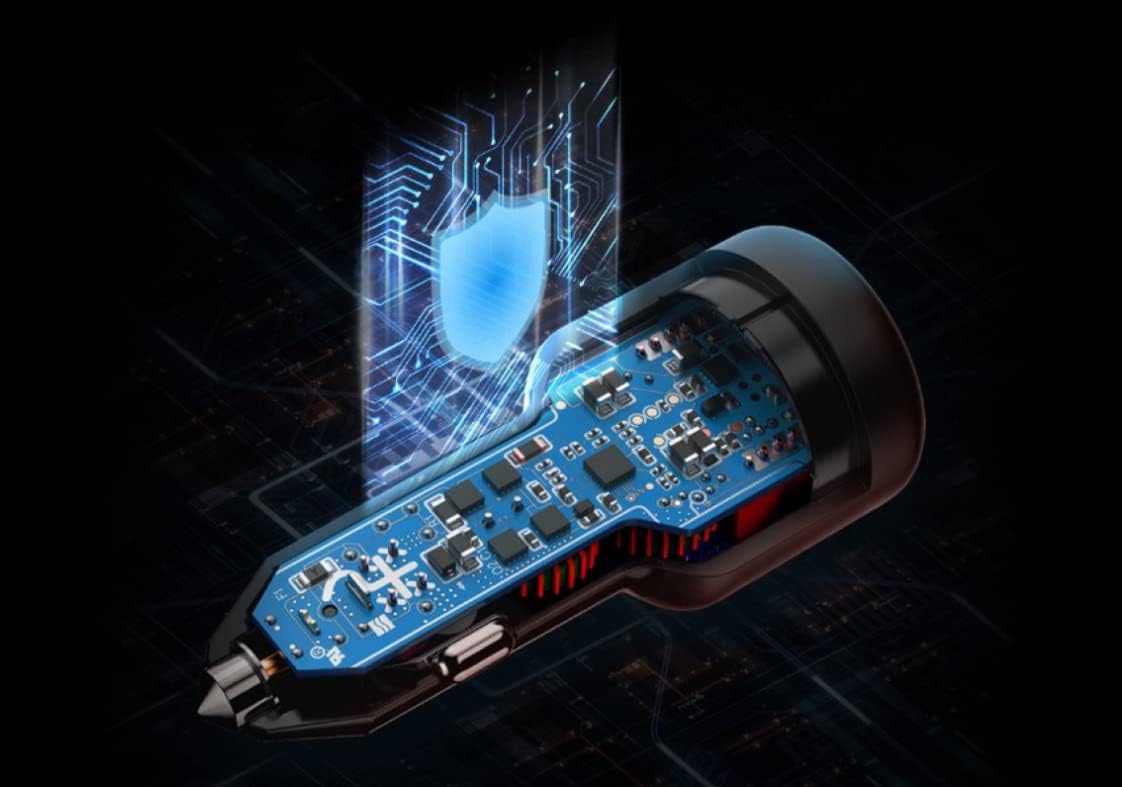
Image: Diagram illustrating the internal smart processing chip and safety features of the car charger.
Fehlerbehebung
Problem: Gerät lädt nicht oder nur langsam.
- Verbindung prüfen: Ensure the car charger is firmly seated in the vehicle's power outlet and the charging cable is securely connected to both the charger and your device.
- Verify Cable: Confirm that the charging cable is not damaged and is compatible with your device and the charger's fast-charging protocols (e.g., SUPERVOOC cable for SUPERVOOC charging).
- Fahrzeugleistung: Ensure your vehicle's engine is running or the power outlet is active. Some vehicle outlets only provide power when the ignition is on.
- Gerätekompatibilität: Confirm your device supports the fast-charging protocols offered by the charger (SUPERVOOC/VOOC, PD, QC).
- Versuchen Sie einen anderen Anschluss/ein anderes Kabel: Test with a different port on the charger or a different known-good cable to isolate the issue.
Issue: Charger feels warm during use.
- It is normal for the charger to become warm during high-power charging. If it becomes excessively hot or emits smoke/odor, immediately disconnect it from the power outlet and discontinue use.
Technische Daten
| Besonderheit | Detail |
|---|---|
| Marke | OnePlus |
| Modellnummer | CCB7JACH |
| Steckertyp | USB-A, USB-C |
| USB-A-Ausgang | 80W MAX (SUPERVOOC) |
| USB-C-Ausgang | 30W MAX (PD) |
| Eingangslautstärketage | 12 Volt (DC) |
| Anzahl USB-Anschlüsse | 2 |
| Kompatible Geräte | Laptops, Tablets, Mobile Phones (OnePlus 10 Pro, OnePlus series supporting SUPERVOOC/VOOC, and other devices supporting PD, QC) |
| Artikelgewicht | 0.11 Kilogramm |
| Material | Plastik |
Garantie und Support
This OnePlus SUPERVOOC 80W Car Charger comes with a 1 Jahr Herstellergarantie.
For warranty claims, technical support, or further assistance, please contact OnePlus customer service through their official webWebsite oder den Händler, bei dem das Produkt gekauft wurde.
Bewahren Sie Ihren Kaufbeleg oder Kaufnachweis zur Inanspruchnahme der Garantie auf.