
FIFINE H6 Gaming Headset User Manual
Modell: H6
1. Einleitung
Thank you for choosing the FIFINE H6 Gaming Headset. This headset is designed to provide an immersive audio experience for gaming on PC, PS4, and PS5. It features virtual 7.1 surround sound, a detachable microphone for clear communication, three EQ modes, and comfortable ear cushions for extended use.
Please read this manual carefully before using the product to ensure proper operation and to maximize your gaming experience.
2. Packungsinhalt
- FIFINE H6 Gaming Headset
- Abnehmbares Mikrofon
- Bedienungsanleitung
3. Produktüberschreitungview
3.1 Headset-Komponenten
The FIFINE H6 headset is designed for comfort and durability, featuring soft ear cushions and an adjustable headband.

Bild 3.1: The headset features breathable ear cushions, a soft headband, and an adjustable metal frame for a comfortable fit. It weighs approximately 330g.
3.2 Inline-Bedienelemente
The headset includes an inline control unit for easy access to audio settings.
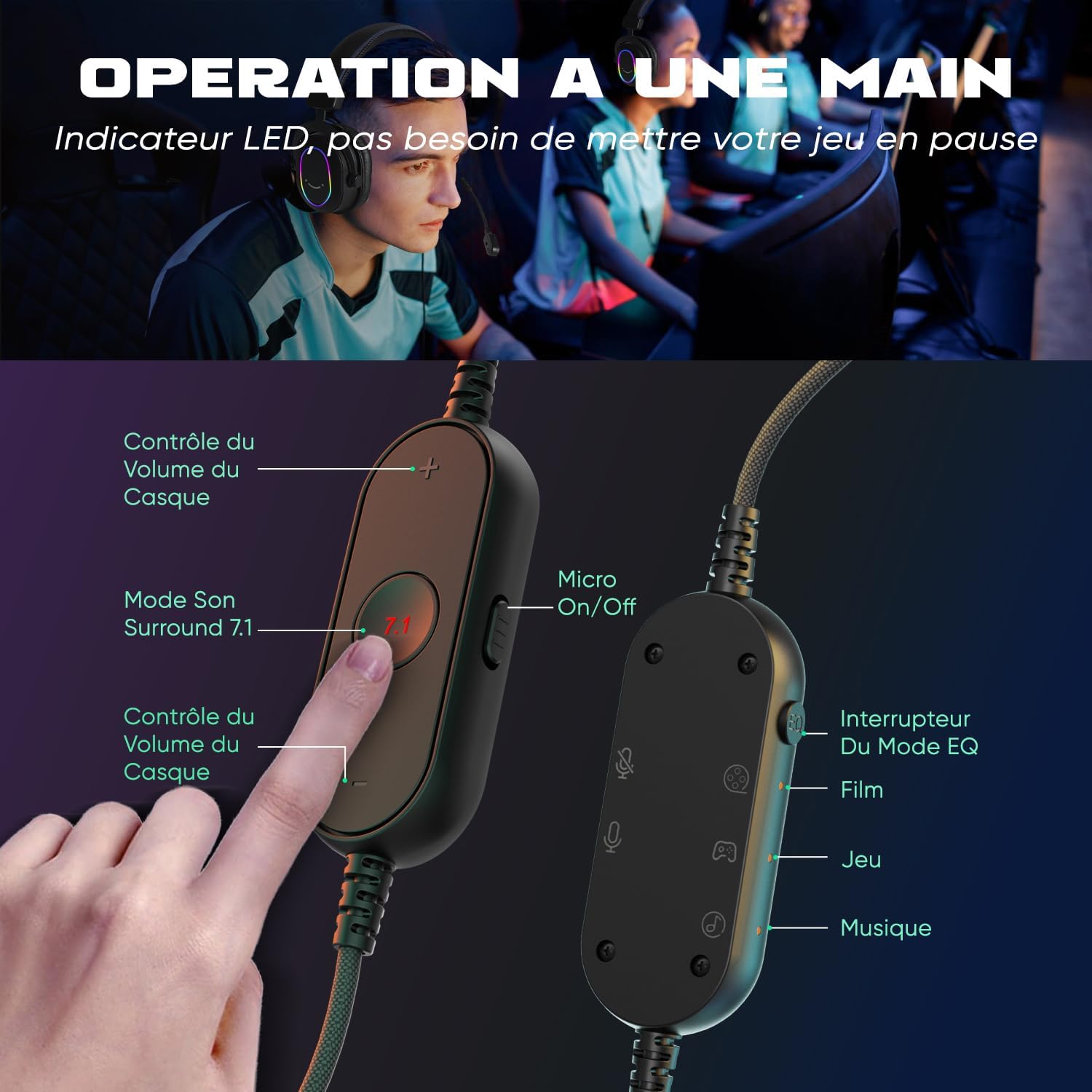
Bild 3.2: The inline controller allows for quick adjustments. It includes headset volume control, a 7.1 surround sound activation button, a microphone on/off switch, and an EQ mode selector for Film, Game, and Music modes.
3.3 Audiotechnologie
Equipped with 50mm drivers, the H6 headset delivers enhanced sound quality for an immersive experience.

Bild 3.3: The headset features 50mm drivers designed to improve overall sound quality and enhance your audio experience.
4. Einrichtung
The FIFINE H6 headset offers plug-and-play functionality, making setup quick and easy.
4.1 Anschließen des Headsets
- Connect the USB-A cable of the headset to an available USB port on your PC, PS4, or PS5.
- The headset is automatically recognized by your device. No additional drivers are typically required.
- Ensure the headset is selected as the default audio input and output device in your system's sound settings.

Bild 4.1: The headset connects via USB and is compatible with Windows, PS4/PS5, and Mac OS devices, offering simple plug-and-play installation.
4.2 Anschließen des Mikrofons
- Insert the detachable microphone into the designated port on the left earcup until it clicks into place.
- Passen Sie den flexiblen Mikrofonarm so an, dass er optimal auf Ihre Stimme ausgerichtet ist.
- To remove, gently pull the microphone out of its port.

Bild 4.2: The headset features a detachable and 360-degree flexible microphone. A red light on the inline control indicates when the microphone is muted.
5. Bedienungsanleitung
5.1 Virtual 7.1 Surround Sound
Activate the virtual 7.1 surround sound for an immersive gaming experience, allowing you to pinpoint audio cues like footsteps and gunfire.
- Drücken Sie die 7.1 button on the inline control unit to toggle virtual 7.1 surround sound on or off.
- An LED indicator on the control unit will confirm the status.

Bild 5.1: Virtual 7.1 surround sound provides an immersive gaming experience, allowing precise localization of in-game sounds such as explosions, gunshots, footsteps, aircraft, and vehicles.
5.2 EQ-Modi
The headset offers three equalization (EQ) modes optimized for different audio scenarios.
- Drücken Sie die EQ-Modusschalter button on the inline control unit to cycle through the modes:
- Filmmodus: Optimized for movie watching.
- Spielmodus: Enhanced audio for gaming, highlighting in-game sounds.
- Musikmodus: Balanced audio for listening to music.
- An LED indicator will show the currently active EQ mode.
5.3 Lautstärkeregelung
- Verwenden Sie die Lauter (+) Und Lautstärke runter (-) buttons on the inline control unit to adjust the headset's audio output level.
5.4 Mikrofonstummschaltung
- Schieben Sie den Micro On/Off switch on the inline control unit to mute or unmute the microphone.
- A red LED light on the control unit indicates when the microphone is muted.
6. Wartung
- Reinigung: Reinigen Sie das Headset mit einem weichen, trockenen Tuch. Verwenden Sie keine scharfen Chemikalien oder Scheuermittel.
- Lagerung: Bewahren Sie das Headset an einem kühlen, trockenen Ort fern von direkter Sonneneinstrahlung und extremen Temperaturen auf.
- Kabelpflege: Avoid bending or twisting the cable excessively to prevent damage. The braided cable material is designed for durability.
- Mikrofon: When not in use, you can detach the microphone to prevent accidental damage.
7. Fehlerbehebung
| Problem | Lösung |
|---|---|
| Kein Ton aus dem Headset |
|
| Mikrofon funktioniert nicht |
|
| Sound quality issues (e.g., static, distortion) |
|
8. Spezifikationen
| Besonderheit | Detail |
|---|---|
| Marke | FIFINE |
| Modellname | H6 (also referred to as MI4 in some documentation) |
| Farbe | Schwarz |
| Konnektivitätstechnologie | Kabelgebunden (USB-A) |
| Platzierung des Ohrs | Ohrüber-Ohr (Ohrumschließend) |
| Treibertyp | Dynamisch |
| Treibergröße | 50 mm |
| Frequenzbereich | 20 Hz – 20,000 Hz |
| Besondere Merkmale | Virtual 7.1 Surround Sound, Detachable Microphone, 3 EQ Modes (Film, Game, Music), RGB Lighting, Inline Controls |
| Kompatible Geräte | Desktop Computers, Gaming Consoles (PS4, PS5) |
| Kabelfunktionen | Braided, Durable, Sufficient Length |
| Material | Metall, Kunststoff |
| Wasserbeständigkeit | Nicht wasserdicht |
9. Garantie und Support
9.1 Garantieinformationen
FIFINE products typically come with a standard manufacturer's warranty. Please refer to your purchase documentation or the official FIFINE webAuf der Website finden Sie die spezifischen Garantiebedingungen, die für Ihre Region gelten.
9.2 Kundendienst
For technical assistance, troubleshooting, or any questions regarding your FIFINE H6 Gaming Headset, please contact FIFINE customer support through their official webWebsite oder der Einzelhändler, bei dem Sie das Produkt gekauft haben.
You can often find support contact information on the FIFINE brand store page or by visiting www.fifinemic.com.