
Einführung
This manual provides comprehensive instructions for the setup, operation, and maintenance of your Yealink W78P DECT IP Phone System. Please read this manual thoroughly before using the device to ensure proper functionality and to prevent damage. Keep this manual for future reference.
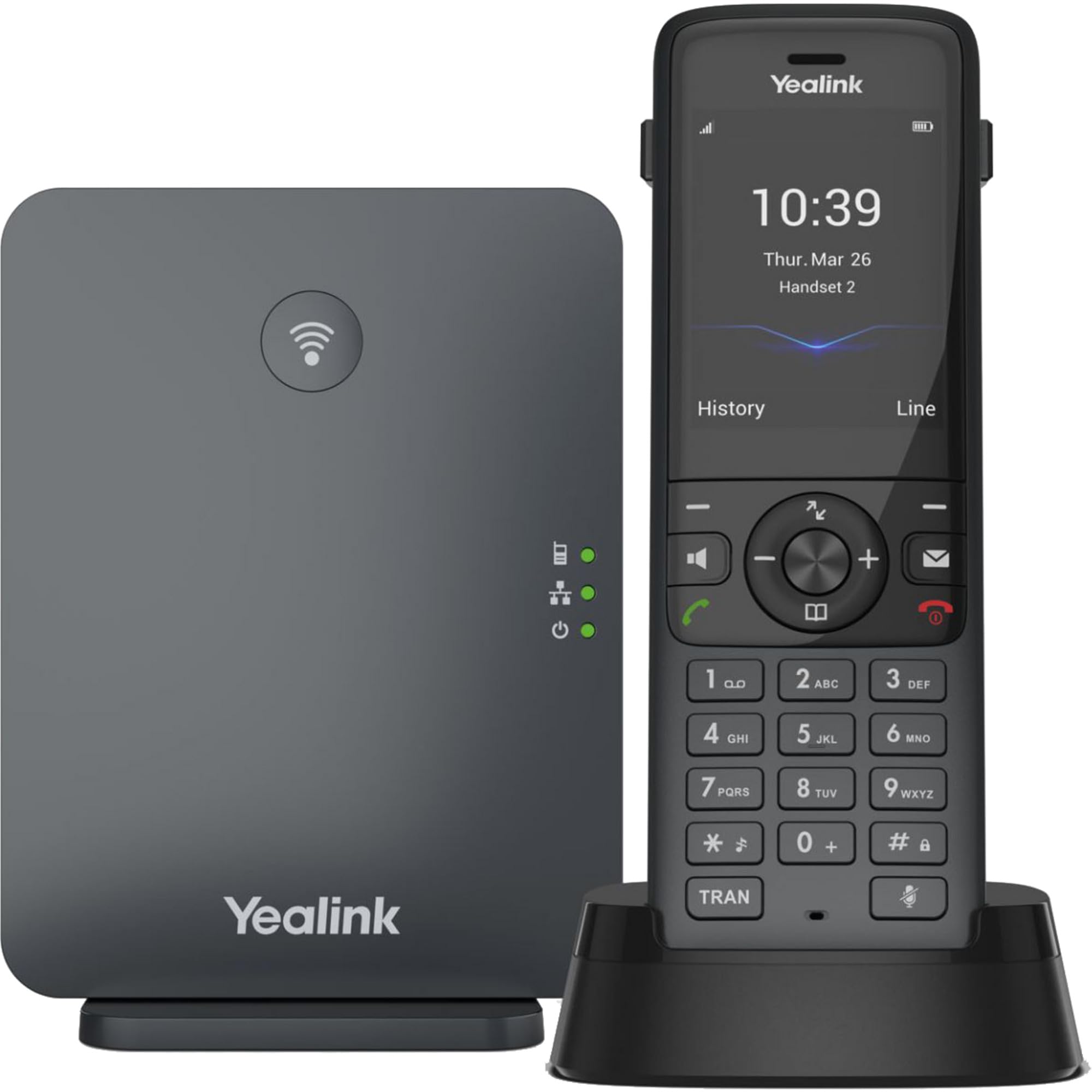
Image: The Yealink W78P system, featuring the W70B base station and the W78H cordless handset in its charging cradle.
Lieferumfang
Überprüfen Sie, ob alle Artikel in Ihrem Paket vorhanden sind:
- W78H Mobilteil
- W70B Basisstation
- Ladeschale für Mobilteil
- Power Adapter for Handset Charging Cradle and Base Station
- Netzwerkkabel
Installationshandbuch
1. Anschließen der Basisstation (W70B)
- Stromanschluss: Connect the power adapter to the W70B base station and plug it into a power outlet. Alternatively, if your network supports Power over Ethernet (PoE), connect the base station to a PoE-enabled network switch using the provided network cable.
- Netzwerkverbindung: Connect one end of the network cable to the LAN port on the W70B base station and the other end to your router or network switch.
- Wait for the base station to power on and obtain an IP address. The network indicator LED on the base station will illuminate steadily when connected.
2. Charging the Handset (W78H)
- Connect the power adapter to the handset charging cradle and plug it into a power outlet.
- Place the W78H handset into the charging cradle. The battery icon on the handset display will indicate charging status. Allow the handset to charge fully before initial use.
3. Initial Handset Registration
The W78H handset typically comes pre-registered to the W70B base station in a W78P package. If registration is required or if you are adding a new handset:
- On the W70B base station, press and hold the registration button until the registration LED flashes.
- Navigieren Sie auf dem Mobilteil W78H zu Menü > Einstellungen > Registrierung > Mobiltelefon registrieren.
- Select the desired base station (if multiple are detected) and enter the base station PIN (default is 0000).
- Nach erfolgreicher Registrierung wird auf dem Mobiltelefon „Mobiltelefon abonniert“ angezeigt.
Bedienungsanleitung
Anrufe tätigen und empfangen
- Anrufen: Wählen Sie die Nummer und drücken Sie die Anruf key (green phone icon).
- So beantworten Sie einen Anruf: Drücken Sie die Anruf -Taste oder die Freisprecheinrichtung Schlüssel.
- So beenden Sie einen Anruf: Drücken Sie die Anruf beenden key (red phone icon).
- Wahlwiederholung: Drücken Sie die Anruf key to access the call history and select a number to redial.
Erweiterte Anruffunktionen
- Halten: Drücken Sie während eines Anrufs die Taste Halten Funktionstaste. Drücken Sie sie erneut, um den Anruf fortzusetzen.
- Übertragung: Drücken Sie während eines Anrufs die Taste Überweisen Funktionstaste drücken, neue Nummer wählen und drücken Überweisen wieder.
- Konferenz: Drücken Sie während eines Anrufs die Taste Konferenz Drücken Sie die Funktionstaste, wählen Sie die Nummer des zweiten Gesprächspartners und drücken Sie nach der Verbindung die entsprechende Taste. Konferenz erneut allen Parteien beizutreten.
Headset-Anschluss
- Bluetooth Kopfhörer: The W78H handset supports Bluetooth connectivity. Navigate to Menü > Einstellungen > Bluetooth to enable Bluetooth and pair with your headset.
- 3.5mm Jack Headset: Connect a compatible 3.5mm headset to the headset jack on the side of the W78H handset.
DECT Radio Coverage
The W78P system offers a radio coverage of up to 50 meters indoors and up to 300 meters outdoors, under ideal conditions. Environmental factors may affect actual range.
Wartung
Reinigung
- Wischen Sie Mobilteil und Basisstation mit einem weichen, fusselfreien Tuch ab.amp Tuch.
- Keine Scheuer- oder Lösungsmittel verwenden.
- Stellen Sie vor der Reinigung sicher, dass das Gerät ausgeschaltet und vom Stromnetz getrennt ist.
Batteriepflege
- The W78H handset provides up to 21 hours of talk time and 166 hours of standby time under ideal conditions.
- Um eine optimale Batterielebensdauer zu gewährleisten, vermeiden Sie extreme Temperaturen.
- Charge the handset regularly. A 10-minute charge provides approximately 2 hours of talk time.
Fehlerbehebung
If you encounter issues with your Yealink W78P system, refer to the table below for common problems and solutions.
| Problem | Mögliche Ursache | Lösung |
|---|---|---|
| Kein Wählton | Base station not powered or not connected to network. | Check power and network cable connections to the W70B base station. Ensure network indicator LED is steady. |
| Auf dem Mobilteil wird „Nicht registriert“ angezeigt. | Handset lost registration with base station. | Re-register the handset to the base station following the steps in the "Initial Handset Registration" section. |
| Schlechte Audioqualität | Out of DECT range, interference, or network issues. | Move closer to the base station. Check for sources of interference (e.g., Wi-Fi routers, microwaves). Verify network stability. |
| Handy lädt nicht | Charging cradle not powered or handset not seated correctly. | Ensure the charging cradle's power adapter is connected. Re-seat the handset firmly in the cradle. |
Technische Spezifikationen
| Besonderheit | Detail |
|---|---|
| Marke | Yealink |
| Modellnummer | W78P |
| Farbe | Schwarz |
| Material | Acrylnitril-Butadien-Styrol (ABS) |
| Artikelabmessungen (L x B x H) | 24 x 51 x 157 Millimeter |
| Artikelgewicht | 500 Gramm |
| Stromquelle | Batteriebetrieben |
| Anzahl Batterien | 1 Lithium-Ionen |
| Telefongesprächszeit | 21 Stunden |
| Telefon-Standby-Zeit | 166 Stunden |
| Kompatible Geräte | Yealink W56H, Yealink W57R, Yealink W59R, Yealink W73H, Yealink W78H |
| Anrufer-ID | Ja |
| Mehrlinienbetrieb | Ja |
| Ursprungsland | USA |
| UPC | 841885125675, 841885109125 |
Garantieinformationen
The Yealink W78P DECT IP Phone System comes with a 2 Jahr Herstellergarantie. Please retain your proof of purchase for warranty claims. For detailed terms and conditions, refer to the warranty documentation included with your product or visit the official Yealink webWebsite.
Kundenservice
Für technische Unterstützung, Fehlerbehebung, die über diese Anleitung hinausgeht, oder Serviceanfragen wenden Sie sich bitte an den Yealink-Kundendienst. Die Kontaktdaten finden Sie auf der offiziellen Yealink-Website. webWebsite oder über Ihren Produktanbieter.