
Einführung
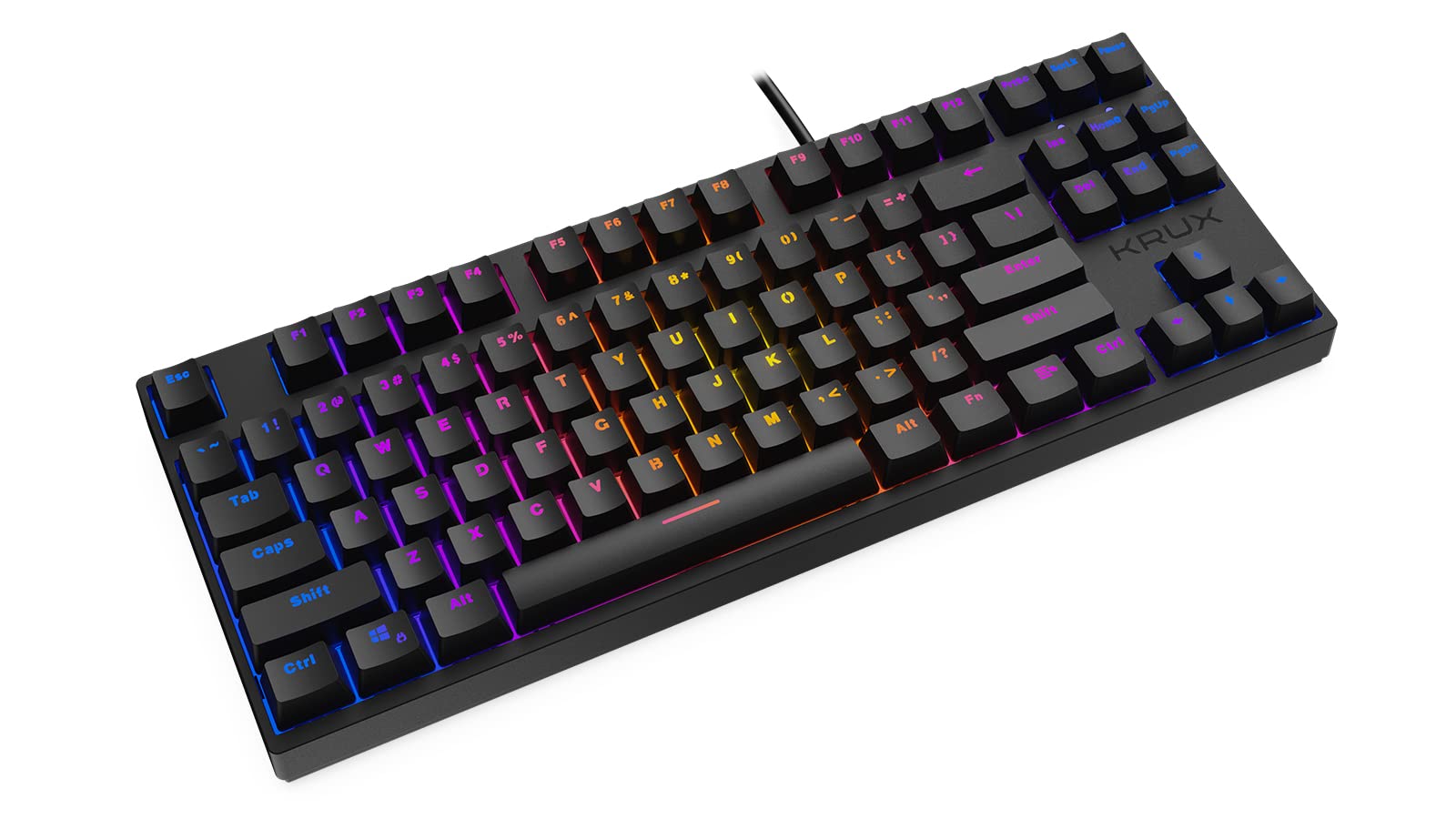
Thank you for choosing the KRUX Atax Pro RGB Outemu Brown KRX0039 Wired Gaming Keyboard. This manual provides essential information for setting up, operating, maintaining, and troubleshooting your new mechanical gaming keyboard. Please read this manual thoroughly before use to ensure optimal performance and longevity of your device.
Aufstellen
Follow these steps to set up your KRUX Atax Pro RGB keyboard:
- Auspacken der Tastatur: Nehmen Sie die Tastatur vorsichtig aus der Verpackung. Vergewissern Sie sich, dass alle Komponenten vorhanden sind.
- Mit Computer verbinden: Plug the USB-A connector of the keyboard cable into an available USB-A port on your computer or laptop.
- Treiberinstallation: The keyboard is plug-and-play. Your operating system (Windows, macOS, Linux) should automatically detect and install the necessary drivers. No additional software installation is typically required for basic functionality.
- Positionierung: Stellen Sie die Tastatur auf eine stabile, ebene Fläche. Passen Sie die hinteren Füße an Ihren bevorzugten Tippwinkel an.
Bedienungsanleitung
The KRUX Atax Pro RGB keyboard offers various functions beyond standard typing:
Grundlegende Tastenfunktionen
- Standardtasten: Alle Standard-alphanumerischen und Symboltasten funktionieren wie erwartet.
- Funktionstasten (F1-F12): These keys perform their standard functions.
- Navigationscluster: Includes Insert, Home, Page Up, Delete, End, Page Down for document navigation.
- Pfeiltasten: Standard directional control.
RGB-Hintergrundbeleuchtungssteuerung
Die Tastatur verfügt über eine anpassbare RGB-Hintergrundbeleuchtung. Verwenden Sie die folgenden Tastenkombinationen mit der Fn key (located near the right Alt key) to control lighting effects:
- Fn + F1-F12: Specific multimedia or system functions (refer to keycap legends for exact functions).
- Fn + PrtSc: Durchschalten Sie verschiedene RGB-Beleuchtungsmodi.
- Fn + Scrlk: Passen Sie die Helligkeit der Hintergrundbeleuchtung an.
- Fn + Pause: Change backlight color or direction in certain modes.

Gaming-Funktionen
- N-Key-Rollover: The keyboard supports N-key rollover, allowing multiple simultaneous key presses to be registered accurately, which is beneficial for gaming.
- Anti-Ghosting: Prevents unintended key presses from registering when multiple keys are pressed at once.
Wartung
Durch sachgemäße Wartung werden die Langlebigkeit und Leistungsfähigkeit Ihrer Tastatur gewährleistet:
- Cleaning the Keycaps: Verwenden Sie ein weiches,amp cloth with mild soap and water to gently wipe the keycaps. Avoid excessive moisture.
- Reinigung unter den Tastenkappen: For deeper cleaning, you may carefully remove keycaps using a keycap puller (not included) and use compressed air to remove dust and debris from the switches.
- Reinigung des Chassis: Wischen Sie das Tastaturgehäuse mit einem trockenen oder leicht feuchten Tuch ab.amp Tuch.
- Vermeiden Sie Flüssigkeiten: Verschütten Sie keine Flüssigkeiten auf der Tastatur. Sollte dennoch etwas verschüttet werden, trennen Sie die Tastatur sofort vom Stromnetz und lassen Sie sie vollständig trocknen, bevor Sie sie wieder anschließen.
- Lagerung: Bewahren Sie die Tastatur an einem kühlen, trockenen Ort fern von direkter Sonneneinstrahlung und extremen Temperaturen auf.

Fehlerbehebung
If you encounter issues with your KRUX Atax Pro RGB keyboard, try the following solutions:
- Tastatur reagiert nicht:
- Stellen Sie sicher, dass das USB-Kabel sowohl an die Tastatur als auch an den Computer fest angeschlossen ist.
- Versuchen Sie, die Tastatur an einen anderen USB-Anschluss anzuschließen.
- Starten Sie Ihren Computer neu.
- Testen Sie die Tastatur an einem anderen Computer, um ein systemspezifisches Problem auszuschließen.
- RGB-Hintergrundbeleuchtung funktioniert nicht:
- Check if the backlight brightness is turned down (Fn + Scrlk).
- Cycle through lighting modes (Fn + PrtSc) to see if it reactivates.
- Stellen Sie sicher, dass die Tastatur über den USB-Anschluss ausreichend mit Strom versorgt wird.
- Bestimmte Tasten werden nicht registriert:
- Remove the keycap and check for any debris or obstruction around the switch. Use compressed air to clean.
- If the issue persists, it may indicate a faulty switch.
- Ghosting or Input Lag:
- Stellen Sie sicher, dass die USB-Treiber Ihres Computers auf dem neuesten Stand sind.
- Avoid connecting the keyboard through unpowered USB hubs.
Technische Daten
| Besonderheit | Detail |
|---|---|
| Marke | Krux |
| Modellname | Atax PRO RGB Outemu Brown TKL |
| Modellnummer | KRX0039 |
| Konnektivitätstechnologie | USB-A (kabelgebunden) |
| Tastaturbeschreibung | Mechanisch |
| Schaltertyp | Outemu Brown (Tactile) |
| Anzahl der Schlüssel | 87 |
| Hintergrundbeleuchtung | RGB |
| Farbe | Schwarz |
| Empfohlene Verwendung | Spiele |
| Artikelgewicht | 940 Gramm |
| Kompatible Geräte | Notebook, PC |

Garantie und Support
Garantie: Dieses Produkt wird mit einem 2 Jahr Herstellergarantie Diese Garantie gilt ab Kaufdatum und deckt Material- und Verarbeitungsfehler bei normalem Gebrauch ab. Sie deckt keine Schäden ab, die durch Missbrauch, Unfälle, Modifikationen oder nicht autorisierte Reparaturen verursacht wurden.
Technische Unterstützung: For technical assistance, warranty claims, or further inquiries, please contact KRUX customer support through their official website or the retailer where the product was purchased. Please have your product model number (KRX0039) and proof of purchase ready when contacting support.