
VABIRA VBR-200
VABIRA VBR-200 PAR Meter User Manual
Modell: VBR-200
1. Einleitung
The VABIRA VBR-200 is a versatile PAR (Photosynthetically Active Radiation) meter designed for accurate measurement of light intensity in various growing environments. It provides essential data such as PPFD (Photosynthetic Photon Flux Density), DLI (Daily Light Integral), LUX, CCT (Correlated Color Temperature), temperature, humidity, and VPD (Vapor Pressure Deficit). The device also features data logging capabilities and can function as a light dimmer.
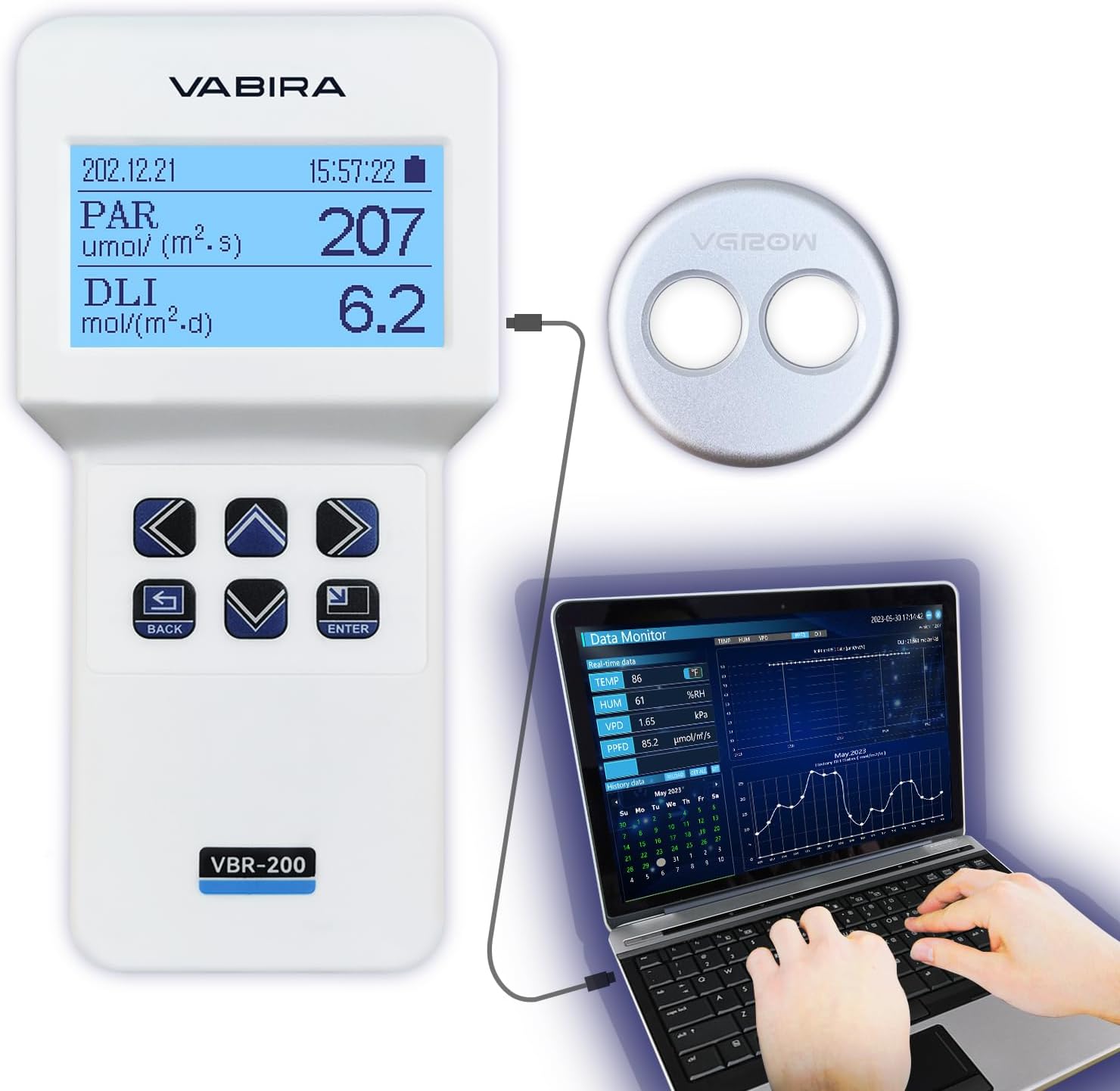
Figure 1: VBR-200 PAR Meter connected to its sensor and a laptop for data monitoring.
2. Packungsinhalt
Bitte überprüfen Sie, ob alle unten aufgeführten Artikel in Ihrem Paket enthalten sind:

Figure 2: Included components: Master unit, PAR & Light Sensors, Temp & Humidity Sensor, 3 AAA Batteries, 5V Adapter, Network Cable, Data Cable, Screwdriver, and Telescopic Rod.
- VBR-200 Master Unit
- PAR & Light Sensors
- Temperatur- und Feuchtigkeitssensor
- 3 x AAA-Batterien
- 5V Netzteil
- Netzwerkkabel
- Datenkabel (USB)
- Schraubendreher
- Teleskopstange
3. Einrichtung
- Einlegen der Batterie: Open the battery compartment on the back of the VBR-200 Master Unit using the provided screwdriver. Insert 3 AAA batteries, ensuring correct polarity. Close the compartment.
- Sensoranschluss:
- Connect the PAR & Light Sensor cable to the designated port on the Master Unit.
- Connect the Temperature & Humidity Sensor cable to its respective port.
- Telescopic Rod Assembly: Attach the PAR & Light Sensor to the telescopic rod for extended reach and precise positioning during measurements.
- Einschalten: Press the power button on the Master Unit to turn on the device.
- Software Installation (for Data Logging):
Zu view historical data and change curves, install the "Data Monitor" software on a Windows PC. The software is not compatible with iOS systems.
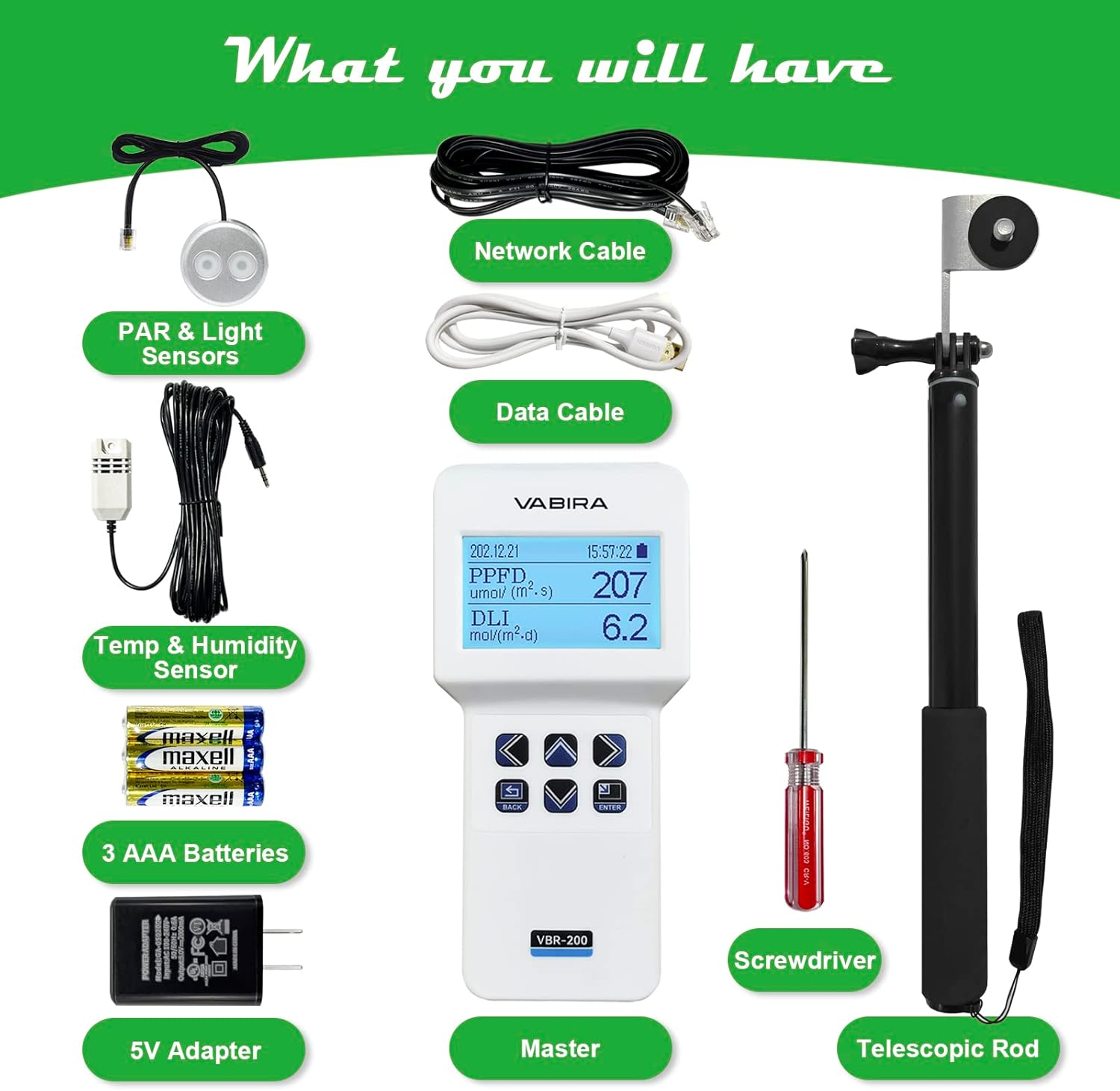
Figure 3: The Data Monitor software interface, displaying real-time and historical data for various parameters. This software is compatible with Windows 7 and above systems.
Connect the VBR-200 Master Unit to your PC using the provided Data Cable (USB) to transfer logged data.
4. Bedienungsanleitung
4.1 Basic Measurements (PPFD, DLI, Temp, Hum, VPD)
The VBR-200 can display real-time measurements directly on its screen.

Figure 4: The VBR-200 displaying PPFD and DLI measurements in a plant growing environment.

Figure 5: The VBR-200 displaying Temperature, Humidity, and VPD measurements, crucial for environmental control.
- PPFD Measurement: Position the PAR & Light Sensor at the desired measurement point. The device will display the PPFD value in µmol/(m²·s). The VBR-200 accurately measures PAR according to the McCree Curve.
- DLI Recording: The device automatically records Daily Light Integral (DLI) every second. DLI is displayed in mol/(m²·d).
- Temperature, Humidity, and VPD: Ensure the Temperature & Humidity Sensor is properly connected and positioned in the environment to be measured. The screen will show real-time temperature, relative humidity (%RH), and Vapor Pressure Deficit (VPD) in kPa.
4.2 CCT Measurement
The VBR-200 can also test the Correlated Color Temperature (CCT) of light sources.

Figure 6: The VBR-200 is capable of measuring Correlated Color Temperature (CCT), ranging from warm to cool light.
4.3 Data Logging and Analysis
Connect the VBR-200 to a Windows computer using the data cable to access the "Data Monitor" software. This software allows you to:
- View Echtzeitdaten.
- Review historical data for DLI, PPFD, and VPD, specific to every minute.
- Analyze change curves over time (e.g., daily, monthly DLI).
4.4 Dimmerfunktion
The VBR-200 can be used to control the power of compatible grow lights, acting as a dimmer. This function supports most brands but may not be compatible with all specific models (e.g., Spixxx Farmxx, Maxx Hydxx, Bloox Plxx, Migxx).

Figure 7: The VBR-200 can function as a light dimmer, adjusting light power based on a set percentage or to achieve a target PPFD.
There are two primary ways to use the dimmer function:
- Prozenttage-based Dimming: Adjust the light power to a desired percentage.
- PPFD Target Dimming: The meter will automatically adjust the light's power to achieve a required PPFD value.
Video 1: Demonstration of the VBR-200's ability to test PAR and VPD, and its functionality as a light dimmer. This video illustrates how the device can be used to measure light intensity and environmental factors, and then adjust light output to meet specific PPFD targets.
5. Spezifikationen

Figure 8: Detailed specifications for the VBR-200 PAR Meter.
| Parameter | Wert |
|---|---|
| Technische Daten | 0.98 x 3.31 x 6.89 Zoll |
| Artikelgewicht | 0.634 Unzen (195 g mit Batterie) |
| Batterien | 3 AAA-Batterien (im Lieferumfang enthalten) |
| Hersteller | De-Power |
| PAR Measurement Range | 0-9999 µmol/m²/sec |
| PAR Repeatability | ±1 µmol/m²/sec |
| PAR Display Resolution | 0.1 µmol/m²/sec (0-9999) |
| PAR Measuring Rate | 1 Messung pro Sekunde |
| PAR Cut-On Wavelength | 400 ± 10nm |
| PAR Cut-off Wavelength | 700 ± 10nm |
| Strombedarf | 1.5 V AAA-Alkalibatterie |
The VBR-200 utilizes a PAR Sensor IC with a spectral response close to PAR curves (400-700 nm), optimized for plant photosynthesis. This differs from LUX sensors, which are calibrated for human eye sensitivity and are less suitable for measuring light for plant growth.

Figure 9: Comparison illustrating the spectral response of the PAR Sensor IC versus a typical LUX Sensor IC, highlighting the VBR-200's suitability for plant growth light measurement.
6. Wartung
- Reinigung: Use a soft, dry cloth to clean the meter and sensors. Do not use abrasive cleaners or solvents.
- Lagerung: Bewahren Sie das Gerät bei Nichtgebrauch an einem kühlen, trockenen Ort fern von direkter Sonneneinstrahlung und extremen Temperaturen auf.
- Batteriewechsel: Tauschen Sie die Batterien aus, sobald die Anzeige für niedrigen Batteriestand auf dem Bildschirm erscheint, um genaue Messwerte zu gewährleisten.
- Sensorpflege: Handle sensors with care. Avoid dropping or subjecting them to strong impacts. While the PAR sensor is designed to be durable, including some water resistance, it is not intended for prolonged submersion unless specified for specific models (e.g., VBR-AQUA for aquariums).
7. Fehlerbehebung
| Problem | Mögliche Ursache | Lösung |
|---|---|---|
| Gerät lässt sich nicht einschalten. | Schwache oder leere Batterien; falsche Batterieinstallation. | Ersetzen Sie die Batterien durch neue AAA-Batterien und achten Sie dabei auf die richtige Polarität. |
| Ungenaue Messwerte. | Sensor dirty or damaged; environmental interference; low battery. | Clean sensors gently. Ensure sensors are not obstructed. Replace batteries. If issues persist, contact support. |
| Data Monitor software not working (Windows). | Software not installed correctly; incorrect USB connection; operating system incompatibility. | Ensure software is installed on Windows 7 or above. Reconnect USB cable. Restart PC and device. |
| Dimmerfunktion funktioniert nicht. | Incompatible grow light; incorrect connection. | Verify compatibility of your grow light with the VBR-200 dimmer function. Ensure proper connection. |
8. Garantie und Support
For warranty information and technical support, please refer to the contact details provided in your product packaging or visit the official VABIRA webWebsite. Bewahren Sie Ihren Kaufbeleg für Garantieansprüche auf.
Manufacturer: De-Power