
Einführung
This manual provides detailed instructions for the setup, operation, maintenance, and troubleshooting of your Varmilo VA Series V2 Warrior Soar TKL Mechanical Keyboard. This keyboard features a Tenkeyless (TKL) form factor, durable Dye Sub PBT keycaps, and genuine Cherry MX Blue mechanical switches.

Figure 1: Varmilo VA Series V2 Warrior Soar TKL Mechanical Keyboard (Cherry MX Blue).
Aufstellen
1. Anschließen der Tastatur
- Locate the USB-C port on the back of your Varmilo VA Series V2 keyboard.
- Verbinden Sie das mitgelieferte USB-C-Kabel mit dem USB-C-Anschluss der Tastatur.
- Connect the other end of the USB-C cable to an available USB port on your computer (PC or Laptop).
- Die Tastatur ist Plug-and-Play-fähig und sollte von Ihrem Betriebssystem automatisch erkannt werden.
2. Kabelmanagement
The VA Series V2 features cable grooves on the bottom case, allowing the USB-C cable to exit from the left, right, or middle of the keyboard. Route the cable through the desired groove to customize your desk setup.
3. Adjusting Kickstands
The keyboard is equipped with double-section kickstands on the underside. Gently flip out the kickstands to adjust the typing angle to your preference. The double-section design offers multiple height options.

Abbildung 2: Unterseite view illustrating cable routing grooves and adjustable kickstands.
Bedienungsanleitung
1. Keyboard Layout and Functions
The Varmilo VA Series V2 Warrior Soar is a Tenkeyless (TKL) keyboard, meaning it omits the numeric keypad to save space while retaining all essential keys, including the function row (F1-F12), navigation cluster, and arrow keys.
2. Cherry MX Blue Switches
This keyboard is equipped with genuine Cherry MX Blue mechanical switches. These switches are characterized by:
- Operation Force: 50gf (gram-force)
- Schaltertyp: Klicky
- Rückmeldung: Tactile bump and audible click
- Klang: Classic clicky sound

Figure 3: Cherry MX Blue Mechanical Switch characteristics and Force-Travel diagram.
3. Kontrollleuchten
Indicator lights for functions such as Caps Lock are located on the top right of the keyboard. These lights provide visual feedback on the status of specific keyboard functions.
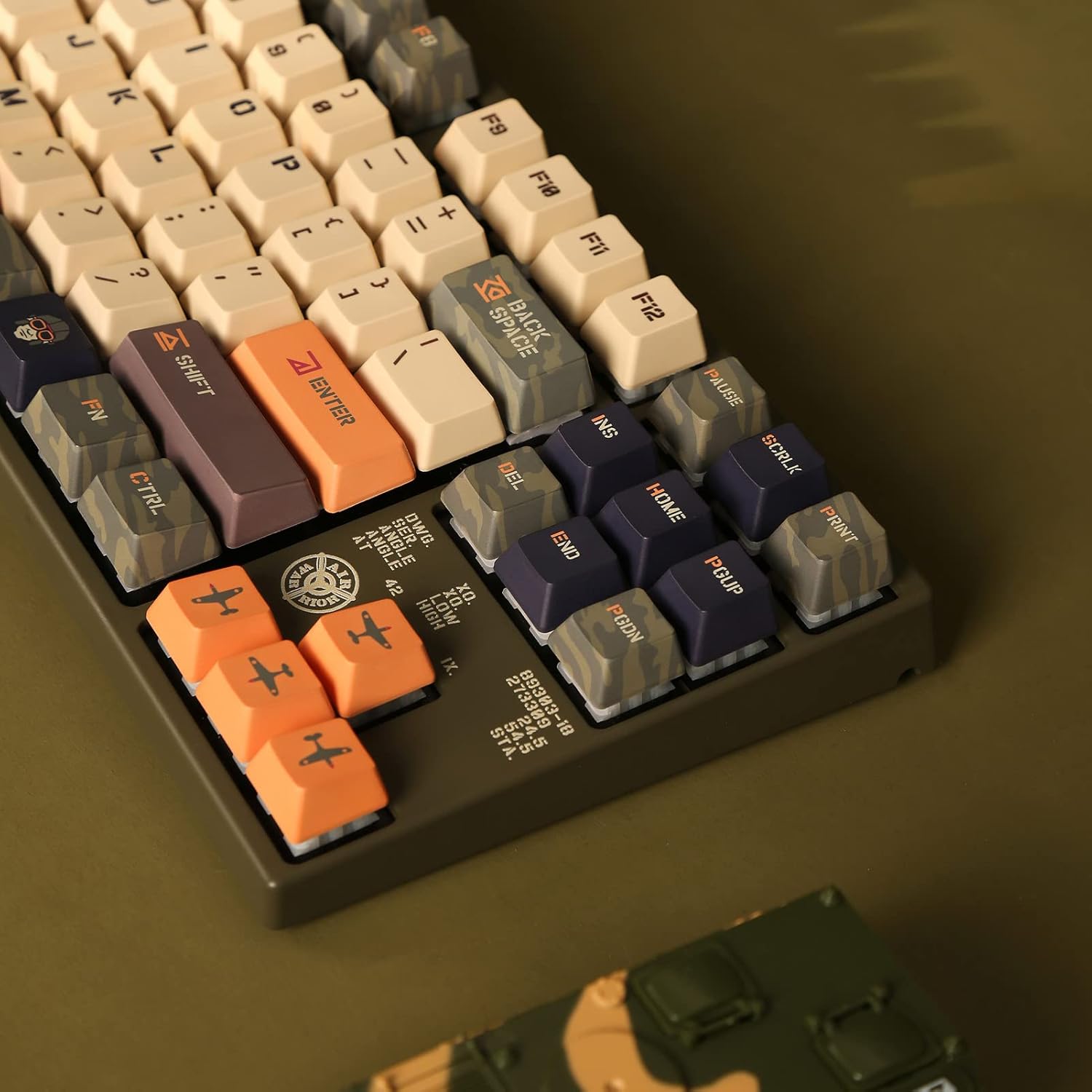
Figure 4: Close-up of indicator lights and keycap legends.
4. Keycap Material
The keyboard features thick Dye Sub PBT keycaps. PBT (Polybutylene Terephthalate) is known for its durability, resistance to shine, and long-lasting legends due to the dye-sublimation process.
Wartung
1. Allgemeine Reinigung
- Trennen Sie die Tastatur vor der Reinigung vom Computer.
- Verwenden Sie eine weiche Bürste oder Druckluft, um Staub und Schmutz zwischen den Tastenkappen zu entfernen.
- For surface cleaning, lightly dampen a microfiber cloth with water or a mild, non-abrasive cleaner. Avoid excessive moisture.
- Reinigungsmittel dürfen nicht direkt auf die Tastatur gesprüht werden.
2. Pflege der Tastenkappen
The Dye Sub PBT keycaps are highly durable. To clean them, you may carefully remove them using a keycap puller (not included) and wash them with mild soap and water. Ensure they are completely dry before reattaching them to the switches.
3. Sound-Proofing
The keyboard incorporates sound-proof silicone pads between the PCB and the positioning plate. This design helps to minimize typing noise. Avoid disassembling the keyboard to maintain the integrity of these components.
Fehlerbehebung
Tastatur reagiert nicht
- Kabelverbindung prüfen: Ensure the USB-C cable is securely connected to both the keyboard and the computer. Try reconnecting the cable.
- Versuchen Sie einen anderen USB-Anschluss: Connect the keyboard to a different USB port on your computer.
- Test auf einem anderen Computer: If possible, test the keyboard on another computer to determine if the issue is with the keyboard or the original computer's setup.
- Starte den Computer neu: A simple computer restart can often resolve connectivity issues.
Schlüssel werden nicht registriert
- Unter den Tastenkappen reinigen: Dust or debris under a keycap can prevent it from registering. Refer to the Maintenance section for cleaning instructions.
- Fehlfunktion des Schalters: If a specific key consistently fails, the switch itself might be faulty. Contact Varmilo support for assistance.
Technische Daten
| Marke | Varmilo |
| Modellnummer | VEA87 |
| Tastaturtyp | Mechanisch |
| Formfaktor | Ziffernblocklos (TKL) |
| Schaltertyp | Cherry MX Blue |
| Tastenkappenmaterial | Farbstoffsubstituiertes PBT (Polybutylenterephthalat) |
| Konnektivität | USB-C |
| Kompatible Geräte | Notebook, PC |
| Im Lieferumfang enthaltene Komponenten | USB-Kabel |
Garantieinformationen
Specific warranty terms and conditions for your Varmilo VA Series V2 Warrior Soar TKL Mechanical Keyboard are typically provided with the product packaging or available on the official Varmilo website. Please refer to these resources for detailed warranty coverage and claim procedures.
Unterstützung
For further assistance, technical support, or to inquire about replacement parts, please visit the official Varmilo website or contact their customer service department. You may find contact information and FAQs on their support pages.
Varmilo-Beamter WebWebsite: Visit Varmilo Store on Amazon