
1. Einleitung
Thank you for choosing the Voktta Battery Capacity Voltage Meter. This device is designed to accurately monitor your battery's capacity, voltage, and temperature, providing essential data for various applications. It features a clear display, alarm functions, and broad compatibility with different battery types. Please read this manual thoroughly before installation and operation to ensure correct usage and optimal performance.
2. Produktmerkmale
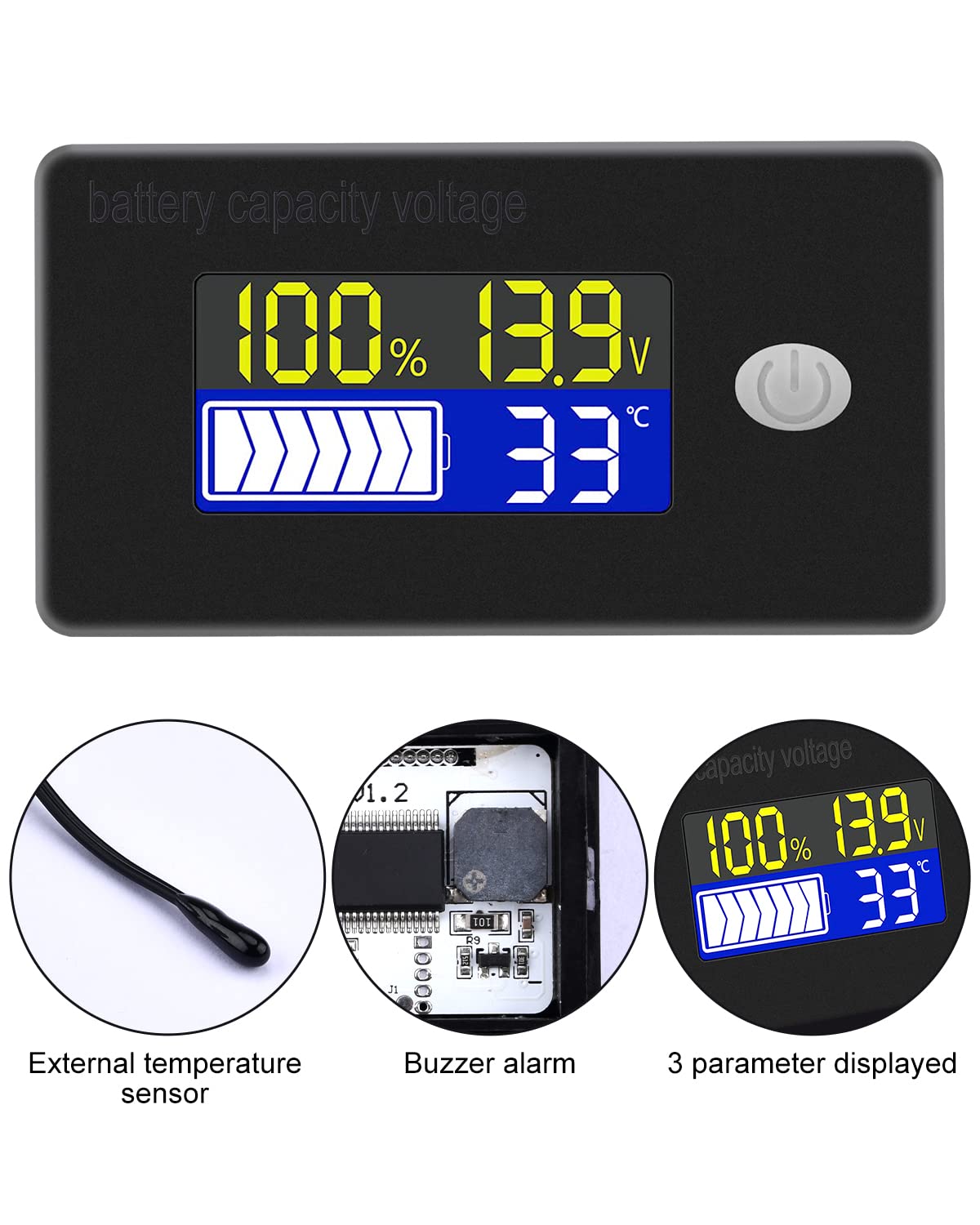
- Multifunktionsdisplay: Simultaneously shows battery capacity percentage, Bdtage, and temperature (Celsius or Fahrenheit).
- Integrierter Schutz: Equipped with a protective cover, dustproof and waterproof surface, and reverse input connection protection.
- External Temperature Sensor & Buzzer: Includes an external temperature sensor for accurate readings and an internal buzzer for high/low voltage and over-temperature alarms.
- Six Programmable Modes: Allows setting battery type, delay for ultra-low power mode, adjusting battery percentage limits, activating undervoltage alarm and threshold, activating temperature alarm, and voltage Kalibrierung.
- Breite Akkukompatibilität: Compatible with 12V, 24V, 36V, 48V, 60V, 72V, 84V lead-acid batteries, lithium-ion batteries, polymer lithium-ion batteries, 3-15 series lithium-ion batteries, water batteries, and lithium iron phosphate batteries.
- Breite Anwendung: Suitable for use in jet skis, golf carts, RVs, lawnmowers, aquariums, DIY solar generators, and other systems requiring battery monitoring.
3. Packungsinhalt
Bitte prüfen Sie das Paket auf folgende Artikel:
- Voktta Battery Capacity Voltage-Meter
- Connection Wires (Red for positive, Black for negative)
- Externer Temperatursensor
- Benutzerhandbuch (dieses Dokument)

4. Sicherheitshinweise
- Vor der Installation oder Wartung des Geräts muss immer die Stromzufuhr unterbrochen werden.
- Ensure correct polarity when connecting the wires (Red to positive, Black to negative) to prevent damage to the meter and battery.
- Die angegebene Betriebsspannung darf nicht überschritten werden.tage-Bereich (10-100V).
- Keep the device away from extreme temperatures, moisture, and corrosive environments.
- Versuchen Sie nicht, das Gerät zu zerlegen oder zu verändern. Überlassen Sie alle Wartungsarbeiten qualifiziertem Fachpersonal.
5. Produktüberschreitungview
The Voktta Battery Capacity Voltage Meter features a compact design with a clear LCD display and a single control button. The external temperature sensor provides accurate ambient or battery temperature readings.

6. Installation und Verkabelung
Befolgen Sie diese Schritte für eine ordnungsgemäße Installation:
- Montage: Choose a suitable location for the meter, ensuring it is protected from direct impact and excessive vibration. The meter is designed for panel mounting.
- Stromanschluss: Connect the red wire to the positive (+) terminal of your battery system and the black wire to the negative (-) terminal. Ensure a secure connection. The meter supports a wide voltage Eingangsbereich von 10-100V.
- Anschluss Temperatursensor: Plug the external temperature sensor into its designated port on the back of the meter. Position the sensor to measure the desired temperature (e.g., near the battery for battery temperature, or in the environment for ambient temperature).

7. Ersteinrichtung
After connecting the meter, you may need to configure it for your specific battery type and preferences.
7.1 Ein-/Ausschalten
Press the power button (usually located on the front panel) to turn the device on or off.

7.2 Batterietyp einstellen
The meter supports various battery types. Refer to the detailed programming instructions (often accessed by holding the power button or a dedicated 'SET' button) to select the correct battery chemistry and voltage configuration (e.g., 3S Lithium, 12V Lead-Acid).

8. Bedienungsanleitung
Once powered on and configured, the meter will display real-time battery information.
8.1 Anzeigemodi
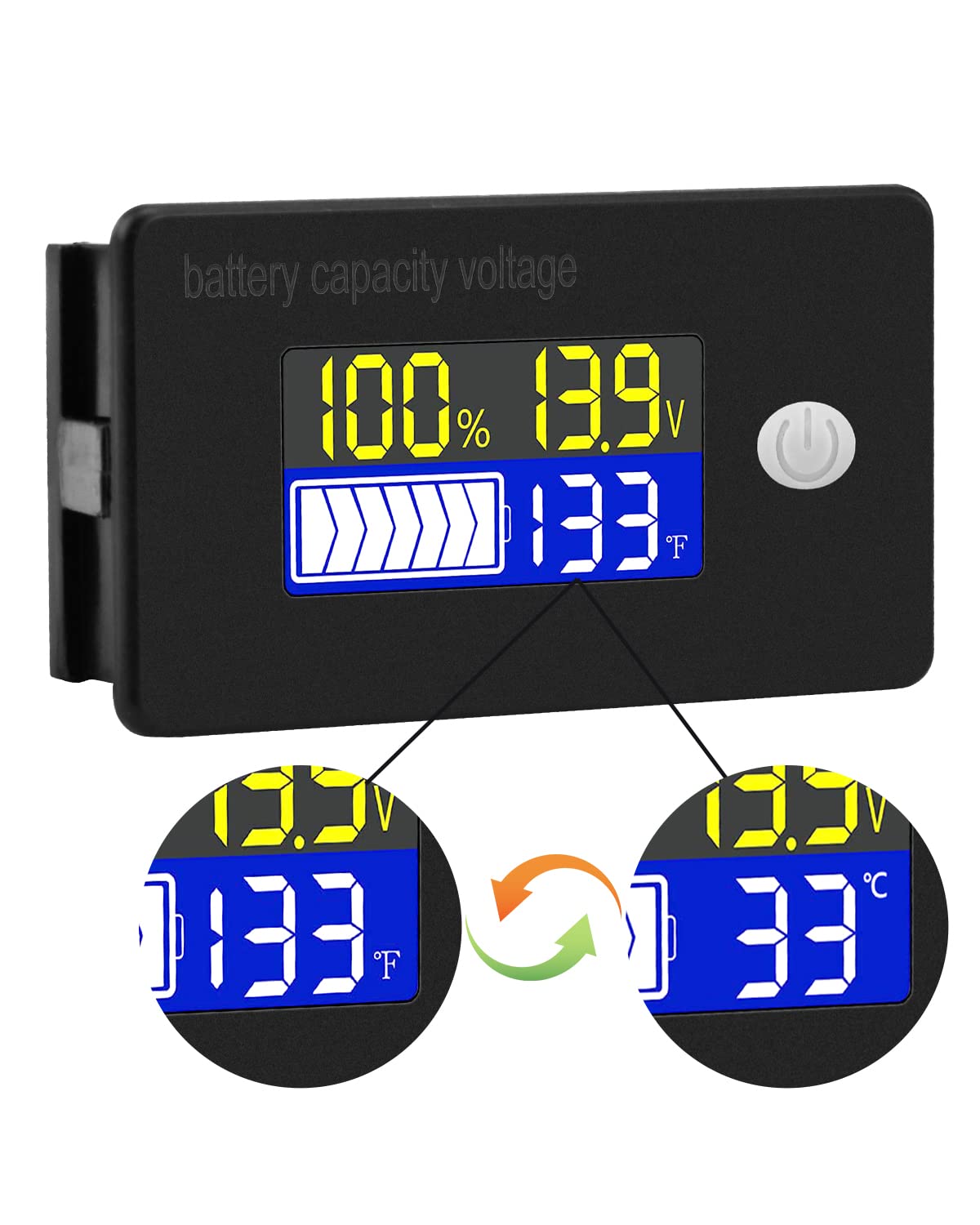
The display typically shows battery capacity percentage, aktuelles Volumentage, and temperature. Some models allow switching between Celsius and Fahrenheit for temperature display.
8.2 Alarmfunktionen
The internal buzzer will activate if the battery voltage falls below the set low voltage threshold, exceeds the high voltage threshold, or if the temperature goes beyond the set limits. This provides an audible warning for critical conditions.
9. Erweiterte Konfiguration
The meter offers several programmable modes for fine-tuning its operation. Access these modes by following the specific button press sequences outlined in the full product documentation (if provided separately) or by holding the main button for an extended period.
- Einstellung des Batterietyps: Configure the meter for your specific battery chemistry and cell count (e.g., LiFePO4, Li-ion, Lead-Acid, 3S, 4S, etc.).
- Ultra-Low Power Mode Delay: Set a delay (10s, 20s, 30s, 60s, 120s adjustable) before the meter enters a low power consumption state to conserve energy.
- Akku-Prozenttage Grenzen: Adjust the upper and lower voltage thresholds that correspond to 100% and 0% battery capacity for accurate percentage Anzeige.
- Untervoltage-Alarm: Activate and set the specific voltage threshold (e.g., 10.5V to 60.0V) at which the low voltage alarm will trigger.
- Übertemperaturalarm: Activate and set the temperature threshold (e.g., 0°C to 79°C or 0°F to 179°F) at which the over-temperature alarm will trigger.
- Bandtage-Kalibrierung: Perform voltage calibration to ensure the most accurate readings.
10. Spezifikationen
| Parameter | Wert |
|---|---|
| Marke | Voktta |
| Modellnummer | B0BHSSKRVP |
| Betriebslautstärketage | 10 bis 100 V |
| Betriebsstrom | 8-10 mA |
| Stromverbrauch (Ruhemodus) | 15-20 uA |
| Bandtage Genauigkeit | ±0.1% ~ ±0.5% |
| Temperaturgenauigkeit | ±0.5℃ ~ ±1℃ (built-in standard, external 30cm probe) |
| Temperaturbereich | -19~80℃ / 0~179℉ |
| Over-temperature Alarm Setting | 0~79℃ / 0~179℉ |
| Niedrige Lautstärketage Alarmeinstellung | 10.5 bis 60.0 V |
| Summerlautstärke | 60~80 dB |
| Betriebstemperatur | -10~65℃ |
| Farbe | Schwarz |
| Einhaltung | CE, IP67, RoHS |
| Messtyp | Voltmeter |
11. Fehlerbehebung
If you encounter issues with your Voktta Battery Capacity Voltage Meter, beachten Sie die folgenden häufigen Probleme und Lösungen:
- Kein Bildschirm:
- Check power connections: Ensure red wire is connected to positive and black to negative, and connections are secure.
- Überprüfen Sie die Batterielautstärketage: Bestätigen Sie die Batterieladungtage liegt innerhalb des Betriebsspannungsbereichs von 10-100V.
- Ungenaue Messwerte:
- Bandtage/Kapazität: Stellen Sie sicher, dass der richtige Batterietyp und die richtige Spannung verwendet werden.tage configuration are set in the meter's settings. Perform voltage calibration if available.
- Temperatur: Check if the external temperature sensor is properly connected and positioned.
- Alarm wird ständig ausgelöst:
- Review alarm thresholds: Adjust the low voltage, hohe Lautstärketage, or over-temperature alarm settings to appropriate levels for your battery and application.
- Check battery health: A constantly triggering low voltage alarm might indicate a failing battery.
- Tasten reagieren nicht:
- Power cycle the device: Turn the meter off and then on again.
- Stellen Sie sicher, dass keine Fremdkörper die Tasten blockieren.
12. Wartung
To ensure the longevity and accurate operation of your Voktta Battery Capacity VoltagBeachten Sie bei der Wartung des Zählers folgende Richtlinien:
- Reinigung: Reinigen Sie Display und Gehäuse mit einem weichen, trockenen Tuch. Verwenden Sie keine Scheuermittel oder Lösungsmittel.
- Verbindungen: Überprüfen Sie regelmäßig alle Kabelverbindungen, um sicherzustellen, dass sie sicher und korrosionsfrei sind.
- Umweltschutz: While the device has some dust and water resistance (IP67), avoid prolonged exposure to harsh weather conditions or direct water immersion.
- Lagerung: Wenn Sie das Gerät über einen längeren Zeitraum lagern, trennen Sie es von der Stromversorgung und bewahren Sie es an einem kühlen, trockenen Ort auf.
13. Unterstützung
For any questions, technical assistance, or if you encounter issues not covered in this manual, please contact Voktta customer support. We are committed to providing assistance to resolve any problems you may experience.
Kontaktinformationen finden sich üblicherweise auf der Produktverpackung oder beim Händler. webWebsite, auf der das Produkt gekauft wurde.